
yes but you cant just find new content that way. it should be posible to just pull watchlist.
Without getting too technical, let's just say the method of linking to JustWatch's data will not allow what you are looking for, or it's so complicated with such a limited use case that it isn't worth my time to pursue for a one-time activity. SLM is a complete replacement for all watchlists from any service, thus you do have to start over. Just a few days of pain will yield a lifetime of ease!
FYI, there is a product out there that might help sync watchlists across various services, but I've only ever taken a cursory look through it and it might be overkill (and beyond the financial means) for a project like this.
1 Like
Yeah...I think its a bit much for you to do that and it's not necessary. I was able to migrate a relatively big list from Trakt onto SLM with ease. I can use Universal Trakt Scrobbler to sync up Crunchyroll, Prime and Netflix to there so its no big deal and I can just go back to SLM and set stuff to watched after a season...
There appears to have been a recent update related to Disney+ that makes it possible for movies to autoplay instead of going to the landing page (unfortunately, TV shows seem to still go to the landing page). To take advantage of this, you'll need to create a new Stream Link Mapping as so:

-
If 'Stream Link' contains:
disneyplus.com/browse/entity- -
For 'Object Type':
MOVIE(don't do this for TV Shows right now) -
Do this activity:
Replace string with... -
Using this:
disneyplus.com/play/
I've added this to the default list for new installs (on a future release), but existing users will need to add this themselves.
EDIT: It doesn't appear to be every movie; some still have the old format that will go to the landing page.
EDIT 2: Upon further inspection, some TV Shows have the new format, but it's generic and and not tied to individual episodes (or any episodes, for that matter). Mapping them will actually just get you an error from Disney+. As such, make sure this Stream Link Mapping is only for MOVIE.
2 Likes
Installed this finally today, its really great. @babsonnexus you should be proud and thank you for giving this to the community. Is there a way to import from trakt lists or mdblists?
1 Like
There are no import from other sources functionality and won't be any time in the near or medium future. The far future? Who knows!
Is it possible to add streaming service from different countries? Let say Hulu from the US and the BBC iPlayer from the UK?
Welcome!
Being in a single country is a fundamental assumption of SLM. In order to allow multiple countries, core components would have to be re-written. It is all technically possible, but would be a massive undertaking. As such, this will not be addressed any time soon. However, I have added the feature request:
1 Like
Posted in wrong topic before
Seeing a lot of the below errors. This is after marking watched and trashing. Do I need to manually delete as I can see the stream links in file station and it’s cluttering up the log.
With the exception of "Everyone", all others have R/W.
Synology DSM
Portainer
2025/08/04 19:08:39.324286 [DVR] Could not delete #19145 /volume1/docker/app/channels_folder/Imports/TV/slm/Only Murders in the Building (2021)/Season 03/SUB S03E01.strmlnk (user) (permission denied)
2025/08/04 19:08:39.431147 [DVR] Could not delete #19118 /volume1/docker/app/channels_folder/Imports/TV/slm/Bosch Legacy (2022)/Season 02/SUB S02E10.strmlnk (user) (permission denied)
2025/08/04 19:08:39.556012 [DVR] Could not delete #19117 /volume1/docker/app/channels_folder/Imports/TV/slm/Bosch Legacy (2022)/Season 02/SUB S02E09.strmlnk (user) (permission denied)
2025/08/04 19:08:39.749515 [DVR] Could not delete #19116 /volume1/docker/app/channels_folder/Imports/TV/slm/Bosch Legacy (2022)/Season 02/SUB S02E08.strmlnk (user) (permission denied)
2025/08/04 19:08:39.892622 [DVR] Could not delete #19115 /volume1/docker/app/channels_folder/Imports/TV/slm/Bosch Legacy (2022)/Season 02/SUB S02E07.strmlnk (user) (permission denied)
2025/08/04 19:08:40.002402 [DVR] Could not delete #19114 /volume1/docker/app/channels_folder/Imports/TV/slm/Bosch Legacy (2022)/Season 02/SUB S02E06.strmlnk (user) (permission denied)
2025/08/04 19:08:40.124146 [DVR] Could not delete #19113 /volume1/docker/app/channels_folder/Imports/TV/slm/Bosch Legacy (2022)/Season 02/SUB S02E05.strmlnk (user) (permission denied)
2025/08/04 19:08:40.261323 [DVR] Could not delete #19112 /volume1/docker/app/channels_folder/Imports/TV/slm/Bosch Legacy (2022)/Season 02/SUB S02E04.strmlnk (user) (permission denied)
2025/08/04 19:08:40.470357 [DVR] Could not delete #19111 /volume1/docker/app/channels_folder/Imports/TV/slm/Bosch Legacy (2022)/Season 02/SUB S02E03.strmlnk (user) (permission denied)
2025/08/04 19:08:40.587483 [DVR] Could not delete #19110 /volume1/docker/app/channels_folder/Imports/TV/slm/Bosch Legacy (2022)/Season 02/SUB S02E02.strmlnk (user) (permission denied)
Try logging into a workstation using the user that SLM runs under and try and delete one of those files. Does it work?
If you're running Channels DVR Server from the Synology Package install, you need to give the Synology System internal user channels R/W access https://getchannels.com/dvr-server/#synology
Click the link below
Note: To import Local Content, you will need to grant permissions to the channels System internal user.
If Channels DVR Server (running as Synology user channels) doesn't have R/W access to the directories, it cannot delete the files.
1 Like
Thanks!!
I knew it was a permissions issue - just needed to go to the correct spot to fix.
Now that Jeopardy and Wheel of Fortune are available on Hulu and Peacock, I've noticed a bit of an oddity at the source for the Stream Links. For Hulu, instead of going to individual episodes, it seems to be going to the show page. Not a huge deal, but the show page is different on Hulu for Disney+. As such, this is what can be done with a Stream Link Mapping to get that corrected:

-
If 'Stream Link' contains:
hulu\.com/series/.+?-([a-f0-9\-]{36})$ -
For 'Object Type':
SHOW -
Do this activity:
Replace pattern (REGEX) with... -
Using this:
disneyplus.com/browse/entity-\1
Do note that I've learned that both shows are only going to be the five most recent episodes, plus a smattering of "classic" ones, so these Stream Links will not get you a complete archive, or even a recent one.
Sorry if this was already covered, but I noticed the stream link for Amazon prime content will auto play the episode/movie, but it always starts from beginning. Does anyone know if there is a mapping override that will autoplay but resume instead?
For now, I turned off the mapping override so it just goes to the landing page.
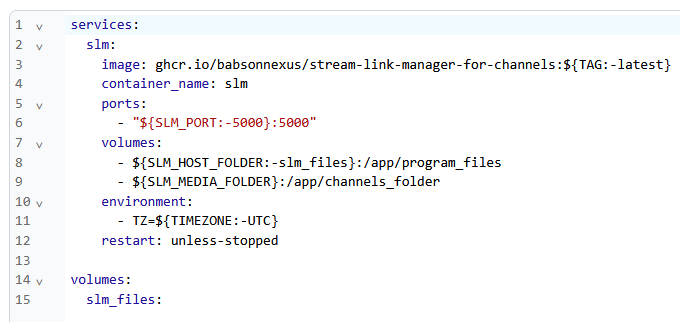
Im trying to set SLM up and i'm a bit confused. I have a Computer running linux and have Docker running on it, also have portainer installed. And my Channels Dvr software resides on a Win 11 computer. When setting up the extensions for SLM, specifically SLM_MEDIA_FOLDER , Do I use smb:// Ip_address_/ media directory? and if i do, how do i get around the from login needed username and password for My Win 11 directory share?
And also when I try to install SLM through Portainer using stacks, Im encountering an installation error when copying the installation method found on Github.
SLM needs access to wherever your Channels DVR folder is. If those are on two separate machines and/or different OSes, it is up to you to set up a share between them that will work without any interaction. If that is not going to work for your specific situation, you'll need install SLM on the machine with Channels DVR. You could either install Docker Desktop and deploy from there (please follow the directions linked on the Wiki for setting up WSL first) or just use the Windows version.
Not much to go on here. I'm guessing it has something to do with your environmental variables, or lack thereof. I just did a test install a few days ago and did not encounter any problems.

FYI, just a heads up that there is a very, very big update coming in a few days!
Based on what you're describing, you'll need to add your Samba share to Portainer-Volumes first, and then use the Volume name you establish there in your SLM stack, along with slm_files:
Here's a post describing the process in another context:
Happy 12,000+ Docker downloads, Stream Link/File Manger!

I was hoping to get this all out by the 10K threshold, but I missed it. So instead, I'll now announce that as of v2025.12.15.1330, SLM has been 85% rewritten from the ground up in an effort to simplify interactions, make maintenance easier and cleaner, introduce new capabilities, improve performance, and future proof against planned and unplanned functionality.

These changes include, but are not limited to:
- A single, clean location called 'Manage Program' has been created for adding and editing all programs, including videos. This completely deprecates 'Add Programs', 'Modify Programs', and 'Manage Videos'. Details can be found here:
- Searching has clearer messaging and unlimited filter functionality. Details here:
- 'New & Updated' is now a range of dates instead of just a single day. Details here:
- Instead of manually searching using either of the two methods above, you can now have a 'Feed' run on a regular schedule that will build up the results until you are ready for review. Further, you can have results be automatically bookmarked/hidden using the 'Auto-Mapping' functionality. Complete details here:
- Bookmarking/Hiding can now be accomplished in one step in an expanded search/feed results area. You no longer have to go through the two screen process, although that option is still available by selecting one the of 'edit' choices. Further, there are massive amounts of 'quick actions' you can do while executing, such as setting watched/unwatched status, assigning labels, importing metadata, and more! Further information can be found here:
- When adding a manual program, all necessary selections happen on the first screen. Learn more here:
- YouTube Playlists that are imported into SLM can be kept in sync as new videos are added, as if they were new episodes. This is discussed here:
- When modifying a program, especially a TV Show, there is no longer a checkbox for seasons and all episodes or anything similar. Instead, there is a box for 'Global' controls that can push modifications down to individual items using either direct selection (i.e., 'All Season 02', 'Everything through Season 06') or with filter functionality. As part of this, only 100 detail items are loaded at a clip, meaning that this much faster and shows with thousands of episodes are no longer a performance or crash issue! More about this can be found here:
- Movies and TV Shows can now have metadata imported, both from JustWatch and video providers like YouTube, depending upon your source. This is especially useful when Channels DVR cannot find a match or the match is missing pertinent information like the duration. Additionally, automation tries to correct imported metadata on a regular basis if certain conditions are met. And as part of all these changes, fixed the summary field so it now remembers carriage returns upon save. Much of this can be reviewed here:
- Ability for new TV Show episodes to automatically have metadata imported. This is covered in part here:
- Video order on the webpage is reflective of the value set by users and generally matches to what would be seen in Channels DVR (there are some disagreements of exactness like how to order items that have the same release date or ignoring articles with alphabetical sorting). See this for additional details:
- 'Check Availability' has been replaced with 'Examine', which means the user can see the original search results data for a program, including its description. More information here:
- Users can choose to add 'TV Show Titles' and/or 'Episode Titles' to Stream Link/File file names. Details here:
And these are just the big ticket items! There are so many small adjustments and changes that are just too numerous to list. Suffice to say, the entire experience has changed and will be much easier for new users, but still familiar to long-term ones.
Thanks so much for the update.
The program has been very helpful.
Would I use the volume name in the "value" portion of the environmental variables?