Remote Access to 2nd Channels DVR Server

I have a PC Channels DVR server (192.168.0.149) on one account and a 2nd NVidia Channels DVR server (192.168.0.118) on another account. Port forwarding et al is set up and remote access to the PC server works.

How do I gain remote access to the 2nd Channels DVR server via the Channels client on an Apple TV?

go.channelsdvr.net doesn't let one indicate which server nor which account you are inputting the activation code for. And for some reason it seems to default to the PC server????

2 Likes

You would have to pick another port, setup the port forwarding for that port (ie 8090 -> nvidia 8089), and email support with the account username and port chosen.

2 Likes

Both have been done around 08-19-2021:

  1. Ports:
    image

     2nd NVidia Channels DVR Server is the Tiffany Server
    
  2. 08-19-2021 10:15 AM support email reply "Confirm your new account"

       Click the following link to confirm and activate your new account:
    

https://community.getchannels.com/u/activate-account/5e2ce188bdeea25fe82cadf388f88bfe

Did you do this part?

Not sure, so I just sent username, port request to [email protected]

As always, special thanks for your help ! ! !

It's been 19 hours AND I have NOT heard back from support :frowning:

You requested that port 8089 be used in your email, but that's the default port.

Your screenshot above showed 8088, but it's not clear from your email which account that port needs to be applied to.

When we try to set up remote access for the Channels client on an Apple TV, only bjonline / 8088 appears. For that client, we want access to bjonline1 / 8089....

Username Port Server Name IP Address
bjonline1 8089 Tiffany Server 192.168.0.118 REQUESTED USERNAME /PORT
bjonline 8088 My Server 192.168.0.149

1 Like

Okay thanks.

Please open chrome incognito over LTE, then go to my.ChannelsDVR.net and login to the @Tiffany_Folsom account. Does it take you to the correct dvr web UI?

1 Like

Yes, it does on my home network.

From the remote location, I can't try it out until 7 PM tonight. If I can log in from the remote location via chrome incognito, what are my next steps?

The make sure getchannels.com/account shows the correct username before scanning the QR code on the TV (after clicking Connect > Away from Home)

1 Like

I went to the remote location, from my mobile incognito to go.channelsdvr.net, entered code, asked to log in, used right account credentials and it worked!!!! YEAH :wink:

Wait, so i can setup two DVRs in two locations and use both from one interface? Is there documentation on this?

1 Like

Turns out we connected to our 2nd server BUT we could NOT access 'live TV' in the guide. We got a long text message on the screen starting with the word "Get...." We changed the "Internet Streaming" quality to 300Kbps and still see the error message. H E L P ! ! !

BTW: when I access the 2nd server from home, the 'live TV in the guide does playback.

1 Like

No, you can only connect to one at a time.

You'll need to check the Log on the DVR web UI and see what the error is. Sounds like maybe a storage or network problem trying to connect to the streams.

If its running on SHIELD and you upgraded to 9.0 then that could be part of the issue.

Nvidia has 9.0.1 (33.1.0.283) with CDVR at 4.2.1 (latest I can access).

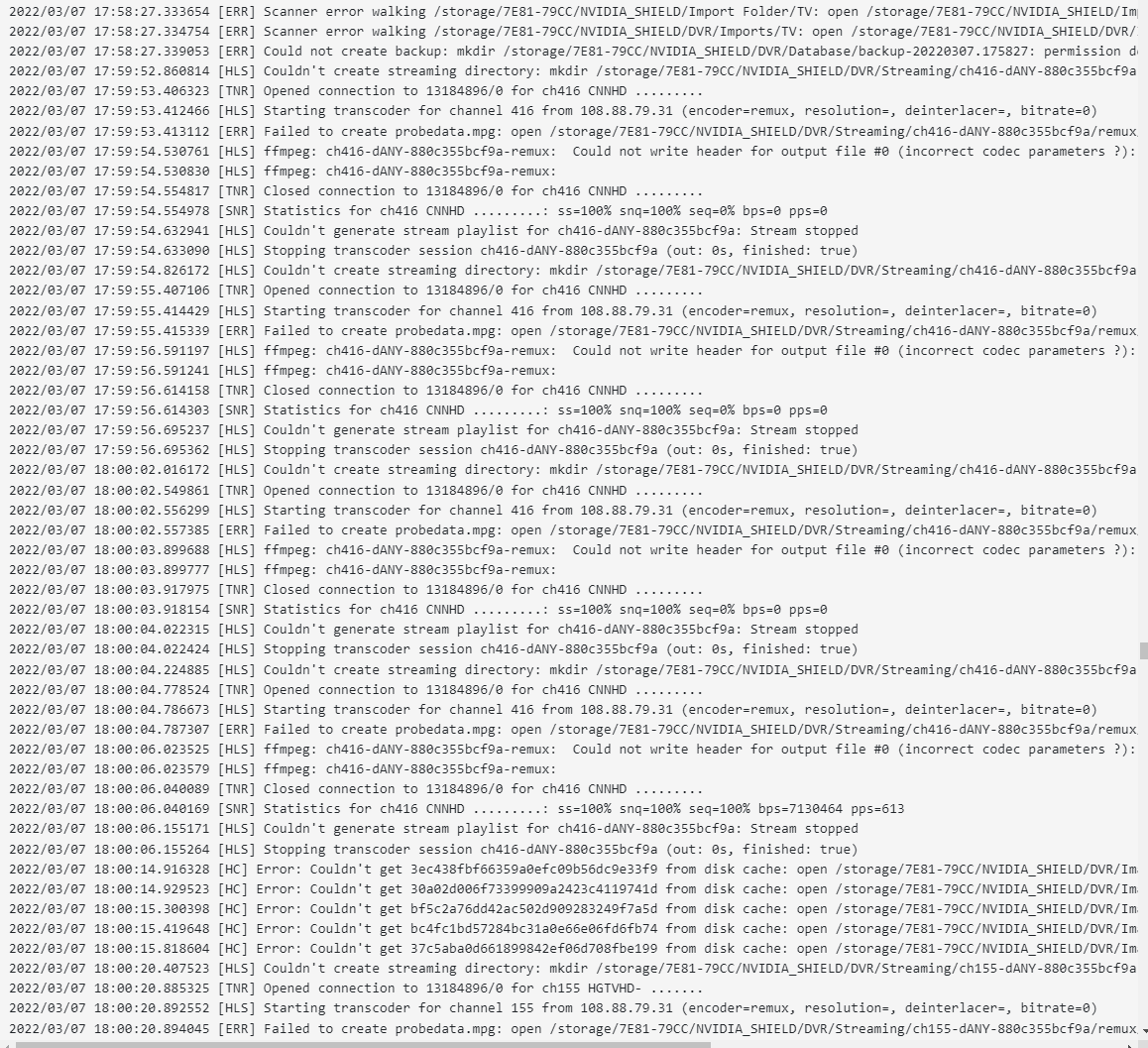
Below is the log from Monday when the remote access was attempted at 5:58 PST. I captured the scanner error before the call, in case that might be an issue (which I now believe I have fixed).

Tried accessing CNN (416) and then HGTV (155).

You need the 9.0.2 (33.1.0.301) hotfix: https://www.nvidia.com/en-us/geforce/forums/shield-tv/9/485445/shield-experience-upgrade-901-hotfix-image/

Hold on! I can have two different Channels DVR on my Channels app???

1 Like

Never mind. I scrolled up and saw. Boo. Why not???

1 Like