Remote connection following move to Mac Mini

I moved my install from a Pi4 following the notice to a Mac Mini. I’ve changed the IP of the Mac Mini to what the Pi used to be, and I can connect to admin page on web. I’ve ensured the router ports are still forwarded to the right IP.

The issue is that on the web page it says it could not establish remote connection.

Had this happened to anyone else? Anyone got ideas?

Did you turn OFF the Pi4, OR just disable the Channels server on THAT machine?

Then, enabled the server on the Mac Mini? If you mean the Remote Streaming isn't working on Automatic, temp set it to Manual, let it get out (make sure the port is open/forwarded on your router), then switch it back to Automatic, and see if it continues to work. I had to do that myself a couple times, and then it worked.

Yea the Pi4 is off. I’ve toggled between automatic and manual and also disabled ‘private WiFi’ in case that was causing an issue, firewall is also off on the Mac.

I just can’t think what else to try everything matches up. I’ve rebooted both the router and Mac as well.

:cry:

What url and what is the error

Change the IP address on your new Mac Mini Channels server, and check again. There's no reason to stay on the same address your Pi had. Just make sure whatever one you pick, is fixed, so DHCP doesn't change it every so often.

OH, Yeah!: IF your Mac Mini is set to use an hardwired ethernet cable connection, turn OFF the Mac Mini's internal wireless! Don't try running both at the same time

I've switched it to a difference IP and updated the port forwarding, its a wifi connection rather than ethernet.

The url for the server is now http://192.168.0.37:8089/admin/settings/general

The description says this: "Could not establish remote connection"

Nothing appears in the logs, the dianostics page says: ** Remote Access

Could not connect to 03cf60e13abd.u.channelsdvr.net. Check if the port is mapped.**

1 Like

From your home network visit and check port 8089. Does it return “true”?
https://portchecker.io/

No, it returns false

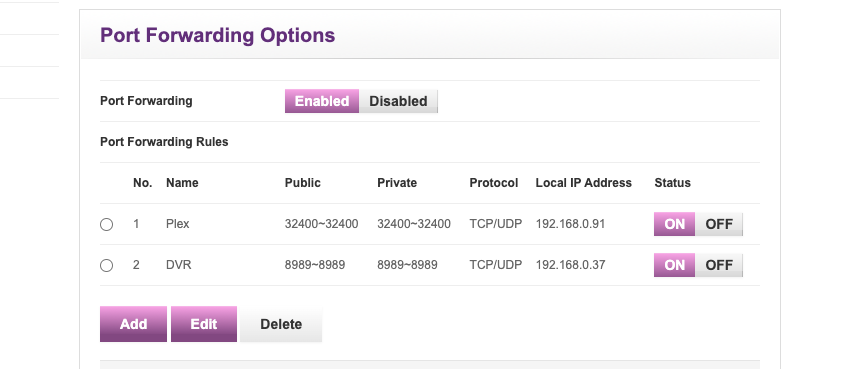
It looks like its set up right

Are you using 8989 -- or is that a mistake?

EDIT: Looking at your previous posts, you should be forwarding the standard 8089...

Good catch.

Oh my... thank you