I am using all Ubiquiti hardware, including CyberSecure.
Never had the CDVR server show up for anything like that.
What do you mean by it is blocking "outbound network intrusions"?
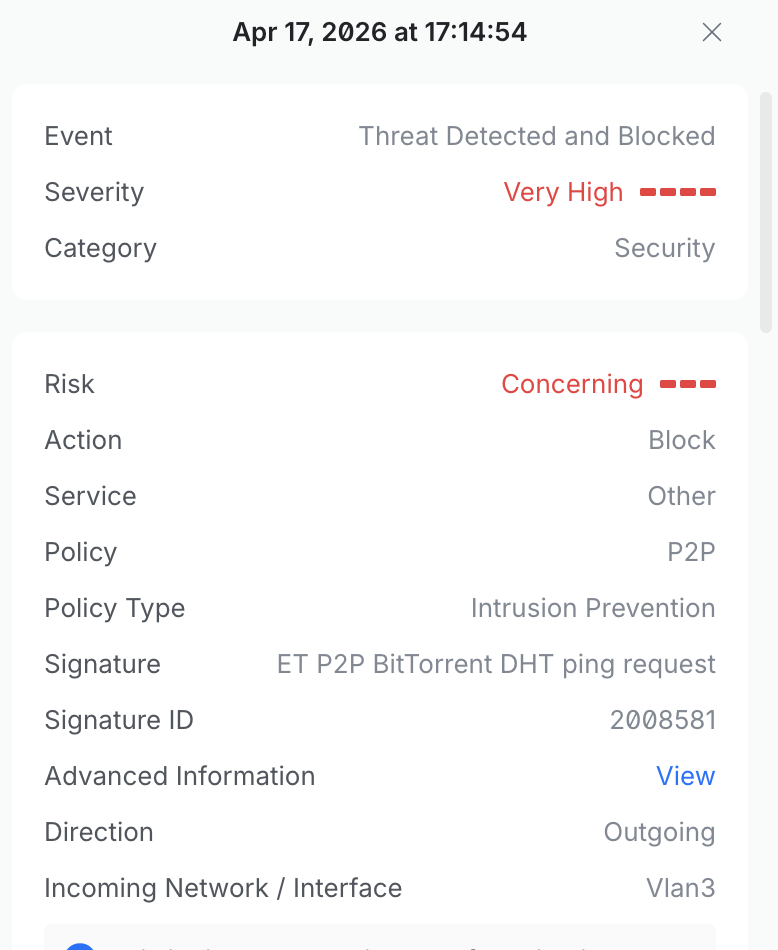
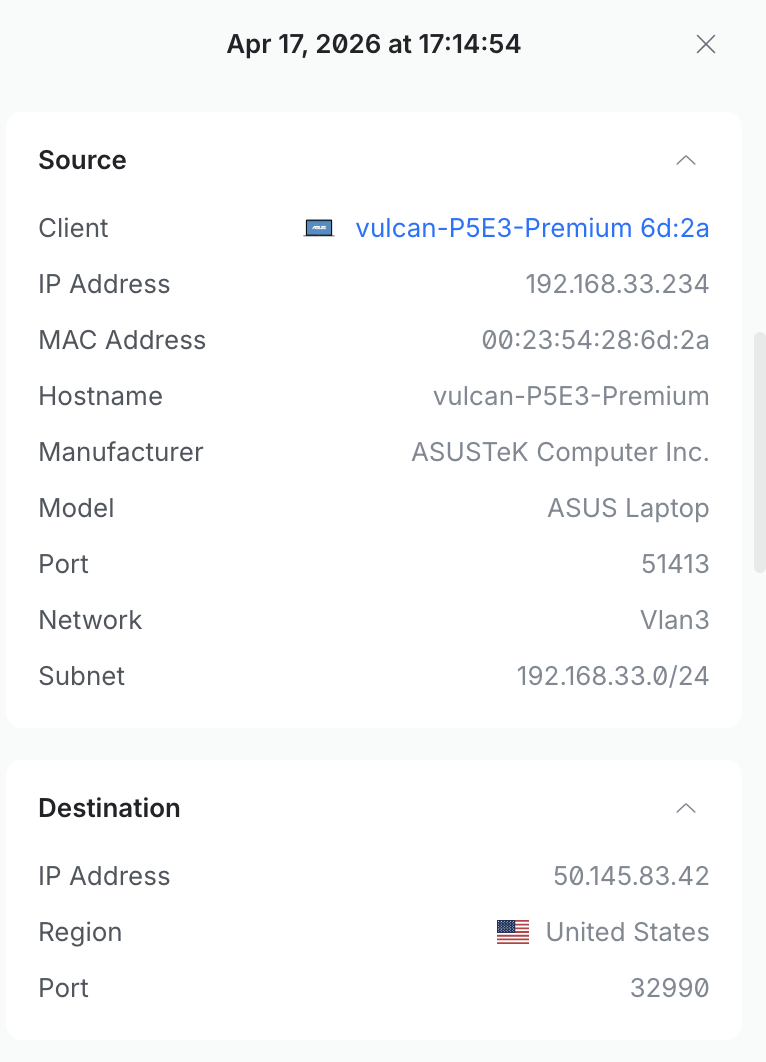
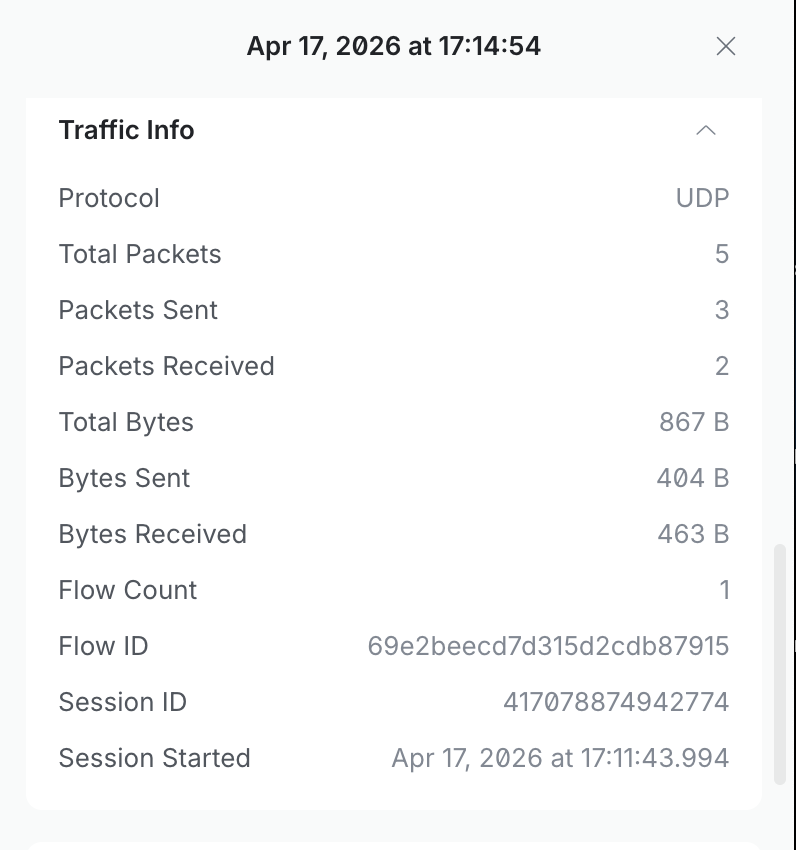
Post some screen shots and give more information, cause that is extremely vague and not really helpful at all. What Service, Category, Policy Type, Signature ID and threat etc does it state...it gives tons of info other than what you state.
Do you have your server exposed to the internet via port forwarding?
(That usually results in inbound port scanning)
Do you have other things running on the computer, like BitTorrent's or other things that need outbound internet connections?
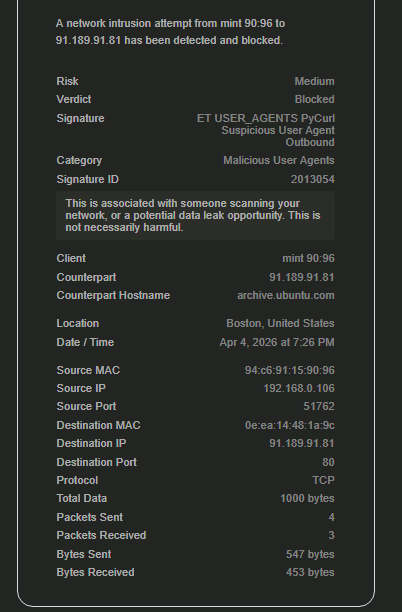
I was recently testing Mint on a spare mini pc.
I did get several alerts from it, clean install, only installed and updated it, no other software installed.
Check the details of such alerts, and you will see its system related, not anything to do with CDVR.
Like this.
Probably False Positives, but, if that is the source of your alerts, best to take that up with the Linux Mint Community on their fourms.
(though, with CPUID and Notepad++ having compromised download sites giving people malware ridden installers these days, who knows, maybe one of Mint's download mirrors got hacked or a repository...idk.)
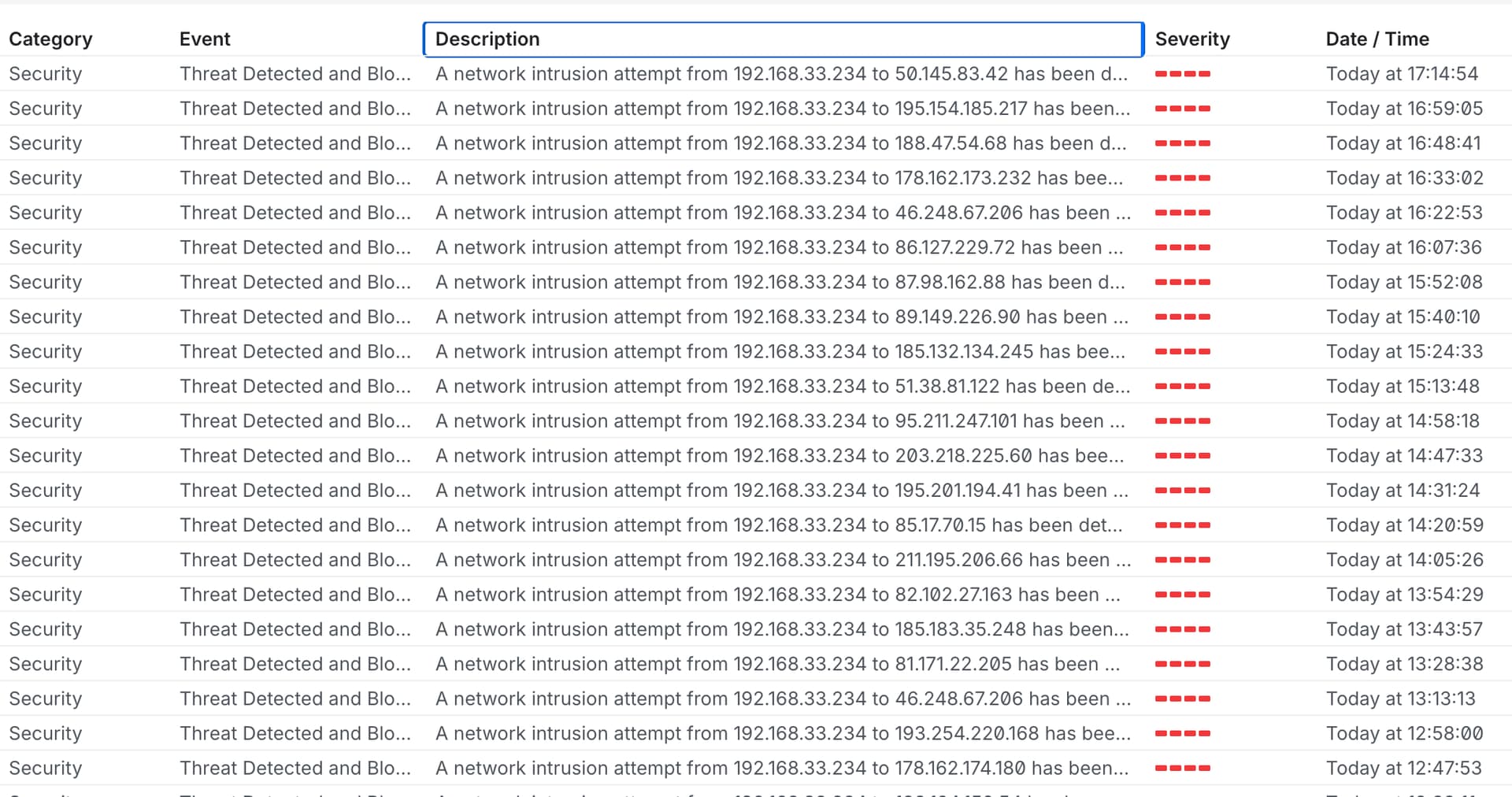
I'm getting many many outbound intrusion attempts every few minutes to random countries worldwide. Ubiquiti CyberSecure is blocking the attempts so far. I do not have any open ports in my firewall router.
This was a clean Linux Mint 22.3 install followed with Channels DVR Server.
I thought I was very careful to not do any unnecessary web browsing to avoid driveby...
I installed ClamAV to check the system. I am also going to install a Rootkit scanner to do the same.
Says it right there…. BitTorrent dht ping request. U have a BitTorrent client running. Or something that is using a P2P connection. Some remote access software or file syncing software may use it.
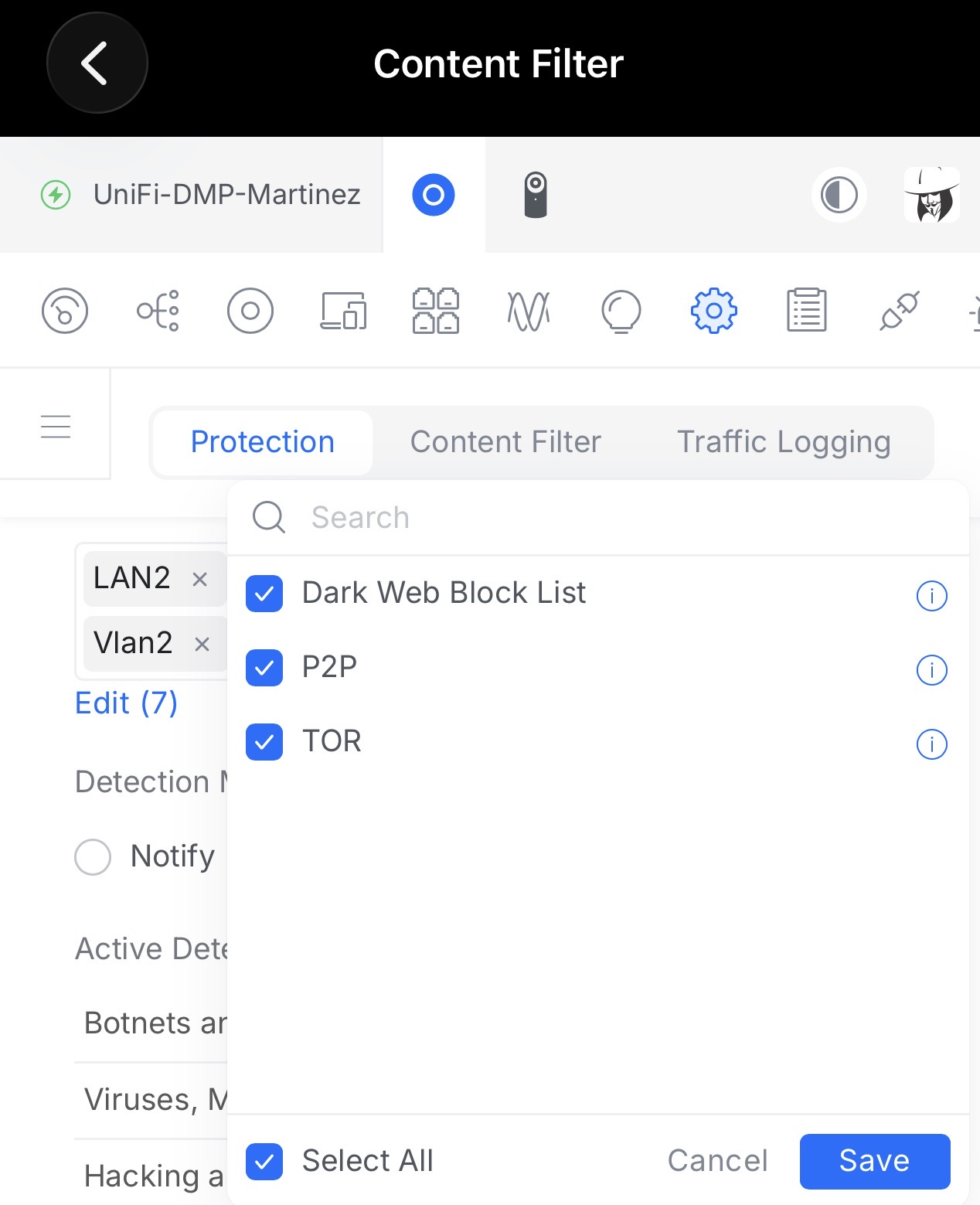
That signature will always trigger if that category P2P and or Bittorent is enabled in cyber secure. Such signatures are highly sensitive and triggered pretty much with anything that attempts to make a P2P or bittorent connection or request.
They can be disabled in cyber secure if you are want to use such bittorent software. I’m probably do not get these alerts because I have those categories disabled
They can. yes. But so does many other legit software and processes.
Mint has a built in Firewall that u can enable i believe.
Again, Unifi's Firewall protection, even without CyberSecure, is very sensitive.
Either way, this is not a Channels DVR related thing. (far as i can tell)
You may have better luck on Ubiquiti forms or Linux forms.
Unless someone else here has more experience with Linux Mint and can give you more insight....thats all i can say, is that you have something running that is using P2P/Bittorent connection protocols.
If you enable remote streaming and open the port on your router, port forward or use auto then your server is open to the Internet. Ubiquity's firewall will report some connection requests that attempt to exploit your system. There is no guarantee that all exploits will be stopped.
It is safer to use a VPN such as the builtin Tail Scale and since you have a Univi Router you can use any number of the VPNs that it supports. I use the Teleport VPN and it's very easy to set up.
Channels DVR is almost certainly the source. It legitimately makes many outbound connections because it:
Connects to guide data servers worldwide
Uses TVE (TV Everywhere) streaming sources that pull from CDNs globally
Checks for software updates
May connect to Gracenote/Tribune metadata services
Your Ubiquiti router is likely misclassifying these as P2P intrusion attempts.
Channels DVR’s connection pattern — many short-lived connections to many different IPs globally — looks behaviorally similar to BitTorrent or other P2P traffic to a heuristic firewall, which is probably why you asked the original question.
However, the more important question is: what is initiating these connections from inside your network? If it’s Channels DVR, that’s expected. If something else is running, that’s a red flag.
Anytime you have a port open an IDS is going to report attempted network intrusions, that's just a fact of being on the internet. You're literally just getting hit with port scans most likely. It's just a fact of life on the internet and having a port open.
Do you have UPnP enabled? Because that would mean you have open ports in your router if you have UPnP enabled. That automatically opens ports. UPnP is usually enabled by default on these devices, on most routers actually, and it's the one thing I recommend disabling because it automatically opens ports on your network and is just a huge security risk in my opinion.
I don't know what to tell you, you're getting port scanned, it's normal.
It has nothing to do with channels DVR. It's just noise. It literally says the IDS is blocking them. I mean this is just a whole lot of false positives.
Actually looking closer at that it looks like you have something running on that machine maybe scan it for malware. That literally says it's something related to BitTorrent. Maybe you have some malware or a Bitcoin miner running on that machine and don't realize it. I would possibly do an AV scan but it's not Channels DVR doing it.
If you have transmission installed and DHT enabled and transmission is running it's possible that you haven't downloaded or anything that could be connecting to peers.
I would just make sure transmission is not running or removed and see if it stops and also disable DHT.
It's most certainly the issue though if that's running. I wonder if it runs as a daemon in the background?
unless you have a very unusual configuration guide data should come from a single gracenote server.
The purpose of CDS is to avoid connections all over the internet. The concentrate streaming to a CDN cache near you on the internet
Channels software updates are to a single server
Gracenote and Tribune are not all over the place, limited servers.
You have not answered a very important question. Do you have a port open or forwarded on your Ubiquity router to your Channels DVR server?
To me this looks like one of a few things:
Your server being probed and responding
Your server is compromised
Regarding possible compromise, take a very close look at the list of services running on your server. Also list all services with network connections including half open ones.
Your issue is likely an open port(s) and reflection of hosts probing your server from the internet. Interpreting firewall event logs is an artform.
An easy test to see if it's the Channels DVR server (not the computer, the code) is to kill that process. If the events stop it's related to the code running. If you find this, go over your firewall rules and/or add a deny all inbound to the server on your firewall