Sanity Check - Moving DVR Folder - ChannelsDVR on Synology

Hey everyone. Just looking for a quick sanity check regarding a big folder relocation I need to do. In a nutshell, I need to move the DVR folder to another volume on my Synology NAS. Based on guidance in the wiki, all I should need to do is:

  • Disable the server
  • Rsync the data to the new volume
  • Reconfigure the base folder to the new volume
  • Re-enable the server

Am I on the right track? Is there anything else I should do to ensure a smooth transition?

For context, the volume currently hosting the root DVR folder has file system errors which need to be corrected. Synology's built in repair functions have failed to repair the volume so I may need to rebuild the volume altogether. :frowning:

Sounds correct, but before you do it, check that Channels DVR can access the new volume.

  • Disable the server
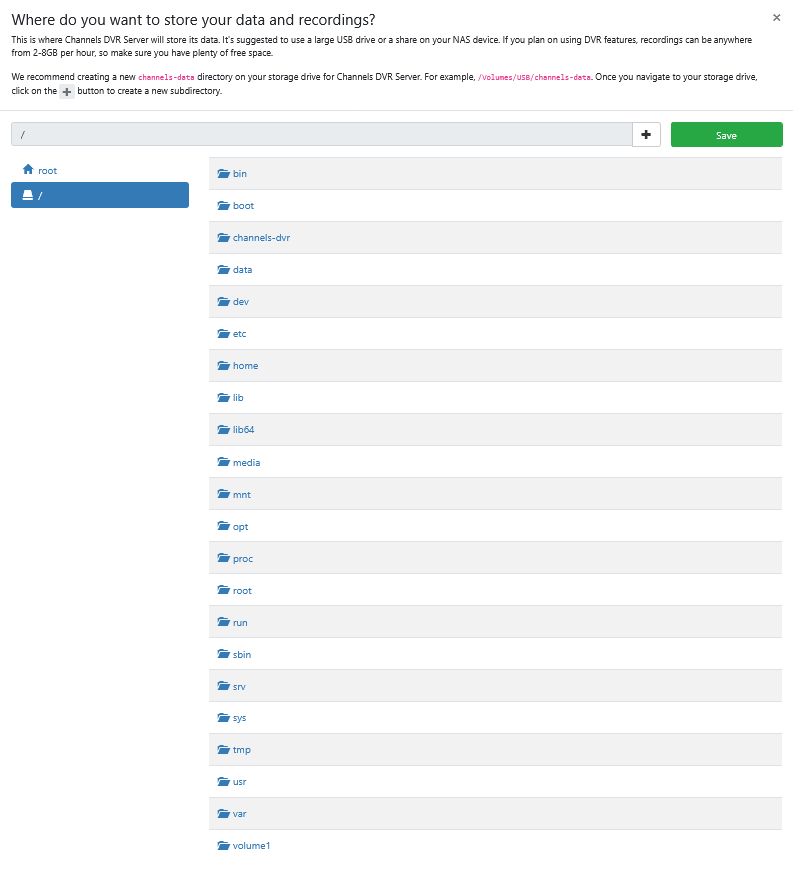
  • See if you can pick the base folder on the new volume

I only have a volume1 on my Synology

Good call. I can see the new volume and associated shares listed under Sources -> Personal Media -> Add Source so that's a good sign.

I would check it from where you're going to use it. Just to be sure.

One other thing is that the executable directory for Channels DVR Server is stored in /volume1/@appstore/ChannelsDVR if you're running the Synology Package install.

Don't know if it's possible to run that from another volume.

In fact, probably all your installed packages are in /volume1

1 Like

move the recorded media only. The media is taking up most of the room rather than the ChannelsDVR folder.

Indeed, I suspect it is not possible to move data in the "@" folders. At least, not easily. Since the bulk of the volume's data exists outside of those folders, my hope is that a drastic size reduction of the affected volume might allow the internal repair tools to actually complete the repair task.

And there are symlinks in the /var folder pointing to them for installed packages.