SHIELD TV Crash When Going to Home Screen and Back into the App

I posted this on Discord to try to get some activity on the server and help out, but I figured I'd also share it here just in case it's easier for the Channels DVR crew to track. :blush:

I'm so close to getting my Nvidia Shield working with Channels happily. I'm just running into an issue where if I press the home button, to back out of the app, and then go back in, Channels will give me a just black screen and I have to force stop the app or close it from the app switcher. I'm not sure if Maddox has any ideas. I pulled this over and over from adb logcat.

01-21 02:00:11.853 I/MediaFocusControl( 3711): abandonAudioFocus() from uid/pid 10098/6567 clientId=android.media.AudioManager@823b0d1com.getchannels.android.PlayerActivity@baca65f
01-21 02:00:11.962 V/AvrcpMediaPlayerWrapper( 3895): onPlaybackStateChanged(): com.getchannels.dvr.app : PlaybackState {state=2, position=34925, buffered position=0, speed=1.0, updated=81290, actions=822, custom actions=[], active item id=-1, error=null}
01-21 02:00:12.713 E/Surface ( 6567): freeAllBuffers: 1 buffers were freed while being dequeued!
01-21 02:00:12.863 E/BufferQueueProducer( 3403): [SurfaceView - com.getchannels.dvr.app/com.getchannels.android.PlayerActivity#0](id:d4b0000000c,api:0,p:-1,c:3403) disconnect: not connected (req=1)
01-21 02:00:13.136 I/ActivityTaskManager( 3711): START u0 {act=android.intent.action.MAIN cat=[android.intent.category.LEANBACK_LAUNCHER] flg=0x10000000 pkg=com.getchannels.dvr.app cmp=com.getchannels.dvr.app/com.getchannels.android.MainActivity} from uid 10105
01-21 02:00:23.146 W/ActivityTaskManager( 3711): Activity destroy timeout for ActivityRecord{2a6a8e1 u0 com.getchannels.dvr.app/com.getchannels.android.PlayerActivity t276 f}}

Basically, at random, the app will just open to a completely black screen. There's no rhyme or reason for it. I also tried hybrid and software decoding just to confirm that it wasn't a video player issue.
This is happening both on beta and stable.

01-21 02:01:32.028 W/ActivityTaskManager( 3711): Activity top resumed state loss timeout for ActivityRecord{db1346d u0 com.getchannels.dvr.app/com.getchannels.android.MainActivity t276}
01-21 02:01:33.384 E/Surface ( 5045): freeAllBuffers: 1 buffers were freed while being dequeued!
01-21 02:01:40.777 W/ActivityTaskManager( 3711): Activity top resumed state loss timeout for ActivityRecord{db1346d u0 com.getchannels.dvr.app/com.getchannels.android.MainActivity t276}
01-21 02:01:42.951 W/ActivityTaskManager( 3711): Activity stop timeout for ActivityRecord{db1346d u0 com.getchannels.dvr.app/com.getchannels.android.MainActivity t276}
01-21 02:01:44.632 I/ActivityTaskManager( 3711): START u0 {act=android.intent.action.MAIN cat=[android.intent.category.LEANBACK_LAUNCHER] flg=0x10000000 pkg=com.getchannels.dvr.app cmp=com.getchannels.dvr.app/com.getchannels.android.MainActivity} from uid 10105
01-21 02:01:45.028 E/Surface ( 5045): freeAllBuffers: 1 buffers were freed while being dequeued!

This was also after the app had failed and I was kind of going home and going back in trying to get it to sort of load and it never would. I just had to eventually kill it and it just happens at random. It's super weird.

It seems like there's a crash bug on Android TV, from what I can tell. That happens when the app is backgrounded for even a few seconds, but it's random.
Probably not much help but I definitely don't have this issue on my (2017) Shield. The only time I can get CDVR to crash is if I use any of the F-key shortcuts, then it will crash about 7 or 8 times out of 10. Have never had it open to a black screen.

That is super weird.
I have no idea what's going on then. Maybe my shield is defective. Maybe I just need to go out and buy a new one. I don't know. It has been running pretty much continuously for the last four or five years.

I'd try a factory reset before getting a new one.

Have you opened it up and cleaned it out ever? That seemed to help mine run a bit smoother. Mine had all sorts of dust bunnies in there after about 6 years. lol

Lots of YouTube videos on how to open it up. I didn't bother re-pasting the processor, but some say that helps too.

I've done a factory reset and I also repasted it.
You know, I'm wondering, I did have it sitting on my AVR for the last five years, so I'm wondering if maybe just the heat from that degraded the hardware itself.

I just tested my Shield by exiting live TV playback directly to the Shield home screen by pressing the Home button. Relaunching Channels goes smoothly.
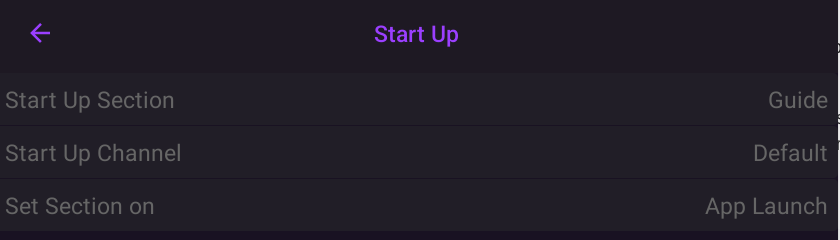
What are your startup setting for the Channels app? I launch to the guide on app startup, rather than resuming live playback.

Same here, I have to go to the guide.
I seem to be having so many issues with the Shield that no one else is having. I really think I have a hardware fault at this point.

1 Like

Yeah, baking the Shield on top of your AVR for 5 years probably didn't do it any favors. Is it a 2017 model? Maybe time to upgrade to 2019...? :slight_smile:

This is a 2019, but it's been baking for a long time, so that's probably part of the issue.
Worst case scenario, I'll go to Best Buy, pick one up, and if it continues to happen, then I know it's something else and I can return it.

I'm just trying to find a way to abandon the Apple TV. I can't stand it. It just totally goes against everything I stand for, lol. If I can get my Shield working or a Shield working, I would be happy.

What kind of hardware do you have the server running on?

It's an Unraid server. i7 12700K 128 GB of RAM. 38TB of storage. Database is on Samsung 980 Pro I believe.

Stop fighting it and try to find another hill to die on. I too was a "I'm not supporting Apple" and "Android is my platform" person. Well now I have 4 AppleTV's in my house. I really wanted to love Android TV but I just couldn't. My Wife got PISSED when I switched to AppleTV. Not because she missed Android.

In her words, "You mean this was available all this time and you chose to make me use this crap with all of these ads and menus that don't make sense? Why are you fighting against my mental health????"

It just works, no tweaking a 7 year old device, custom launchers, glitches, etc.

1 Like

I like that though. I like tweaking a 7 year old device with custom launchers. That's fun for me.
I absolutely hate that I can't tweak anything on the Apple TV and that it just works. There's no fun in that. :smile:

The simplest explanation is my Shield has some sort of pre-failure.
I also notice when I start a stream up, it'll like sort of stutter and glitch for a second and then pick back up.

You don't have to see all of those ads and menus on Android TV, just install Projectivy Launcher. :wink:

I've considered getting an ATV but their draconian limitations on side-loading always stops me.

It seems to me that previously said that you had a second Shield at home. A 2017 model? Have you tried that one under the same conditions?

Projectivity Launcher is fantastic. @YetiMan Do you use an ADBTuner at all or an HDMI encoder?

When you start a stream, does it stutter for like a split second before it starts streaming? Like you get a bit of a jitter? I notice when I kick off a channel, I get a bunch of dropped frames, it stutters for a moment, and then just starts playing.

It's a different chipset, so I don't know if that's an apples to apples comparison.
Plus, I would just replace the 2019 one anyway, that 2017 one is like a refurb I got from NVIDIA after my original 2017 failed ages ago.

I do use ADBTuner, do not have an HDMI encoder, but I do use an HDMI splitter to get the Shield output to my kitchen TV.

I used to have a problem with micro-stutters when I first started using CDVR, but those went away after a time. Not sure what solved it, I assumed it was an update. I do not get any stutters when starting a stream but I don't watch a lot of live TV either.

What source is giving you the stutters?

Everyone has their preference but my issue is Nvidia doesnt stand behind their product for both hardware and software. The newest device is 7 years old and still has an ASTC1 bug for some stations that they know about but refuse to fix. It made my local ABC unwatchable. Apparently it is a hardware bug that they are perfectly fine in leaving as-is.

You know, I wonder if it's just an issue with the hardware decoder. I switched to hybrid on the new Shield and it seems better.

I was initially getting that black screen issue, but the behavior was slightly different. I can't explain it. It was really wonky but in a better way. And I switched to the video decoder to hybrid, and in the brief testing I did on my lunch break, it seems like hybrid might have fixed it.

Regardless, the new Shield did act wonky, but it acted wonky in a different way, which is promising to me. Regardless, the Apple TV is going back to Walmart. I just don't like the damn thing.

I'd rather kill an app once in a while on a device I like that actually lets me kill an app properly than be irritated with a $150 piece of hardware I despise.

Edit: I should mention the other Shield did behave totally differently and hardware, software, hybrid all failed. So I do have to play with this new one a little bit more, but I think it might have been a hardware issue. I'm hoping.