
I'm suggesting showing the actual file name in the DVR>Manage list (or an option to show it). I know I can just click the Options button and then View Details. But when adding a bunch of shows or movies, it's a bit of a hassle to have to do that for multiple titles when trying to confirm that imported shows were correctly matched.
I know most of the time mismatches are obvious. But I've had issues with finding out of order TV episodes and multipart franchise films. Having the file name right there would allow me to just scroll down the list quickly and find what needs fixed.
I'm thrown a mockup below of what I'm talking about with my most recent mismatch!
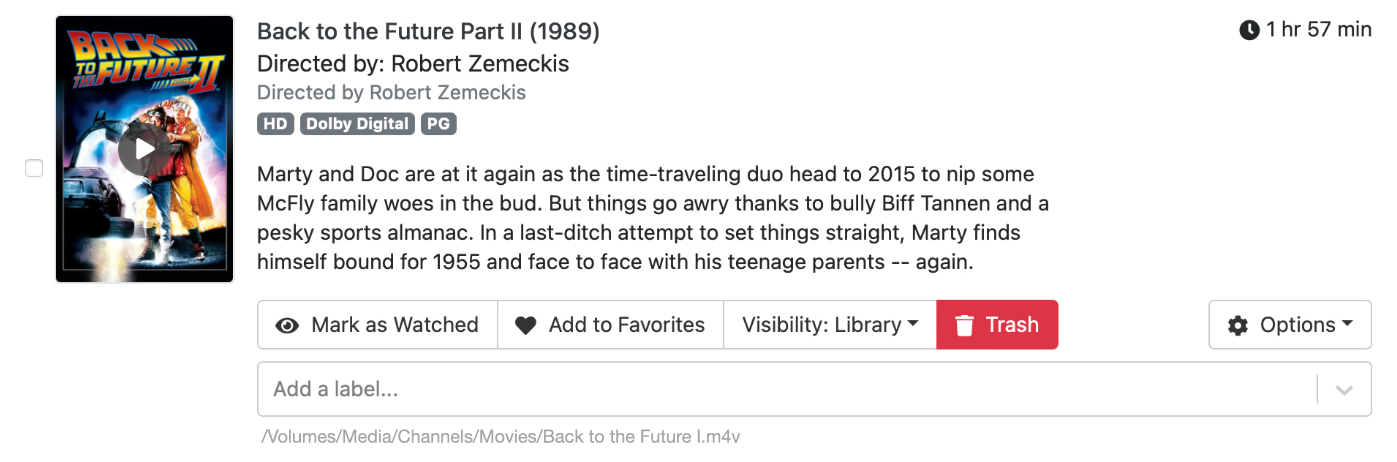
Yes, I know why that example mismatched - it's not titled "Back to the Future I"! But I've also had Mission: Impossible II comeback as Mission: Impossible - Fallout. Since I have both films, I might not have noticed these errors.