
Hello,
The Personal Media feature has been getting better with every update and it's working really nicely with my slightly larger library (~15,000 TV episodes, ~7,500 movies). I wanted to share a script that triggers Channels to scan/prune when Sonarr or Radarr imports or deletes content.
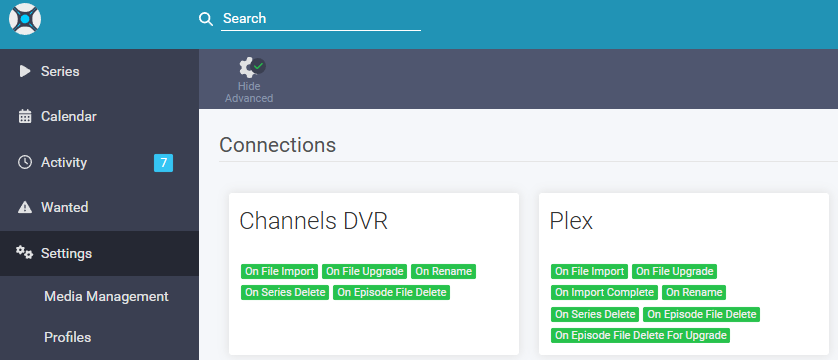
The problem: When Sonarr/Radarr upgrades a file, the filename changes (e.g., from [WEBDL-1080p][h264]-playWEB.mkv to [Bluray-1080p][x265]-iVy.mkv). Channels sees the new file and adds it, but the old database entry for the deleted file remains - resulting in duplicate entries. The built-in scan finds new files but doesn't automatically prune orphaned entries, so duplicates accumulate over time. This script triggers a prune on upgrade/delete to keep things tidy, and a scan on import so new content appears quickly.
Why not auto-prune by default? The community has documented this well - if a drive disconnects, auto-prune would wipe your entire library from the database. The script includes a mount safety check that actually verifies (some) files are accessible before allowing prune to run, which should catch mount failures that a simple database check would miss.
A note on the safety check: The mount verification works by requesting a tiny bit of video data from sample files via the HLS endpoint - if Channels can serve it, the files are genuinely accessible. It checks both a movie and an episode when you have both (to cover separate mounts), or two files of the same type if you only have one. It's the best approach I could come up with, but it's not bulletproof - there may be edge cases I haven't thought of. Use at your own risk, keep backups of your Channels database, and if anyone has ideas for a more robust check, please share!
What it does:
- Triggers a Personal Media scan on import (new content appears quickly)
- Prunes orphaned database entries on delete/upgrade (removes stale entries, does NOT delete files)
- Verifies media files are actually accessible before pruning (requests 1 byte of video data via HLS endpoint)
- Only affects Personal Media imports - DVR recordings, Stream Links, etc. are untouched
- Uses official API endpoints
Caveats:
- Scans are full library scans (Channels checks file modification times, so it's fairly quick)
- Mount verification adds ~4-5 seconds, but results are cached for 90 seconds to handle batch imports efficiently
- For massive bulk imports (thousands of files), you might want to disable the script temporarily
- Fire-and-forget approach means you won't know if a request failed, but Channels handles duplicate requests gracefully
- If you've extended your scan interval like I have (1 hour instead of the default 5 minutes), the instant scan becomes more valuable
Setup:
- Save to
/config/scripts/channels-sync.shin your Sonarr/Radarr config chmod +x /config/scripts/channels-sync.sh- Edit
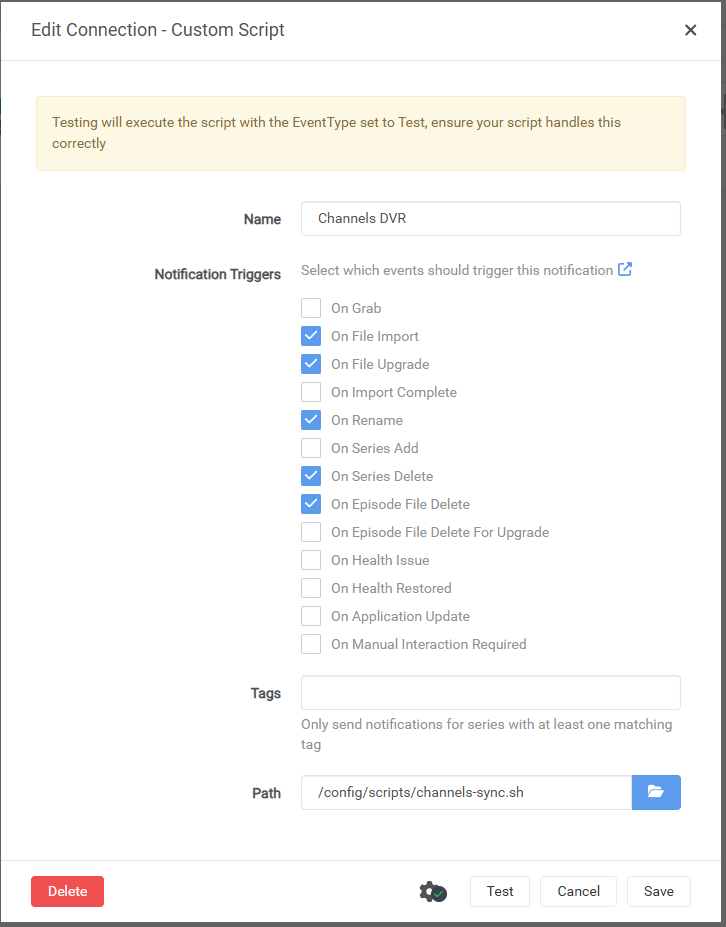
CHANNELS_URLto match your setup - Settings → Connect → Custom Script with triggers:
- On File Import, On File Upgrade, On Rename, On Series/Movie Delete, On Episode/Movie File Delete
Hope this helps! I put this together with LLM assistance, so if you've got improvements or a completely different approach, I'm all ears.
Created and test on 27/12/2025
Sonarr Version: 4.0.16.2944 (lscr.io/linuxserver/sonarr)
Radarr Version: 6.0.4.10291 (lscr.io/linuxserver/radarr)
Channels Version: 2025.10.30.0047 (fancybits/channels-dvr:nvidia)
channels-sync.sh
#!/bin/bash
#===============================================================================
# Channels DVR Sync Script for Sonarr/Radarr
#===============================================================================
#
# Triggers Channels DVR to scan for new Personal Media when Sonarr/Radarr
# imports content, and prunes orphaned Personal Media entries when files are
# deleted. Prune only removes database entries - it does NOT delete any files
# and does NOT affect DVR recordings.
#
# SAFETY FEATURE:
#   Before pruning, this script verifies that Personal Media files are actually
#   accessible on disk by requesting video data from sample files. This prevents
#   catastrophic library wipes if a drive disconnects or mount fails.
#
#   Scope: Only checks imported content (source=imports) - does NOT affect:
#          DVR Recordings, Stream Links, PlayOn Cloud, or Stream Files.
#
#   The verification result is cached (default 90s) to avoid API overhead
#   during batch imports.
#
# INSTALLATION:
#   1. Save this script to your Sonarr/Radarr config directory:
#      - Sonarr: /config/scripts/channels-sync.sh (container path)
#      - Radarr: /config/scripts/channels-sync.sh (container path)
#   2. Make executable: chmod +x /config/scripts/channels-sync.sh
#   3. Ensure Unix line endings (LF, not CRLF)
#   4. Edit CHANNELS_URL below to match your setup
#
# SONARR SETUP (Settings -> Connect -> + -> Custom Script):
#   Name: Channels DVR Sync
#   Triggers (in UI order):
#             [ ] On Grab
#             [x] On File Import
#             [x] On File Upgrade
#             [ ] On Import Complete
#             [x] On Rename
#             [ ] On Series Add
#             [x] On Series Delete
#             [x] On Episode File Delete
#             [ ] On Episode File Delete For Upgrade  <- handled by On File Upgrade
#             [ ] On Health Issue
#             [ ] On Health Restored
#             [ ] On Application Update
#             [ ] On Manual Interaction Required
#   Path: /config/scripts/channels-sync.sh
#
# RADARR SETUP (Settings -> Connect -> + -> Custom Script):
#   Name: Channels DVR Sync
#   Triggers (in UI order):
#             [ ] On Grab
#             [x] On File Import
#             [x] On File Upgrade
#             [x] On Rename
#             [ ] On Movie Added
#             [x] On Movie Delete
#             [x] On Movie File Delete
#             [ ] On Movie File Delete For Upgrade  <- handled by On File Upgrade
#             [ ] On Health Issue
#             [ ] On Health Restored
#             [ ] On Application Update
#             [ ] On Manual Interaction Required
#   Path: /config/scripts/channels-sync.sh
#
# REQUIREMENTS:
#   - curl (included in linuxserver.io and hotio images)
#   - Network access from Sonarr/Radarr container to Channels DVR
#
# TESTED WITH:
#   - linuxserver/sonarr, linuxserver/radarr (Alpine-based)
#   - hotio/sonarr, hotio/radarr
#
# API ENDPOINTS USED:
#   GET  /dvr                          - Status/health check
#   GET  /api/v1/movies?limit=1        - Get sample movie ID for mount verification
#   GET  /api/v1/episodes?limit=1      - Get sample episode ID for mount verification
#   GET  /dvr/files/{id}/hls/...       - Verify file is accessible on disk
#   PUT  /dvr/scanner/scan             - Trigger Personal Media scan
#   PUT  /dvr/scanner/imports/prune    - Remove orphaned Personal Media entries
#
#===============================================================================

#-------------------------------------------------------------------------------
# CONFIGURATION
#-------------------------------------------------------------------------------

#-- Connection -----------------------------------------------------------------

CHANNELS_URL="${CHANNELS_URL:-http://172.20.0.1:8089}"   # Your Channels DVR URL

#-- Features -------------------------------------------------------------------

ENABLE_SCAN="${ENABLE_SCAN:-true}"    # Trigger Personal Media scan on import
ENABLE_PRUNE="${ENABLE_PRUNE:-true}"  # Remove orphaned entries on delete

#-- Mount Safety Check ---------------------------------------------------------
# Before pruning, verifies Personal Media files are actually accessible on disk
# by requesting video data from sample files. This prevents library wipes if a
# drive disconnects or mount fails. Only checks "Imports" source - does NOT
# affect DVR Recordings, Stream Links, PlayOn Cloud, or Stream Files.

ENABLE_MOUNT_CHECK="${ENABLE_MOUNT_CHECK:-true}"  # Verify mounts before prune
MOUNT_CHECK_INTERVAL="${MOUNT_CHECK_INTERVAL:-90}" # Cache duration (seconds)

#-- Debugging ------------------------------------------------------------------

DEBUG="${DEBUG:-false}"  # Set "true" to log detailed diagnostics

#-------------------------------------------------------------------------------
# SCRIPT - No need to edit below this line
#-------------------------------------------------------------------------------

# Cache file location - /tmp clears on container restart, forcing fresh check
MOUNT_CHECK_CACHE="/tmp/channels-dvr-mount-verified"

log() { echo "[Channels-Sync] $1"; }

debug() { [ "$DEBUG" = "true" ] && log "DEBUG: $1"; }

#-------------------------------------------------------------------------------
# Mount Verification Functions
#-------------------------------------------------------------------------------
# These functions verify that media files are actually accessible on disk,
# not just present in the Channels DVR database. This prevents the prune
# operation from wiping your library if a drive disconnects or mount fails.
#
# The script automatically detects what content you have and checks 2 files:
#   - Both movies AND TV: 1 movie + 1 episode (verifies both mounts)
#   - Movies only: 2 movies (newest + oldest for variety)
#   - TV only: 2 episodes (newest + oldest for variety)
#   - Neither: skips verification (nothing to protect)
#-------------------------------------------------------------------------------

# Check if we verified mounts recently (within MOUNT_CHECK_INTERVAL seconds)
# Returns 0 (true) if cache is fresh, 1 (false) if stale/missing
mount_check_is_fresh() {
    [ -f "$MOUNT_CHECK_CACHE" ] || return 1

    local cache_time current_time age

    # Get cache file modification time (seconds since epoch)
    # Using stat with fallback for different implementations
    if stat -c %Y "$MOUNT_CHECK_CACHE" >/dev/null 2>&1; then
        cache_time=$(stat -c %Y "$MOUNT_CHECK_CACHE")
    elif stat -f %m "$MOUNT_CHECK_CACHE" >/dev/null 2>&1; then
        cache_time=$(stat -f %m "$MOUNT_CHECK_CACHE")
    else
        return 1  # Can't determine age, treat as stale
    fi

    current_time=$(date +%s)
    age=$((current_time - cache_time))

    debug "Mount check cache age: ${age}s (interval: ${MOUNT_CHECK_INTERVAL}s)"

    [ "$age" -lt "$MOUNT_CHECK_INTERVAL" ]
}

# Verify a specific file is accessible by requesting 1 byte of video data
# This MUST touch the actual file on disk - it cannot be served from cache
# Returns 0 (true) if file is accessible, 1 (false) otherwise
verify_file_accessible() {
    local file_id="$1"
    local http_code

    [ -z "$file_id" ] && return 1

    # Request first byte of first video segment
    # HTTP 200 or 206 (partial content) = file accessible
    # HTTP 404 or timeout = file not accessible
    http_code=$(curl -s -o /dev/null -w "%{http_code}" \
        -H "Range: bytes=0-0" \
        --max-time 5 \
        "${CHANNELS_URL}/dvr/files/${file_id}/hls/stream.m3u8/stream0.ts?vcodec=copy" 2>/dev/null)

    debug "File $file_id verification: HTTP $http_code"

    [ "$http_code" = "200" ] || [ "$http_code" = "206" ]
}

# Get sample file IDs from the library for verification
# Uses limit=1 and sort order to get specific files efficiently
get_movie_id() {
    local order="${1:-desc}"  # desc=newest, asc=oldest
    curl -s --max-time 10 \
        "${CHANNELS_URL}/api/v1/movies?source=imports&limit=1&sort=date_added&order=${order}" 2>/dev/null \
        | grep -o '"id":"[^"]*"' | head -1 | cut -d'"' -f4
}

get_episode_id() {
    local order="${1:-desc}"  # desc=newest, asc=oldest
    curl -s --max-time 10 \
        "${CHANNELS_URL}/api/v1/episodes?source=imports&limit=1&sort=date_added&order=${order}" 2>/dev/null \
        | grep -o '"id":"[^"]*"' | head -1 | cut -d'"' -f4
}

# Main mount verification function
# Checks 2 files total based on what content exists in the library
# Returns 0 (true) if mounts OK, 1 (false) if verification failed
verify_mounts() {
    local file1="" file2=""
    local has_movies="" has_episodes=""

    debug "Starting mount verification..."

    # Check what content types exist (newest of each)
    has_movies=$(get_movie_id desc)
    has_episodes=$(get_episode_id desc)

    debug "Content check: movies=${has_movies:-none}, episodes=${has_episodes:-none}"

    # Determine which 2 files to check based on available content
    if [ -n "$has_movies" ] && [ -n "$has_episodes" ]; then
        # Has BOTH: check 1 movie + 1 episode (verifies both mount points)
        file1="$has_movies"
        file2="$has_episodes"
        debug "Strategy: 1 movie + 1 episode (both mounts)"

    elif [ -n "$has_movies" ]; then
        # Movies ONLY: check newest + oldest movie (variety/redundancy)
        file1="$has_movies"
        file2=$(get_movie_id asc)
        debug "Strategy: 2 movies (newest + oldest)"

    elif [ -n "$has_episodes" ]; then
        # Episodes ONLY: check newest + oldest episode (variety/redundancy)
        file1="$has_episodes"
        file2=$(get_episode_id asc)
        debug "Strategy: 2 episodes (newest + oldest)"

    else
        # No Personal Media at all - nothing to protect
        debug "No Personal Media found - skipping verification"
        return 0
    fi

    # Verify first file
    debug "Checking file 1: $file1"
    if ! verify_file_accessible "$file1"; then
        log "ERROR: Mount verification FAILED for file ID: $file1"
        return 1
    fi

    # Verify second file (if different from first)
    if [ -n "$file2" ] && [ "$file2" != "$file1" ]; then
        debug "Checking file 2: $file2"
        if ! verify_file_accessible "$file2"; then
            log "ERROR: Mount verification FAILED for file ID: $file2"
            return 1
        fi
    fi

    debug "Mount verification passed"
    return 0
}

# Wrapper that handles caching of mount verification results
# This prevents redundant API calls during batch imports
check_mounts_with_cache() {
    # Check if we verified recently
    if mount_check_is_fresh; then
        debug "Mount verification cached - skipping"
        return 0
    fi

    # Need fresh verification
    debug "Mount verification cache stale/missing - verifying..."

    if verify_mounts; then
        # Success - update cache timestamp
        touch "$MOUNT_CHECK_CACHE"
        debug "Mount verification passed - cache updated"
        return 0
    else
        # Failed - remove cache to force re-check next time
        rm -f "$MOUNT_CHECK_CACHE"
        return 1
    fi
}

#-------------------------------------------------------------------------------
# Core Functions
#-------------------------------------------------------------------------------

# Check Channels DVR is running and reachable
channels_ok() {
    curl -s --max-time 5 "${CHANNELS_URL}/dvr" 2>/dev/null | grep -q '"status":"running"'
}

# Legacy safety check - verify database shows content
# Kept as secondary check alongside mount verification
library_has_content() {
    curl -s --max-time 5 "${CHANNELS_URL}/dvr" 2>/dev/null | grep -q '"files":[1-9]'
}

# Trigger Personal Media scan
do_scan() {
    if [ "$ENABLE_SCAN" != "true" ]; then
        debug "Scan skipped (disabled)"
        return 0
    fi

    # Fire and forget - Channels deduplicates rapid requests internally
    curl -s -X PUT --max-time 2 "${CHANNELS_URL}/dvr/scanner/scan" >/dev/null 2>&1 &
    log "Scan requested"
}

# Prune orphaned Personal Media entries (removes DB entries, not files)
do_prune() {
    if [ "$ENABLE_PRUNE" != "true" ]; then
        debug "Prune skipped (disabled)"
        return 0
    fi

    # Safety check 1: Verify database shows content
    if ! library_has_content; then
        log "ERROR: Prune blocked - library appears empty or unreachable"
        return 1
    fi

    # Safety check 2: Verify mounts are accessible (unless disabled)
    if [ "$ENABLE_MOUNT_CHECK" = "true" ]; then
        if ! check_mounts_with_cache; then
            log "ERROR: Prune blocked - mount verification failed"
            log "       This prevents library wipe if drive disconnected"
            return 1
        fi
    else
        debug "Mount check disabled - skipping"
    fi

    # All safety checks passed - proceed with prune
    curl -s -X PUT --max-time 2 "${CHANNELS_URL}/dvr/scanner/imports/prune" >/dev/null 2>&1 &
    log "Prune requested"
}

#-------------------------------------------------------------------------------
# Main Script
#-------------------------------------------------------------------------------

# Detect calling application and extract event details
if [ -n "$sonarr_eventtype" ]; then
    EVENT="$sonarr_eventtype"
    UPGRADE="$sonarr_isupgrade"
    TITLE="$sonarr_series_title"
    APP="Sonarr"
elif [ -n "$radarr_eventtype" ]; then
    EVENT="$radarr_eventtype"
    UPGRADE="$radarr_isupgrade"
    TITLE="$radarr_movie_title"
    APP="Radarr"
else
    log "ERROR: Not called from Sonarr/Radarr (missing event variables)"
    exit 0
fi

# Debug mode - log configuration
if [ "$DEBUG" = "true" ]; then
    log "DEBUG: APP=${APP} EVENT=${EVENT} UPGRADE=${UPGRADE} TITLE=${TITLE}"
    log "DEBUG: CHANNELS_URL=${CHANNELS_URL}"
    log "DEBUG: ENABLE_SCAN=${ENABLE_SCAN} ENABLE_PRUNE=${ENABLE_PRUNE} ENABLE_MOUNT_CHECK=${ENABLE_MOUNT_CHECK}"
    log "DEBUG: MOUNT_CHECK_INTERVAL=${MOUNT_CHECK_INTERVAL}s"
fi

# Verify Channels DVR is reachable before proceeding
if ! channels_ok; then
    log "ERROR: Channels DVR unreachable at ${CHANNELS_URL}"
    exit 0
fi

# Handle events from Sonarr/Radarr
case "$EVENT" in
    Test)
        log "Connection test successful (${APP} -> Channels DVR at ${CHANNELS_URL})"
        log "Settings: ENABLE_SCAN=${ENABLE_SCAN}, ENABLE_PRUNE=${ENABLE_PRUNE}, ENABLE_MOUNT_CHECK=${ENABLE_MOUNT_CHECK}"

        # On test, run full mount verification (ignoring cache) to confirm it works
        if [ "$ENABLE_MOUNT_CHECK" = "true" ]; then
            log "Running mount verification..."
            if verify_mounts; then
                log "Mount verification: PASSED"
            else
                log "Mount verification: FAILED (check file accessibility)"
            fi
        fi
        ;;
    Download)
        log "Imported: ${TITLE}"
        # On upgrade, prune old entry BEFORE triggering scan
        if [ "$UPGRADE" = "True" ] || [ "$UPGRADE" = "true" ]; then
            do_prune
        fi
        do_scan
        ;;
    EpisodeFileDelete|MovieFileDelete)
        log "File deleted: ${TITLE}"
        do_prune
        ;;
    SeriesDelete|MovieDelete)
        log "Deleted: ${TITLE}"
        do_prune
        ;;
    Rename)
        log "Renamed: ${TITLE}"
        # Rename = file moved, so prune old path and scan for new
        do_prune
        do_scan
        ;;
    *)
        log "Unhandled event: ${EVENT}"
        ;;
esac

exit 0