Spinning circle when trying to watch a recording on any platform

It appears that all my passes on a particular channel solely work with Audio Only playback (other channels work fine with audio/video). If I try to watch video from that channel within the Android or iOS apps or browser player, I just get an infinite spinning circle. Any suggestions on how to fix? Diagnostic logs per http://localhost:8089/admin/troubleshooting have been submitted ff901f71-f6c5-4d41-9890-a0ac0f35fad9 and immediately I see these error messages, although searching other threads here it appears these can be ignored as bugs/irrelevant ("Allow apps to communicate through Windows Defender Firewall" both "Private" and "Public" are already checked off for Channels DVR Server, and I used the Norton Uninstaller a long time ago to remove as much bloatware as possible):

System Firewall
The Windows firewall is missing rules for Channels DVR

Third Party Firewall
Found third-party firewall software: Norton Security

I also emailed [email protected] but my last attempt on 9/21/2023 was never replied to so I have had better luck here. Thanks.
Can you watch the recorded mpg file in VLC?

Yes that is working, and that is a good reminder for home viewing. I actually tried downloading the file to my mobile device for remote viewing, but it was taking forever so I just ended up falling back on YouTube TV. Hoping to fix the problem to avoid having to download if you have other ideas.

I have this happen on almost everything I try to play in a browser remotely if it's something stored in Local Content. What frequently gets it moving for me is to wait about 30 seconds and then press the seek forward button. Might be worth a try.

Sounds like your server's hardware needs more time to access the content and start the transcode than your browser has set as its timeout.

(It almost sounds as if your local content is stored on another drive that has gone to sleep, and the extra time that is causing the timeout is because the drive needs to spin up ...)

Interesting but no luck with that for me.

1 Like

I had trashed a lot of the programs from that channel, but decided to do some more troubleshooting while waiting for new content to record, and the restored programs are working fine on the iOS/Android apps (still not playing in a browser, but I prefer using the app anyway). I'll keep testing this trash/restore trick on new content to make sure it works consistently.

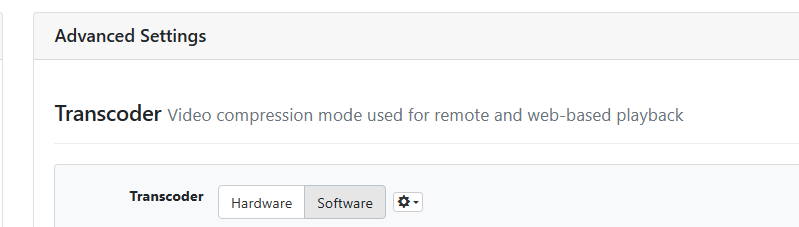
The trash/restore trick stopped working on my next attempt. For the record, via email Channels Support had suggested "Please try changing the Transcoder to Software and see if that fixes it. It appears there are some problems with your NVENC hardware encoder" and my response "This did not fix it. Android I still get the spinning circle. iOS the recording starts playing, but the spinning circle keeps coming back during playback making it unwatchable. I also tried downloading the file on iOS, and now it's back to not playing at all (like Android)."

For those of us following along, I am assuming this was for the transcoding on the server, and not the client, correct?

this is the setting I changed (please correct me if I was wrong)

You're recording from an ATSC3 channels transmitting in HEVC 10bit video. This is suitable for watching in-home inside the Channels app in Original quality. Your NVIDIA GPU is struggling to convert this format and so is your CPU by itself in Software mode.

If its important for you to watch this content in the browser or remotely in apps, then you should recording the ATSC1 version instead.

Or you can watch the HEVC in Original quality without trying to convert it.

This topic was automatically closed 365 days after the last reply. New replies are no longer allowed.