Strange Problem updating all of my docker instances to latest pre-release

On all of my docker instances of Channels I get this error when trying to update them to the latest pre-release. The UI says "Browser refresh needed" and then just sticks on the existing pre-release that is 10 days old. My physical server doesn't have an issue, its just all of my docker instances. Any ideas?

2023/10/20 12:26:36.743275 [SYS] Downloading new version v2023.10.20.0149
2023/10/20 12:26:42.171671 [SYS] Error checking for update: symlink 2023.10.20.0149 /channels-dvr/latest: file exists

I can go in and change the symlink to an older release, delete the 10.20.0149 directory and try it again but I thought I would report this in case it is not just a "me" thing...
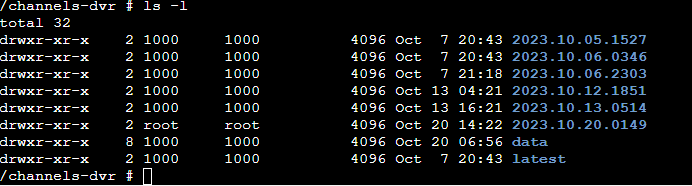
What are the permissions on the latest symlink? My best guess is we're unable to remove the symlink to update it to point to the new location.

We'll add more error checking to report when we are unable to remove the symlink to make this more clear in the future.

So I did migrate to a new docker server a couple of weeks ago and used scp to move over the mapped storage.
/channels-dvr is owned by root
drwxr-xr-x 10 root root 4096 Oct 20 06:56 channels-dvr

Then inside the directory there is a mix of root and 1000. should I just chown -R /channels-dvr? the 10.06 release is what I am stuck on

/channels-dvr # ls -l
total 32
drwxr-xr-x    2 1000     1000          4096 Oct  7 20:43 2023.10.05.1527
drwxr-xr-x    2 1000     1000          4096 Oct  7 20:43 2023.10.06.0346
drwxr-xr-x    2 root     root          4096 Oct  7 21:18 2023.10.06.2303
drwxr-xr-x    2 root     root          4096 Oct 13 04:21 2023.10.12.1851
drwxr-xr-x    2 root     root          4096 Oct 13 16:21 2023.10.13.0514
drwxr-xr-x    2 root     root          4096 Oct 20 06:53 2023.10.20.0149
drwxr-xr-x    8 1000     1000          4096 Oct 20 06:56 data
drwxr-xr-x    2 1000     1000          4096 Oct  7 20:43 latest
/channels-dvr # 

Make sure it’s all owned by the user ID you’re running channels under. It does look like it’s 1000.

so I chowned the /channels-dvr directory and deleted the downloaded update directory as I got an already exists error. I'm back to the same error and now the re-downloaded 2023.10.20.0149 directory is owned by root? It looks like channels is running under root? I literally just setup a new docker server, created the mapped storage and scp'd the contents over to the new server, then installed the container. Nothing crazy...

If you're running under Docker and haven't explicitly set a user/group when creating the container, Channels will run as root within the container.

Hmm so I should chown -R root:root?
update I chown'd everything as root. deleted the dir with the latest pre-release update. Channels downloaded it and it was owned by root. I still get the error though

2023/10/20 14:54:44.369833 [SYS] Downloading new version v2023.10.20.1433
2023/10/20 14:54:50.347327 [SYS] Error checking for update: symlink 2023.10.20.1433 /channels-dvr/latest: file exists
1 Like

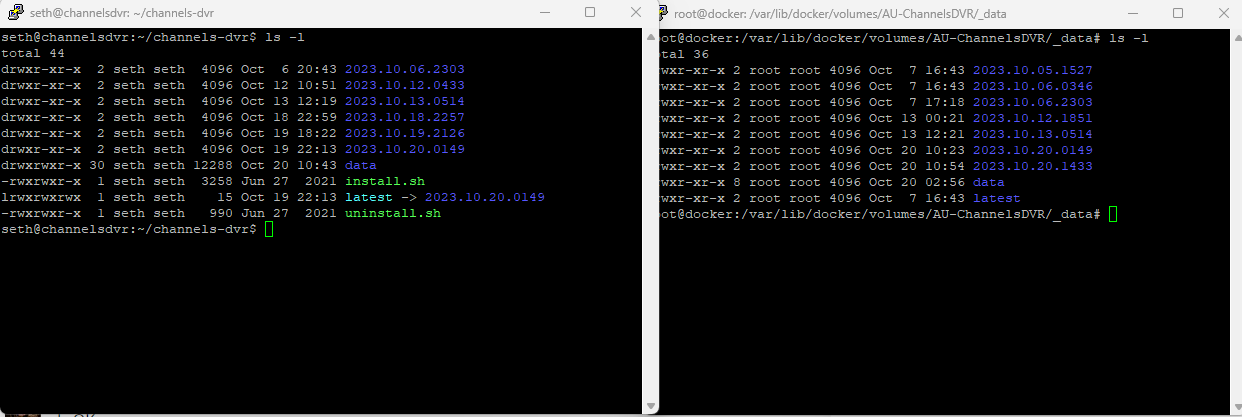
Could it be its having an issue creating the symlink? The server on the left is my physical server and the one on the right is a docker container. No symlink in the docker container. Crazy thing is channels is doing everything as root so you would think there would be no issues...

There's no reason to scp the /channels-dvr volume at all when making a new container.

I was migrating and wanted to preserve my settings etc. What can I do now to fix?

Ive got it. SCP copied over "latest" not as a symlink but as a directory. I deleted the "latest" directory and then manually created the symlink "latest" to the latest pre-release directory

Restoring from a backup does exactly that.

Yeah i hear ya. I was migrating about 20 containers and using that method for all of them not thinking that channels would have an issue .

This topic was automatically closed 365 days after the last reply. New replies are no longer allowed.