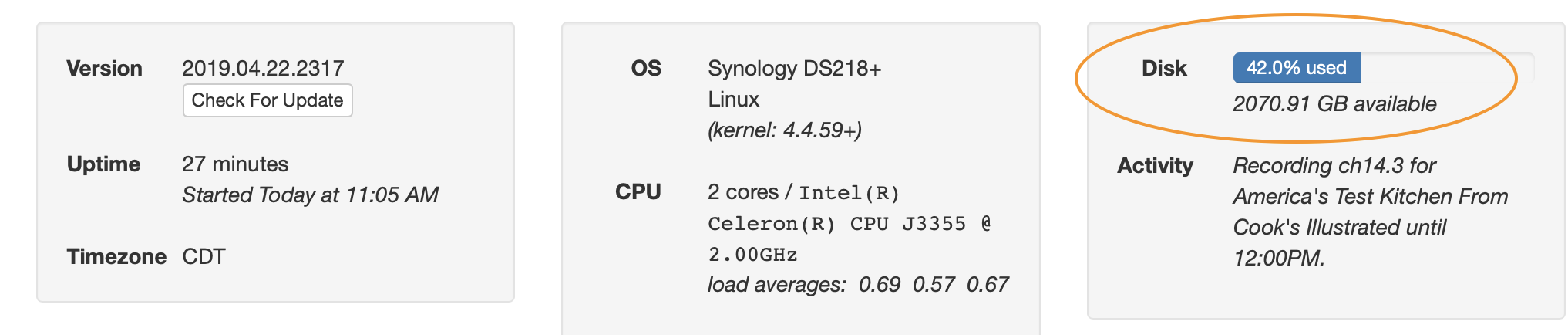
Synology drive w/ Quota, but Channels Disk is entire volume?

Channels on a Synology DS218+, working perfectly except for one issue.

I've set up Channels to record to a "DVR" older, as the instructions suggest. I'd like to limit this to preserve space for other stuff, so I've got a quota set up at 500GB. Channels seems to "see" the entire NAS capacity, not just the /DVR. Is this normal?

Setup on Synology...
21%20AM 35%20AM

View from Channels...
52%20AM

That 2.070 GB is the full available space on the Synology, not just the 500GB I'd like to allocate to Channels. Any way to ensure Channels only "sees" the 500GB?

A couple of points:

  1. IIRC, Channels runs as root on the Synology, and therefore is essentially exempt from disk quotas. To enable quotas, the Channels package would have to run as a different user; perhaps looking at the sc-media user/group that SynoCommunity packages use would be a good starting point.
  2. The system calls that Channels uses don't take quotas into account, either. Therefore, the amount reported in Channels is going to be for the entire physical disk.

If you are using a Synology NAS and you want to ensure that Channels really doesn't use more than a particular amount of space (and to have the interface properly reflect that), then I can only think of one workaround: Using the Storage Manager to create a new Volume, and move Channels and the Shared Folder you created for its recordings onto this new Volume.