Synology NAS - Numerous Chromium Instances - Crashes NAS

Hi -

After running Channels DVR on my Synology DS220+ for a few years without any issues, Ive started to have issues where after a period of time the NAS would lock up. I can hear it working hard. Here's it's current state:
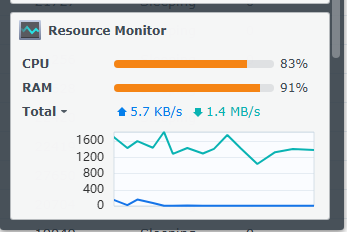
image

The issue first showed up in May/June, but resolved on its own. It's now back.

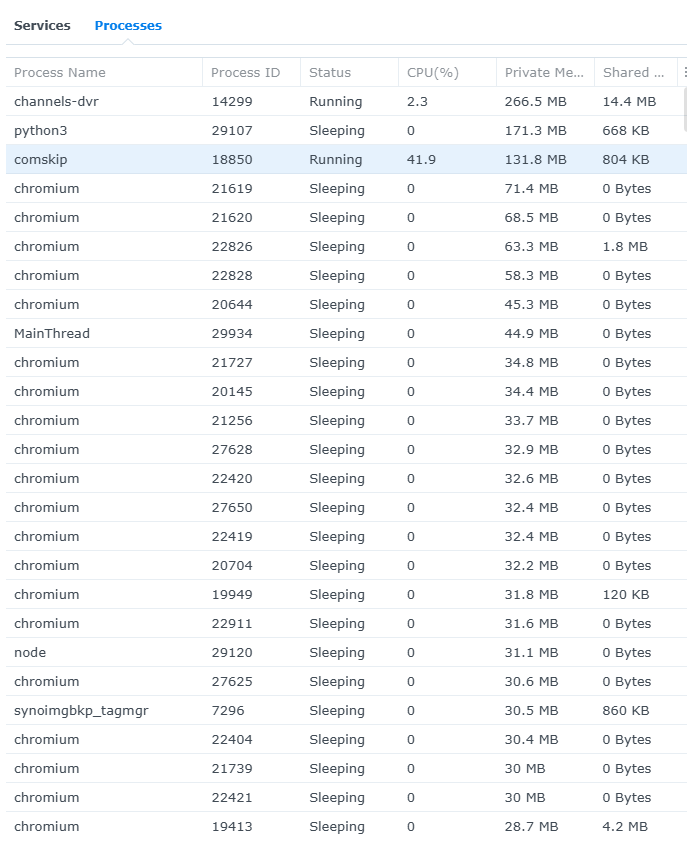
I'm trying to understand what the culprit is. Looking at the Resource Monitor information in DSM, I see my largest Memory culprits are numerous instances of chromium running. With Channels-DVR, comskip and chromiums, I feel all these are consuming my 6GB of ram. When I reboot the NAS, all is good until all these build again.

Is it common to have that many chromium instances at once? I know it's linked to TVE. Are these all the stations logged in?

Any other advice is appreciated. I'm going to turn off all Docker containers as a start now.
Are you running Channels natively or in a docker?

Natively.

Same here. I just checked my 220+ and it’s probably got several hundred instances of chromium in sleep. No issues with NAS. I have about 7 containers running in Portainer.

ChatGPT is telling me it's likely a container in Docker thats running wild. I'm checking each container to see if I can identify the culprit.

I'm running DSM 7.3.2-86009 Update 4. I have 4 GB Ram. Sorry I couldn't be of help.

A container spawning instances of Chromium on the host? Not likely. If a container uses Chromium, it's inside the container.

Any suggestions?

I looked at the Docker containers, MLBServer was consuming a crap ton of memory. ChatGPT has helped me diagnose it to that container.

When I reboot the NAS, all is good until some task runs away and loads up the memory. It triggers this kswapd0 task on the NAS that is tied to memory sharing which is killing the NAS and brings it to a halt until rebooted.

Definitely.

Let @tonywagner know this is happening in the mlbserver thread.