Timeshifting on PC inconsistent

I watch 24 hour news channels while working from home. I am viewing using the Channels DVR web viewer. I typically pause the playback during meetings and calls and then use that buffer to skip commercials.

I've found that this has worked for the most part but does have some issues. I've found that if I step away long enough that my screen blanks (five minutes) that the stream will start over when the screen wakes. Additionally, I see times where the stream will just restart or stop while playing back. I have not experienced this using the Android app on my tvs.

Is there a better way to do this? I thought about perhaps using VLC or some other app if I can get the URL for the network stream.

This is not a complaint but rather looking for a way to improve the experience. Thanks.
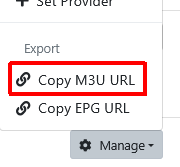
The developers will tell you that the web browser is not a supported client, so don't expect fixes.
The VLC integration works on Windows to watch in VLC.

You can also copy your CDVR source playlist and open it as a network stream in VLC.
That will give you a playlist in VLC with all the channels from that CDVR source
Screenshot 2026-03-10 at 17-48-58 Channels Settings

1 Like

Excellent!

I've tried both methods for getting the stream. Hopefully this will be more resilient though the Channels web worked well most of the time.

Thanks again for always taking the time to help me and others. It is most appreciated.

Little more info for anyone that finds this in the future. I tried both methods and both do work. I do not find that the timeshift works well though. I have seen similar reconnects losing the buffer and oddities on the ff/rw using VLC. The timeline does not always grow so moving around is odd to say the least. Lastly, I have seen jumps when trying to watch the buffer.

In short, I'll see if I can't get an Android emulator going and maybe I can use the Channels app.

You can try passing the HLS stream to VLC.
Open a currently airing program from the grid guide and right click copy the url for the channel from the
Screenshot 2026-03-11 at 12-18-56 Channels Guide button and paste the url into VLC open network stream.

Gave that a try and found the experience was the same.

Keep an eye on this project if you're using Windows

1 Like

As a follow up, I have installed Kodi and the Simple IPTV add-on and imported the exported m3u from Channels (actually I made one with just the news channel). I have been using it all day and have not had a problem with playback or moving around within the buffer.

Just sharing this in case someone else comes across a similar, oddball use case like mine.