
His stats he posted show buffering and dropouts on his HDHR source too.
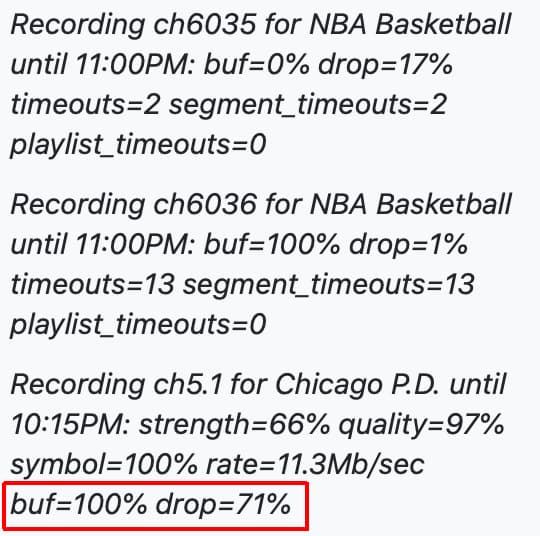
For sure but having issues with recording here lately with HDHomeRun and TVE recordings. Just trying to track this issue down. I had turned my Desktop PC off for a while and just turned it on yesterday and wondering if that is causing an issue but I don’t have any antivirus software on there as now but I can double check but this seems to been happening before I turned that on. And the only “desktop” on is my old Mac Pro. I have a MacBook Pro that I use for work from time to time but hardly use it.
What is your Channels DVR server?
You should be running that HDHR packet loss test from it.
I am running that packet loss from my server. It’s a MacPro Mid 2010 with an SSD drive for the OS and 4TB for Channels DVR and 1 4TB for Plex and 1 8TB for Plex installed. With 16gb of RAM.
No anti-virus/anti-malware software running on it?
That packet loss test doesn't write to disk, so if no errors from it, you can change the parameters and have it dump the stream to disk to see if it has errors.
That’s correct no anti-virus or anything of the sort.
How could I run a write to disk test? What is the prompt for that?
You can rerun the packet loss test and tell it to save to a file instead of to null
change hdhomerun_config FFFFFFFF save /tuner# null
to hdhomerun_config FFFFFFFF save /tuner# filename.mpg
1 Like

Just see dots no disk errors.
Unless someone has other ideas I would submit diagnostics from the DVR.
3 Likes
And both interrupted. Par for the course w/TVE, huh.
Yeah and they both say they ended at 8:30 PM PT but only play first half ... oh well like you said that is TVE.
@themediaguy hope you work things out.
buf=100% usually means the storage is too slow. Could be disk failure
During all of those recordings I had a 2.2 mb/s and I have restarted my network and my server and it’s up to 11.4 mb/s. I have been emailing back and forth with Eric and seems like a disk failure.
1 Like
Currently I am at 92% percent storage. I need to go through things and delete. I might just go to Micro Center and pick up a hard drive and go from 4 tb to 8 tb hard drive.
I re ran the test and restarted my network. It’s saying shoots up to 121 mb/s and then down to 66 mb/s. I’m gonna try to buy a new hard drive tomorrow and see if that works out for the better. Probably that number shoots down when there is a lot of recordings and it can’t handle it. But hopefully I can get this worked out.
Did you ever find out what was causing the problem?
I have been super busy with work and traveling. All I have done is transfer over stuff to a new 8tb drive and haven’t replace it in my Mac Pro. All I have done is updated to the latest pre-release and everything seems to be working really nice. Haven’t had any issues since. Wondering now if it was just a TVe problem and a server problem.
This topic was automatically closed 365 days after the last reply. New replies are no longer allowed.