Traffic when recording

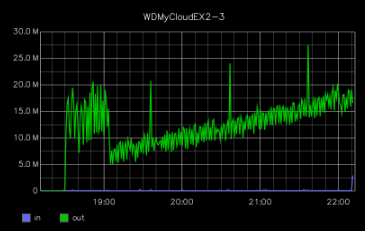
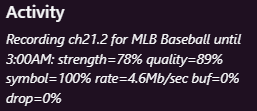
I thought I'd see if there's a reason for my observation here. I've been recording a baseball game since about 7:00 PM. It's on an ATSC 1 channel, so there's only like 5 Mbps
image

However, the graph of the traffic going to the NAS that's holding the DVR volume has been increasing steadily since the recording started and is now up to 15 Mbps traffic to the volume.

image

Any idea why?

Is Channels DVR installed on the NAS?
The graph is showing traffic marked as out
Does that mean from the outside coming in or from the inside going out

Could be clients using tuner sharing watching

What's the bitrate towards the end of the recording? Did the broadcaster keep increasing the bitrate?

What else is on that link?

To display all active and listening connections with netstat , use the -a option in combination with the -n (numeric) option for faster output without hostname resolution.

Thanks all for all the good questions:

No, channels is installed in a container on a different host. The only thing on this NAS is a single volume which is dedicated to Channels.

Yes, because this measurement is on the Ethernet switch the NAS is connected to, so OUT is to the NAS, IN is from .

Nobody here would have been watching that game. There was another user showing as viewing another thing in the activity, but the progress was stopped and the user said they hadn't been watching for hours, and that file is actually stored on a different volume on a different NAS( one shared with Plex)

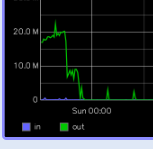
The recording continued up to 20 Mbps, then dropped for the next program. This is an ATSC 1 broadcast, just one channel of several on that frequency... they don't have the room to increase it that far.
image
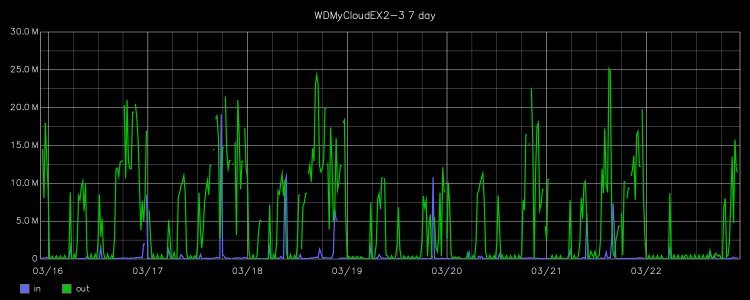
Judging by this, longer, image... it seems to be a common trend for longer recordings:

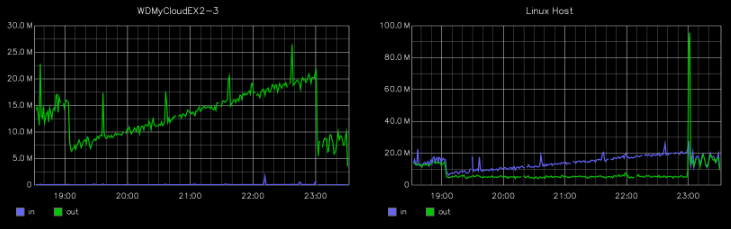
Okay, this is interesting and goes to that... here is the graph of the host and the NAS for the entire recording:


On the right, the green OUT line would include the data from the HDHomeRun into the Channels machine, the blue line IN is the Channels output to the NAS.

I would check netstat on the NAS.
There must be other traffic besides the DVR recording going to the NAS.
No way a single ATSC 1.0 channel would use that much bandwidth.

Are you sharing the NAS volume using SMB, NFS, or?

I agree that the bandwidth picture doesn't make sense. Hence the question. Note the upgraded graph I addeded... the data is at least going from Channels host to the NAS, though it is possible that Channels isn't responsible for it (based only on this graph).

iSCSI. Something I'm probably not going to continue when I purchase a single new NAS to replace the ones I'm running.

That might explain it.

So Channels server is abusing the file system.

What is the filesystem on the iSCSI device and mount options?

├─/mnt/dvr /dev/sdc1 ext4 rw,relatime,stripe=128

I continue to wonder if something else is running in that container. The only way to find out is to log into the console.

To display all active and listening connections with netstat , use the -a option in combination with the -n (numeric) option for faster output without hostname resolution.

Also look at processes ps-a

Hopefully your container is not compormised.

Good luck,

Morris

Can you tell us how big the file is recorded during these 4 hours?

The file is 8.9 GB. Which is about 4.5 Mbps.

Do you have live commercial detection enabled. That might explain the constant and increased file bandwidth.

No live commercial detection enabled currently. I don't understand how that would manifest as greatly increased writes without any significant read traffic.

The streaming index is rewritten every second. That index will grow as the file grows. That could certainly be part of it. The file is generally fairly small, so I don't know what would account for the rest.

an old bosses voice in my head is saying it's the wire! it's always the wire he says. lol. but seriously if there is a small issue with a wire/termination/connector it could account for escalating re-transmits.

1 Like

Can you put netdata on the linux host? This way we could get more stats.

Yes, I can. I grabbed the default compose YAML and pasted it into Portainer. But what specifically are you looking for?

Disk activity.