Tubi for Channels docker

I understand it is wierd ... @tmm1 Your looks good going in but when extracted it Adds the Title to the episodenum.

@tmm1 here is another sample ....

<programme start="20250320162959 +0000" stop="20250320170000 +0000" channel="4142">
<title>The Carol Burnett Show</title>
<sub-title>Cass Elliot, Pat Paulsen</sub-title>
<desc>Cass Elliot and Pat Paulsen star. Pat looks at "How To Be A Sensuous Female" and Cass joins 10th Avenue.</desc>
<icon src="https://canvas-lb.tubitv.com/opts/irhDxm5l41En_A==/3cfadee4-cf9e-4aa6-912d-e26c8e129787/CN4HEMcEOgUxLjEuNg=="/>
<series-id system="xmltv:">The Carol Burnett Show</series-id>
<previously-shown/>
<episode-num system="xmltv:">The Carol Burnett Show/S4E2</episode-num>
<episode-num system="onscreen">S4E2</episode-num>
<episode-num system="xmltv_ns">3.1.</episode-num>
<rating>
<value>TV-G</value>
</rating>
</programme>

I found a work around using NEXTPVR to get what I wanted did not have the problem of adding Title to episode-num ... so this definitely is the way Channels DVR is handling Extracting of guide data of the Tubi Docker to use in other apps. Thanks all.

NextPVR

<programme start="20250321145553 +0000" stop="20250321154217 +0000" channel="nextpvr-7376">
<title>Nikita</title>
<sub-title>S03:E14 - The Life We've Chosen</sub-title>
<desc>Amanda holds Alex hostage.</desc>
<episode-num system="xmltv_ns">2.13.0</episode-num>
<episode-num system="onscreen">S3 E14</episode-num>
</programme>

Updated to your latest version last night.
Seeing some new errors in the log today.
I'm restarting your container at 5:55PM every day and these errors appeared right after after the container restart today.

2025-03-23T00:55:19.649980327Z [INFO] ? http server started on [::]:7777
2025-03-23T00:55:19.711976459Z [INFO] Starting Scheduler thread
2025-03-23T00:55:19.712263320Z [INFO] Running EPG Scheduler
2025-03-23T00:55:19.712483919Z [INFO] EPG: Updating Channel Data
2025-03-23T00:55:19.712680083Z [INFO] Update Token via API Call
2025-03-23T00:55:19.712808899Z [INFO] Updating Token Session
2025-03-23T00:55:19.830480363Z [INFO] Close the Token API session
2025-03-23T00:55:19.830972166Z Connection Error. HTTPSConnectionPool(host='account.production-public.tubi.io', port=443): Max retries exceeded with url: /user/login (Caused by SSLError(SSLCertVerificationError(1, "[SSL: CERTIFICATE_VERIFY_FAILED] certificate verify failed: Hostname mismatch, certificate is not valid for 'account.production-public.tubi.io'. (_ssl.c:1010)")))
2025-03-23T00:55:19.831264921Z [ERROR] Error in use_signin_creds Connection Error. HTTPSConnectionPool(host='account.production-public.tubi.io', port=443): Max retries exceeded with url: /user/login (Caused by SSLError(SSLCertVerificationError(1, "[SSL: CERTIFICATE_VERIFY_FAILED] certificate verify failed: Hostname mismatch, certificate is not valid for 'account.production-public.tubi.io'. (_ssl.c:1010)")))
2025-03-23T00:55:19.831494700Z [ERROR] EPG: Connection Error. HTTPSConnectionPool(host='account.production-public.tubi.io', port=443): Max retries exceeded with url: /user/login (Caused by SSLError(SSLCertVerificationError(1, "[SSL: CERTIFICATE_VERIFY_FAILED] certificate verify failed: Hostname mismatch, certificate is not valid for 'account.production-public.tubi.io'. (_ssl.c:1010)")))
2025-03-23T00:55:19.831647426Z [INFO] EPG Scheduler Complete

Tubi certificate expired (or not valid for host/domain name)?

Was running fine since I updated the container last night until the restart today.

Bottom line. It's no longer refreshing EPG, so it's running out.

EDIT: Just to verify, I can sign in at the Tubi website without issues

UPDATE: Appears to have been a one time issue. :man_shrugging: Container is now updating EPG.

Can you try taking out your restarting every day? I put some corrections for downloading every so often (had an issue with ordering in my previous logic why that wasn't working as expected)

OK. Will pause my container restart task (until it runs out of guide data again).

How often is the container supposed to grab new EPG from Tubi?
From the logs, it looks like every 6-7 hours.

I noticed that the guide data for this tubi container doesn’t correctly match movies as movies or tv shows as TV shows. I remember when the Pluto docker was created, @maddox @tmm1 made changes to it to correctly match up. Can this be done for Tubi as well?

So i'm finally asking about this

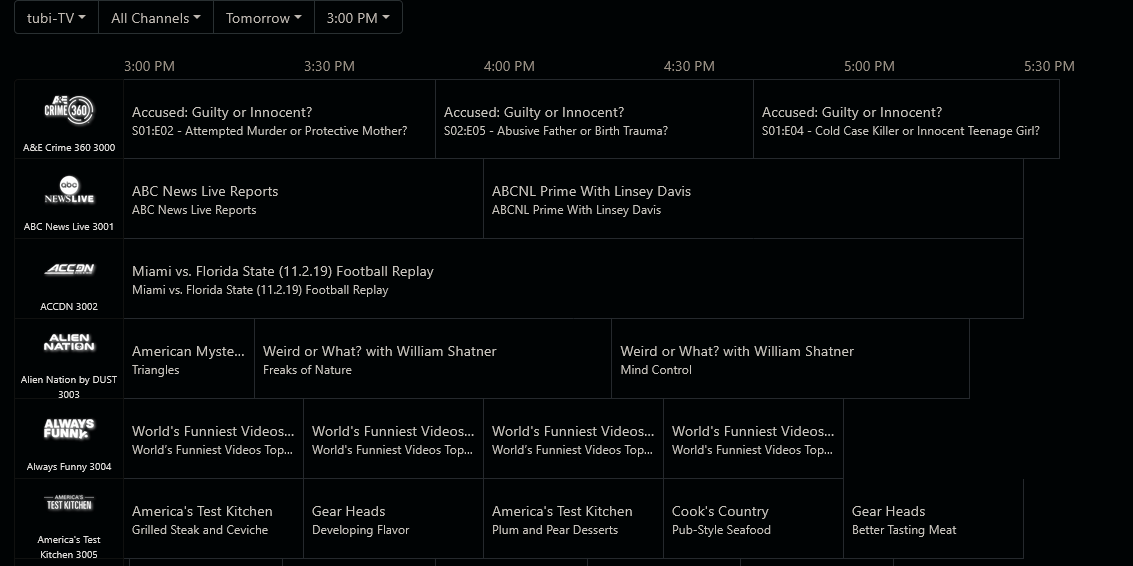
The tubi version of America's test kitchen which i like a lot has said "channel is no longer available" on its guide data for literal months now - no idea how to fix and nothing seems to fix

I'm seeing that channel with the same guide data on both Tubi and Samsung sources.
Of course the guide data for those sources isn't the same 16 days like an HDHR or TVE source.

Are you using gracenote or the epg from tubi - i have been using gracenote for a long time and thats where the issue is - i changed to epg and it looks like yours now

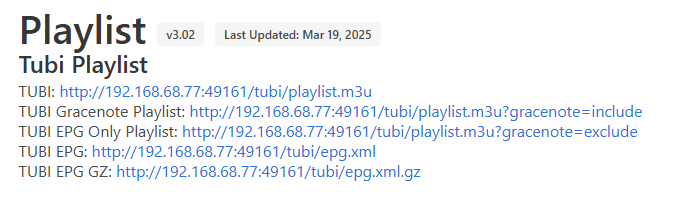
Can someone explain what each m3u and EPG option means?

I used the TUBI Playlist with the TUBI EPG and I'm not seeing any guide data. The m3u pulls the stations in fine. Just missing the guide data for some reason.

image

  1. m3u for all the stations.

  2. m3u for only the stations with Gracenote IDs so Channels can populate the guide data from Gracenote the same as OTA and TVE.

  3. m3u for only the stations without Gracenote IDs, so you must use the EPG with it to get guide data. The idea is that you'd use each of these as separate sources for reasons articulated below.

  4. The guide data you must use for non-Gracenote available stations, or all stations if you don't want to use Gracenote guide data. FYI, you want to use Gracenote guide data because it goes out for 2 weeks as opposed to just a few days of the EPG data.

  5. The same as #4, except compressed to be a smaller file that is quicker to download.

Delete and recreate your guide data in Channels. Check the logs to confirm they are actually loading. If not, something is wrong with your settings or network.