TVE fails for YouTube TV on Synology (Package Center install)

I sent a support case via email last night along with my logs, but thought I should also post about it here as well. I signed-up for YouTube TV but I cannot get TVE to work with it on my Synology DSM1621+ (I have it installed via Package Center, not in Container Manager). I keep getting the Google Block notification when trying to authenticate (I can authenticate separately with NBC no problem, so the credentials work). I never had TVE issues with Philo or Sling TV.

AI is telling me to move Channels DVR to Container Manager instead, which I really don't want to do if I can avoid it (apparently some kind of Chrome version issue with YouTube TV logins for the Package Center version). If I have to move my installation, how does the Container Manager version compare? Any ups/downs (I also use Tailscale)? I couldn't find anything concrete saying that Channels DVR does NOT support YouTube TVE on a Synology via Package Center. Hoping to get some clear answers here and hopefully will hear back from the Support Team on my message yesterday.
https://getchannels.com/docs/channels-dvr-server/tv-everywhere/provider-help/#youtube-tv

I had YTTV TVE running in the Channels DVR Synology package install, but moved all my servers to docker containers on my Synology. Channels DVR YTTV TVE runs fine in a docker container.

Just make sure if you install Channels DVR in a docker container to use "host" network mode.

I'm using a Google account (with no gmail and no recovery options) attached to my YouTube TV family plan for YTTV TVE authentication.

Confirmed that all of the above is how I have mine setup with the Google account, 2FA off, no gmail involved, etc. I did follow all those instructions. Would be nice to know if it ever works anymore for new YTTV accounts with TVE on a Synology package install.

Great to hear that it works in a docker container - I’m hoping to avoid having to set that up just to get TVE to work. Just a bit worried with transcoding, etc. with it running in a docker container vs. natively on the Synology via package center.

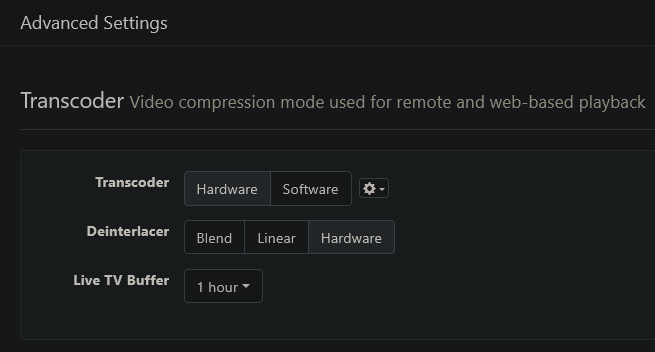
You Synology model doesn't do hardware transcode with Channels DVR, does it?
Mine (DS-1019+) does.
Screenshot 2026-08-17 at 20-02-09 Channels Settings

When I migrated from a Synology package install to a docker container, I kept the same recording directory and restored the latest backup from the Synology package install.

In fact you can install it in a docker container and switch back and forth between the container and the Synology package. Just one running and the other stopped. Just have to backup, stop, start the other one and restore from the backup.

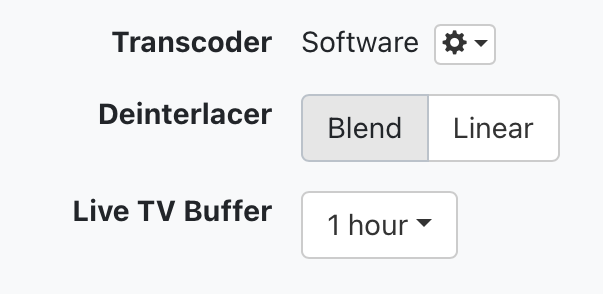
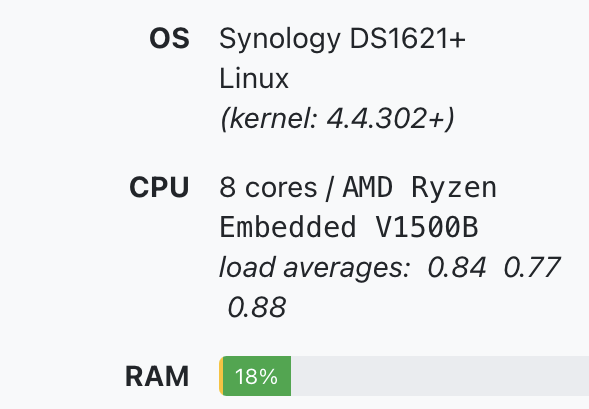
I don’t know how to properly answer that - a bit over my head. But here is my setup if this helps (I thought it does transcoding - Plex does for sure and it works great for my blu-rays (not 4K though)):

image

image

Seeing your screenshot now I guess mine only does software transcoding - I just hope it works just as well in a docker container as it does natively (because it works really well on my Synology with commercial detection, etc.).

Good to know about the docker install.

Do you have any docker containers currently installed on your Synology?

Yes - I have several, so I’m familiar with it (e.g. Home Assistant, Navidrome are my biggest ones). Natively I run Plex, Emby and Channels.

I just now saw this article, so maybe it's not worth trying to get TVE with YouTube TV (and it wouldn't help going back to Sling TV either since this hits all providers from what I can tell):

My main use case is sports (ESPN, etc.). Sure I can get FS1, etc. apparently (if still true), but that is secondary for me.

Well this sucks ... guess I have to stick with the apps to watch and record sports going forward :frowning_face: