TVE - YTTV ESPN Error

Weird issue started today. ESPN Channel shows HTTP 451 Error.

log shows

2024/12/08 10:36:25.534203 [TVE] action=version product=Chrome/131.0.6778.69 jsVersion=13.1.201.8 protocol=1.3 revision=@199634819b22eaa58d8efc35430bc8853b17807
2024/12/08 10:36:25.534920 [TVE] action=page_ready chromeVersion=131
2024/12/08 10:36:25.535783 [TVE] action=navigate url=https://sp.auth.adobe.com/adobe-services/authenticate/saml?noflash=true&mso_id=YouTubeTV&requestor_id=ABC&no_iframe=true&domain_name=adobe.com&redirect_url=https%3A%2F%2Fsp.auth.adobe.com%2Fadobe-services%2FcompletePassiveAuthentication
2024/12/08 10:36:25.607925 [TVE] action=request type=Document method=GET url=https://sp.auth.adobe.com/adobe-services/authenticate/saml
2024/12/08 10:36:26.061554 [TVE] action=response url=https://sp.auth.adobe.com/adobe-services/authenticate/saml?noflash=true&mso_id=YouTubeTV&requestor_id=ABC&no_iframe=true&domain_name=adobe.com&redirect_url=https%3A%2F%2Fsp.auth.adobe.com%2Fadobe-services%2FcompletePassiveAuthentication status=451 status_text=
2024/12/08 10:36:26.090939 [ERR] Could not start stream for TVE-YouTubeTV ch6141 ESPN2: TVE: http error 451

Any ideas?

Seeing similar issues with my friends server (Win 10 + YTTV). ESPN is actually not showing in guide and ESPN2 and SEC are tossing these error reports:

2024/12/08 11:16:12.282662 [ERR] Failed to start stream for ch6144: TVE: http error 451
2024/12/08 11:16:12.346241 [HLS] Couldn't generate stream playlist for ch6144-dANY-ip100.82.118.91: TVE: http error 451
2024/12/08 11:16:12.346241 [HLS] Stopping transcoder session ch6144-dANY-ip100.82.118.91 (out=0s finished=false first_seq=0 last_seq=-1)
2024/12/08 11:16:12.725342 [TVE] action=authz_retry err=adobe.pendingLogout reason=34764
2024/12/08 11:16:12.792105 [TVE] action=auth mvpd=YouTubeTV requestor=ABC
2024/12/08 11:16:13.584526 [TVE] action=version product=Chrome/131.0.6778.109 jsVersion=13.1.201.15 protocol=1.3 revision=@0cd6f1c484c0cf07827aa6482a5e3cdf50395669
2024/12/08 11:16:13.585776 [TVE] action=page_ready chromeVersion=131
2024/12/08 11:16:13.586279 [TVE] action=navigate url=https://sp.auth.adobe.com/adobe-services/authenticate/saml?noflash=true&mso_id=YouTubeTV&requestor_id=ABC&no_iframe=true&domain_name=adobe.com&redirect_url=https%3A%2F%2Fsp.auth.adobe.com%2Fadobe-services%2FcompletePassiveAuthentication
2024/12/08 11:16:13.589384 [TVE] action=request type=Document method=GET url=https://sp.auth.adobe.com/adobe-services/authenticate/saml
2024/12/08 11:16:14.122707 [TVE] action=response url=https://sp.auth.adobe.com/adobe-services/authenticate/saml?noflash=true&mso_id=YouTubeTV&requestor_id=ABC&no_iframe=true&domain_name=adobe.com&redirect_url=https%3A%2F%2Fsp.auth.adobe.com%2Fadobe-services%2FcompletePassiveAuthentication status=451 status_text=
2024/12/08 11:16:14.197893 [ERR] Failed to start stream for ch6144: TVE: http error 451
2024/12/08 11:16:15.342401 [HLS] Stopping transcoder session ch6144-dANY-ip100.82.118.91 (out=0s finished=false first_seq=0 last_seq=-1)

When trying to rescan ESPN, seeing this error message:

Seems strange that you both show Channels DVR trying to authenticate with ABC for an ESPN channel.
It should be authenticating with ESPN instead.

I thought so but it is an ABC owned channel sort of.

Yes, it doesn’t show in my guide either but I get the HTTP 451 Error.

Either of you using a VPN?
Try running the Channels DVR troubleshooting and see if any errors.

I just have Tailscale between our servers so I can more easily manage. For now, I've mapped over my ESPN based and Fox Sports channels so he can still watch his normal shows. No issues identified in troubleshooting tab either normal or re-run intensive tasks.

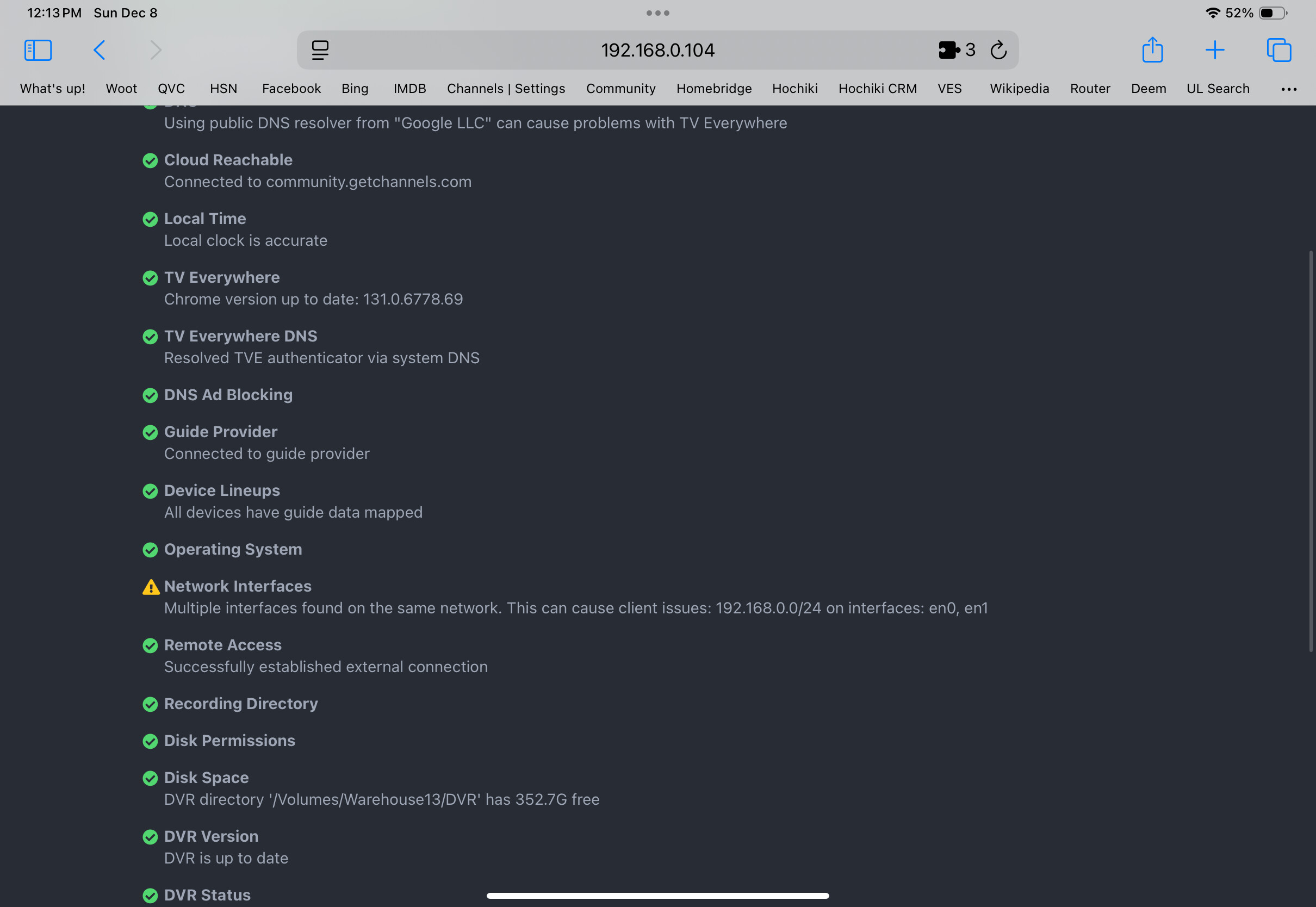
I have the following in troubleshooting.

:warning: Network Interfaces
Says you have two network interfaces on the same network.

I don't have YouTube TV, but when I go to https://www.espn.com/watch/ and select YouTube TV as my provider, it sends me to accounts.google.com to sign in, with this in the URL
RequesterID=["ESPN"].

My DVR Server authenticates using ESPN, not ABC.

2024/12/08 08:22:56.688951 [TVE] action=auth mvpd=Comcast_SSO requestor=ESPN
2024/12/08 08:22:56.728649 [TVE] action=xvfb display=:753
2024/12/08 08:23:02.926414 [TVE] action=version product=Chrome/120.0.6099.129 jsVersion=12.0.267.10 protocol=1.3 revision=@204016af461e03117aa3858b51ba4534c7cfda81
2024/12/08 08:23:02.987788 [TVE] action=page_ready chromeVersion=120
2024/12/08 08:23:02.988847 [TVE] action=navigate url=https://sp.auth.adobe.com/adobe-services/authenticate/saml?noflash=true&mso_id=Comcast_SSO&requestor_id=ESPN&no_iframe=true&domain_name=adobe.com&redirect_url=https%3A%2F%2Fsp.auth.adobe.com%2Fadobe-services%2FcompletePassiveAuthentication
2024/12/08 08:23:16.747168 [TVE] stream timestamps: espn1: start_at=2024-12-08T08:22:48-08:00 end_at=2024-12-08T08:23:07-08:00 live_delay=7.605165172s
2024/12/08 08:23:16.747333 [TNR] Opened connection to TVE-Comcast_SSO for ch6140 ESPN1

Yeah I have no idea how that is possible.

If you have any content blockers running (ad-guard, pi-hole, etc.) make sure to whitelist your DVR server.

Yeah, I have nothing running like that. I have no idea how I ended up with two network connections. Nor can I figure out how to get rid of one. do I just reinstall channels?

What does net say under settings, status, net interface? My guess is your 2 interfaces there are one for your LAN Ethernet port and the other is your WiFi chip address. Disable WiFi on the machine and reboot. I doubt this is causing the issue but worth a try.

Yea it says en0 and en1 are active. I did have a tailscale set up but it caused nothing but problems so I got rid of it and turned it off in channels. I don’t think it’s a WiFi thing but am leftover artifact of the tailscale. I will try the WiFi thing though as it can’t hurt.

@Rwbisme @jator
Were you trying to watch or record TVE ABC Channel 6001 at the time those errors appeared in the log?

The developers would probably need to see more of the log to figure out what was happening at the time. Best to submit Diagnostics from your DVR.

Post your output of ifconfig from a command prompt so we can see what is going on

I have solved the two network problem. It was a router issue with an old static IP. I am green on troubleshooting now but am back to the ESPN HTTP 451 Error on the TVE.

Go to Watch ESPN - Stream Live Sports & ESPN Originals and select YouTube TV as your provider.
Capture

Are you able to authenticate and watch on their website?

1 Like

Yes, able to watch it online. I am rescanning entirely now.