Using an HDMI Encoder with ah4c:appletv capturing from an AppleTV running the Cox Contour App

---- edit ---

My goal here is to establish a new thread for those who desire to use an Apple TV and an HDMI capture device such as a linkPi (which I use) as a tuner, but utilize as much of the AH4C framework as possible.. In my use case, I have found that using the "walled garden" app provided by my provider has the most reliable streaming and tuning without worrying about reauthorizing individual provider apps, etc.

@ChannelSam and a few others worked out a nifty way of tuning the spectrum APP running on an Apple TV 4K using PYATV commands and leveraging AH4C.

I am trying to use that as a jumping off point to have a similar tuner to the spectrum deployment , but using my own pyatv scripts that will control a different app. In this case the cox contour app.

I hope others can find this thread useful.

--- end edit ---

Im deploying a new tuner for my home setup using portainer/docker. It leverages some of the work that the folks using the spectrum app and an Apple TV as a tuner. Ive read a lot of the threads and found these two particularly useful:

Im following the model that @bnhf recommended using environmental variables as opposed to hard coding things in my YAML.

I tried to deploy the stack using a TAG variable that @ChannelSam used TAG=appletv:test2

That did not deploy because it appears it no longer exists.

I did deploy a stack using TAG=appletv , as @bnhf suggested. That build did not populate any of the pyatv code needed for the appleTV.

Is there a master build, that incorporates all code to support the traditional firestick tuning as well as the pyatv binaries for Apple TV? ChatGPT pointed out that " bnhf mentioned he later rebuilt the image using the latest pyatv:master and tesseract support and released it under bnhf/ah4c:appletv.test"

@bnhf @ChannelSam @uspino @Helios2 Is there a master build? @Helios2 thread is about 6 months old.

That build is not found when I run:

~ % docker pull bnhf/ah4c:appletv.test

Any help would be appreciated. Id like to see if I can deploy the correct build(s) if they exist.

Thanks all.

1 Like

This is currently working for me to control 2 atv 4k to tune spectrum channels. The apple test stuff was removed after testing was completed.
It's hard to remember but during the first run if you go to the ah4c webpage located in my case at [ServerIP:7654] it may give you the chance to run the atvpair.sh script...if not you can do it manually from inside the container by using portainer going to the container and clicking on the command Prompt icon...navigate to the folder holding the file and run it...this will create the atv key file so it can control the appletv... You will have to be able to see the appletv screen you are pairing to get the code either way. Let me know if you need more help.

Also you don't need the User_Script entry...just something I am playing with ... @bnhf added it as an option...it will run that script when the container starts up if I remember right. You may want to make sure the update entries are true on first run then change them to false.

version: '3.9'
services:
  ah4c:
    image: bnhf/ah4c:${TAG}
    container_name: atvtuner
    hostname: atvtuner
    dns_search: ${DOMAIN} # Specify the name of your LAN's domain, usually local or localdomain
    ports:
      #- ${ADBS_PORT}:5037 # Port used by adb-server
      - ${HOST_PORT}:7654 # Port used by this ah4c proxy
      #- ${WSCR_PORT}:8000 # Port used by ws-scrcpy
    environment:
      - IPADDRESS=${IPADDRESS} # Hostname or IP address of this ah4c extension to be used in M3U file (also add port number if not in M3U)
      - NUMBER_TUNERS=${NUMBER_TUNERS} # Number of tuners you'd like defined 1, 2, 3 or 4 supported
      - TUNER1_IP=${TUNER1_IP} # Streaming device #1 with adb port in the form hostname:port or ip:port
      - TUNER2_IP=${TUNER2_IP} # Streaming device #2 with adb port in the form hostname:port or ip:port
      - TUNER3_IP=${TUNER3_IP} # Streaming device #3 with adb port in the form hostname:port or ip:port
      - TUNER4_IP=${TUNER4_IP} # Streaming device #4 with adb port in the form hostname:port or ip:port
      - ENCODER1_URL=${ENCODER1_URL} # Full URL for tuner #1 in the form http://hostname/stream or http://ip/stream
      - ENCODER2_URL=${ENCODER2_URL} # Full URL for tuner #2 in the form http://hostname/stream or http://ip/stream
      - ENCODER3_URL=${ENCODER3_URL} # Full URL for tuner #3 in the form http://hostname/stream or http://ip/stream
      - ENCODER4_URL=${ENCODER4_URL} # Full URL for tuner #4 in the form http://hostname/stream or http://ip/stream
      - STREAMER_APP=${STREAMER_APP} # Streaming device name and streaming app you're using in the form scripts/streamer/app (use lowercase with slashes between as shown)
      - USER_SCRIPT=${USER_SCRIPT} #User startup script that runs at startup located in scripts directory

      - CHANNELSIP=${CHANNELSIP} # Hostname or IP address of the Channels DVR server itself
      - ALERT_SMTP_SERVER=${ALERT_SMTP_SERVER} # The domainname:port of the SMTP server you'll be using like smtp.gmail.com:587. This is for sending ah4c alerts if tuning fails.
      - ALERT_AUTH_SERVER=${ALERT_AUTH_SERVER} # The auth server for the e-mail you'll be using like smtp.gmail.com
      - ALERT_EMAIL_FROM=${ALERT_EMAIL_FROM} # The e-mail address you'd like your ah4c failure alert e-mails to show as being from.
      - ALERT_EMAIL_PASS=${ALERT_EMAIL_PASS} # Gmail and Yahoo both support the creation of app-specific e-mail passwords, and this is the way to go! It's NOT recommended to use your everyday e-mail password.
      - ALERT_EMAIL_TO=${ALERT_EMAIL_TO} # The e-mail address you'd like your alert e-mails sent to.
      #- ALERT_WEBHOOK_URL=""
      - LIVETV_ATTEMPTS=${LIVETV_ATTEMPTS} # For FireTV Live Guide tuning only, set maximum number of attempts at finding the desired channel
      - CREATE_M3US=${CREATE_M3US} # Set to true to create device-specific M3Us for use with Amazon Prime Premium channels -- requires a FireTV device
      - UPDATE_SCRIPTS=${UPDATE_SCRIPTS} # Set to true if you'd like the sample scripts and STREAMER_APP scripts updated whether they exist or not
      - UPDATE_M3US=${UPDATE_M3US} # Set to true if you'd like the sample m3us updated whether they exist or not
      - TZ=${TZ} # Your local timezone in Linux "tz" format
    volumes:
      - ${HOST_DIR}/scripts:/opt/scripts # pre/stop/bmitune.sh scripts will be stored in this bound host directory under streamer/app
      - ${HOST_DIR}/m3u:/opt/m3u # m3u files will be stored here and hosted at http://<hostname or ip>:7654/m3u for use in Channels DVR - Custom Channels settings
      - ${HOST_DIR}/adb:/root/.android # Persistent data directory for adb keys
    restart: unless-stopped
TAG=appletv
DOMAIN=localdomain
ADBS_PORT=
HOST_PORT=7654
WSCR_PORT=
IPADDRESS=192.168.1.101:7654
NUMBER_TUNERS=2
TUNER1_IP=192.168.1.54
TUNER2_IP=192.168.1.55
ENCODER1_URL=http://192.168.1.41:8090/stream3
ENCODER2_URL=http://192.168.1.41:8090/stream4
STREAMER_APP=scripts/atv/spectrum
USER_SCRIPT=scripts/tuners_stop_delay.sh
CHANNELSIP=http://192.168.1.20:8089
ALERT_SMTP_SERVER=
ALERT_AUTH_SERVER=
ALERT_EMAIL_FROM=
ALERT_EMAIL_PASS=
ALERT_EMAIL_TO=
LIVETV_ATTEMPTS=2
CREATE_M3US=false
UPDATE_SCRIPTS=false
UPDATE_M3US=false
TZ=America/New_York
HOST_DIR=/srv/5ab84941-c842-42b9-9bce-80979edd927d/Pool/_AppData/atvtuner

You may want to consider re-titling your post, as I was quite confused until I read the response.

From my brief reading, you are extending/repurposing the Android HDMI encoding for Channels to work with a Cox provided Android streaming device; is that correct? (Perhaps a preamble would be nice if so.)

And lost to me—and perhaps others—why is the appletv tag necessary?

Absolutely, agree - I was already thinking of changing the thread name and will do so.

@racameron Me too! This is actually my stumbling block at the moment. Im trying to nail down what would be the correct tag to use as of today, not last January to obtain the correct build that includes the spectrum scripts, the pyatv code, as well as anything needed for firestick control.

@ChannelSam I have a similar docker-compose file and set of environment variables to the one you just posted. I had used yours as my baseline on my first deployment, with the TAG = appletv. Of course I modified my environment list with my appropriate variable values.

When I deployed for the first time using:

CREATE_M3US=true
UPDATE_SCRIPTS=true
UPDATE_M3US=true

The following directories were created:

ah4c\adb (which is suspiciously empty! ) Shouldnt the pyatv code be here by setting the TAG=appletv? I assume there should also be code pulled down for the android streaming sticks in the adb directory. Wouldn't it go here as well?

ah4c\m3u (which contains a bunch of nifty m3u examples, such as direct.m3u - so something did get pulled in here)

ah4c\m3u\scripts\firetv\directv (which has bmitune, prebmitune, and stopbmitune)

ah4c\scripts\atv\spectrum never got created

I placed my cox scripts here:
ah4c\scripts\atv\cox

So @ChannelSam did the docker compose using appletv:test2 or appletv ever download the pyatv code? Did you have to manually install pyatv and adb separately?

Also @bnhf and @ChannelSam I just tried TAG=latest, it pulled a couple of adbkey files into the adb directory, but no pyatv stuff, and no spectrum stuff (which I was going to use as a starting point for the cox scripts)

Thank you both

And just in case, here are my compose and stack.env:

version: '3.9'
services:
  ah4c:
    image: bnhf/ah4c:${TAG}
    container_name: ah4c-cox
    hostname: tuner-cox
    dns_search: ${DOMAIN} # Specify the name of your LAN's domain, usually local or localdomain
    ports:
      #- ${ADBS_PORT}:5037 # Port used by adb-server
      - ${HOST_PORT}:7654 # Port used by this ah4c proxy
      #- ${WSCR_PORT}:8000 # Port used by ws-scrcpy
    environment:
      - IPADDRESS=${IPADDRESS} # Hostname or IP address of this ah4c extension to be used in M3U file (also add port number if not in M3U)
      - NUMBER_TUNERS=${NUMBER_TUNERS} # Number of tuners you'd like defined 1, 2, 3 or 4 supported
      - TUNER1_IP=${TUNER1_IP} # Streaming device #1 with adb port in the form hostname:port or ip:port
      - TUNER2_IP=${TUNER2_IP} # Streaming device #2 with adb port in the form hostname:port or ip:port
      - TUNER3_IP=${TUNER3_IP} # Streaming device #3 with adb port in the form hostname:port or ip:port
      - TUNER4_IP=${TUNER4_IP} # Streaming device #4 with adb port in the form hostname:port or ip:port
      - ENCODER1_URL=${ENCODER1_URL} # Full URL for tuner #1 in the form http://hostname/stream or http://ip/stream
      - ENCODER2_URL=${ENCODER2_URL} # Full URL for tuner #2 in the form http://hostname/stream or http://ip/stream
      - ENCODER3_URL=${ENCODER3_URL} # Full URL for tuner #3 in the form http://hostname/stream or http://ip/stream
      - ENCODER4_URL=${ENCODER4_URL} # Full URL for tuner #4 in the form http://hostname/stream or http://ip/stream
      - STREAMER_APP=${STREAMER_APP} # Streaming device name and streaming app you're using in the form scripts/streamer/app (use lowercase with slashes between as shown)
      - CHANNELSIP=${CHANNELSIP} # Hostname or IP address of the Channels DVR server itself
      - ALERT_SMTP_SERVER=${ALERT_SMTP_SERVER} # The domainname:port of the SMTP server you'll be using like smtp.gmail.com:587. This is for sending ah4c alerts if tuning fails.
      - ALERT_AUTH_SERVER=${ALERT_AUTH_SERVER} # The auth server for the e-mail you'll be using like smtp.gmail.com
      - ALERT_EMAIL_FROM=${ALERT_EMAIL_FROM} # The e-mail address you'd like your ah4c failure alert e-mails to show as being from.
      - ALERT_EMAIL_PASS=${ALERT_EMAIL_PASS} # Gmail and Yahoo both support the creation of app-specific e-mail passwords, and this is the way to go! It's NOT recommended to use your everyday e-mail password.
      - ALERT_EMAIL_TO=${ALERT_EMAIL_TO} # The e-mail address you'd like your alert e-mails sent to.
      #- ALERT_WEBHOOK_URL=""
      - LIVETV_ATTEMPTS=${LIVETV_ATTEMPTS} # For FireTV Live Guide tuning only, set maximum number of attempts at finding the desired channel
      - CREATE_M3US=${CREATE_M3US} # Set to true to create device-specific M3Us for use with Amazon Prime Premium channels -- requires a FireTV device
      - UPDATE_SCRIPTS=${UPDATE_SCRIPTS} # Set to true if you'd like the sample scripts and STREAMER_APP scripts updated whether they exist or not
      - UPDATE_M3US=${UPDATE_M3US} # Set to true if you'd like the sample m3us updated whether they exist or not
      - TZ=${TZ} # Your local timezone in Linux "tz" format
    volumes:
      - ${HOST_DIR}/scripts:/opt/scripts # pre/stop/bmitune.sh scripts will be stored in this bound host directory under streamer/app
      - ${HOST_DIR}/m3u:/opt/m3u # m3u files will be stored here and hosted at http://<hostname or ip>:7654/m3u for use in Channels DVR - Custom Channels settings
      - ${HOST_DIR}/adb:/root/.android # Persistent data directory for adb keys
    restart: unless-stopped


TAG=latest
DOMAIN=localdomain
ADBS_PORT=
HOST_PORT=7654
WSCR_PORT=
IPADDRESS=192.168.1.52:7654
NUMBER_TUNERS=1
TUNER1_IP=192.168.1.22
ENCODER1_URL=http://192.168.1.50:8090/stream0
TUNER2_IP=
ENCODER2_URL=
TUNER3_IP=
ENCODER3_URL=
TUNER4_IP=
ENCODER4_URL=
STREAMER_APP=scripts/atv/cox
CHANNELSIP=http://192.168.1.52:8089
ALERT_SMTP_SERVER=
ALERT_AUTH_SERVER=
ALERT_EMAIL_FROM=
ALERT_EMAIL_PASS=
ALERT_EMAIL_TO=
LIVETV_ATTEMPTS=5
CREATE_M3US=true
UPDATE_SCRIPTS=true
UPDATE_M3US=true
TZ=America/Chicago
HOST_DIR=/Volumes/M4_Ext_SSD/docker/containers/channels/ah4c

I will try and setup a fresh test container and see what steps it takes to use it with appletv's when I get a chance later today or tomorrow and post the information here.

ur awesome. Thanks!!

FYI. In case it saves you time,

I already have a standalone pyatv installation with Apple TV pairing configuration files as well as working cox tuning scripts using atvremote commands.

I just can’t figure out why the pyatv and spectrum files didn’t get pulled into the container and where the pieces are supposed to come from for the “spectrum” build

I don't have the atv/spectrum scripts locally, nor are they in the repo, so let's get them added. @ChannelSam if you could post what you're currently using for Spectrum scripts that would be helpful.

@mnwxman132 Ultimately, your AppleTV/Cox-specific scripts should be placed in scripts/atv/cox, and submitted here so we can add them to the repro for the next guy. :slight_smile: Also, pyatv is included in the ah4c:appletv container, so I don't believe there's anything else required other than the usual prebmitune.sh, bmitune.sh and stopbmitune.sh.

EDIT: Also, I took a pass at modifying the title of this post, to try to get a bit more specific about what's being discussed here...

Yes, absolutely ill submit my findings here for others.

As far as i could tell, pyatv wasnt included when I built the stack using the docker-compose - see above, unless Im missing something. Where would the pyatv executables be after deploying the stack,? adb subdirectory, ah4c directory, ??

The ah4c:appletv container itself is built in two stages, with the final stage using postlund/pyatv as a source container, and ah4c added to that. Everything will be setup as you'd expect when using the pyatv container. pyatv will be in the container's default path -- so all pyatv commands can be run using only the name of the executable or script.

The location of the adb directory, and the ah4c scripts on your host computer are defined in this portion of the Docker Compose:

    volumes:
      - ${HOST_DIR}/ah4c/scripts:/opt/scripts # pre/stop/bmitune.sh scripts will be stored in this bound host directory under streamer/app
      - ${HOST_DIR}/ah4c/m3u:/opt/m3u # m3u files will be stored here and hosted at http://<hostname or ip>:7654/m3u for use in Channels DVR - Custom Channels settings
      - ${HOST_DIR}/ah4c/adb:/root/.android # Persistent data directory for adb keys

Keep in mind that adb is irrelevant in this build.

I just spent some time working on this and got it up in a test build to where I could at least issue some commands to the appletv through the container...
Findings...

You must use the appletv tag build...the others don't have pyatv installed.

@bnhf ...There seems to be something weird going on with the build...no matter what it would not allow me to get to the ah4c website using a different that default port of 7654 :man_shrugging:
Edit....This was my error the port assignment works fine.

You won't be able to use this for both android and apple devices because adb is not included.

As stated currently no files in atv/scripts folders so you have to add what you want.

The atvpair.sh is not included in a fresh build so you will have to add it or just simply copy and paste the 3 commands one at a time into the docker containers command line and be done with it. OR

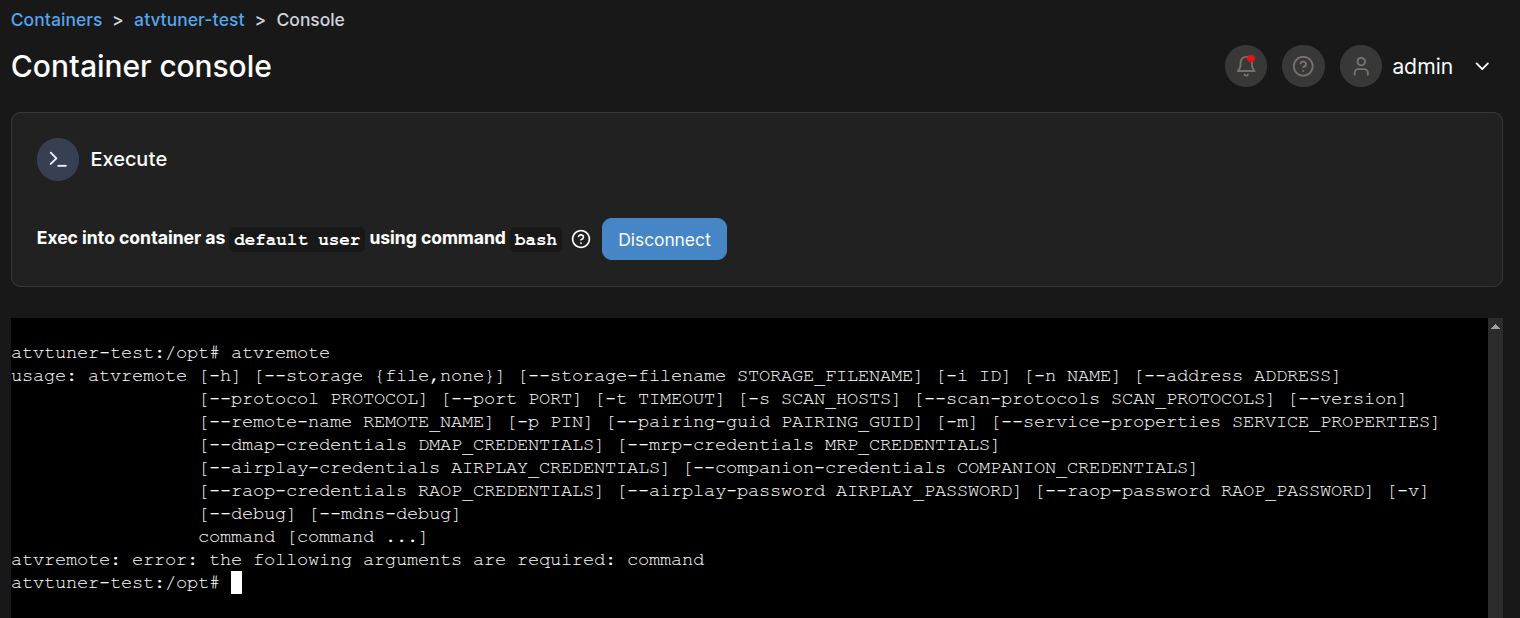
As soon as the container spun up I went to the log for the container in portainer to see if there was any errors...since everything looked good I used the container's cli button and got a command window where I tried the command atvremote... If you don't get a good response from this then there is no point in going forward until you do.

The files atvpair.sh,bmitune.sh, prebmitune.sh, stopbmitune.sh need to be located in the /scripts/atv/spectrum.
Or where ever you are placing them (maybe /scripts/atv/cox).
IF YOU ARE USING THEM... You will probably have to chmod the permissions to make sure they are executable...
I originally in the past and for this test setup just manually did the atvpair.sh commands and only used bmitune.sh and stopbmitune.sh when I run this before. Now I am trying different things that would be very confusing here and don't always work so I won't include any of that.

Create the file atvpair.sh and make it executable if you haven't yet and run it or just run the commands manually starting with the mv /root/...
don't forget to use the actual ip address of the appletv.

atvpair.sh

#! /bin/bash

#docker exec -it ah4c scripts/atv/spectrum/atvpair.sh <appletv_ip>

streamerIP="$1"

mv /root/.android/.pyatv.conf /root 2>/dev/null || echo "No existing .pyatv.conf found"

atvremote -s $streamerIP --protocol companion pair

mv /root/.pyatv.conf /root/.android && echo ".pyatv.conf moved to persistent directory"

bmitune.sh

#!/bin/bash

channelID="$1"
streamerIP="$2"

/usr/local/bin/atvremote --storage-filename /root/.android/.pyatv.conf -s $streamerIP launch_app=spectrumTV://watch.spectrum.net/livetv/$channelID

stopbmitune.sh

#!/bin/bash

channelID="$1"
streamerIP="$2"

/usr/local/bin/atvremote --storage-filename /root/.android/.pyatv.conf -s $streamerIP home

spectrum.m3u

#EXTM3U

#EXTINF:-1 channel-id="35152" channel-number="1002" tvg-name="WDTNDT" tvc-guide-stationid="35152",NBC-DAYTON
http://{{ .IPADDRESS }}/play/tuner/35152

#EXTINF:-1 channel-id="54526" channel-number="1003" tvg-name="WHIODT2" tvc-guide-stationid="54526",MeTV
http://{{ .IPADDRESS }}/play/tuner/54526

#EXTINF:-1 channel-id="32771" channel-number="1004" tvg-name="WLIODT" tvc-guide-stationid="32771",NBC-LIMA
http://{{ .IPADDRESS }}/play/tuner/32771

#EXTINF:-1 channel-id="35153" channel-number="1005" tvg-name="WDTNDT2" tvc-guide-stationid="35153",ION_MYSTERY
http://{{ .IPADDRESS }}/play/tuner/35153

#EXTINF:-1 channel-id="82773" channel-number="1006" tvg-name="INSPHD" tvc-guide-stationid="82773",INSPIRE_TV
http://{{ .IPADDRESS }}/play/tuner/82773

#EXTINF:-1 channel-id="21660" channel-number="1007" tvg-name="WHIODT" tvc-guide-stationid="21660",CBS-DAYTON
http://{{ .IPADDRESS }}/play/tuner/21660

#EXTINF:-1 channel-id="30636" channel-number="1008" tvg-name="WKEFDT2" tvc-guide-stationid="30636",FOX-DAYTON
http://{{ .IPADDRESS }}/play/tuner/30636

#EXTINF:-1 channel-id="61494" channel-number="1009" tvg-name="WBDTDT2" tvc-guide-stationid="61494",BOUNCE
http://{{ .IPADDRESS }}/play/tuner/61494

#EXTINF:-1 channel-id="44680" channel-number="1010" tvg-name="WTLWDT" tvc-guide-stationid="44680",WTLW-44
http://{{ .IPADDRESS }}/play/tuner/44680

#EXTINF:-1 channel-id="30618" channel-number="1011" tvg-name="WKEFDT" tvc-guide-stationid="30618",ABC-DAYTON
http://{{ .IPADDRESS }}/play/tuner/30618

#EXTINF:-1 channel-id="30748" channel-number="1012" tvg-name="Dabl" tvc-guide-stationid="30748",Dabl
http://{{ .IPADDRESS }}/play/tuner/30748

#EXTINF:-1 channel-id="35477" channel-number="1013" tvg-name="WBDTDT" tvc-guide-stationid="35477",CW
http://{{ .IPADDRESS }}/play/tuner/35477

#EXTINF:-1 channel-id="91396" channel-number="1014" tvg-name="WKEFDT3" tvc-guide-stationid="91396",MY_TV
http://{{ .IPADDRESS }}/play/tuner/91396

#EXTINF:-1 channel-id="97217" channel-number="1015" tvg-name="WRGTDT3" tvc-guide-stationid="97217",ANTENNA_TV
http://{{ .IPADDRESS }}/play/tuner/97217

#EXTINF:-1 channel-id="52780" channel-number="1017" tvg-name="WRGTDT2" tvc-guide-stationid="52780",TBD
http://{{ .IPADDRESS }}/play/tuner/52780

#EXTINF:-1 channel-id="59296" channel-number="1018" tvg-name="WEHD" tvc-guide-stationid="59296",WE_TV
http://{{ .IPADDRESS }}/play/tuner/59296

#EXTINF:-1 channel-id="58515" channel-number="1020" tvg-name="TBSHD" tvc-guide-stationid="58515",TBS
http://{{ .IPADDRESS }}/play/tuner/58515

#EXTINF:-1 channel-id="58574" channel-number="1025" tvg-name="FXHD" tvc-guide-stationid="58574",FX
http://{{ .IPADDRESS }}/play/tuner/58574

#EXTINF:-1 channel-id="58623" channel-number="1028" tvg-name="SYFYHD" tvc-guide-stationid="58623",SYFY
http://{{ .IPADDRESS }}/play/tuner/58623

#EXTINF:-1 channel-id="62420" channel-number="1029" tvg-name="CCHD" tvc-guide-stationid="62420",Comedy_Central
http://{{ .IPADDRESS }}/play/tuner/62420

#EXTINF:-1 channel-id="59337" channel-number="1030" tvg-name="AMCHD" tvc-guide-stationid="59337",AMC
http://{{ .IPADDRESS }}/play/tuner/59337

#EXTINF:-1 channel-id="60150" channel-number="1031" tvg-name="LIFEHD" tvc-guide-stationid="60150",Lifetime
http://{{ .IPADDRESS }}/play/tuner/60150

#EXTINF:-1 channel-id="61812" channel-number="1032" tvg-name="EHD" tvc-guide-stationid="61812",E!
http://{{ .IPADDRESS }}/play/tuner/61812

#EXTINF:-1 channel-id="58452" channel-number="1033" tvg-name="USAHD" tvc-guide-stationid="58452",USA
http://{{ .IPADDRESS }}/play/tuner/58452

#EXTINF:-1 channel-id="42642" channel-number="1034" tvg-name="TNTHD" tvc-guide-stationid="42642",TNT
http://{{ .IPADDRESS }}/play/tuner/42642

#EXTINF:-1 channel-id="60046" channel-number="1035" tvg-name="VH1HD" tvc-guide-stationid="60046",VH1
http://{{ .IPADDRESS }}/play/tuner/60046

#EXTINF:-1 channel-id="60964" channel-number="1036" tvg-name="MTVHD" tvc-guide-stationid="60964",MTV
http://{{ .IPADDRESS }}/play/tuner/60964

#EXTINF:-1 channel-id="59186" channel-number="1037" tvg-name="PARHD" tvc-guide-stationid="59186",Paramount
http://{{ .IPADDRESS }}/play/tuner/59186

#EXTINF:-1 channel-id="59440" channel-number="1038" tvg-name="CMTVHD" tvc-guide-stationid="59440",CMT
http://{{ .IPADDRESS }}/play/tuner/59440

#EXTINF:-1 channel-id="59432" channel-number="1040" tvg-name="NIKHD" tvc-guide-stationid="59432",Nickelodeon
http://{{ .IPADDRESS }}/play/tuner/59432

#EXTINF:-1 channel-id="73541" channel-number="1041" tvg-name="TVLNDHD" tvc-guide-stationid="73541",TV_Land
http://{{ .IPADDRESS }}/play/tuner/73541

#EXTINF:-1 channel-id="59684" channel-number="1042" tvg-name="DISNHD" tvc-guide-stationid="59684",Disney
http://{{ .IPADDRESS }}/play/tuner/59684

#EXTINF:-1 channel-id="60048" channel-number="1043" tvg-name="TOONHD" tvc-guide-stationid="60048",Cartoon
http://{{ .IPADDRESS }}/play/tuner/60048

#EXTINF:-1 channel-id="57394" channel-number="1044" tvg-name="APLHD" tvc-guide-stationid="57394",Animal_Planet
http://{{ .IPADDRESS }}/play/tuner/57394

#EXTINF:-1 channel-id="64490" channel-number="1051" tvg-name="TRUTVHD" tvc-guide-stationid="64490",truTV
http://{{ .IPADDRESS }}/play/tuner/64490

#EXTINF:-1 channel-id="58625" channel-number="1052" tvg-name="BRAVOHD" tvc-guide-stationid="58625",Bravo
http://{{ .IPADDRESS }}/play/tuner/58625

#EXTINF:-1 channel-id="70522" channel-number="1053" tvg-name="OXYGNHD" tvc-guide-stationid="70522",Oxygen
http://{{ .IPADDRESS }}/play/tuner/70522

#EXTINF:-1 channel-id="56905" channel-number="1056" tvg-name="DSCHD" tvc-guide-stationid="56905",Discovery
http://{{ .IPADDRESS }}/play/tuner/56905

#EXTINF:-1 channel-id="57391" channel-number="1058" tvg-name="TLCHD" tvc-guide-stationid="57391",TLC
http://{{ .IPADDRESS }}/play/tuner/57391

#EXTINF:-1 channel-id="57708" channel-number="1059" tvg-name="HSTRYHD" tvc-guide-stationid="57708",History
http://{{ .IPADDRESS }}/play/tuner/57708

#EXTINF:-1 channel-id="87182" channel-number="1060" tvg-name="TRAV" tvc-guide-stationid="11180",Travel
http://{{ .IPADDRESS }}/play/tuner/87182

#EXTINF:-1 channel-id="51529" channel-number="1061" tvg-name="AETVHD" tvc-guide-stationid="51529",A&E
http://{{ .IPADDRESS }}/play/tuner/51529

#EXTINF:-1 channel-id="49788" channel-number="1062" tvg-name="HGTVD" tvc-guide-stationid="49788",HGTV
http://{{ .IPADDRESS }}/play/tuner/49788

#EXTINF:-1 channel-id="63236" channel-number="1063" tvg-name="BETHD" tvc-guide-stationid="63236",BET
http://{{ .IPADDRESS }}/play/tuner/63236

#EXTINF:-1 channel-id="50747" channel-number="1065" tvg-name="FOODHD" tvc-guide-stationid="50747",Food_Network
http://{{ .IPADDRESS }}/play/tuner/50747

#EXTINF:-1 channel-id="66268" channel-number="1068" tvg-name="HALLHD" tvc-guide-stationid="66268",HALLMARK
http://{{ .IPADDRESS }}/play/tuner/66268

#EXTINF:-1 channel-id="46710" channel-number="1069" tvg-name="HMMHD" tvc-guide-stationid="46710",Hallmark_Movies_Mysteries
http://{{ .IPADDRESS }}/play/tuner/46710

#EXTINF:-1 channel-id="70388" channel-number="1073" tvg-name="OWNHD" tvc-guide-stationid="70388",OWN
http://{{ .IPADDRESS }}/play/tuner/70388

#EXTINF:-1 channel-id="49438" channel-number="1074" tvg-name="NGCHD" tvc-guide-stationid="49438",National_Geographic
http://{{ .IPADDRESS }}/play/tuner/49438

#EXTINF:-1 channel-id="71280" channel-number="1080" tvg-name="SUNDHD" tvc-guide-stationid="71280",SundanceTV
http://{{ .IPADDRESS }}/play/tuner/71280

#EXTINF:-1 channel-id="65342" channel-number="1081" tvg-name="IDHD" tvc-guide-stationid="65342",Investigation_Discovery
http://{{ .IPADDRESS }}/play/tuner/65342

#EXTINF:-1 channel-id="31046" channel-number="1083" tvg-name="MTHD" tvc-guide-stationid="31046",MotorTrend
http://{{ .IPADDRESS }}/play/tuner/31046

#EXTINF:-1 channel-id="64492" channel-number="1085" tvg-name="BBCAHD" tvc-guide-stationid="64492",BBC_America
http://{{ .IPADDRESS }}/play/tuner/64492

#EXTINF:-1 channel-id="59444" channel-number="1095" tvg-name="IFCHD" tvc-guide-stationid="59444",IFC
http://{{ .IPADDRESS }}/play/tuner/59444

#EXTINF:-1 channel-id="126128" channel-number="1139" tvg-name="EARTHX" tvc-guide-stationid="126128",EarthX
http://{{ .IPADDRESS }}/play/tuner/126128

#EXTINF:-1 channel-id="67375" channel-number="1157" tvg-name="MAGNHD" tvc-guide-stationid="67375",Magnolia
http://{{ .IPADDRESS }}/play/tuner/67375

#EXTINF:-1 channel-id="73413" channel-number="1197" tvg-name="FETV" tvc-guide-stationid="73413",fe_tv
http://{{ .IPADDRESS }}/play/tuner/73413

#EXTINF:-1 channel-id="61960" channel-number="1217" tvg-name="TVONEHD" tvc-guide-stationid="61960",TV_One
http://{{ .IPADDRESS }}/play/tuner/61960

#EXTINF:-1 channel-id="97409" channel-number="1228" tvg-name="ASPREHD" tvc-guide-stationid="97409",ASPiRE
http://{{ .IPADDRESS }}/play/tuner/97409

#EXTINF:-1 channel-id="68796" channel-number="1230" tvg-name="POPHD" tvc-guide-stationid="16715",POP
http://{{ .IPADDRESS }}/play/tuner/68796

#EXTINF:-1 channel-id="62746" channel-number="1231" tvg-name="IONHD" tvc-guide-stationid="62746",ION
http://{{ .IPADDRESS }}/play/tuner/62746

#EXTINF:-1 channel-id="113430" channel-number="1233" tvg-name="CIRCLE" tvc-guide-stationid="113430",CIRCLE
http://{{ .IPADDRESS }}/play/tuner/113430

#EXTINF:-1 channel-id="109454" channel-number="1237" tvg-name="STARTTV" tvc-guide-stationid="109454",Start_TV
http://{{ .IPADDRESS }}/play/tuner/109454

#EXTINF:-1 channel-id="122968" channel-number="1238" tvg-name="STRY" tvc-guide-stationid="122968",Story_TV
http://{{ .IPADDRESS }}/play/tuner/122968

#EXTINF:-1 channel-id="131889" channel-number="1241" tvg-name="CHIMETV" tvc-guide-stationid="131889",ChimeTV
http://{{ .IPADDRESS }}/play/tuner/131889

#EXTINF:-1 channel-id="130088" channel-number="1242" tvg-name="STELLAR" tvc-guide-stationid="130088",Stellar_TV
http://{{ .IPADDRESS }}/play/tuner/130088

#EXTINF:-1 channel-id="83098" channel-number="1264" tvg-name="RVLTHD" tvc-guide-stationid="83098",Revolt
http://{{ .IPADDRESS }}/play/tuner/83098

#EXTINF:-1 channel-id="55887" channel-number="1278" tvg-name="LMNHD" tvc-guide-stationid="55887",LMN
http://{{ .IPADDRESS }}/play/tuner/55887


#EXTINF:-1 channel-id="32645" channel-number="1301" tvg-name="ESPNHD" tvc-guide-stationid="32645",ESPN
http://{{ .IPADDRESS }}/play/tuner/32645

#EXTINF:-1 channel-id="45507" channel-number="1302" tvg-name="ESPN2HD" tvc-guide-stationid="45507",ESPN2
http://{{ .IPADDRESS }}/play/tuner/45507

#EXTINF:-1 channel-id="49848" channel-number="1308" tvg-name="BSGLHD" tvc-guide-stationid="49848",Bally_Sports_Great_Lakes
http://{{ .IPADDRESS }}/play/tuner/49848

#EXTINF:-1 channel-id="68658" channel-number="1309" tvg-name="BSOH3HD" tvc-guide-stationid="68658",Bally_Sports_BSOH3HD
http://{{ .IPADDRESS }}/play/tuner/68658

#EXTINF:-1 channel-id="91114" channel-number="1310" tvg-name="BSOH3AH" tvc-guide-stationid="91114",Bally_Sports_BSOH3AH
http://{{ .IPADDRESS }}/play/tuner/91114

#EXTINF:-1 channel-id="54286" channel-number="1312" tvg-name="BSDHD" tvc-guide-stationid="54286",Bally_Sports_Detroit
http://{{ .IPADDRESS }}/play/tuner/54286

#EXTINF:-1 channel-id="61854" channel-number="1316" tvg-name="GOLFHD" tvc-guide-stationid="61854",Golf
http://{{ .IPADDRESS }}/play/tuner/61854

#EXTINF:-1 channel-id="82547" channel-number="1317" tvg-name="FS1HD" tvc-guide-stationid="82547",Fox_Sports_1
http://{{ .IPADDRESS }}/play/tuner/82547

#EXTINF:-1 channel-id="58321" channel-number="1333" tvg-name="BIG10HD" tvc-guide-stationid="58321",BIG10
http://{{ .IPADDRESS }}/play/tuner/58321

#EXTINF:-1 channel-id="71198" channel-number="1335" tvg-name="BGTEN02" tvc-guide-stationid="71198",BIG10_2
http://{{ .IPADDRESS }}/play/tuner/71198

#EXTINF:-1 channel-id="89714" channel-number="1336" tvg-name="SECH" tvc-guide-stationid="89714",SEC_Network
http://{{ .IPADDRESS }}/play/tuner/89714

#EXTINF:-1 channel-id="45399" channel-number="1346" tvg-name="NFLHD" tvc-guide-stationid="45399",NFL_Network
http://{{ .IPADDRESS }}/play/tuner/45399

#EXTINF:-1 channel-id="111871" channel-number="1348" tvg-name="ACC" tvc-guide-stationid="111871",ACC_Network
http://{{ .IPADDRESS }}/play/tuner/111871


#EXTINF:-1 channel-id="58646" channel-number="1350" tvg-name="CNNHD" tvc-guide-stationid="58646",CNN
http://{{ .IPADDRESS }}/play/tuner/58646

#EXTINF:-1 channel-id="64549" channel-number="1351" tvg-name="HLNHD" tvc-guide-stationid="64549",HLN
http://{{ .IPADDRESS }}/play/tuner/64549

#EXTINF:-1 channel-id="60179" channel-number="1352" tvg-name="FNCHD" tvc-guide-stationid="60179",Fox_News
http://{{ .IPADDRESS }}/play/tuner/60179

#EXTINF:-1 channel-id="58718" channel-number="1353" tvg-name="FBNHD" tvc-guide-stationid="58718",Fox_Business
http://{{ .IPADDRESS }}/play/tuner/58718

#EXTINF:-1 channel-id="64241" channel-number="1354" tvg-name="MSNBC" tvc-guide-stationid="16300",MSNBC
http://{{ .IPADDRESS }}/play/tuner/64241

#EXTINF:-1 channel-id="58780" channel-number="1355" tvg-name="CNBCHD" tvc-guide-stationid="58780",CNBC
http://{{ .IPADDRESS }}/play/tuner/58780

#EXTINF:-1 channel-id="71799" channel-number="1356" tvg-name="BLOOMHD" tvc-guide-stationid="71799",Bloomberg
http://{{ .IPADDRESS }}/play/tuner/71799

#EXTINF:-1 channel-id="62077" channel-number="1357" tvg-name="HSNHD" tvc-guide-stationid="62077",HSN
http://{{ .IPADDRESS }}/play/tuner/62077

#EXTINF:-1 channel-id="99450" channel-number="1358" tvg-name="HSN2HD" tvc-guide-stationid="99450",HSN_2
http://{{ .IPADDRESS }}/play/tuner/99450

#EXTINF:-1 channel-id="68344" channel-number="1359" tvg-name="CSPAN" tvc-guide-stationid="10161",C-SPAN
http://{{ .IPADDRESS }}/play/tuner/68344

#EXTINF:-1 channel-id="68334" channel-number="1360" tvg-name="CSPN2HD" tvc-guide-stationid="68334",C-SPAN_2
http://{{ .IPADDRESS }}/play/tuner/68334

#EXTINF:-1 channel-id="68332" channel-number="1361" tvg-name="CSPN3HD" tvc-guide-stationid="68332",C-SPAN_3
http://{{ .IPADDRESS }}/play/tuner/68332

#EXTINF:-1 channel-id="109435" channel-number="1362" tvg-name="SPNWDTH" tvc-guide-stationid="109435",Spectrum_News_Dayton
http://{{ .IPADDRESS }}/play/tuner/109435

#EXTINF:-1 channel-id="91096" channel-number="1363" tvg-name="NEWSNTN" tvc-guide-stationid="91096",NewsNation
http://{{ .IPADDRESS }}/play/tuner/91096

#EXTINF:-1 channel-id="33540" channel-number="1364" tvg-name="WPTDDT" tvc-guide-stationid="33540",PBS
http://{{ .IPADDRESS }}/play/tuner/33540

#EXTINF:-1 channel-id="33542" channel-number="1365" tvg-name="WPTDDT2" tvc-guide-stationid="33542",PBS_AGAIN
http://{{ .IPADDRESS }}/play/tuner/33542

#EXTINF:-1 channel-id="33547" channel-number="1366" tvg-name="WPTDDT3" tvc-guide-stationid="33547",PBS_LIFE
http://{{ .IPADDRESS }}/play/tuner/33547

#EXTINF:-1 channel-id="33549" channel-number="1367" tvg-name="WPTDDT4" tvc-guide-stationid="33549",PBS_OHIO
http://{{ .IPADDRESS }}/play/tuner/33549

#EXTINF:-1 channel-id="67164" channel-number="1369" tvg-name="EWTNHD" tvc-guide-stationid="67164",Catholic_TV
http://{{ .IPADDRESS }}/play/tuner/67164

#EXTINF:-1 channel-id="58812" channel-number="1370" tvg-name="WEATHHD" tvc-guide-stationid="58812",The_Weather_Channel
http://{{ .IPADDRESS }}/play/tuner/58812

#EXTINF:-1 channel-id="91994" channel-number="1371" tvg-name="ACUWTHH" tvc-guide-stationid="91994",AccuWeather
http://{{ .IPADDRESS }}/play/tuner/91994

That's all I can think of right now... :grinning:

@bnhf
if yo can give me some pointers, thoughts on getting this build to run with a different port. I will spin one all the way up and even let it tune some channels to make sure the scripts are 100%. Couldn't leave it up for long today because I had to take the main one down to use the same port number. :peace_symbol:

Should be just a question of changing these two env var values, like I'm doing here:

HOST_PORT=7664
IPADDRESS=192.168.1.101:7664

Don't change anything in the Docker compose.

:man_shrugging: Apparrently it is all me... :joy:
I recopied the docker compose over to a new test one so I could run everything at once... left the compose alone again. adjusted environment variables host, ipaddress, tuner number down to one and pointed tuner at extra appletv and booted up.
It complained about the version 3.9 at the top last time and first time here even though my normal one works fine with it...then the next time I hit deploy with it still there it went right through and started.
Thanks again I will just blame my fat fingers and poor eyes. :wink:

1 Like

You'll only see the warning about using Version (it's been deprecated), when there's an actual error elsewhere. Ignore the warning, and look further down in the message for the true error.

Thank you very much for your insight! I went down a long stray path but am much further along...

When I initially deployed the AH4C container, I tried running some pyatv commands (like checking the version) inside the container to confirm everything was working, but got errors — for example, python3 -m pyatv --version failed with a “not directly executable” error.

Turns out that was just a misunderstanding of how pyatv is structured. The correct way to run commands is to use atvremote, which is the actual CLI frontend for pyatv. Once I switched to using atvremote, everything worked — I could run version checks and attempt control commands.

So it wasn’t a container issue — just a misuse of the wrong entry point

Once I saw the working ah4c webUI at port 7654 on my host browser as pointed out by @ChannelSam , things started to make sense

Thank you for all this. I am very much further along. Ive deployed the stack and see the ah4c web UI. I can also run some of the atvremote commands from the console, so all my questions about the TAG have been answered.

Now Im hitting a bit of a roadblock and wanted to jog your memory , (perhaps @bnhf @Fofer and/or others can chime in as well ) with what you are doing for your spectrum implementation. Are you running your docker on a MAC, a Windows PC or linux machine? I thought I remember you mentioning you use a MAC for this, but it may have been someone else.

Ive been using CHatGPt to try and work through this and it is pointing me to the following:

The root issue appears to be that Docker on macOS doesn’t use host networking and instead creates an isolated VM network (usually 192.168.65.0/24). Because of this, the container can’t fully communicate with LAN devices like the Apple TV over protocols like Companion or MRP, which rely on mDNS and direct LAN access.

Even with the container able to ping the Apple TV’s IP, pyatv inside Docker can’t detect or pair with it properly. This seems to break remote key commands, app switching, and pairing — though ping and basic IP reachability work

There are workarounds, but it would mean Id have to call all my cox tuning scripts using pyatv outside the docker. I had already developed a standalone environment and have a tuning script and force_quit script which run outside of docker. I was hoping to keep everything running inside of docker so I could take your scripts @ChannelSam and model all the logic that ties everything together with the ah4c logic , the M3Us, etc.

And of course also keep everything as portable as possible within a docker container. Im Alsop new to docker and portainer, just a few weeks into this project. It is quite possible that ChatGPT has led me on another stray path and there is a simple fix.

Ive been wracking my brain all day testing different ways to have the atvremote inside docker be able to see my local LAN IP addresses. I even tried using my tailnet as a workaround, My host and the Apple TV tuner are both on my tailnet anyway, so I was hoping using my tailnet IPs could work - to no avail.

Does anyone have atvremote commands controlling an Apple TV from within the docker on a MAC. I have an apple M4 Mac mini. I know @Fofer uses an apple silicon Mac @Fofer have you ever tried running pyatv within a docker container on your Mac mini?

Any insight would be appreciated, and thanks in advance to all

What version of Docker Desktop are you running?
See PSA: Running Channels DVR in Docker Desktop for Mac/Windows/Linux using HOST network mode

I can't help with the mac issues...running linux server here...

I will say use the COMPLETE paths for your commands in your scripts I could run atvremote commands directly in the docker ah4c container console...BUT if I put the same command in a script I had issues (don't remember all the details anymore).
Example atvremote command in script:

/usr/local/bin/atvremote --storage-filename /root/.android/.pyatv.conf -s $streamerIP home