W11 catastrophe no audio

I had a serious failure of a W11 install today and it's nearly back to operational but I've lost audio when using Channels DVR live or recordings when using a browser. Every thing appears to be working but I have no audio. Any ideas what's up? W11 24H2 update after an install/repair demolished/removed nearly all apps.

Video is fine but audio has left me!

**** Recovered audio. W11 had removed authorization Realtek audio
1 Like

I think you are using the same computer as your server and also as a workstation using Chrome to play video.

First thing I'd check is that you have the correct audio output selected. Click the speaker icon on the right side of the task bar. At the right side of the volume slider there is an > symbol. Click it. It will show multiple outputs if you have more than one. Select the one that you need to use. If you don't know, push the slider to the right to make it loud. Then click the slider. If you hear sound you have the correct output selected. If not, try another till you get it.

I moved Channels to a Synology a few months ago. This is just an older ThinkPad that's been with me for years that I got bored with the other day and decided to do the W10 > W11 upgrade. I don't know that I'm happy or sad but it was an adventure,

If you choose to install windows 11 Pro on any machine you best have knowledge of Group policy (gpedit.msc) as Windows 11 tends to lock down your PC... even browsing NAS public folders will be affected.

Plus make sure to disable Recall feature as it takes screenshots ... including if you enter credit card numbers.

Check Status: Dism /Online /Get-Featureinfo /Featurename:Recall 
Disable: Dism /Online /Disable-Feature /Featurename:Recall 
Enable: Dism /Online /Enable-Feature /Featurename:Recall

Or use the Chrome browser as it knows about credit cards.

I got a 'Disabled' report first check

Is it still available in the Settings app?

I'm holding out until the last possible second before going to Win11

I do not see it on 24H2.

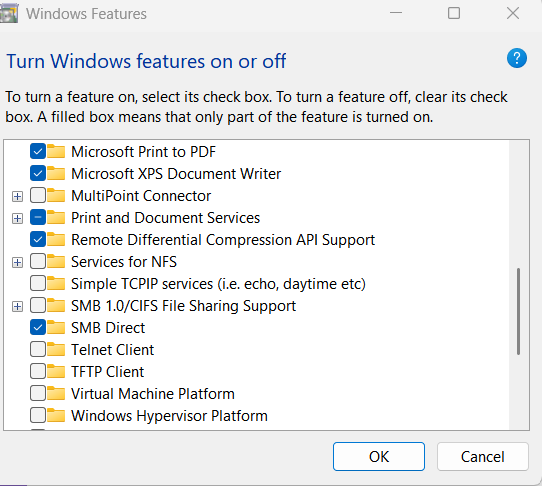
Looks like it's now a windows feature
https://support.microsoft.com/en-us/windows/retrace-your-steps-with-recall-aa03f8a0-a78b-4b3e-b0a1-2eb8ac48701c
To remove Recall, type Turn Windows features on or off in the search box on your taskbar. Uncheck Recall from the dialog and restart your PC. Any snapshots that were previously saved will be deleted when Recall is removed.

To re-enable Recall, type Turn Windows features on or off in the search box on your taskbar. Select Recall from the dialog and restart your PC.

Must be invisible with an up-to-date W11 lol ... Those websites are outdated.

image

1 Like

I'm glad I didn't jump on the Win11 bandwagon yet.

My PC is AI enabled that is why I disabled it ....

This topic was automatically closed 30 days after the last reply. New replies are no longer allowed.