Wake PC from Sleep to Record

When I had a Mac I used a beta test of waking the computer to record, is there a way to do this for PC? Also is there a way to wake the PC when Channels starts up on Apple TV.

5 Apple TVs, 1 PC with Channels DVR, Plex (for out of house), and Infuse for in house.

Thanks keep up a great product.
I have a Mac and tried this a few days ago and it didn’t wake my Mac up to record

Wake from sleep is supported on both Mac and PC.

On the Mac you need to find the TV icon in the Mac menu bar and select the “auto wake helper” option in the dropdown to set it up.

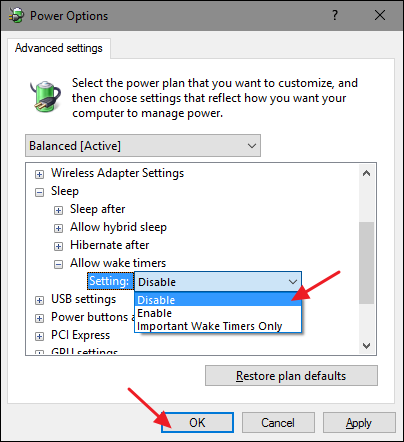
On Windows, you need to ensure that wake timers are set to “Enabled” on your system. See http://stackoverflow.com/a/3764944/332798

Thank you for that

What about if the PC is sleep mode and you turn on Channels App on Apple TV - is there a way for the DVR to wake up to watch recordings?

The Mac has something called “sleep proxy” built in for this, but there’s nothing similar on Windows. You would need to rig up some sort of wake on lan setup.

1 Like

Just thinking out loud here, what wakes the pc to record? Would it be possible to map the dvr button to time +30 seconds to wake the pc (no recording) just wake so recordings are available?

1 Like

There’s a windows feature called “Wake Timers” where you tell Windows to wake up at a certain time and it does. The DVR figures out when the next recording is, and adds a wake timer for that time (-3 minutes) into the OS.

I don’t know what “dvr button” you’re referring to. You can add custom wake timers yourself, but you would have to do so before the PC goes to sleep. Alternatively you can use another computer to send a WOL (wake on lan) packet to the sleeping PC.

1 Like

The dvr button on the channels app -which is there when the computer is awake on the menu at the top if the computer is sleeping it is not there.

Is there a way for that button to be there all the time and if so can it be used to “wake”the pc similiar to the way the recording wakes the pc? Even on a delayed basis.

Once again I am thinking function but wouldnt know how to make it happen. Thats for smart people like you.

I don’t have a windows DVR, but this article discusses adding the bonjour components to windows to do this with Kodi. Might be worth a read.

https://forum.kodi.tv/showthread.php?tid=205044

1 Like

thanks, this worked. I just need to be sure the computer doesn’t go to sleep while watching a recording as the DVR disappears.

This should be built into the DVR already. It won’t let the computer sleep if it is busy recording or if someone is busy browsing/watching.

it wakes up to record ok but last night while I was watching the program disappeared and so did the dvr. I got it back by waking the computer.

ill test it again and see what happens

I activated this feature when I first signed up for the DVR service a few days ago and it worked great at first but today I noticed that none of the recordings that I had scheduled for the last couple of days were recorded. My log was full of queues similar to this:

2018/09/04 04:44:50 [DVR] queued recording job 1537415970-2 (EP011581290071)
2018/09/04 04:44:50 [DVR] queued recording job 1537487970-2 (EP011581290097)
2018/09/04 04:44:50 [DVR] queued recording job 1537732770-2 (EP011581290166)
2018/09/04 04:44:50 [DVR] queued recording job 1537736370-2 (EP011581290026)

I clicked “restart” and will give it another go.

1 Like

Can you email the entire log to [email protected]

Done. Thanks!

Okay, I see here is the part of the log where it was waiting to record but never woke up until the next day:

2018/09/04 04:44:50 [DVR] Waiting 14h14m39.020962225s until next job 1536101970-2 Shark Tank
2018/09/04 04:55:10 [DVR] Waiting 14h4m19.6288994s until next job 1536101970-2 Shark Tank
2018/09/05 17:25:03 [DVR] Deleting expired job 1536101970-2 Shark Tank
2018/09/05 17:25:03 [DVR] Deleting expired job 1536105570-2 Shark Tank

On your Mac, if you click on the TV icon in the menu bar (next to clock), does it show an “Install Auto-Wake Helper” option?

No, but it did before and I clicked on it after installing the program. After clicking “restart” yesterday the Mac did wake from sleep to record a show that I had manually selected but then it did not wake again for the next scheduled recording.

I have changed my sleep settings to “never” and everything is being recorded as scheduled from what I can tell.

1 Like

Hello - seems the Channels DVR wake timers are broken and are waking my PC up after 3 minutes of sleep. So, if for example my PC is configured to sleep every night from midnight to 6AM with a 3 minute grace period, it will go to sleep at 12:03AM and wake up 3 minutes later at 12:06AM. This cycle repeats itself all night long on a 6 minute cycle. I know it's Channels DVR b/c I checked with the "powercfg/lastwake" command, which showed it was the Channels DVR process. Also, my SmartPower log files show that this happens all night long on a 6 minute interval.