
I just setup TVEverywhere by supplying my Spectrum credentials but the channel guide lacks all the channels I can see if I were to log into the Spectrum TV app. Most disturbing is that I can't find where & how to record the Patriots vs. Broncos football game on later today. It's playing on a CBS affiliate WBNS-channel 10 locally, but I can find nothing for it in the lineup on the Channels Guide. Nor can I find anything for CBS except local city news feeds. I can find "after-the-fact" sports programs on ESPN but no live NFL football games to record. HELP!
Can you link your Provider (Spectrum) at the CBS website and stream your local station there?
Do any TVE channels appear in your guide (You have to create a TVE source first)
https://getchannels.com/docs/channels-dvr-server/quick-guide/installation-setup/#tv-everywhere
After creating a Spectrum TVE Source, did you enable Settings > Advanced > Experimental > Local Networks via TV Everywhere?
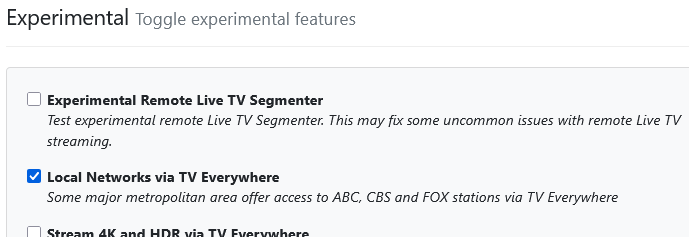
Thank you! I had already listed Spectrum as the source and supplied my Spectrum credentials when I posted my question. That's why I was concerned, annoyed and disappointed when the only reason I bought a subscription (as well as the MiniPC recommended as a server) FAILED.
I hate commercials, half-time shows, sideline interviews and color commentators standing in the endzone tossing a football and jokes back and forth like they're best buddies (Fox is the worst). Previously, I'd been recording all the games from a laptop screen using OBS and zipping past all the crap with VLC's programmable keystrokes, but that got old when I mis-judged the recording time and missed several overtime games.
A ChatBot recommended Channels DVR as the best solution and I'm elated, albeit a newbie to the platform. Your quick reply WORKED and I'm all set to record both games today. Thank you again!
Now I'm eager to learn how to remotely select the programs I want to record. My new media server is setup in the basement of a huge house and I'd like to program it somewhat like I did with my laptop setup except better. I'm used to using TeamViewer but if there's another way, I'd like to learn how to use it. TeamViewer is notorious for disabling my free access for weeks whenever it sees any new device added to my profile.
Any suggestions would be appreciated
Any suggestions would be appreciated
Yes, don’t ask a chatbot, read the manual then ask questions.
1 Like
AI vs RI
AI is good for doing the research and giving you information, but your brain needs to process, evaluate and comprehend that information. Then sort the wheat from the chaff. That's RI (Real Intelligence). 
I used Teamviewer for years, but they locked out my free access. I have found Getscreen. It gives free access for two permanent connections. I think it works great. But you can manage your Channels server app from any browser on your network. Getscreen works great if you need to log in the server computer to check on system updates or do a reboot remotely.
chrome remote desktop and windows RDP work through tailscale. all for free 
1 Like
Or you can access the DVR web UI from any browser without screen share
This topic was automatically closed 30 days after the last reply. New replies are no longer allowed.