Which of multiple storage paths do recordings get written to?

My Channels DVR server is running on a 5TB HDD and Drive1:\Channels has been the only "Storage Path" used. 90 percent or more of the content in the library is located on numerous paths specified in Local Content because they consist largely of programs created apart from Channels.

I just freed up an 8TB drive I'd like to add as a Storage Path and had some questions about it.

  1. Is it best if it's located on the host computer of Channels DVR? Or is it equally favorable to put it in a storage server that is always available?

  2. I frequently play these files without using the Channels interface (I can scrub through sporting events by passing my finger from left-to-right across the screen, which allows me to see a lot more content faster than using the navigation tools of the Channels player(s) - so It's very important to me that files of a series are grouped to easily find.

Are recordings allocated between Storage Paths in a way that makes it easy to find shows belonging to a common series? Does Channels DVR just record to the path that has the most free space? Or does it fill up the primary before using the additional paths?

  1. If there is not attempt at grouping recordings physically, is it a simple matter to manually move/copy them to force them into such logical groupings?
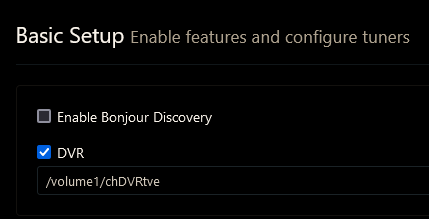
It's highly recommended to have Channels record to a local disk on the DVR server.

Channels DVR only records to the path you setup here
Screenshot 2022-12-27 at 21-02-23 Channels Settings

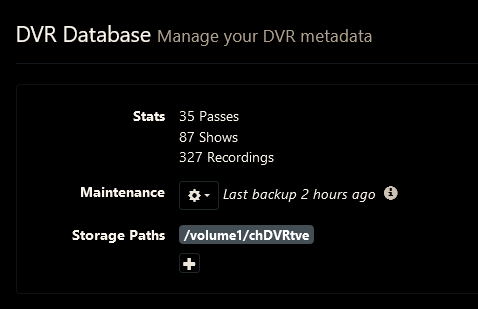
You can add additional Storage Paths and move recordings it makes to those to free up the primary storage path. Channels will search all the paths to playback, but only uses the primary to record to.
Screenshot 2022-12-27 at 21-02-42 Channels Settings

When Channels records, it creates showname folders for TV Shows or Specials, but puts all recorded Movies in one directory.

1 Like

Oh, that makes the most sense. I think I conflated the DVR location with the "Storage Paths" because I have always used the same path in both fields.

That simplifies what I'd like to do considerably. I can designate the empty 8TB drive as a Storage Path and keep the DVR path cleared up by manually moving recordings from their original location on the 5TB drive to the corresponding Storage Path on the 8TB drive. Is that correct?

Thanks!

Yes, just make sure when you move them they're kept in the same folder structure.

i.e.
./TV/ShowName1/recorded_episodes
./TV/ShowName2/recorded_episodes

./Movies/recorded_movies

Something just occurred to me. If I'm specifying Drive1:\Channels as the DVR location, do I need to include that as a DVR Database Storage Paths as well? Or is that redundant?

1 Like

It is indeed redundant. The primary path is always searched. Additional storage paths are for additional locations.

Your primary path dose not need to be on the channels server. Mine is on a SMB share on a NAS. A storage server is a great idea allowing you to manage storage and on some systems this means you can grow the storage. This eliminates the need to provide multiple storage locations making navigation of your library easier when you brows the directories. If you have multiple storage locations configured, all writes are to the first one listed.

Is there any performance impact (or any other impact) of moving content to Local Content vs adding another drive in Storage Paths? I have been moving content like PlayOn recordings to Local Content (a separate drive) because I did not know about the Storage Path feature.

1 Like

It may work for you, but isn't recommended.

Content in additional Storage Paths is for recordings Channels DVR made and already has the metadata in its database.

Local Content Imports is for things Channels didn't record, thus has no metadata for,
Pretty sure if you use the PlayOn integration, you can move those to additional Storage Paths using the same directory structure.
Anything you put in Local Content Imports has to be matched by Channels DVR against either Gracenote or TheMovieDataBase to get metadata.

2 Likes

Not recommended by who?

I pointed out that an SMB share was not working and one of the developers corrected this. It works great and makes managing storage much easier.

2 Likes

Yes, they allow you to use a UNC path.
Not recommended by the developers.
Because it generates a lot of back-n-forth network traffic doing it that way.
It's recommended to use local storage in or attached to your server (like SATA/USB).

1 Like

A good network is designed for traffic. In my case the network between the server and the storage is virtual as the server is running on the NAS. The storage is a pair of SSDs in RAID 1 so redundant and the reads are double speed. Should I fill the array I simply add more and the share grows. Furthermore, traffic departing my NAS is at 10-GB. I can see people having problems if their server is on a weak WiFi network which I understand is more common than experienced people would expect.

3 Likes

That's what I do, run it from and store it on the same NAS.

Then I misunderstood your post to mean you were using a UNC path to an SMB share on another device as your primary recording path.

1 Like

I think writing to a NAS from your server doubles the Network traffic in real-time ... Stream incomes to the server then gets written to the NAS. That is double the network traffic .. That is Why I record to an SSD on my server then move to a NAS when DVR is Idle.

You are still creating the same amount of writes to the server yet now at full speed possibly saturating your network. Even 4k is relatively slow at about 25 Mbs. If you are on a slow or saturated wireless network this is an issue. On a gig ethernet network it's nothing.

True I reread your initial post and now understand what you are doing ... I see no problem.

I am moving them when the DVR is Idle so I am not taking Bandwidth from users or recordings in progress that can cause buffering or corrupted recordings.

1 Like

It's a matter of environment/design. With a high powered server and network Channels DVR is a lightweight application. Run it on a PI over WiFi and it's easy to overload. How many hear have experienced Buy cheap, buy twice?

3 Likes

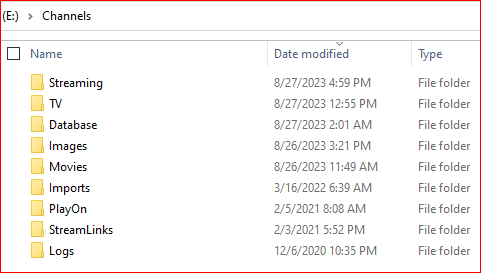
My storage is a USB (3.0) 14TB drive (E:) with this folder structure:
image
as I understand this, if I want to create an additional storage location on another 14TB USB (F:), I would copy this structure under F:\Channels.
Since I only want content I'm assuming I only need to move:
TV
Movies
Imports
PlayOn

Correct? I don't have any Streamlinks

TV and Movies for sure.
I don't think it will work moving Imports or PlayOn since they're imported and not recorded, but I could be wrong. PlayOn might work, but pretty sure Imports wouldn't.