
I'm not sure what's going on there. Try the usual; restart your computer, uninstall completely, then reinstall. That looks like something related to the new cache behavior. It's supposed get about three days' worth of recordings from the cache and display that. Then get more when you scroll far enough. That prevents it from getting sluggish when there are hundreds of recordings. Maybe that didn't get triggered somehow. Try running resizing the window to force the scroll bar to appear.
1 Like
Is there a view in the admin web UI that displays things in the order you are referring to?
DVR web UI
Library > TV Shows
Sort by Date Updated
http://127.0.0.1:8089/admin/browse/shows?sort=date_updated
This is sorting /dvr/groups by descending RecordedAt value
I test using curl and jq
curl "http://127.0.0.1:8089/dvr/groups" | jq --raw-output "sort_by(.RecordedAt) | reverse | .[] | \"\(.RecordedAt)\t\(.Name)\t\(.ID)\""
Same results using the published API (except it filters out the group Movie)
curl "http://127.0.0.1:8089/api/v1/shows" | jq --raw-output "sort_by(.last_recorded_at) | reverse | .[] | \"\(.last_recorded_at)\t\(.name)\t\(.id)\""
There is documentation on the published API's
I can't reproduce that issue, but CoPilot thinks he knows what caused the error and applied a fix. Give it a try: v1.3.3
That fixed the non-scrolling issue.
Thanks! I checked them out:
Sorting by "ID" is not at all correct. Is there a secondary sort going on in there?
"Date Updated" is remains almost correct. A few shows are way out of order. This one would be my preference if that wrinkle can be ironed out.
Sorting by "Date Added" is unchanged: it sorts by when a series was first added, which is not very useful.
v1.35 is now available. Added sort by last recorded date in the TV Shows list, and made it the default sort.
1 Like
Thank you! Last Recorded is perfect.
WinChannels has been pinned to my taskbar!!! where has this app been all this time! lol thanks again! being able to select the source for a live channel is the tool i've been missing.
1 Like
Not sure why I'm seeing this
Version not yet detected. Connect to a server first.
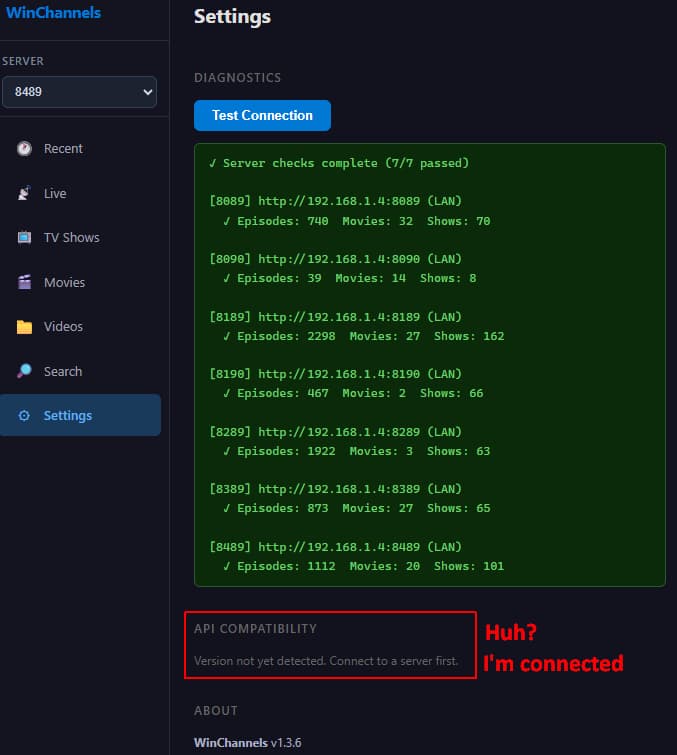
Other than that, everything is working great!
Version 1.3.8 is now available. This one adds an error log and will create a bug report that you can post here. It also (properly) implements an API compatibility check for each configured server, and check for the existence of a new version.
v1.3.8 should provide a better compatibility check.
Thanks, but that just appears to be checking for the Channels DVR Server version, which will change with every prerelease version https://community.getchannels.com/t/dvr-pre-release-notes/28832/9999
There is no way to check the server API version (public documented or private undocumented) as far as I know. And the public documented API (/api/v1) hasn't changed for a long time Channels Support - Server API
I recently put in a request for an update to an API
Right. The mutations use the undocumented API. Those could change with any server version update, so I need to keep up with that. The delete (trash) command is unlikely to change, but as for the "mark as not recorded", it's not hard to imagine them creating a replacement protocol. Even so, they would not remove the existing command until all clients have been updated. Or so it says in the fine print I'm imagining 
Think it would be easier if you just verified (what you call) a mutation was working and report an error if not.
For example, with "mark as not recorded".
-
Verify the ProgramID exists in
/programsasrecordedbefore sending the command to delete it
"EP027201150081": "recorded-3385", -
Verify the ProgramID no longer exists in
/programsasrecordedafter sending the command to delete it. The pass scheduler could create a new entry in/programsfor aqueuedscheduled recording
"EP027201150081": "queued-1778066970-248",
Thanks for creating this incredible Windows app.
This is now my "go to" Channels client on Windows for my seven Channels DVR Servers.
1 Like
Is there a list of keybinds for transport controls e.g. skip forward/back? Tried right/left arrow, did nothing. Also can the skip seconds be made configurable or is it the usual 30 sec forward, 7 sec back?
Good idea! Try v1.4.1 - keyboard navigation and playback shortcuts added. Also added configurable skip intervals.
1 Like
Here is a synopsis of feature updates since the initial release. Please note, starting with version 1.3.6, the program checks for the existence of new releases. If you are using an older version, please visit the repository to get the latest version: Releases · jay3702/winchannels
v1.0.0 — Initial release: Recent Recordings, TV Shows, Movies, Library browsing, HLS playback with broadcast and SRT sidecar captions, multi-server support, and Settings.
v1.1.0 — Live TV view with channel browsing, source and Favorites filters, deduplication, and click-to-play. Source diagnostics matrix and "Stats for Nerds" player overlay (Shift+S). Windows ARM64 installer.
v1.1.8 — Hidden channels toggle in Live TV to suppress source-hidden and duplicate feeds. Linux x64 and ARM64 builds added.
v1.2.0 — Tailscale dual-address support with automatic LAN/Tailscale probe on startup. TV Shows redesigned to a two-level show → episode detail flow. Trash and Mark as Not Recorded actions in episode and recording detail panes. API version guard banner when the server version changes.
v1.2.2 — Sort toggle buttons (▲/▼) replace dropdowns across TV Shows and Movies.
v1.3.0 — Cross-library Search page with type filters (Any, Title, Summary, Series Name) and direct navigation to matching results. Recording file path shown in episode and movie detail panes. Sort direction overhaul with stacked ▲/▼ buttons and a Date Updated field option.
v1.3.1 — Cache-first page revisits for all views — pages render instantly from cache with a background refresh. Progressive list rendering for large libraries. Persisted sort selections. Resizable split-view panels for TV Shows and Library.
v1.3.4 / v1.3.5 — Last Recorded sort option added to TV shows list and set as the default.
v1.3.6 — Startup check for newer WinChannels releases; a banner links to the latest release on GitHub.
v1.3.7 — Repository-hosted API compatibility matrix with improved server version detection and clearer per-server compatibility status in Settings.
v1.3.8 — Local bug report composer with a persistent 48-hour client error log, server IP redaction, and auto-run connection test.
v1.4.0 — Auto-focus the first episode card when a TV show is selected, so keyboard navigation starts immediately.
v1.4.1 — Full keyboard D-pad navigation across sidebar, list, and grid zones. Configurable player keybindings and skip intervals in Settings.