Windows 10 Sunset/Migrate to Linux Questions

Guessing that others may be in the same boat with the end of Windows, and thought this was worth posting publicly.

With Microsoft sunsetting Windows 10, I'm planning to take the old laptop where I've been running our Channels DVR to Linux. I'm guessing I track most Channels users as generally technically literate, but I've also never had any reason to use Linux (and my coding knowledge is mostly all forgotten and of the DOS era...). This is all making me realize that the very easy, plug and play nature of Channels spoiled me to never thinking about some of the back end questions of how it really works.

  1. If I have a USB hard drive on my Windows machine that's NTFS, will my existing library of recordings survive a transition to Linux? I would think so, but couldn't actually find that answer on the internet (my thought was to disconnect the drive when flashing the machine so it couldn't be accidentally reformatted too). If I'm right, is there a trick when setting up Channels again to have the same library location?
  2. Will I lose all of my settings (e.g., TVE log in, channels lists, my list of available channels via my HD Homerun)? In other words, is that information living on my laptop or are my settings somewhere uploaded to a Channels server?
  3. Is there any reason why I shouldn't go with Mint? It seems like the sweet spot for someone like me, but figured it was better to ask for the wisdom of the community first.

Thanks!

Windows is still alive. I upgraded my Windows 10 PC to Windows 11 when the upgrade was free. I don't know if it's still possible to upgrade for free now.

Anyway, I just wanted to say that Channels DVR works very well on Windows 11 and see no reason to go with Linux.

Each solution has pros and cons.

If you really want to go with Linux, that's perfectly fine.

My main message here is that you don't have to be afraid of Windows 11. If your server worked fine on Windows 10, it will continue to work on Windows 11. That's all I'm saying. :wink:

Upgrading to windows 11 may be dependent on how old his laptop is. It might not have TPM 2.0 or a new enough processor to upgrade. Yes I know there are some workaround out there. But they are just that work arounds that are not supported by Microsoft. So his only option for security support/updates would be another operating system

1 Like

Fair statements, I didn't think of that.
Thank you for bringing this up.

Hopefully somebody will be able to answer the questions about Linux migration. I can't, unfortunately.

I did a quick search and everything tells me modern Linux distros can read and write ntfs just fine. The hard part will be to mount the usb drive. That way linux will see the drive each time it starts up. I did this on my Debian server. It should be as simple as pointing to the correct location in Channels DVR and running a backup to restore the settings in Channels DVR.

Thanks, super helpful. And yes, this is a "old" laptop that Microsoft has decided cannot run Windows 11. Definitely would happily have taken the free upgrade, but with that off the table I thought flashing to Linux (in theory) could be more satisfying than getting a new computer as a server.

Do you (or anyone in the community, don't want to monopolize your help) happen to know if it's as simple as listing the correct drive location for the library in a Linux world?

If so, it sounds like it would be as simple as backing up my recordings/library, flashing the OS, following the instructions for installing Channels (and potentially Chrome), then restoring the recordings and setting the correct library. Of course, I'm sure there's some step that I'm overlooking....

Thanks again for the quick responses, and hopefully this helps others with "old" laptops as their hubs.

For the most part Channels DVR doesn't care about the location just as long as you keep the same file structure that is currently on your hard drive. I don't use a graphical interface on my debian linux server. So it might be easier from a graphical interface to mount your usb drive.

It basically works like this..

You need to create a folder will say inside /mnt

Name the new folder like /mnt/usbdrive

Then you will need to figure out how to mount the usb drive. Then setup /etc/fstab and add a line that on bootup that will auto mount the drive after restart each time.

You will most likely need one specific for ntfs when mounting.

Something simular to this below. Where you need to get the uuid of the usb drive. The /mnt/usbdrive is the folder you created for the USB drive to mount to and all the files on the drive will show up inside that folder.

UUID={Your-NTFS-UUID} /mnt/usbdrive ntfs-3g defaults,nofail 0 0

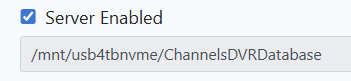
Then you can point your channels dvr folder to /mnt/usbdrive/folderonusb

Example from my server below from channels.

image

P.S. not as easy as Windows. But a lot of resources online.

Besides the easy (Thanks to the devs) backup old server and restore to new server, copy/move recordings over, You have to consider any imports that are outside of your DVR recording directory.

Those imports store the absolute pathname to the imported videos in the CDVR database, so you would have to find a way (symlinks?) to duplicate those absolute pathnames on the new server, or re-import them all. Ref: Personal media - rename input paths and rescan - #2 by chDVRuser

This topic was automatically closed 30 days after the last reply. New replies are no longer allowed.