It looks like the recent AWS outage has affected TV Everywhere on YouTube TV. Shows aren’t recording, and when I try to rescan channels, it either stops at 27 or moves forward extremely slowly. Channels also won’t tune through YouTube TV at all. I’ve tried re-entering my YouTube TV credentials and rescanning, but with little success. Is anyone else experiencing this issue?
1 Like
I don't rescan channels anymore, unless absolutely necessary.
If I have an issue with a channel, I try to play it in the DVR web UI player.
If the channel needs re-authorized, that will re-authorize it.
Rescanning channels might cause them to fail and no longer be in the guide.
I just make sure to keep up to date with the latest DVR prerelease version.
Any specific channels you're having an issue with?
(I don't watch/record every single YTTV TVE channel)
Seems like it is every channel via YouTube TV with TVE, I have Philo integrated with TVE as well and it seems to work fine, but YouTube TV is a no go. Only started happening since the outage yesterday, has been literally flawless since before the outage.
1 Like
@chDVRuser I don't record every channel either, just a few specific ones, but going through the guide in the web browser to test (as I often do to test things like this when/if something breaks) just picking random channels and they all exhibit the same behavior when on the YouTube TV source.
OK.
Well I'm not going to pick 130 of my random channels to check.
Good luck.
1 Like
What? You don't need to pick 130, literally just pick 1 or 2 channels off the YouTube TV TVE source and see if that works, I'd never ask you to try out 130 channels, that would be insane. If one or 2 fail, then they all fail, try like CBS and CNN, those are two I tried without success.
Both working for me
I had an issue with YTTV TVE. I changed my Google password and tried to rescan on Monday. It would get stuck and never fully scan. To fix this, I created another Google account under my family that's just dedicated to YTTV TVE and it scanned flawlessly. Try using a new account.
That's what I use.
And that account is using a non-gmail email address with no recovery options.
So far, so good.
Same here, I have a dedicated account just for this also non Gmail, however, I do still have the issue.
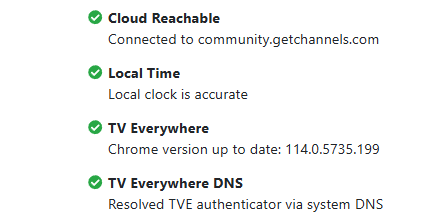
May not have anything to do with your issue. But make sure your google chrome version is on the latest possible incase that is causing the issue. Not sure what your running for server. If you check troubleshooting the version should be 114 or above.
UPDATE: I solved it, I had put on a passkey a while ago and it needed to re-auth but was failing at a passkey. Disabled passkey and other methods other than password only. Relogged in and works now. So, my token expired but now it is all fixed!
1 Like
How can you use a NON gmail account for YTTV?
I thought that was a requirement of YTTV.
1 Like
I used my primary google account (with gmail and 2FA) to sub to YTTV.
I then created a new google account (without gmail and without 2FA) using a non-gmail email address for the username.
I then add this account as a family member and shared YTTV with it. This is the google account I use in Channels DVR.
Was able to get this to work for the last 2 years just fine, noticed recently that TVE wasn't picking up all channels and forgot how much of a pain this was to reauth last time, and deleted the YTTV source and re-added it thinking that would help and now I'm stuck in the insecure browser issue. I've updated chrome in troubleshooting, using the remote link to make sure its https when authenticating, account has no 2FA or passkeys, and yet I'm still getting the insecure browser message trying to use my second account which i double checked is still on my youtube account and still totally works on tv.youtube.com, email even shows recent reauths with it. Not sure what else to do, I've tried every troubleshooting step mentioned. Totally bummed.
1 Like
Did you also update to the latest Pre-Release. I know there was a TVE update as well.
1 Like
Good suggestion, just updated to the pre-release build and have the same "Blocked by Google: This browser or app may not be secure" issue. Bummer.
Usually that error has to do with an outdated chrome version or not using https://yourip:8089 from the server. When in troubleshooting do you have a chrome version number higher than 114. Also what server are you running?
Running on a Synology, I've used the support checks and updated the chrome build, did that first and made sure I was running through an external connection to have full https: when making the request and not running locally which bypasses the https... everything in troubleshooting is green.
TV Everywhere
Chrome version up to date: 129.0.6668.59
Definitely odd as the account is doing the family share workaround, the account doesn't have a passkey or 2FA, and is just used for this and haven't had issues until a few days ago.
Hmm interesting. How did you get Chrome updated beyond 114 on your synology nas? My Channels DVR server is installed locally on the machine. It doesn't give me the option to be updated to anything newer than that. Do you have Channels DVR installed as a container or Virtual Machine?