
Under drive size it shows 700 gb when I have a 2tb nvme ssd setup with zfs. Please add zfs compatibility in channels for ubuntu.

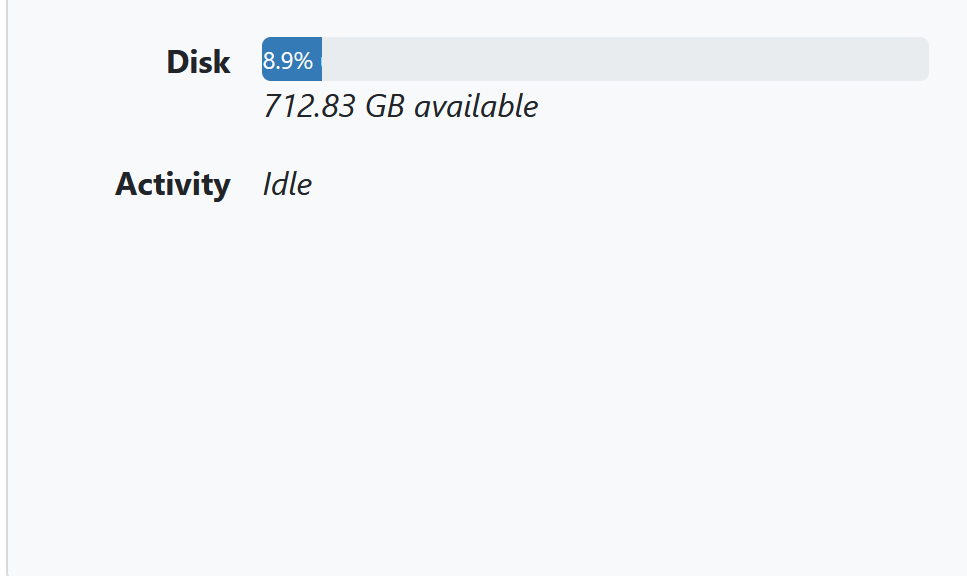
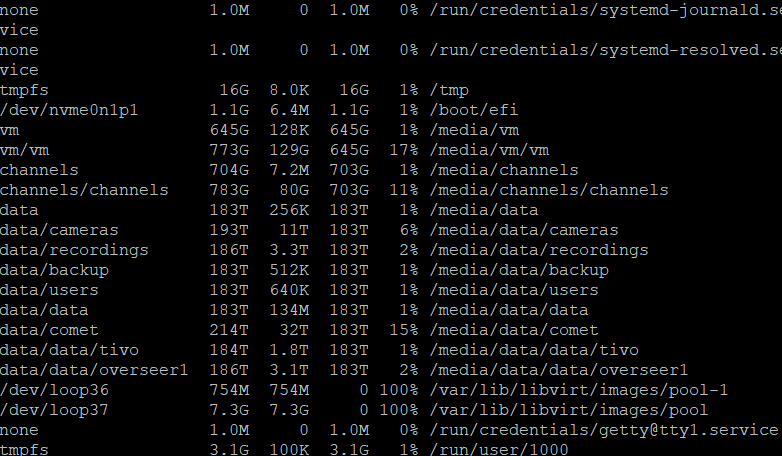
What does df show?
any word on this??? thanks.
That's a very impressive amount of storage. Ballpark figure $10k for the setup?
I am not discussing money here.
Any update???
1 Like
I don't know where you've pointed your DVR data root, but your df -h for /media/channels/channels matches what we're reporting.
df does not work with zfs you have to use zpool list
any word?
Nope. We use what the OS reports to us (which is what df shows). It’s the Linux standard way of showing available disk space for a volume. I’ve never seen a system where available space can go negative and I don’t understand how any software would behave if that happened.
Well I am rather insulted. I built this system from barebones. I can guarantee you that I put in a 2tb ssd, not 700gb. zpool list shows 2tb and google says df does not work on zfs. Unless samsung is in the habit of selling 700gb drives as 2tb, I am inclined to believe the sticker on the ssd rather than df.
I don't doubt you put in a 2TB SSD. I don't have enough information from what you've posted to know what your particular configuration is, but df shows us what's actually being made available to the OS for programs (like us) to use — that's the same information ZFS itself is reporting.
zpool list shows the raw capacity of the pool, before parity, snapshots, reservations, and quotas. It's not a measure of what you can write. zfs list -o name,used,avail,refer,usedbysnapshots,quota,reservation may show you where the other ~1.3TB went.
Folks here with more ZFS experience may be able to help you dig into it further.
Thank you for that command. Apparently I had hidden zfs datasets from back when I was running truenas that I never created. I deleted them and now I am showing 1.75 tb. thanks again.