that works with -c:v copy but when I switch to -c:v h264_nvenc I get this
Cannot load libcuda.so.1

that works with -c:v copy but when I switch to -c:v h264_nvenc I get this
Cannot load libcuda.so.1
I'm more of an Intel guy, you're going to need to tell me what's needed to get Nvidia working in a Docker container. I've never build ah4c with Nvidia in mind, and have no way to test.
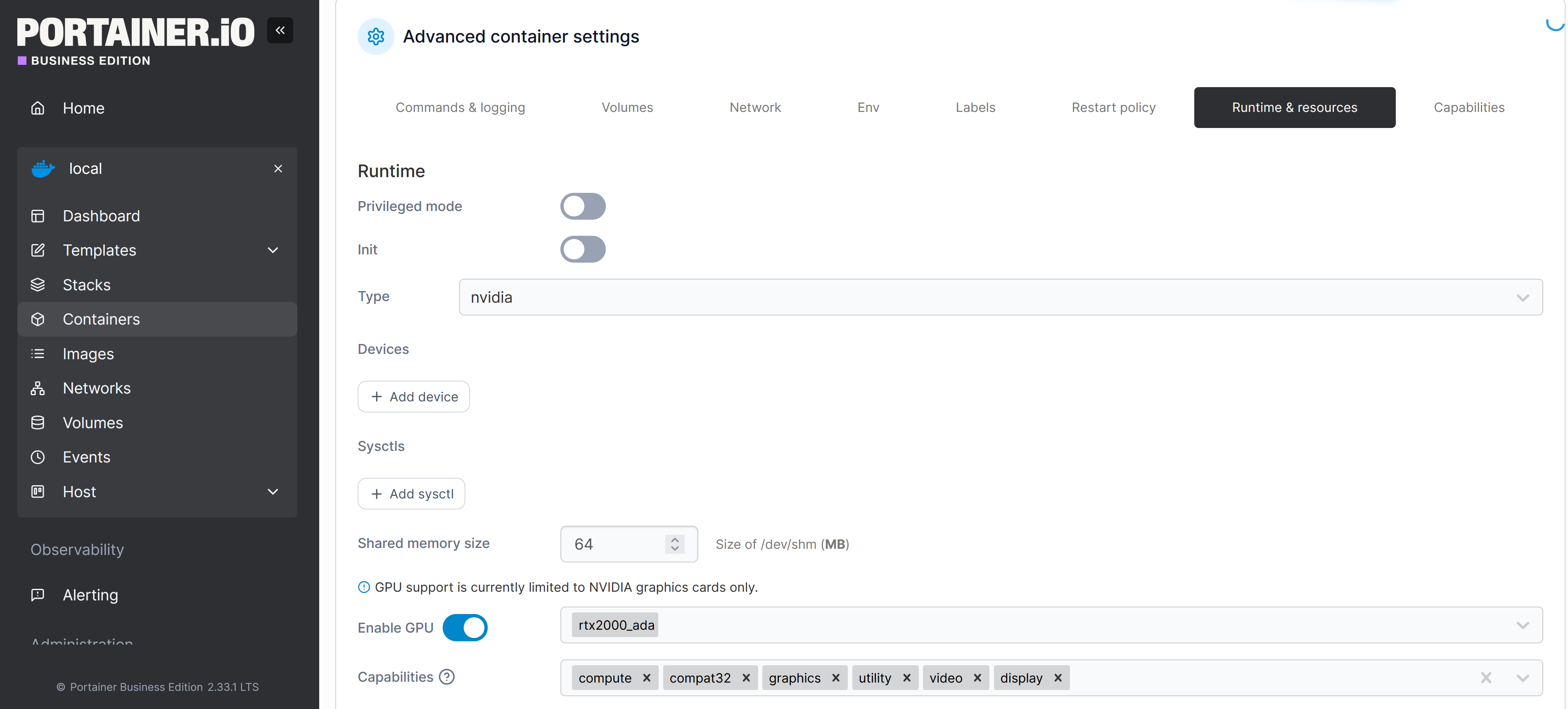
Did you try binding the GPU?
 services:
  ah4c: # This docker-compose typically requires no editing. Use the Environment variables section of Portainer to set your values.
    # 2025.09.13
    # GitHub home for this project: https://github.com/bnhf/ah4c.
    # Docker container home for this project with setup instructions: https://hub.docker.com/r/bnhf/ah4c.
    image: bnhf/ah4c:${TAG:-latest}
    container_name: ${CONTAINER_NAME:-ah4c}
    hostname: ${HOSTNAME:-ah4c}
    dns_search: ${DOMAIN:-localdomain} # Specify the name of your LAN's domain, usually local or localdomain
    ports:
      - ${ADBS_PORT:-5037}:5037 # Port used by adb-server
      - ${HOST_PORT:-7654}:7654 # Port used by this ah4c proxy
      - ${SCRC_PORT:-7655}:8000 # Port used by ws-scrcpy
    environment:
      - IPADDRESS=${IPADDRESS} # Hostname or IP address of this ah4c extension to be used in M3U file (also add port number if not in M3U)
      - NUMBER_TUNERS=${NUMBER_TUNERS} # Number of tuners you'd like defined 1, 2, 3 or 4 supported
      - TUNER1_IP=${TUNER1_IP} # Streaming device #1 with adb port in the form hostname:port or ip:port
      - TUNER2_IP=${TUNER2_IP} # Streaming device #2 with adb port in the form hostname:port or ip:port
      - TUNER3_IP=${TUNER3_IP} # Streaming device #3 with adb port in the form hostname:port or ip:port
      - TUNER4_IP=${TUNER4_IP} # Streaming device #4 with adb port in the form hostname:port or ip:port
      - TUNER5_IP=${TUNER5_IP} # Streaming device #5 with adb port in the form hostname:port or ip:port
      - TUNER6_IP=${TUNER6_IP} # Streaming device #6 with adb port in the form hostname:port or ip:port
      - TUNER7_IP=${TUNER7_IP} # Streaming device #7 with adb port in the form hostname:port or ip:port
      - TUNER8_IP=${TUNER8_IP} # Streaming device #8 with adb port in the form hostname:port or ip:port
      - TUNER9_IP=${TUNER9_IP} # Streaming device #9 with adb port in the form hostname:port or ip:port
      - ENCODER1_URL=${ENCODER1_URL} # Full URL for tuner #1 in the form http://hostname/stream or http://ip/stream
      - ENCODER2_URL=${ENCODER2_URL} # Full URL for tuner #2 in the form http://hostname/stream or http://ip/stream
      - ENCODER3_URL=${ENCODER3_URL} # Full URL for tuner #3 in the form http://hostname/stream or http://ip/stream
      - ENCODER4_URL=${ENCODER4_URL} # Full URL for tuner #4 in the form http://hostname/stream or http://ip/stream
      - ENCODER5_URL=${ENCODER5_URL} # Full URL for tuner #5 in the form http://hostname/stream or http://ip/stream
      - ENCODER6_URL=${ENCODER6_URL} # Full URL for tuner #6 in the form http://hostname/stream or http://ip/stream
      - ENCODER7_URL=${ENCODER7_URL} # Full URL for tuner #7 in the form http://hostname/stream or http://ip/stream
      - ENCODER8_URL=${ENCODER8_URL} # Full URL for tuner #8 in the form http://hostname/stream or http://ip/stream
      - ENCODER9_URL=${ENCODER9_URL} # Full URL for tuner #9 in the form http://hostname/stream or http://ip/stream
      - CMD1=${CMD1} # Typically used for ffmpeg processing of a device's stream
      - CMD2=${CMD2} # Typically used for ffmpeg processing of a device's stream
      - STREAMER_APP=${STREAMER_APP} # Streaming device name and streaming app you're using in the form scripts/streamer/app (use lowercase with slashes between as shown)
      - CHANNELSIP=${CHANNELSIP} # Hostname or IP address of the Channels DVR server itself
      - ALERT_SMTP_SERVER=${ALERT_SMTP_SERVER} # The domainname:port of the SMTP server you'll be using like smtp.gmail.com:587. This is for sending ah4c alerts if tuning fails.
      - ALERT_AUTH_SERVER=${ALERT_AUTH_SERVER} # The auth server for the e-mail you'll be using like smtp.gmail.com
      - ALERT_EMAIL_FROM=${ALERT_EMAIL_FROM} # The e-mail address you'd like your ah4c failure alert e-mails to show as being from.
      - ALERT_EMAIL_PASS=${ALERT_EMAIL_PASS} # Gmail and Yahoo both support the creation of app-specific e-mail passwords, and this is the way to go! It's NOT recommended to use your everyday e-mail password.
      - ALERT_EMAIL_TO=${ALERT_EMAIL_TO} # The e-mail address you'd like your alert e-mails sent to.
      #- ALERT_WEBHOOK_URL=""
      - LIVETV_ATTEMPTS=${LIVETV_ATTEMPTS} # For FireTV Live Guide tuning only, set maximum number of attempts at finding the desired channel
      - CREATE_M3US=${CREATE_M3US:-false} # Set to true to create device-specific M3Us for use with Amazon Prime Premium channels -- requires a FireTV device
      - UPDATE_SCRIPTS=${UPDATE_SCRIPTS:-true} # Set to true if you'd like the sample scripts and STREAMER_APP scripts updated whether they exist of not
      - UPDATE_M3US=${UPDATE_M3US:-true} # Set to true if you'd like the sample m3us updated whether they exist of not
      - TZ=${TZ} # Your local timezone in Linux "tz" format
      - SPEED_MODE=${SPEED_MODE:-false} # Set to false if you'd like the target streaming app to be closed after each tuning cycle (limited script support).
      - KEEP_WATCHING=${KEEP_WATCHING:-235m} # In supported scripts, set the delay before resending a tuning deeplink to prevent "Are you still watching?" type messages. Examples: Use 4h for 4 hours or 240m for 240 minutes.
      - AUTOCROP_CHANNELS=${AUTOCROP_CHANNELS} # Space separated list of channels (by number) with black borders on 4 sides to autocrop while maintaining aspect ratio. Requires LinkPi Encoder!
      - LINKPI_HOSTNAME=${LINKPI_HOSTNAME} # Hostname or IP address of your LinkPi encoder. For use with AUTOCROP_CHANNELS.
      - LINKPI_USERNAME=${LINKPI_USERNAME} # LinkPi username. For use with AUTOCROP_CHANNELS.
      - LINKPI_PASSWORD=${LINKPI_PASSWORD} # LinkPi password. For use with AUTOCROP_CHANNELS.
      - USER_SCRIPT=${USER_SCRIPT} # A custom user script to be run at container start. If placed in /HOST_DIR/olivetin, only the script name is required, like ./userscript.sh
    volumes:
      - ${HOST_DIR:-/data}/ah4c/scripts:/opt/scripts # pre/stop/bmitune.sh scripts will be stored in this bound host directory under streamer/app
      - ${HOST_DIR:-/data}/ah4c/m3u:/opt/m3u # m3u files will be stored here and hosted at http://<hostname or ip>:7654/m3u for use in Channels DVR - Custom Channels settings
      - ${HOST_DIR:-/data}/ah4c/adb:/root/.android # Persistent data directory for adb keys
    runtime: nvidia
    deploy:
      resources:
        reservations:
          devices:
            - driver: nvidia
              count: all
              capabilities: [gpu]
    restart: unless-stopped
usually doing this works for me on Intel
 services:
  ah4c: # This docker-compose typically requires no editing. Use the Environment variables section of Portainer to set your values.
    # 2025.09.13
    # GitHub home for this project: https://github.com/bnhf/ah4c.
    # Docker container home for this project with setup instructions: https://hub.docker.com/r/bnhf/ah4c.
    image: bnhf/ah4c:${TAG:-latest}
    container_name: ${CONTAINER_NAME:-ah4c}
    hostname: ${HOSTNAME:-ah4c}
    dns_search: ${DOMAIN:-localdomain} # Specify the name of your LAN's domain, usually local or localdomain
    ports:
      - ${ADBS_PORT:-5037}:5037 # Port used by adb-server
      - ${HOST_PORT:-7654}:7654 # Port used by this ah4c proxy
      - ${SCRC_PORT:-7655}:8000 # Port used by ws-scrcpy
    environment:
      - IPADDRESS=${IPADDRESS} # Hostname or IP address of this ah4c extension to be used in M3U file (also add port number if not in M3U)
      - NUMBER_TUNERS=${NUMBER_TUNERS} # Number of tuners you'd like defined 1, 2, 3 or 4 supported
      - TUNER1_IP=${TUNER1_IP} # Streaming device #1 with adb port in the form hostname:port or ip:port
      - TUNER2_IP=${TUNER2_IP} # Streaming device #2 with adb port in the form hostname:port or ip:port
      - TUNER3_IP=${TUNER3_IP} # Streaming device #3 with adb port in the form hostname:port or ip:port
      - TUNER4_IP=${TUNER4_IP} # Streaming device #4 with adb port in the form hostname:port or ip:port
      - TUNER5_IP=${TUNER5_IP} # Streaming device #5 with adb port in the form hostname:port or ip:port
      - TUNER6_IP=${TUNER6_IP} # Streaming device #6 with adb port in the form hostname:port or ip:port
      - TUNER7_IP=${TUNER7_IP} # Streaming device #7 with adb port in the form hostname:port or ip:port
      - TUNER8_IP=${TUNER8_IP} # Streaming device #8 with adb port in the form hostname:port or ip:port
      - TUNER9_IP=${TUNER9_IP} # Streaming device #9 with adb port in the form hostname:port or ip:port
      - ENCODER1_URL=${ENCODER1_URL} # Full URL for tuner #1 in the form http://hostname/stream or http://ip/stream
      - ENCODER2_URL=${ENCODER2_URL} # Full URL for tuner #2 in the form http://hostname/stream or http://ip/stream
      - ENCODER3_URL=${ENCODER3_URL} # Full URL for tuner #3 in the form http://hostname/stream or http://ip/stream
      - ENCODER4_URL=${ENCODER4_URL} # Full URL for tuner #4 in the form http://hostname/stream or http://ip/stream
      - ENCODER5_URL=${ENCODER5_URL} # Full URL for tuner #5 in the form http://hostname/stream or http://ip/stream
      - ENCODER6_URL=${ENCODER6_URL} # Full URL for tuner #6 in the form http://hostname/stream or http://ip/stream
      - ENCODER7_URL=${ENCODER7_URL} # Full URL for tuner #7 in the form http://hostname/stream or http://ip/stream
      - ENCODER8_URL=${ENCODER8_URL} # Full URL for tuner #8 in the form http://hostname/stream or http://ip/stream
      - ENCODER9_URL=${ENCODER9_URL} # Full URL for tuner #9 in the form http://hostname/stream or http://ip/stream
      - CMD1=${CMD1} # Typically used for ffmpeg processing of a device's stream
      - CMD2=${CMD2} # Typically used for ffmpeg processing of a device's stream
      - STREAMER_APP=${STREAMER_APP} # Streaming device name and streaming app you're using in the form scripts/streamer/app (use lowercase with slashes between as shown)
      - CHANNELSIP=${CHANNELSIP} # Hostname or IP address of the Channels DVR server itself
      - ALERT_SMTP_SERVER=${ALERT_SMTP_SERVER} # The domainname:port of the SMTP server you'll be using like smtp.gmail.com:587. This is for sending ah4c alerts if tuning fails.
      - ALERT_AUTH_SERVER=${ALERT_AUTH_SERVER} # The auth server for the e-mail you'll be using like smtp.gmail.com
      - ALERT_EMAIL_FROM=${ALERT_EMAIL_FROM} # The e-mail address you'd like your ah4c failure alert e-mails to show as being from.
      - ALERT_EMAIL_PASS=${ALERT_EMAIL_PASS} # Gmail and Yahoo both support the creation of app-specific e-mail passwords, and this is the way to go! It's NOT recommended to use your everyday e-mail password.
      - ALERT_EMAIL_TO=${ALERT_EMAIL_TO} # The e-mail address you'd like your alert e-mails sent to.
      #- ALERT_WEBHOOK_URL=""
      - LIVETV_ATTEMPTS=${LIVETV_ATTEMPTS} # For FireTV Live Guide tuning only, set maximum number of attempts at finding the desired channel
      - CREATE_M3US=${CREATE_M3US:-false} # Set to true to create device-specific M3Us for use with Amazon Prime Premium channels -- requires a FireTV device
      - UPDATE_SCRIPTS=${UPDATE_SCRIPTS:-true} # Set to true if you'd like the sample scripts and STREAMER_APP scripts updated whether they exist of not
      - UPDATE_M3US=${UPDATE_M3US:-true} # Set to true if you'd like the sample m3us updated whether they exist of not
      - TZ=${TZ} # Your local timezone in Linux "tz" format
      - SPEED_MODE=${SPEED_MODE:-false} # Set to false if you'd like the target streaming app to be closed after each tuning cycle (limited script support).
      - KEEP_WATCHING=${KEEP_WATCHING:-235m} # In supported scripts, set the delay before resending a tuning deeplink to prevent "Are you still watching?" type messages. Examples: Use 4h for 4 hours or 240m for 240 minutes.
      - AUTOCROP_CHANNELS=${AUTOCROP_CHANNELS} # Space separated list of channels (by number) with black borders on 4 sides to autocrop while maintaining aspect ratio. Requires LinkPi Encoder!
      - LINKPI_HOSTNAME=${LINKPI_HOSTNAME} # Hostname or IP address of your LinkPi encoder. For use with AUTOCROP_CHANNELS.
      - LINKPI_USERNAME=${LINKPI_USERNAME} # LinkPi username. For use with AUTOCROP_CHANNELS.
      - LINKPI_PASSWORD=${LINKPI_PASSWORD} # LinkPi password. For use with AUTOCROP_CHANNELS.
      - USER_SCRIPT=${USER_SCRIPT} # A custom user script to be run at container start. If placed in /HOST_DIR/olivetin, only the script name is required, like ./userscript.sh
    volumes:
      - ${HOST_DIR:-/data}/ah4c/scripts:/opt/scripts # pre/stop/bmitune.sh scripts will be stored in this bound host directory under streamer/app
      - ${HOST_DIR:-/data}/ah4c/m3u:/opt/m3u # m3u files will be stored here and hosted at http://<hostname or ip>:7654/m3u for use in Channels DVR - Custom Channels settings
      - ${HOST_DIR:-/data}/ah4c/adb:/root/.android # Persistent data directory for adb keys
    devices:
      - /dev/dri:/dev/dri/
    restart: unless-stopped
I can't speak to what's required for Nvidia, but for Intel at least, containers needs to built with support for hardware acceleration in mind -- before passing through /dev/dri will do anything. ah4c was not originally built that way, but as of a month or two ago it's based on debian:bookworm-slim, so it won't be hard to add support for Intel.
Would need to use Nvidia base docker image
I imagine the Docker Compose version of these flags would be required as well?
Not sure, a lot of that stuff got rolled into docker by default. But I think you still need an image that's based off of https://hub.docker.com/r/nvidia/cuda
EDIT: I may be wrong. Maybe all you need is --runtime nvidia and it will share the libcuda into the container
OK, so I've built a version of ah4c with vaapi support. It was pushed this afternoon as bnhf/ah4c:test. If anyone is dying to try using a Zinwell NextGen TV box with ah4c and an encoder, and has a decent Docker host with an iGPU, it should now be possible to run the encoder output through ffmpeg with hardware accleration.
The idea would be to compensate for the ill effects of HDR coming out of the Zinwell box and passing through the encoder. ffmpeg would hopefully be able to either compensate through tone mapping or tag fixes if the HDR data is still there, but flags are missing. Running ffprobe on the stream as it exits the encoder might tell the story.
So I got nvenc working, not sure how but now I need the ffmpeg command to convert hdr to sdr. thanks
ffprobe output:
Input #0, mpegts, from 'http://192.168.1.70:8090/stream0':
  Duration: N/A, start: 78776.830667, bitrate: N/A
  Program 1
    Metadata:
      service_name    : HDMI-1
      service_provider: Server
  Stream #0:0[0x64]: Video: h264 (High) ([27][0][0][0] / 0x001B), yuvj420p(pc, bt470bg/bt470bg/bt709, progressive), 1920x1080, 60 fps, 120 tbr, 90k tbn
  Stream #0:1[0x65]: Audio: aac (LC) ([15][0][0][0] / 0x000F), 48000 Hz, stereo, fltp, 130 kb/s
a little more specific info:
ffprobe -v quiet -show_streams -select_streams v:0 http://192.168.1.70:8090/stream0
[STREAM]
index=0
codec_name=h264
codec_long_name=H.264 / AVC / MPEG-4 AVC / MPEG-4 part 10
profile=High
codec_type=video
codec_tag_string=[27][0][0][0]
codec_tag=0x001b
width=1920
height=1080
coded_width=1920
coded_height=1080
closed_captions=0
film_grain=0
has_b_frames=0
sample_aspect_ratio=N/A
display_aspect_ratio=N/A
pix_fmt=yuvj420p
level=41
color_range=pc
color_space=bt470bg
color_transfer=bt709
color_primaries=bt470bg
chroma_location=left
field_order=progressive
refs=1
is_avc=false
nal_length_size=0
ts_id=1
ts_packetsize=188
id=0x64
r_frame_rate=120/1
avg_frame_rate=60/1
time_base=1/90000
start_pts=7592831999
start_time=84364.799989
duration_ts=N/A
duration=N/A
bit_rate=N/A
max_bit_rate=N/A
bits_per_raw_sample=8
nb_frames=N/A
nb_read_frames=N/A
nb_read_packets=N/A
extradata_size=38
DISPOSITION:default=0
DISPOSITION:dub=0
DISPOSITION:original=0
DISPOSITION:comment=0
DISPOSITION:lyrics=0
DISPOSITION:karaoke=0
DISPOSITION:forced=0
DISPOSITION:hearing_impaired=0
DISPOSITION:visual_impaired=0
DISPOSITION:clean_effects=0
DISPOSITION:attached_pic=0
DISPOSITION:timed_thumbnails=0
DISPOSITION:non_diegetic=0
DISPOSITION:captions=0
DISPOSITION:descriptions=0
DISPOSITION:metadata=0
DISPOSITION:dependent=0
DISPOSITION:still_image=0
DISPOSITION:multilayer=0
[/STREAM]
edit:
I tweaked the colors a little and it looks nice
my stack looks like
services:
  ah4c: # This docker-compose typically requires no editing. Use the Environment variables section of Portainer to set your values.
    # 2025.09.13
    # GitHub home for this project: https://github.com/bnhf/ah4c.
    # Docker container home for this project with setup instructions: https://hub.docker.com/r/bnhf/ah4c.
    image: bnhf/ah4c:${TAG:-latest}
    container_name: ${CONTAINER_NAME:-ah4c}
    hostname: ${HOSTNAME:-ah4c}
    dns_search: ${DOMAIN:-localdomain} # Specify the name of your LAN's domain, usually local or localdomain

    ports:
      - ${ADBS_PORT:-5037}:5037 # Port used by adb-server
      - ${HOST_PORT:-7654}:7654 # Port used by this ah4c proxy
      - ${SCRC_PORT:-7655}:8000 # Port used by ws-scrcpy
    environment:
      - IPADDRESS=192.168.1.28:7654 # Hostname or IP address of this ah4c extension to be used in M3U file (also add port number if not in M3U)
      - NUMBER_TUNERS=5 # Number of tuners you'd like defined 1, 2, 3 or 4 supported
      - TUNER1_IP=192.168.1.71 # Streaming device #1 with adb port in the form hostname:port or ip:port
      - TUNER2_IP=192.168.1.72 # Streaming device #2 with adb port in the form hostname:port or ip:port
      - TUNER3_IP=192.168.1.73 # Streaming device #3 with adb port in the form hostname:port or ip:port
      - TUNER4_IP=192.168.1.74 # Streaming device #4 with adb port in the form hostname:port or ip:port
      - TUNER5_IP=192.168.1.75 # Streaming device #5 with adb port in the form hostname:port or ip:port
      - ENCODER1_URL=http://192.168.1.70:8090/stream0 # Full URL for tuner #1 in the form http://hostname/stream or http://ip/stream
      - ENCODER2_URL=http://192.168.1.70:8090/stream1 # Full URL for tuner #2 in the form http://hostname/stream or http://ip/stream
      - ENCODER3_URL=http://192.168.1.70:8090/stream2 # Full URL for tuner #3 in the form http://hostname/stream or http://ip/stream
      - ENCODER4_URL=http://192.168.1.70:8090/stream3 # Full URL for tuner #4 in the form http://hostname/stream or http://ip/stream
      - ENCODER5_URL=http://192.168.1.70:8090/stream4 # Full URL for tuner #5 in the form http://hostname/stream or http://ip/stream
      - CMD1=ffmpeg -i http://192.168.1.70:8090/stream0 -c:v h264_nvenc -preset hq -vf eq=brightness=0.2:contrast=1.5:saturation=2,unsharp=5:5:1.0:5:5:0.0 -pix_fmt yuv420p -b:v 70M -minrate 50M -maxrate 95M -bufsize 150M -c:a copy -f mpegts - # Typically used for ffmpeg processing of a device's stream
      - CMD2=ffmpeg -i http://192.168.1.70:8090/stream1 -c:v h264_nvenc -preset hq -vf eq=brightness=0.2:contrast=1.5:saturation=2,unsharp=5:5:1.0:5:5:0.0 -pix_fmt yuv420p -b:v 70M -minrate 50M -maxrate 95M -bufsize 150M -c:a copy -f mpegts - # Typically used for ffmpeg processing of a device's stream
      - CMD3=ffmpeg -i http://192.168.1.70:8090/stream2 -c:v h264_nvenc -preset hq -vf eq=brightness=0.2:contrast=1.5:saturation=2,unsharp=5:5:1.0:5:5:0.0 -pix_fmt yuv420p -b:v 70M -minrate 50M -maxrate 95M -bufsize 150M -c:a copy -f mpegts - # Typically used for ffmpeg processing of a device's stream
      - CMD4=ffmpeg -i http://192.168.1.70:8090/stream3 -c:v h264_nvenc -preset hq -vf eq=brightness=0.2:contrast=1.5:saturation=2,unsharp=5:5:1.0:5:5:0.0 -pix_fmt yuv420p -b:v 70M -minrate 50M -maxrate 95M -bufsize 150M -c:a copy -f mpegts - # Typically used for ffmpeg processing of a device's stream
      - CMD5=ffmpeg -i http://192.168.1.70:8090/stream4 -c:v h264_nvenc -preset hq -vf eq=brightness=0.2:contrast=1.5:saturation=2,unsharp=5:5:1.0:5:5:0.0 -pix_fmt yuv420p -b:v 70M -minrate 50M -maxrate 95M -bufsize 150M -c:a copy -f mpegts - # Typically used for ffmpeg processing of a device's stream
      - STREAMER_APP=scripts/zinwell/livetv # Streaming device name and streaming app you're using in the form scripts/streamer/app (use lowercase with slashes between as shown)
      - CHANNELSIP=192.168.1.28 # Hostname or IP address of the Channels DVR server itself
      - UPDATE_SCRIPTS=true
      - CREATE_M3US=false # Set to true to create device-specific M3Us for use with Amazon Prime Premium channels -- requires a FireTV device
      - TZ=US/Eastern # Your local timezone in Linux "tz" format
      - HOST_DIR=/data
   #    - NVIDIA_VISIBLE_DEVICES=all
   #    - NVIDIA_DRIVER_CAPABILITIES=all


    restart: unless-stopped
  #  deploy:
  #    resources:
  #      reservations:
  #        devices:
  #          - driver: nvidia
  #            count: 1
  #            capabilities: [gpu]
    volumes:
      - ${HOST_DIR:-/data}/ah4c/scripts:/opt/scripts # pre/stop/bmitune.sh scripts will be stored in this bound host directory under streamer/app
      - ${HOST_DIR:-/data}/ah4c/m3u:/opt/m3u # m3u files will be stored here and hosted at http://<hostname or ip>:7654/m3u for use in Channels DVR - Custom Channels settings
      - ${HOST_DIR:-/data}/ah4c/adb:/root/.android # Persistent data directory for adb keys


    # Default Environment variables can be found below under stderr -- copy and paste into Portainer-Stacks Environment variables section in Advanced mode
afterwords I have to go into containers/ah4c/edit and set the following
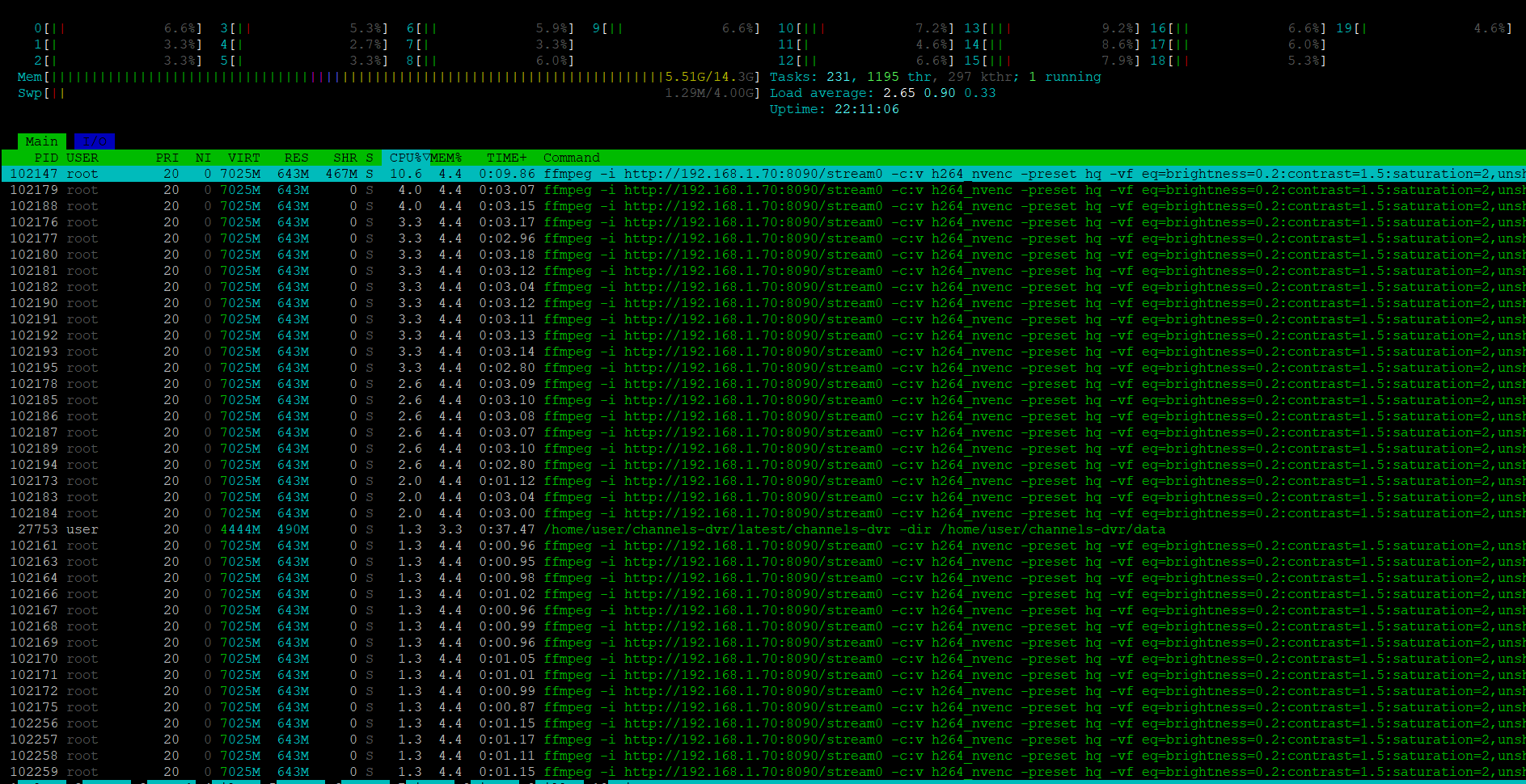
Any feel for the CPU/GPU requirements for this? Any percentage used stats or the like would be nice to know.
Also, for anybody else looking at this, the ffmpeg command shown is use with Nvidia only when the GPU is passed through.
This stack is obviously specific to @techpro2004, for anybody else I recommend using the standard ah4c stack (soon to be updated to include CMDx env vars). Also, as previously mentioned, most all of the Docker Compose YAMLs I've created are designed to be used WITHOUT hard coding anything into the stack itself.
Portainer-Stacks has a separate portion of the editor (use the Environment variables dropdown, and then select Advanced mode), which allows you to decouple the compose from the values that are specific to your installation. This way when a Docker Compose is updated, it's typically a drop-in that uses your existing list of env vars.
Nice to see we solved the ATSC 3 DRM problem. Hopefully, we'll get a network tuner on the way too (or hope and pray that DRM is outlawed)
How do I get the tonemap working with ffmpeg via software rendering. I'm running this on a qnap ts-464 but am not certain how to run ffmpeg with hardware acceleration with docker. I keep getting errors like unsharp not compatible with auto scale.
I am trying to get it working with my uray encoder.
My advice would be to try a basic ffmpeg command and then work your way to the more complex. fyi, I am using an nvidia gpu not the intel one in your qnap. You could also try the above ffmpeg comand I posted in my stack.
edit: make sure to replace h264_nvenc with h264_qsv
I can get the simple ffmpeg working but when I try to use filters with copy it doesn't load with errors like streamcopy and filtering not compatible. Furthermore when I try multiple options I get eq as an invalid input for libx264 and zscale not valid either. I tried your command and it doesn't work with h264_qsv.
Did you pass through your gpu to the container?
edit: did you remember the -vf before eq
I got a command working after trial and error now I just have to figure out how to tonemap.
ffmpeg -init_hw_device vaapi=intel:/dev/dri/renderD128 -hwaccel vaapi -hwaccel_output_format vaapi -hwaccel_device intel -filter_hw_device intel -i srt://192.168.1.141:9000 -vf format=nv12,hwupload -c:v h264_vaapi -c:a copy -f mpegts -