
@Rockies Speaking of UniFi, I have a couple of freebies I think might interest you, but was not able to PM you. I totally get it if you want to keep it that way, but just thought I'd let you know.
This is starting to seem like a plan. My encoders are POE and I have enough free POE ports on the switch to include the ONNs in the wiring closet. Everything runs on a UPS so it should be safe unless a hurricane strikes Tampa again while I'm out of the country.
1 Like
My ONN 4K Pro doesn't seem to get power via POE. So far I can't find anything that promises POE. Is there anything I need to do to enable POE on the ONN 4K Pro?
What splitter are you using?
No splitter in use. POE switch port directly to OON. The encoder is running on POE.
The Onn adapter is 12v, 1.5a, tip is 5.5mm x 2.1mm, centre positive. I use this POE splitter to split the power out to the barrel plug on the ONN 4K Pro;
https://www.amazon.com/dp/B08HS4NT13?ref_=ppx_hzsearch_conn_dt_b_fed_asin_title_3&th=1
You may need to select the right one when on the link above. You want the one labeled " 5.5x2.1mm DC Plug Cable(PS5712TG)". They are rated for 2 amps which is more than enough for ONN 4K Pro. They are also 1Gbe but the ONN 4K Pro is only 100Mb. I have not had any issues with my Unifi switch negotiating down to 100Mb but you could always set the port speed to 100Mb if needed.
Does anyone happen to know if there is a deep link for the CBS app on an android device? I've tried a couple different formats with no success. I used apktool to break down the manifest of the CBS app and there's definitely some stuff in there suggesting deep linking works, but nothing I try opens the CBS app. I was able to get the Paramount Plus app to load, but that's no good because I need to open the live feed of my local CBS station and I don't have a Paramount Plus account.
Now let me explain why I'm trying to go this route with using ADBTuner and deep linking to get CBS. For the longest time, I've been using the local networks via TV Everywhere setting in Channels DVR server and this pulled in my local CBS affiliate no problem...KYW Channel 3 in Philly. Now all of a sudden it doesn't work, and digging deeper I've come to discover that when I go to the CBS website and connect my TV provider and try to pull up the live feed, it doesn't work. It seems it wants my local CBS affiliate to be WYOU in Scranton/Wilkes-Barre but this will not load and I get an error message. I've tried rebooting my router and modem multiple times but I get the same result. On my onn 4k devices however, I install the CBS app and it loads the live feed just fine and uses KYW in Philly. Now I could of course use an antenna to pull in the feed, but unfortunately the signal isn't always the greatest.
So I feel like I'm at my last possible hope here which would be to use ADBTuner and deep linking to get the CBS app to load on my onn 4k device, but as mentioned I have not been able to figure out if that works yet. Just trying to see if anyone out there has had success with deep linking of the CBS app.
Hi everyone! Well, unfortunately it looks like I messed around and got caught - at least in a small way. I've been running a setup based on some older ONN streamers, a 4 channel encoder, and ADBTuner. It has been working fine, but I wanted to a) improve tuning times and responsiveness a bit (these older ONNs were sometimes a bit slow to respond) and b) move some of this traffic off my wifi network.
So - I converted 2 of my 4 tuners to Onn 4k Plus devices with USB-C POE ethernet dongles hanging off one of my Unifi POE switches.
Some of you can of course already see where I've gone wrong... Although I knew that some devices wouldn't support ethernet over USB while usb debugging (ADB) was enabled, I failed to do my research and didn't realize that yes - the Onn 4k Pluses have exactly this problem. Ok - so I got the improved tuning speed and I got POE power (which means I can easily reset the devices if needed), but I didn't get these devices off my Wifi network 
Question: what is the best device for me to buy if I can to correct the error of my ways? The Firestick 4k Max? Any other suggestions?
See my post above on how I use poe splitter with ONN 4K Pro and Unifi switches. It all works great for me. The ONN 4K Pro gets the physical ethernet and the Poe splitter with Unifi switch allows me to remotely power cycle the devices.
Edit: I'm pretty sure @spammedeeper uses the ONN 4K Plus and really likes them. The traffic will be on the wifi though.
OK I got confused when said you have the ONN devices on POE. I incorrectly assumed the ONN devices worked on POE. I'll take a look at splitters to power the devices.
Well I figured it out. If you are using an android TV device (I'm using onn 4k devices), then the deep link for your local CBS would be https://www.cbs.com/live-tv/stream/ and your package in ADBTuner needs to be set to com.cbs.tve I think I was setting mine to the wrong package because there is another one com.cbs.ott which I was initially trying. Anyway, I should be all good now.
I can’t get adbtuner to work with Sling. I used to have Sling and it worked fine with a chromecast. Then I switched to youtube tv. I had to replace the chromecast with an onn, but adbtuner still worked in youtube tv.
Now, when I click on a channel in sling, with my Apple TV, using the default deep links, it fails, saying Channels could not reach the tuner. With a custom config, it opens and plays in the apple tv, but when I schedule something to record, the recording I get is a picture telling me to click to watch now.
I have the onn 4K Plus set to never sleep. I have auto play turned off in the Sling app and it is set to not ask for who is watching..
This is my custom config, although I tried variations:
{
    "name": "Fixed Delay",
    "author": "",
    "version": "0",
    "description": "fixed delay.",
    "uuid": "2d193a0f-641e-4314-b3dc-5c4eeee46582",
    "global_options": {
        "wait_for_video_playback_detection": true,
        "use_fixed_delay": true,
        "fixed_delay_seconds": 10,
        "check_for_and_clear_whos_watching_prompts": true
    },
    "pre_tune_commands": [
        "input keyevent KEYCODE_MEDIA_STOP"
    ],
    "tune_commands": [
        "am start -W -a android.intent.action.VIEW -d '||TARGET_URL_OR_IDENTIFIER||' '||TARGET_PACKAGE_NAME||'"
    ],
    "post_tune_commands": [
        "input keyevent KEYCODE_MEDIA_STOP",
        "input keyevent KEYCODE_MEDIA_PAUSE"
    ]
}
For Paramount Showtime channels I was having issues getting past who's watching so I ended up with a custom config based on @spammedeeper work. The "tune_commands" sleep time needed to be tweaked based on how fast your device is getting to the who's watching screen. My ONN 4K Pros seem to be stable at total of 11 seconds sleep before the enter is executed. I watched the tuner with VLC on a number of tests to find the best amount of sleep. Maybe something like that will work for you on Sling. I have not used Sling.
    "global_options": {
        "wait_for_video_playback_detection": false,
        "use_fixed_delay": true,
        "fixed_delay_seconds": 0,
        "check_for_and_clear_whos_watching_prompts": false
    },
    "pre_tune_commands": [
        "input keyevent KEYCODE_MEDIA_STOP"
    ],
    "tune_commands": [
        "am start -W -a android.intent.action.VIEW -d '||TARGET_URL_OR_IDENTIFIER||' '||TARGET_PACKAGE_NAME||'",
        "sleep 4",
        "sleep 4",
        "sleep 3",
        "input keyevent KEYCODE_ENTER"
    ],
    "post_playback_start_commands": [],
    "post_tune_commands": [
        "am force-stop '||TARGET_PACKAGE_NAME||'",
        "input keyevent KEYCODE_HOME"
    ]
Edit: I think you need to use "development" version to have the "tune_commands" available.
Hey, thanks! That worked!
For the record, I have five Onn Plus for testing, use three in production. They have not given me major challenges. WiFi6 has been reliable, the performance is really great for $30.
The only difference to my DirecTV Osprey (hardware) setup is the lower audio output, which was also on other Onn boxes. To correct this, I boost Onn audio capture by +6fB on my LinkPi.
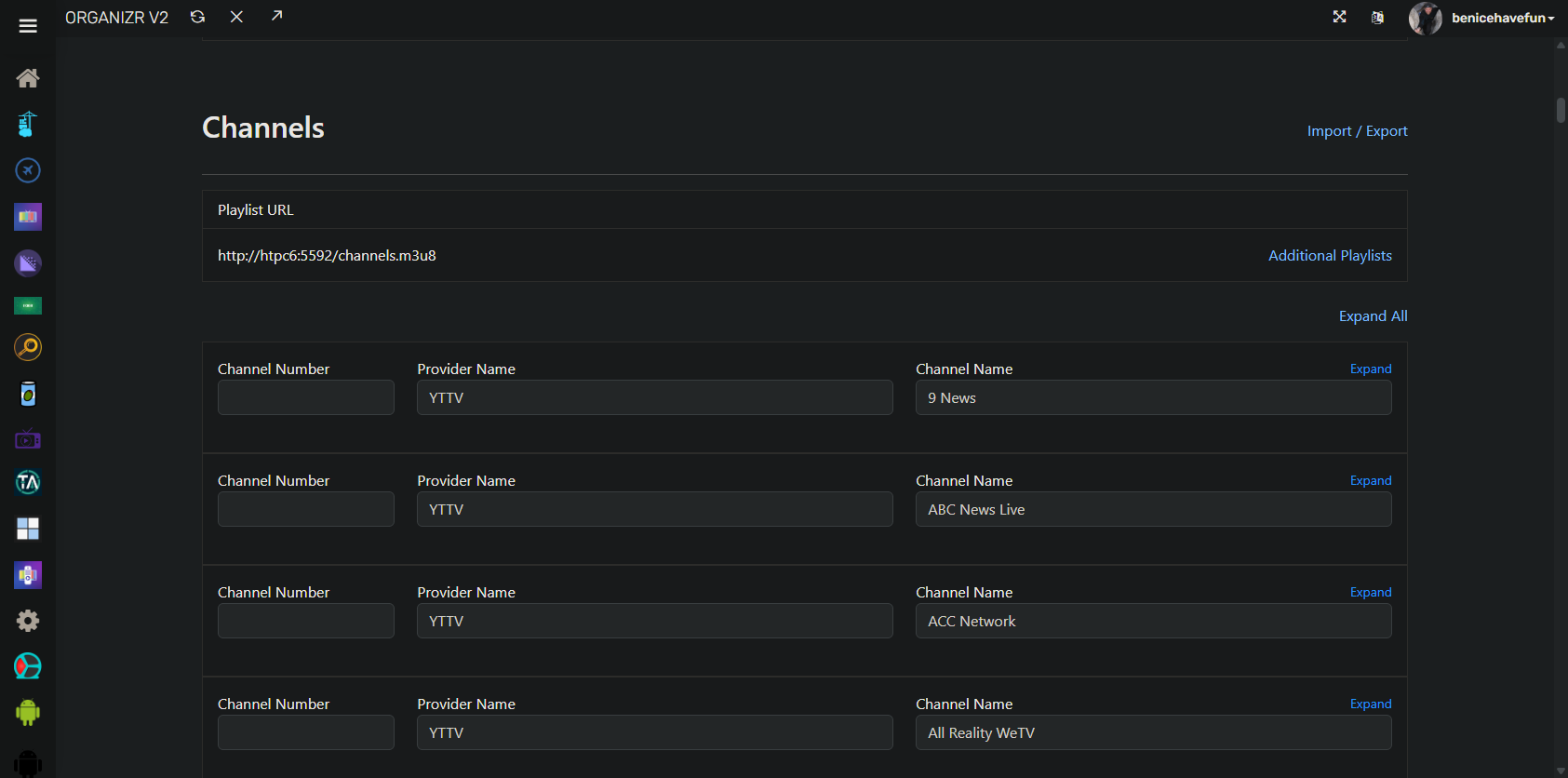
@turtletank I've been playing around with HTML in the WebUI, mostly for my own purposes, but maybe others would like it too?
For those of us with large numbers of channels, I thought adding Expand/Collapse to the Channels section would be nice.
Also, when I imported my channels, I did so without channel numbers, but now when I make any changes entering a channel number is required -- even though everything's been working fine without that value. So, I've removed that as a required value.
Given you never open sourced this project, I'm unsure if you're interested in anything resembling a PR? I've only changed index.html, so I could PM that to you -- unless you'd rather me just keep mods to myself, which is fine too. 
2 Likes
I found that sleep 15 works best for me, but sometimes fails. I can get a paused video if it takes too long, or the watch now screen if too soon. What is really needed is a way to detect the 'watch now' message, like in detecting 'who's watching'.
The other problem that I have, the Development version sometimes kicks me out of the video, to the home screen of the Sling app or the YTTV app. It doesn't happen often, but I never saw it happen with the Latest version.
Looking for some tips to make my setup more reliable.
I'm using a Chromecast w/Google TV and I find the setup works, but many times it gets stuck on a channel and won't unlock. Even if I click release the tuner, it won't release. This makes all my channels untuneable and fail since the tuner shows as not available.
Any advice in making the tuner more reliable would be appreciated.
@turtletank I've made a few more enhancements, which I'm happy to contribute -- if you're cool with it.
I've added the ability to tune CDVR Virtual Channels via ADBTuner. The main value in this is to be able to watch Virtual Channels in the WebUI, Multiview, or in other apps (like VLC or other Media Centers). curl is used for channel changes, as the CDVR Android client doesn't support deeplinks.
There are about 12-18 lines of code and a custom config, so very minimal impact on your core:
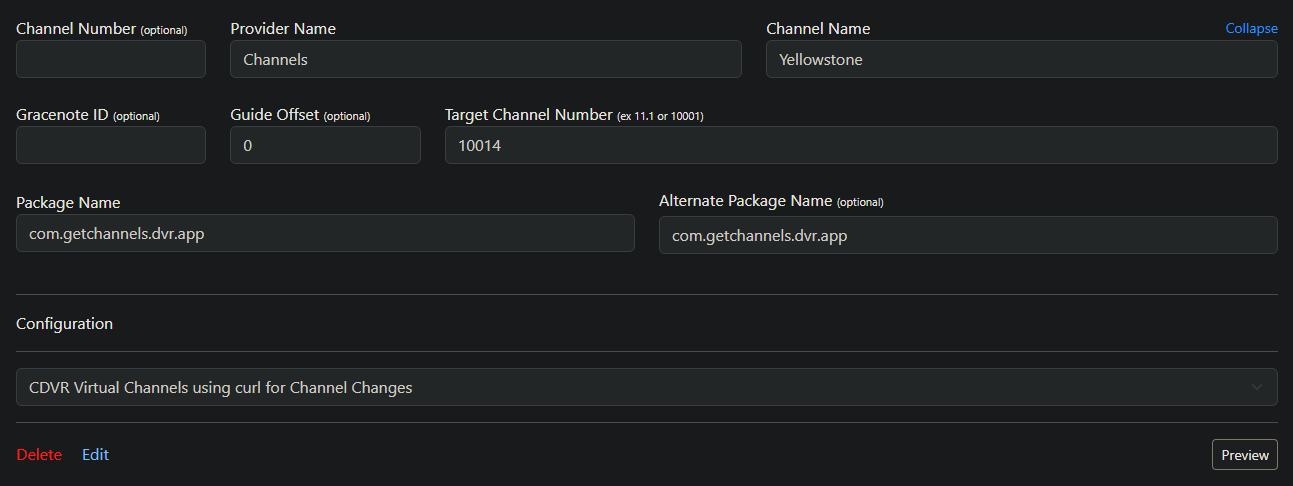
{
    "name": "CDVR Virtual Channels using curl for Channel Changes",
    "author": "bnhf",
    "version": "1.0.0",
    "description": "Tunes CDVR Virtual Channels via a virtual tuner using curl for channel changes.",
    "uuid": "99f34ebf-6484-4043-aa6c-bfeaf9214eb8",
    "global_options": {
        "wait_for_video_playback_detection": false,
        "use_fixed_delay": false,
        "fixed_delay_seconds": 0,
        "check_for_and_clear_whos_watching_prompts": false,
        "wait_after_post_playback_start_commands_seconds": 0
    },
    "pre_tune_commands": [
        "am force-stop com.getchannels.dvr.app",
        "am start -n com.getchannels.dvr.app/com.getchannels.android.MainActivity",
        "sleep 5"
    ],
    "tune_commands": [
        "http://||TARGET_DEVICE_IP||:57000/api/play/channel/||TARGET_URL_OR_IDENTIFIER||"
    ],
    "post_playback_start_commands": [],
    "post_tune_commands": [
        "input keyevent KEYCODE_BACK",
        "am force-stop com.getchannels.dvr.app"
    ]
}
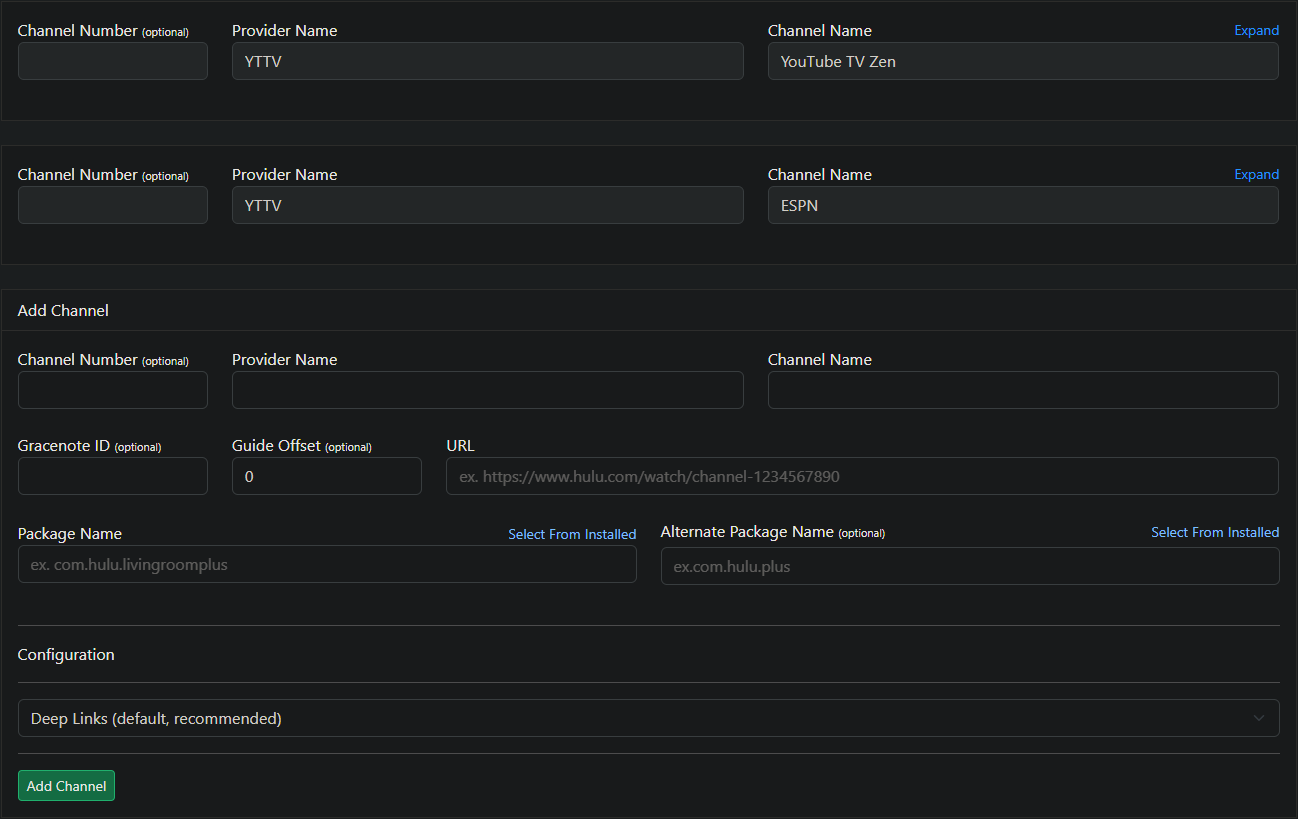
Also, I've reworked the Expand/Collapse I did for the Channels section of the UI, so that it's all done in JavaScript now, which means there's only one line of code to change in your current base -- plus a new small .html and modest .js.
I'm doing it this way in case you're not interested in integrating these changes, to make it easy for me to stay current -- while still keeping the mods.
Looks like this, with previous channels collapsed. They can be expanded individually or as a group:
I've been using Sling myself, migrating Sling from the Docker version of cc4c to ADBTuner, and most of what you're talking about I've seen -- with the bad behavior almost always when the app has to load from scratch.
I have it working well now though, and here are the key elements from my perspective:
-
The app itself is pretty slow to load, even on a FireStick 4K Max, which can cause issues with either ADBTuner or Channels. Best results for me have included specifying
com.slingas a Keep Alive Package. This results in reasonably quick and reliable tuning. -
Since I also have YTTV, and that also benefits from being the Keep Alive Package, I'm running two ADBTuner containers (each with two tuners). I'm using one for YTTV, and the other for Sling and CDVR Virtual Channels.
Here's my custom config:
{
    "name": "Deep Links - Sling with No Video Playback Detection",
    "author": "bnhf",
    "version": "0",
    "description": "Sling virtual tuning without video playback detection.",
    "uuid": "44da8817-32b3-4f52-a5ee-42a208d870a4",
    "global_options": {
        "wait_for_video_playback_detection": false,
        "use_fixed_delay": false,
        "fixed_delay_seconds": 0,
        "check_for_and_clear_whos_watching_prompts": false,
        "wait_after_post_playback_start_commands_seconds": 0
    },
    "pre_tune_commands": [
        "input keyevent KEYCODE_MEDIA_STOP"
    ],
    "tune_commands": [
        "am start -n com.sling/.MainActivity '||TARGET_URL_OR_IDENTIFIER||'"
    ],
    "post_playback_start_commands": [],
    "post_tune_commands": [
        "input keyevent KEYCODE_BACK",
        "input keyevent KEYCODE_HOME"
    ]
}
I'm not sure what you mean by 'watch now', as I see Watch from beginning and Watch Live buttons when playback first starts. But those go away on their own in a few seconds, and have no impact on tuning for me. I'm assuming you have profiles and autoplay disabled on every stick you're capturing from?