ADBTuner: A "channel tuning" application for networked Google TV / Android TV devices

I just pushed another update (20251107-8) to development.

It primarily fixes some bugs related to playback detection.

It seems that the log data related to media_session changed from state=3 to state=PLAYING(3) so this form of playback detection has been broken since that happened.

I also added another fallback method for playback detection. ADBTuner now looks to see if the target application is blocking the screensaver from starting. Every app should do this when video playback starts. For reference, it's doing something equivalent to this:
adb shell dumpsys power | grep "Wake Locks:" -A 20 | grep "SCREEN_BRIGHT_WAKE_LOCK" | grep com.whatever.application


I also added an experimental feature for querying a remote URL to obtain the actual deeplink url.
If the URL associated with a channel in ADBTuner includes a "dynamic_url_json_key" parameter the specified URL will be loaded by ADBTuner and the value specified as the "dynamic_url_json_key" within the remote endpoint's json response will be used for loading the content on the android device.

Example:
If the URL configured for the channel in ADBTuner is this:
http://x.x.x.x?dynamic_url_json_key=deeplink_url

Then http://x.x.x.x will be loaded by ADBTuner and the "deeplink_url" key in the json response will be used to obtain the URL:

{
  "example_field": "something",
  "deeplink_url": "http://android_deep_link_for_something"
}

will be used to load the content on the Android.

This was just something to try to help those that are working on solutions for ESPN. I don't know how much value it has, but it's there now.

turtletank, I started testing your latest 20251107-8 build and it seems to be working great so far. My current setup is using a ONN TV 4K Pro box with Sling TV and Link PI single port box. I was using your stable build and I had to set it to use the compatibility mode for ever link to get it to work. With this build I was able to put it back to using the default deep links and so far its rock solid.

Thank you so much for all your hard work.

I moved over to watching get comedy from Sling and am using the latest development build.
I was able to set Sling to use the normal deep link option and it now pulls up the stream with a brief view of the channel logo as it starts.
I have the ONN 4k from 2023.

1 Like

I pushed a new development build (20251108-1) this morning with some adjustments to media playback detection. I had to listen to the YTTV startup sound once and that was not ok lol.

I also added a new default configuration choice (“Deep Links - Show Tuning Process”) for users that want to see the video as soon as possible and don’t care about watching the content load. It should start streaming after about 2 seconds.

3 Likes

I pushed a small update to the development version (20251109-3) this morning.

It includes a small timing adjustment for media playback detection and to perhaps help with occasional troubleshooting I added some basic remote buttons to the tuner streaming endpoint preview (note: this is just in the tuner section, not in the individual channels).

Edit:
20251109-4 adds a "wake" button as the other buttons won't necessarily wake up a sleeping device.

1 Like

You can now configure ADBTuner for ESPN+ events. Here are the steps:

1 Like

Hello everyone. It's time to take some steps towards a new stable release.
For lack of a better name I'm going to call this ADBTuner 2.0.

For now, this release is scheduled for December 1st, 2025.

The current stable release is quite old and I'm concerned it might be a bumpy upgrade process for some.

For users that have always been on a stable build the upgrade should work just fine. If you have jumped back and forth between stable and development builds there could be some complications.

A beta release is available now using the turtletank99/adbtuner:beta tag.

If your configuration is setup to automatically pull updated versions I suggess you disable that, and/or install the the beta at a time when it would be convenient to troubleshoot any small issues that could come up.

I'm really hoping not to surprise anyone with a broken ADBTuner setup on December 1st.

I appreciate any help I can get in testing this beta build (turtletank99/adbtuner:beta). If you run into any issues please post them here and share Docker logs if possible.

Thanks!


Changes since the last stable release:

Switched to a dedicated proxy server that is always running instead of bringing one up for each stream and tearing it down afterwards. This enabled the following:

  • Significantly improved control over tuner locking.
  • Streams are now kept active for short while after a disconnect so clients can reconnect and continue watching without having to start over. This fixes issues with dodgy network connections and with client apps that retry if the stream doesn't start immediately (Kodi).
  • Tuners will now be shared if more than one client app is streaming the same thing. Shared tuners will be locked until the last client disconnects.

Added experimental support for custom tuning configurations. These configurations can be used to define a set of custom ADB commands for applications that don't work with the default standard or compatibility mode options. A web interface for this is provided at /configurations. This feature is still experimental and may change in the future.

Added health check / status page at /up.

Improved playback detection.

Improved profile screen detection clearing (who's watching).

Added more detailed logging. Specifcally around locked tuners.

Added preview window for each streaming endpoint in the web UI.

Added remote buttons to streaming endpoint preview window for troubleshooting purposes.

Enabled admin preview windows on mobile devices and tablets.

Improved keep alive functionality. This should now work with most applications.

Apps kept awake with the keep alive feature will no longer sit in the foreground. This is preferred as some apps always stream video when they are in the foreground.

By default, all video streams will now start after 20 seconds regardless of if the requested content has started playing. This allows for slow loading content that previously failed if the client connection timed out. The old behavior can be restored by selecting "Terminate Connection" for the "Slow / Failed Tuning Behavior" setting in the admin interface.

Added support for obtaining a deeplink url from a remote endpoint. This can be used by including "dynamic_url_json_key" parameter in the URL. The value should match the key that contains the URL in the json response. This is being used by ESPN+ with Custom Channels via ADBTuner.

And finally, there have been many bug fixes since the last release. This version of ADBTuner should provide a better experience overall.

7 Likes

Will pull the beta here in a few and will start testing. Thanks as always!

A couple of questions as you move towards a new stable release:

Have you had a chance to consider the potential contributions I outlined in this post from about a month ago:

Both are very low impact in terms of code changes.

The other question is whether it's possible now, or would you consider adding, a way to POST a JSON payload (using curl) for both adding channels to an ADBTuner installation and adding a custom configuration?

This would allow me to fully automate, via Project One-Click, something like ESPN+ support and potentially CDVR Virtual Channels (as outlined in my "PR" above).

Question with ADBTuner.

I'm using a second tuner via ADBTuner to pull in a static app (NESN 360). I'd pull it in through a direct m3u from the encoder, but ADBTuner has the settings to keep it awake and to always keep the package alive. This keeps NESN 360 always active and in front.

My question is if there's a way to never have this tuner be actually called. I set the priority of this tuner lower than the other, but is there any way to limit the live tuners or something I can do so that the dedicated to NESN tuner never gets called? I assume a4hc would work, but I'm not as skilled in programming this.

Can you have only the NESN app installed on that device? ADBTuner won't use a device if the target app isn't installed.

Great idea. I'll uninstall Youtube TV.

Thanks for the help!

I apologize for the slow response on this. I've been trying to get caught up and figure out where I left off on a bunch of things so I could get a new release out and then move forward with larger, long-term updates.

Overall, the admin UI hasn't been changed much since the early prototypes and I need to do much better with channel management. I never expected people to use ADBTuner the way they are using it.

I will absolutely, 100% add a REST API for all of the administrative functions and I will get this in before the new stable release is finalized so you can have access to it.

I agree that the administrative interface could use some improvement and we could definitely wrap the channels in a "accordion" widget to reduce the vertical space they consume. However, since I would be adding the REST API, I would like to redo the admin interface to use this API so I think it would be best to hold off on any changes there for now.

At the moment, I'm hesitant to add support for anything that doesn't involve loading content from Android devices. So I think that loading virtual channels from Channels DVR would unfortuately be out-of-scope for this project.


I might be getting too ambitious, but in the coming months I would like to do the following:

  1. Add support for browsing for and installing curated, custom configurations from third-party, hosted git repositories. Would you be interested in maintaining a repository for this purpose?

  2. Add support for custom Python plugins so developers can use ADBTuner's tuner management and streaming functionality, but for other things (Channels DVR virtual channels? Roku? Apple TV?).

  3. Add support for a new plugin type called "channel providers." These plugins could scrape websites or perform other tasks to automatically populate channel lists for specific providers.


One of the original design goals of ADBTuner was to try to make this process as easy as possible. Especially for new users. I think I was successful in some ways and unsuccessful in others. However, I don't yet want to give up on this goal so I would like to stay focused on loading content on Android devices.

Hopefully, with the addition of the features listed above it will let users optionally accept added complexity if they wish to do more things with ADBTuner. A bit of a compromise, but I hope that it can work out.

1 Like

I too started having issues with the NBC app version 9.9.1 and ultimately updated to the latest version. I tried updating to the version that came right after 9.9.1 but unfortunately it seems every version beyond 9.9.1 has the dim screen and logo when it first loads.

HOWEVER, while no direct fix has yet to be implemented into ADBTuner (as far as I know), I figured out how to use Home Assistant to create automation that removes the dim screen and logo when the NBC app opens. To do this, you first need to create a script in Home Assistant (under the Automation and Scenes Category in Settings). Here is the YAML code:

alias: NBC App Dimming
sequence:
  - action: remote.send_command
    metadata: {}
    data:
      num_repeats: 2
      command: DPAD_UP
    target:
      device_id: #this is the ID number for your Android TV Remote Onn device
  - action: remote.send_command
    metadata: {}
    data:
      num_repeats: 2
      delay_secs: 1
      command: DPAD_CENTER
    target:
      device_id: #this is the ID number for your Android TV Remote Onn device
description: >-
  This script will remove the icons at the top of a channel that is playing
  through the NBC app and will also remove the dimness

Once that script is created, you then need to create an automation which can again be found under the Automation and Scenes category under Settings. Here is the YAML code for that:

alias: Run script when NBC app opens
description: ""
triggers:
  - entity_id: media_player.onn_streaming_device_4k_pro_2 #this is the ID Home Assistant gives to your Onn device
    attribute: app_id
    trigger: state
conditions:
  - condition: template
    value_template: "{{ trigger.to_state.attributes.app_id == 'com.nbcuni.nbc.androidtv' }}"
actions:
  - delay: "00:00:15"
  - target:
      entity_id: script.nbc_app_dimming #this is the ID of the first script created
    action: script.turn_on
mode: single

This has been working flawlessly for me. Let me know if you have any questions!

I'm pulling the beta version this morning and hope to have some time to dedicate to testing later this afternoon or evening.

@bnhf , thanks for this guide. I was able to get this setup on my Chromecast. Also note, I had to delete post_playback_start_commands and post_tune_commands for mine to play without going back to the homescreen after 20 seconds of playback.

I pushed an update to development (20251110-4) and beta (2.0-Beta-20251110-1) today.

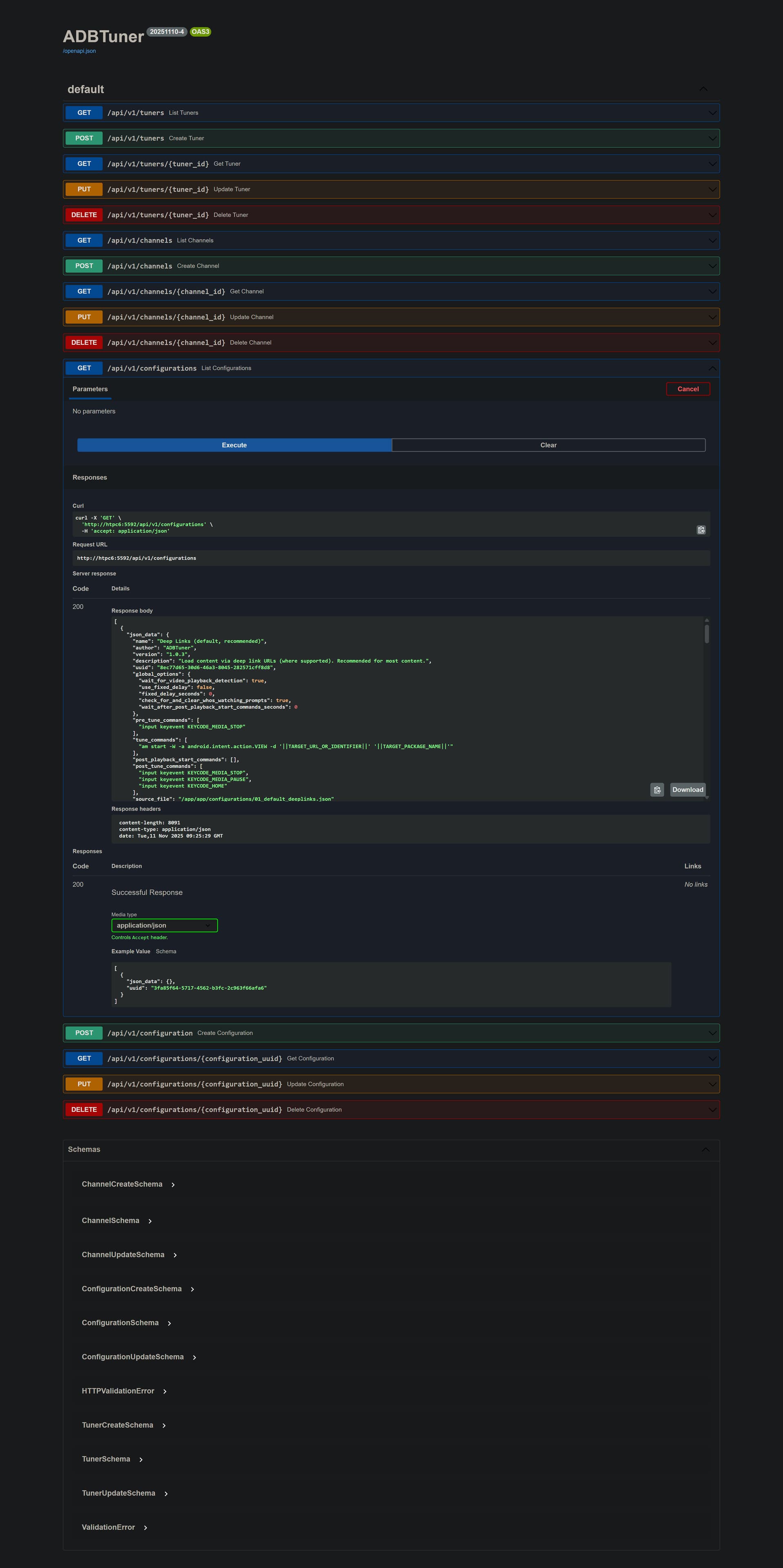
@bnhf A basic rest api was added for administrative functions. Swagger docs are available at /api/docs .
Be careful with this, there isn't a ton of validation in place outside of enforcing schema.

If anyone runs into any issues, please let me know. Thanks!

Testing the BETA on both my setups, the Onn 4K Plus and my DirecTV Osprey Deep Link (DODL) stacks. Both working as expected.

I don't use the Onn 4K setup too often, Deep Link to the standard DirecTV App, as my Osprey production just works. Onn boxes are my backup. But when testing today the Deep Link would open to the guide, not the channel. This is not BETA related problem as I rolled back to last dev version, same issue. I had to adjust my custom config to get it back to normal. Below for those who want to test.

    "global_options": {
        "wait_for_video_playback_detection": true,
        "use_fixed_delay": true,
        "fixed_delay_seconds": 10,
        "check_for_and_clear_whos_watching_prompts": false,
        "wait_after_post_playback_start_commands_seconds": 6
    },
    "pre_tune_commands": [
        "input keyevent 3"
    ],
    "tune_commands": [
        "am start -W -a android.intent.action.VIEW -S -d '||TARGET_URL_OR_IDENTIFIER||' '||TARGET_PACKAGE_NAME||'"
    ],
    "post_playback_start_commands": [],
    "post_tune_commands": [
        "am force-stop '||TARGET_PACKAGE_NAME||'",
        "input keyevent KEYCODE_HOME"
    ]

As to my DODL setup with Osprey boxes, it always works and is faster to tune with Deep Links. The only quirk is I have to put in a fake target app, one that is installed, to allow the scripting to run. ADBT will not allow target app to be a system app. In the case of Osprey, system package is com.att.tv.openvideo to view channels. Once getting past target app validation on tune with dummy target, my custom config manually targets the the "openvideo" app. I do not use TARGET_PACKAGE_NAME variable in my custom config. Any way to skip the Target Package check for this setup? Of course, not urgent at all as it all works flawlessly, just an OCD thing.

Lastly, I'd be happy to help test and maintain custom configs and channel lists for DirecTV if someone sets up a repository.

Thanks for all the hard work and commitment to this community!

Without those commands, you're probably not going to the live point in any event, which you definitely want to do. Somebody else reported this, and as you'll see I'm suggesting trying multiple fast forwards instead:

Looks like this is going to be great!

Listing configurations worked:

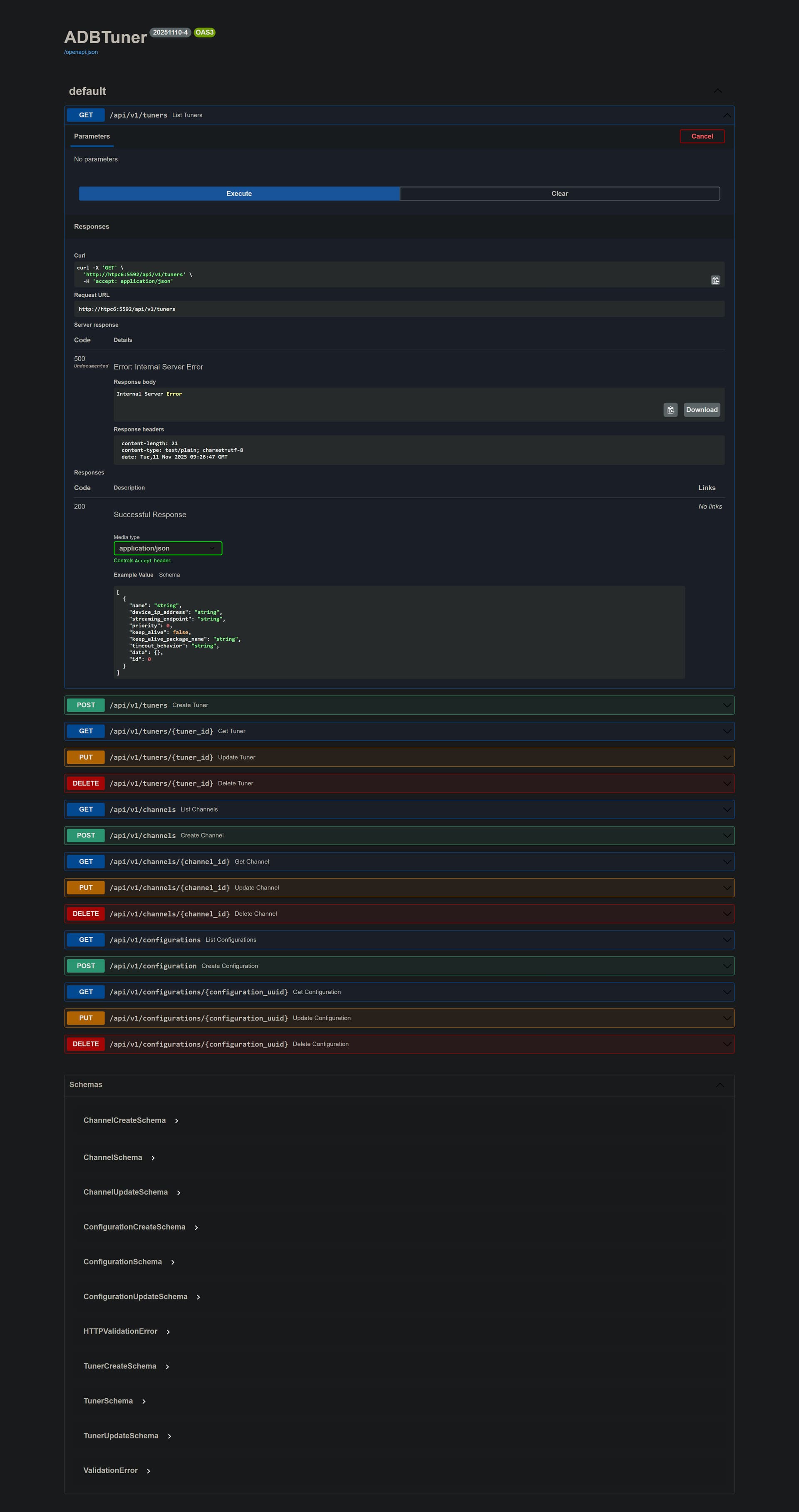
But, listing tuners and channels both failed with 500 errors: