
Heres the second image.
1 Like
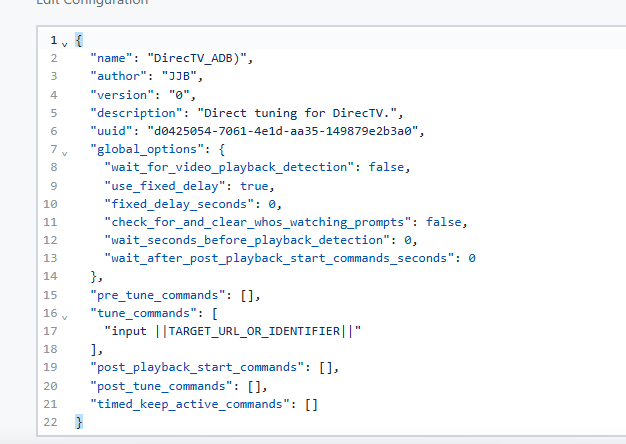
If this configuration worked as-is then replacing the "tune_command" block with the following and putting the channel number in the "URL or Identifier" box for each channel should get things working correctly.
"tune_commands": [
    {"ADB_NUMBER_INPUT_SEQUENCE": {"number": "||TARGET_URL_OR_IDENTIFIER||", "input_delay_seconds": 0.1}}
]
1 Like
Thank you. I’ll try it later today and let you know the outcome.
Works great. Thanks for fixing this and the bonus of not having to manually convert the channel numbers into keyevents.
Hello. is there a way to force a tuner to unlock using a command in the tuning configuration? Thanks
1 Like
What are you looking to solve by doing this? If a tuner isn't being unlocked when it should be that's an issue worth investigating.
Technically the answer is yes because you can hit ADBTuner's own API endpoint, but you wouldn't know which tuner id to address.
"tune_commands": [
  {
    "HTTP": {
      "method": "POST",
      "action": "http://127.0.0.1:5593/api/v1/tuners/<tuner id>/unlock",
      "timeout": 5
    }
  }
]
1 Like
Thank You turtletank!!!! WOW! WOW! not only for your code but for what it also does for me. Your code demonstrated how send HTTP post commands using your interface. With this I now have full control over all my A/V equipment, home automation system, security cameras, really anything that I own that accepts HTTP commands. This really rocks. Now based on what channels I select I can configure my sound equipment, control lighting, set display characteristics, etc... It truly rocks. Now for why i needed the unlock. When you have only one tuner configured, and you change channels, the change is delayed by approximately 7 seconds waiting for adbtuner to detect the media stream ended and release the tuner for the channel change. Releasing the tuner immediately following the channel change, allows channel change to occur without the delay. This off course is optimal for single tuner single user configurations. With multiple tuners, set at 0 priority you don't incur the delay as long as one the turners is in an idle state - but if all tuners are used you again incur the 8 second delay. Obviously not locking the tuner would open the possibility of a tuner being hijacked by a different user or a timed recording. Is there any way to unlock the tuner faster or is there a different way to prevent hijacking?
Also, when I originally reached out to you, I was working with the DirectTV streaming devices and using ADB to control/change channels on the devices. Well -- this has failed as these devices must have some protections built in for ADB. Initially you can activate Developer mode and USB debugging but after rebooting the device a few times (maybe 10) the device will no longer stream content if Developer mode is enabled. So I can no longer access the devices using ADB, but the device does accept external control. I used the Home Assistant AndroidTV plugin to access the remote features of the DirecTV device. By using some trickery I can change the channel of the DirecTv device using adbtuner. Basically I have a Onn device configured as tuner recognized by adbtuner but send a seperate command using a modified tuning configuration to Home Assistant to tune the DirecTv device. It works but it's messy. Is there any way to add a tuner without ADB access to adbtuner. As I said I can control the device but not without tricking adbtuner by using the Onn. Anything you can offer to assist is deeply appreciated. Your work is awesome.
1 Like
@turtletank Given the extent of what @Jubeejb is trying to do, any thought that ah4c might be the better project for him?
1 Like
Well I think ADBTuner is a capable little app that can do a lot of things that haven't been explored yet. As a hobbyist I'd like to see what @Jubeejb can pull off.
But yeah, if someone is looking to automate their home on each channel change then being able to run whatever code they want inside the ah4c container will certainly make it easier to achieve that goal. edit: The DirecTV thing might be easier to figure out as well.
3 Likes
Set this variable in your docker environment:
KNOWN_STREAM_DEFAULT_TIMEOUT=8
It defaults to 8 seconds. You can lower it but you have to make sure enough time is allotted for for whatever post tune commands you have configured. 8 seconds is playing it safe, but it also gives the playback device a nice window to reconnect without having to load the content again.
I'm not quite sure what you are explaining about the rest. Is the Home Assistant plugin sending remote commands to the DirecTV box? Does it provide a REST interface?
1 Like
Hello, Thank you for your help. I'm not familiar with ah4c. As I noted previously I'm not a programmer. I integrate solutions using products the much smarter folks developed. As an example - I use Home Assistant not for home automation but because it has an extensive library of plugins that provide simple interfaces to a wide variety of devices and software - such as Node-Red. I use Node-Red and its large library of nodes and functions that let me interface products like ADBtuner with products like the Directv device. I know just enough JSON and YAML to pass values between the products. I run Docker on and RPI and manage the environment using Portainer. This is my way of saying - I have no idea where or how to set that timeout variable in my docker environment, but it certainly appears to a solution for my challenge. Can you tell me where/how I set that variable?
As for the issue regarding the DirecTV device, yes I can provide the plugin with inputs that can send commands to the Directv device like a remote control without using ADB. Like tune to channel 202 and the device tunes to channel 202. Thats all I know about the plugin. So to make this happen using ADBtuner I modified a tuning configuration to send an HTTP POST command such as "http://192.XXX.XXX.59:1880/user?||TARGET_URL_OR_IDENTIFIER||" to my Node-Red server. When it's received by Node-Red I scan and search the header information for user? which provides the channel number, I move the data to an interface node for Home Assistant that directs the command and channel number to the device. For all this to happen I only needed to provide one line of JSON.
--- {"media_content_id": payload, "media_content_type": "channel"} --- Although this may sound complicated - the solution tunes the device in 1 second. This simple solution would work well in ADBtuner if I could add the DirecTV device without having to enable ADB or a need for a Package Name as it's not relevant to tune the DirecTV device. Is that doable? Thanks so much for all your assistance.
1 Like
Not to hijack the thread, but we actually have a minimal install for AH4C now that is currently in beta and just about ready to go. That I believe is deployable through Olive Tin for Channels, aka Project OneClick. It walks you through a setup wizard, and then there's just a settings page to configure everything, scripts and such, that allow you to tune. If you're using Osprey boxes, which it sounds like you might be, there are scripts that just work for those out of the box. You don't have to do much. And you can pull in all of your channels into an M3U using the action and project one click to grab all those. This beta that I've been working on has a goal of making it as easy as possible to get up and running for new users. So, I would just pick the tool that works best for you. If it comes to tuning by channel number, people have been doing it with AH4C for a couple of years now with very few issues. If you have any questions, feel free to ask in the dedicated thread to not hijack this one, of course.
1 Like
Thank you so much. I'll check it out. It does appear it might be what I'm looking for.
2 Likes
Thank you turtletank, I did manage to figure out how to change the variable. Any assistance with my adb problem is greatly appreciated.
You have to enable developer options and USB debugging. There is no way around ADB with this tool or ah4c.
1 Like
Here's my ADBTuner tuner configuration for the Spectrum app on a Fire Stick 4k Max. I'm still working on it, but it's a better start than anything else AI and I have found. The current FS4K Max still has the ADB interface we need. The new cheap HD has the new OS without ADB. Not sure which other versions have which OS, but the current Max is a safe choice.
{
  "name": "Spectrum Tune Only Configuration ADBTuner example tuning commands",
  "author": "Dan",
  "version": "0",
  "description": "Spectrum double DPAD_UP focus, and discrete keyevent timing.",
  "uuid": "b3ecf82b-41c2-4695-9720-8c5e0d9b65f9",
  "global_options": {
    "wait_for_video_playback_detection": true,
    "use_fixed_delay": false,
    "fixed_delay_seconds": 0,
    "wait_seconds_before_playback_detection": 15,
    "wait_after_post_playback_start_commands_seconds": 5
  },
  "pre_tune_commands": [
    {
      "ADB": {
        "commands": [
          "input keyevent KEYCODE_MEDIA_STOP",
          "adbtuner_open_app ||TARGET_PACKAGE_NAME||"
        ]
      }
    },
    {
      "ADB": {
        "command": "sleep 2"
      }
    },
    {
      "ADB": {
        "command": "input keyevent KEYCODE_DPAD_DOWN"
      }
    },
    {
      "ADB": {
        "command": "input keyevent KEYCODE_ENTER"
      }
    }
  ],
  "tune_commands": [
    {
      "ADB_NUMBER_INPUT_SEQUENCE": {
        "number": "||TARGET_URL_OR_IDENTIFIER||",
        "input_delay_seconds": 0.25
      }
    },
    {
      "HTTP": {
        "method": "GET",
        "action": "http://||TARGET_DEVICE_IP_ADDRESS||/tuned",
        "timeout": 5
      }
    }
  ],
  "tune_match_text_commands": [],
  "post_playback_start_commands": [],
  "post_tune_commands": [
    {
      "ADB": {
        "command": "input keyevent KEYCODE_HOME"
      }
    }
  ],
  "timed_keep_active_commands": []
}
I have ADBTuner setup to record F1 on Apple TV (on an Amazon FireStick) via FruitDeepLinks. However, it gets stuck on this screen rather than starting the event:
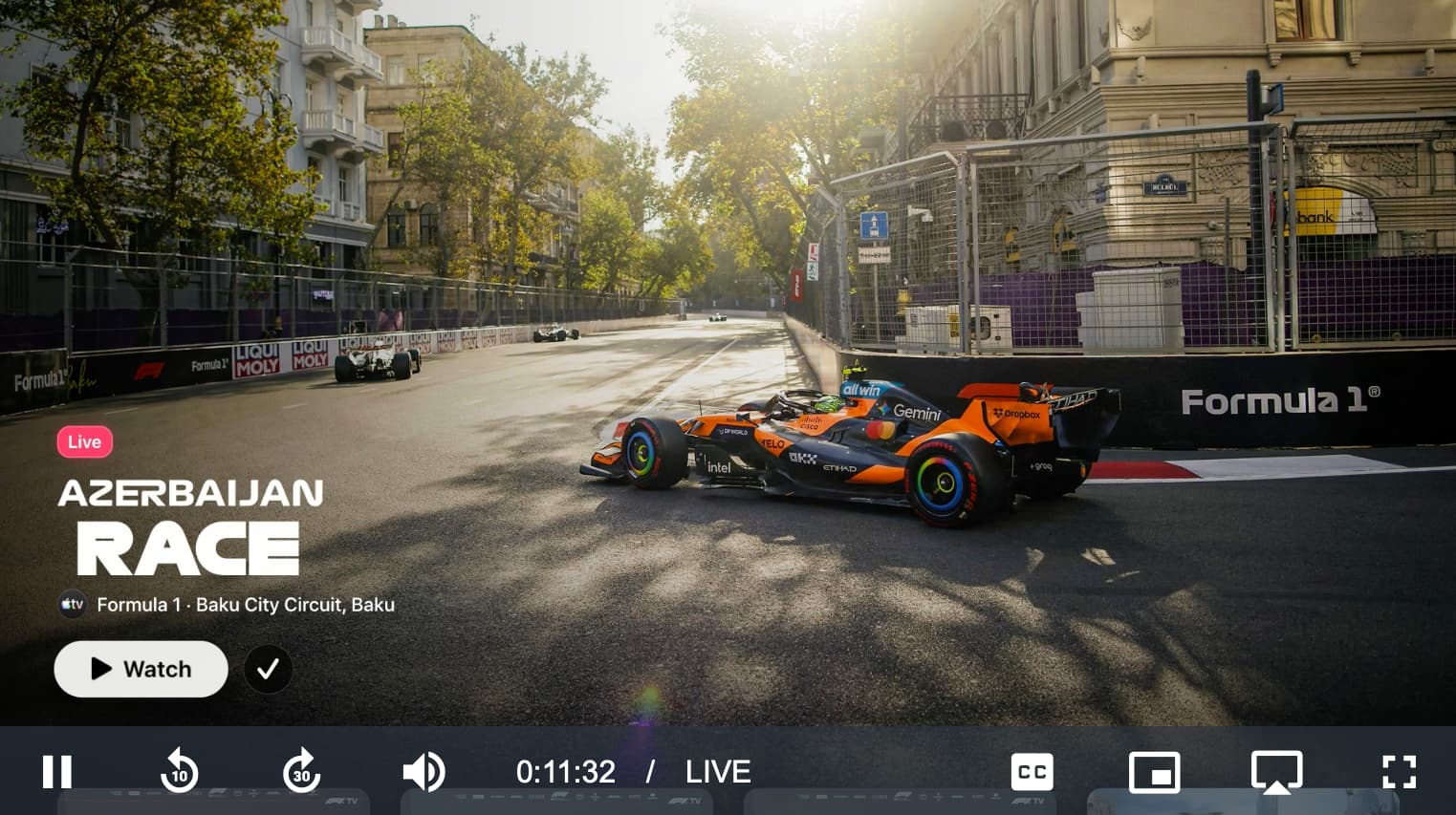
Looking at the logs it appears as though it is not recognizing the buttons on screen and not clicking through:
Starting tune match text monitoring. Match commands: [{'match_text': ['watch', 'live', 'mls', 'mlb', "don't allow"], 'commands': [{'type': 'ADB', 'command': 'input keyevent KEYCODE_DPAD_CENTER'}], 'start_checking_after_seconds': 5}]
Tuning completed after 12.4 seconds. Display was None, application (com.apple.atve.amazon.appletv) was running.
On screen text: '“tv formula 1 - baku city circuit baku  =d -  a et ee  ee af ey ee ete wt soy'
Text match result: Text to match: ['watch', 'live', 'mls', 'mlb', "don't allow"]. Matches found: None.
On screen text: '“tv formula 1 - baku city circuit baku  c= -  sn er a sw (aes ee'
Text match result: Text to match: ['watch', 'live', 'mls', 'mlb', "don't allow"]. Matches found: None.
On screen text: 'sa ae == a ae we os awe ='
Text match result: Text to match: ['watch', 'live', 'mls', 'mlb', "don't allow"]. Matches found: None.
On screen text: '“tv formula 1 - baku city circuit baku  =d -  a et ee  ee af ey ee ete wt soy'
@bhnf suggested in the OliveTin thread where we were originally discussing getting this all working that maybe there are some tweaks that could be made to Tesseract OCR to more accurately read the text in those buttons @turtletank
Thanks for the heads up. I will take a look.
1 Like
I've got something coming soon for Spectrum that will make managing it in ADBTuner and Roku Bridge much, much, much easier, but in the meantime you can see the configurations I'm using: