
I've got something coming soon for Spectrum that will make managing it in ADBTuner and Roku Bridge much, much, much easier, but in the meantime you can see the configurations I'm using:
Here is my Config for DirecTV that works with FireTV and ONN 4k boxes.
{
  "name": "DirecTV for ONN",
  "author": "Anvil",
  "version": "1",
  "description": "Tunes DirecTV for ONN and FireTV.",
  "uuid": "c4a41390-263c-45fc-ad2b-7854e6b09bc2",
  "global_options": {
    "wait_for_video_playback_detection": false,
    "use_fixed_delay": true,
    "fixed_delay_seconds": 2,
    "check_for_and_clear_whos_watching_prompts": false,
    "wait_after_post_playback_start_commands_seconds": 0
  },
  "pre_tune_commands": [],
  "tune_commands": [
    "am start -S -W -n '||TARGET_PACKAGE_NAME||'/$(cmd package resolve-activity -a android.intent.action.MAIN '||TARGET_PACKAGE_NAME||' | awk -F= '/name=/{print $2; exit}') -a android.intent.action.VIEW -d '||TARGET_URL_OR_IDENTIFIER||'",
    "sleep 5; am start -W -n '||TARGET_PACKAGE_NAME||'/$(cmd package resolve-activity -a android.intent.action.MAIN '||TARGET_PACKAGE_NAME||' | awk -F= '/name=/{print $2; exit}') -a android.intent.action.VIEW -d '||TARGET_URL_OR_IDENTIFIER||'"
  ],
  "post_playback_start_commands": [],
  "post_tune_commands": [
    "input keyevent KEYCODE_MEDIA_STOP",
    "input keyevent KEYCODE_HOME"
  ],
  "timed_keep_active_commands": [
    {
      "run_every_minutes": 60,
      "commands": [
        "input keyevent KEYCODE_MEDIA_PLAY"
      ]
    }
  ]
}
@turtletank I just set up a separate instance of ADBTuner to test with Chromecast and the beta feature to automatically enable ADB. I don't know how you pulled that off, but it works. Its like Witchcraft.
Its been a while since I updated ADBTuner. Some major progress has taken place.
Thankyou!
1 Like
I don't think this is an adbtuner issue, but seems like the right place to ask.
I setup my instance last month, just for the ESPN broadcast channels:
- LinkPi ENC1-V3P with latest firmware + Onn 4K Plus
- adbtuner 20260815-1 installed on Synology NAS
- latest Configuration and ESPN Stations imported
It works but I regularly miss recordings due to some glitch with the ESPN app. For example just now I tried to tune into ESPN using the Channels app on my main TV. It follows the script perfectly up to hitting the "Watch Live" button, but then I get "There was an error playing this video" and it's stuck. I then tried to tune ESPN2 - again everything works up to the "Watch Live" button, but then I got "This channel is not part of your package" (which it is). I then went to my desktop, connected my monitor to the Onn and I'm able to watch both channels just fine. I reconnect the ONN to the LinkPi, go back to my TV and everything is fine. In other cases I've seen everything work, but the app just takes me to a gray screen. I would say my success rate for recordings was 100% initially but is now closer to 50%.
Anyone having a similar experience? Any suggestions? Thanks.
1 Like
Absolutely. The same game changer I talked about in this post is now available for the ESPN linear channels. It's very, very nice -- and will put the issues you're describing above in the rearview mirror:
1 Like
A post was merged into an existing topic: AndroidHDMI for Channels (ah4c): A virtual channel tuner using HDMI Encoder(s) + streaming stick(s)
A post was merged into an existing topic: AndroidHDMI for Channels (ah4c): A virtual channel tuner using HDMI Encoder(s) + streaming stick(s)
@turtletank, saw a weird issue. Not sure if it is a one-off or what, but something happened and ADBTuner thought that all tuners were full when they were all open. I traced it back in the logs to something that seemed to start the day before and went on for 16 hours:
2026-10-10 15:37:36.328 | 2026-10-10 15:37:36.314 - lib.adb - [Pool 1] ADB: 10.255.1.168 - reconnected after a dropped connection.
2026-10-10 15:38:45.070 | 2026-10-10 15:38:45.069 - lib.adb - [Pool 1] ADB: 10.255.1.168 - reconnected after a dropped connection.
2026-10-10 15:38:51.289 | 2026-10-10 15:38:51.288 - lib.adb - [Pool 1] ADB: 10.255.1.168 - command failed, device is not responding. Check for approval popup on device.
2026-10-10 15:38:56.211 | 2026-10-10 15:38:56.210 - lib.adb - Reading from 10.255.1.168:5555 timed out (2 seconds)
2026-10-10 15:38:56.212 | 2026-10-10 15:38:56.211 - lib.adb - [Pool 1] ADB: Connection error. Device may be waking up. Trying again.
2026-10-10 15:38:57.213 | 2026-10-10 15:38:57.213 - lib.adb - [Pool 1] ADB: 10.255.1.168 - reachable but not connected, waiting 10s before the next attempt.
2026-10-10 15:39:31.121 | 2026-10-10 15:39:31.120 - lib.adb - [Pool 1] ADB: 10.255.1.168:5555 unreachable, skipping connect.
2026-10-10 15:39:31.133 | 2026-10-10 15:39:31.132 - lib.adb - [Pool 1] ADB: 10.255.1.168:5555 is reachable again.
2026-10-10 15:39:34.119 | 2026-10-10 15:39:34.119 - lib.adb - Reading from 10.255.1.168:5555 timed out (2 seconds)
2026-10-10 15:39:34.119 | 2026-10-10 15:39:34.119 - lib.adb - [Pool 1] ADB: Connection error. Device may be waking up. Trying again.
2026-10-10 15:39:35.119 | 2026-10-10 15:39:35.119 - lib.adb - [Pool 1] ADB: 10.255.1.168 - reachable but not connected, waiting 20s before the next attempt.
2026-10-10 15:40:08.948 | 2026-10-10 15:40:08.947 - lib.adb - [Pool 1] ADB: 10.255.1.168 - reconnected after a dropped connection.
2026-10-10 15:46:37.925 | 2026-10-10 15:46:37.914 - lib.adb - [Pool 1] ADB: 10.255.1.168 - reconnected after a dropped connection.
2026-10-10 15:46:41.190 | 2026-10-10 15:46:41.189 - lib.adb - [Pool 1] ADB: 10.255.1.168 - command failed, device is not responding. Check for approval popup on device.
2026-10-10 15:46:41.365 | 2026-10-10 15:46:41.364 - lib.adb - Unknown command: 1701322796 = 'b', he'' (arg0 = 1952999273, arg1 = 909193789, msg = 'b', height=2160, fps=23.97'')
2026-10-10 15:46:41.366 | 2026-10-10 15:46:41.364 - lib.adb - [Pool 1] ADB: Command error
2026-10-10 15:47:13.314 | 2026-10-10 15:47:13.313 - lib.adb - Unknown command: 892481590 = 'b'6025'' (arg0 = 1818304556, arg1 = 1852990836, msg = 'b'6025, alternativeRefresh'')
2026-10-10 15:47:13.314 | 2026-10-10 15:47:13.314 - lib.adb - [Pool 1] ADB: Command error
2026-10-10 15:47:13.314 | 2026-10-10 15:47:13.314 - lib.adb - Unknown command: 1702125906 = 'b'Rate'' (arg0 = 1566260595, arg1 = 2065706109, msg = 'b'Rates=[]}, {id=181, widt'')
2026-10-10 15:47:13.314 | 2026-10-10 15:47:13.314 - lib.adb - [Pool 1] ADB: Command error
2026-10-10 15:47:45.297 | 2026-10-10 15:47:45.296 - lib.adb - Unknown command: 942882152 = 'b'h=38'' (arg0 = 539766836, arg1 = 1734960488, msg = 'b'h=3840, height=2160, fps'')
...
2026-10-11 07:25:27.936 | 2026-10-11 07:25:27.935 - lib.adb - [Pool 1] ADB: Command error
2026-10-11 07:25:27.936 | 2026-10-11 07:25:27.935 - lib.adb - Unknown command: 1030975590 = 'b'fps='' (arg0 = 808333366, arg1 = 808464432, msg = 'b'fps=60.000004, alternati'')
2026-10-11 07:25:27.936 | 2026-10-11 07:25:27.935 - lib.adb - [Pool 1] ADB: Command error
2026-10-11 07:25:58.251 | 2026-10-11 07:25:58.250 - lib.adb - [Pool 1] ADB: 10.255.1.168 - reconnected after a dropped connection.
2026-10-11 07:49:10.536 | 2026-10-11 07:49:10.534 - tuner_management - Caching installed apps list for all tuners
2026-10-11 07:49:11.106 | 2026-10-11 07:49:11.106 - tuner_management - Cached installed apps for tuner Link Pi ENC1-V3 (1).
2026-10-11 08:50:02.117 | 2026-10-11 08:50:02.087 - tuner_management - Caching installed apps list for all tuners
2026-10-11 09:25:25.678 | 2026-10-11 09:25:25.660 - stream - [Tune Cm32kCLdnCJBgFEBvd2kLh] localhost:7968 | Mozilla/5.0 (Windows NT 10.0; Win64; x64) AppleWebKit/537.36 (KHTML, like Gecko) Chrome/129.0.0.0 Safari/537.36
2026-10-11 09:25:26.599 | 2026-10-11 09:25:26.599 - stream - [Tune (Cm32kCLdnCJBgFEBvd2kLh)] No active tuners found for NFL Network HD. Reserving a new tuner.
2026-10-11 09:25:26.615 | 2026-10-11 09:25:26.614 - tuner_management - [Tune Cm32kCLdnCJBgFEBvd2kLh] Attempting to reserve tuner for: ['com.fastchannels.player'].
...
2026-10-11 09:25:36.759 | 2026-10-11 09:25:36.758 - stream - [Tune (Cm32kCLdnCJBgFEBvd2kLh)] No tuners available for: ['com.fastchannels.player'].
2026-10-11 09:25:40.064 | 2026-10-11 09:25:40.063 - stream - [Tune 5QEgXMxZRfPVJS729v6WHS] localhost:7968 | Mozilla/5.0 (Windows NT 10.0; Win64; x64) AppleWebKit/537.36 (KHTML, like Gecko) Chrome/129.0.0.0 Safari/537.36
...
It didn't matter the method or what I tried to tune to, it was all the same result. I only fixed it by force restarting the containers, which had been running for 15 days at that point.
1 Like
Sorry about that. Thanks for the heads up. I will have a fix for this in the next release.
Interesting... I was reading about FastChannels recently so I could pickup the MotoGP FAST channel, and I saw the conversations about extending to other providers.
@turtletank Text match not detecting the Prime Video profile screen on Android TV (TS4K)
Setup: ADBTuner with the FruitDeepLinks - Prime Video v3.0 (FireTV and AndroidTV) config by bnhf, tuning a TiVo Stream 4K (192.168.68.109) through an HDMI encoder.
Problem: Prime opens to the "Who's watching?" profile screen and stays there. The config's tune match text is ["who's watching", 'watch live', 'new', 'guest'] with DPAD_CENTER as the command, but ADBTuner never finds a match. In the attached log, 26 checks run from +10s to +1:21 and every one returns "Matches found: None." Playback failure is flagged at +32s.
What's been ruled out:
- The deeplink is correct. ADBTuner receives the Prime Video: Get the app format, and selecting a profile manually goes straight to the correct splash screen for the event.
- The text is readable. bnhf captured the same profile screen on an ONN 4K stick and ran it through tesseract with default settings; it returned the profile names, Guest and New at 96% confidence.
- The config is right. The match list covers the words on both the profile and splash screens.
- On a FireStick, the profile screen doesn't appear at all, so this only affects generic Android TV devices.
So the screen captures cleanly and tesseract reads it outside ADBTuner, but ADBTuner's text matching returns nothing. Another user reported a similar tesseract issue here recently, which may be the same root cause.
Attached: tune log, and a screenshot of the TS4K on the profile screen.
Any ideas, or is there a debug setting that would show what text ADBTuner's OCR is actually extracting?
log:
Prime Test on TS4K at Oct 24, 2026, 1:19 PM
   +0.00s  192.168.68.124:5592 | channels-dvr/2026.10.21.2302 Go-http-client/1.1 (linux-x86_64)
   +0.00s  No active tuners found for Prime Test. Reserving a new tuner.
   +0.00s  Attempting to reserve tuner for: ['com.amazon.firebat', 'com.amazon.amazonvideo.livingroom'].
   +0.50s  Attempting to reserve tuner for: ['com.amazon.firebat', 'com.amazon.amazonvideo.livingroom'].
   +1.01s  Attempting to reserve tuner for: ['com.amazon.firebat', 'com.amazon.amazonvideo.livingroom'].
   +1.51s  Attempting to reserve tuner for: ['com.amazon.firebat', 'com.amazon.amazonvideo.livingroom'].
   +2.02s  Attempting to reserve tuner for: ['com.amazon.firebat', 'com.amazon.amazonvideo.livingroom'].
   +2.52s  Attempting to reserve tuner for: ['com.amazon.firebat', 'com.amazon.amazonvideo.livingroom'].
   +3.03s  Attempting to reserve tuner for: ['com.amazon.firebat', 'com.amazon.amazonvideo.livingroom'].
   +3.53s  Attempting to reserve tuner for: ['com.amazon.firebat', 'com.amazon.amazonvideo.livingroom'].
   +3.53s  Available Tuners:
   +3.54s  Name: TS4K Priority: 0
   +3.54s  Using first available tuner (by priority).
   +3.54s  Reserved Tuner: Name: TS4K Priority: 0
   +3.54s  Tuning to Prime Test on TS4K
   +3.54s  Using channel configuration: FruitDeepLinks - Prime Video v3.0 (FireTV and AndroidTV) (bnhf) (a176643f-b3b6-47fb-8527-47908d089695)
   +3.58s  MPEG null packets mode: Redirecting immediately to /proxy/1?requestKey=E6PG5dUCEDuNuAYKZnBTBJ
   +3.84s  ADB: 192.168.68.109 - pidof com.amazon.amazonvideo.livingroom
   +3.93s  Using https://app.primevideo.com/detail?gti=amzn1.dv.gti.2ca173b4-1d07-4930-bcee-32452c49c0ff to load channel.
   +3.93s  Executing pre-tune commands: [{'type': 'ADB', 'command': 'input keyevent KEYCODE_MEDIA_STOP'}, {'type': 'ADB', 'command': 'input keyevent KEYCODE_HOME'}]
   +3.93s  ADB: 192.168.68.109 - input keyevent KEYCODE_MEDIA_STOP
   +3.99s  ADB: 192.168.68.109 - input keyevent KEYCODE_HOME
   +4.10s  Executing tune commands: [{'type': 'ADB', 'command': "am start -n $(dumpsys package 'com.amazon.amazonvideo.livingroom' 2>/dev/null | awk '/https:/{getline; print $2; exit}') -d 'https://app.primevideo.com/detail?gti=amzn1.dv.gti.2ca173b4-1d07-4930-bcee-32452c49c0ff'"}]
   +4.10s  ADB: 192.168.68.109 - am start -n $(dumpsys package 'com.amazon.amazonvideo.livingroom' 2>/dev/null | awk '/https:/{getline; print $2; exit}') -d 'https://app.primevideo.com/detail?gti=amzn1.dv.gti.2ca173b4-1d07-4930-bcee-32452c49c0ff'
   +4.43s  Starting tune match text monitoring. Match commands: [{'match_text': ["who's watching", 'watch live', 'new', 'guest'], 'commands': [{'type': 'ADB', 'command': 'input keyevent KEYCODE_DPAD_CENTER'}], 'check_after_seconds': 5}]
   +5.00s  Fixed delay (5s) elapsed; starting real stream.
   +9.43s  Tuning completed after 9.43 seconds. Display was on, application (com.amazon.amazonvideo.livingroom) was running.
   +9.43s  Initializing keep active command schedule for tuner TS4K (1).
  +10.46s  Text match result: Text to match: ["who's watching", 'watch live', 'new', 'guest']. Matches found: None.
  +12.47s  Text match result: Text to match: ["who's watching", 'watch live', 'new', 'guest']. Matches found: None.
  +15.35s  Text match result: Text to match: ["who's watching", 'watch live', 'new', 'guest']. Matches found: None.
  +18.15s  Text match result: Text to match: ["who's watching", 'watch live', 'new', 'guest']. Matches found: None.
  +21.14s  Text match result: Text to match: ["who's watching", 'watch live', 'new', 'guest']. Matches found: None.
  +24.20s  Text match result: Text to match: ["who's watching", 'watch live', 'new', 'guest']. Matches found: None.
  +27.17s  Text match result: Text to match: ["who's watching", 'watch live', 'new', 'guest']. Matches found: None.
  +30.21s  Text match result: Text to match: ["who's watching", 'watch live', 'new', 'guest']. Matches found: None.
  +32.49s  Possible video playback failure (type 1)
  +33.26s  Text match result: Text to match: ["who's watching", 'watch live', 'new', 'guest']. Matches found: None.
  +36.25s  Text match result: Text to match: ["who's watching", 'watch live', 'new', 'guest']. Matches found: None.
  +39.23s  Text match result: Text to match: ["who's watching", 'watch live', 'new', 'guest']. Matches found: None.
  +42.42s  Text match result: Text to match: ["who's watching", 'watch live', 'new', 'guest']. Matches found: None.
  +45.25s  Text match result: Text to match: ["who's watching", 'watch live', 'new', 'guest']. Matches found: None.
  +48.33s  Text match result: Text to match: ["who's watching", 'watch live', 'new', 'guest']. Matches found: None.
  +51.30s  Text match result: Text to match: ["who's watching", 'watch live', 'new', 'guest']. Matches found: None.
  +54.30s  Text match result: Text to match: ["who's watching", 'watch live', 'new', 'guest']. Matches found: None.
  +57.34s  Text match result: Text to match: ["who's watching", 'watch live', 'new', 'guest']. Matches found: None.
    +1:00  Text match result: Text to match: ["who's watching", 'watch live', 'new', 'guest']. Matches found: None.
    +1:03  Text match result: Text to match: ["who's watching", 'watch live', 'new', 'guest']. Matches found: None.
    +1:06  Text match result: Text to match: ["who's watching", 'watch live', 'new', 'guest']. Matches found: None.
    +1:10  Text match result: Text to match: ["who's watching", 'watch live', 'new', 'guest']. Matches found: None.
    +1:12  Text match result: Text to match: ["who's watching", 'watch live', 'new', 'guest']. Matches found: None.
    +1:15  Text match result: Text to match: ["who's watching", 'watch live', 'new', 'guest']. Matches found: None.
    +1:18  Text match result: Text to match: ["who's watching", 'watch live', 'new', 'guest']. Matches found: None.
    +1:21  Text match result: Text to match: ["who's watching", 'watch live', 'new', 'guest']. Matches found: None.
    +3:25  Releasing tuner 1 as it has been inactive for 10 seconds.
    +3:25  Releasing tuner: {'lock_obtained': 1792862364, 'tuner_name': 'TS4K', 'name': 'Prime Test', 'number': 9599, 'provider_name': '', 'tuner_id': 1, 'channel_id': 150, 'url_or_identifier': 'https://app.primevideo.com/detail?gti=amzn1.dv.gti.2ca173b4-1d07-4930-bcee-32452c49c0ff', 'tuning_status': 'tuned', 'request_key': 'E6PG5dUCEDuNuAYKZnBTBJ', 'target_package': 'com.amazon.amazonvideo.livingroom', 'playback_monitor': {'last': 3560682158984581, 'stalled_since': 1792862375.4381542, 'reported': True}}
    +3:25  Using configuration: FruitDeepLinks - Prime Video v3.0 (FireTV and AndroidTV) (bnhf) (a176643f-b3b6-47fb-8527-47908d089695) for channel cleanup.
    +3:25  Post tune commands: [{'type': 'ADB', 'command': 'input keyevent KEYCODE_MEDIA_STOP'}, {'type': 'ADB', 'command': 'input keyevent KEYCODE_HOME'}]
    +3:25  [Pool 1] ADB: 192.168.68.109 - input keyevent KEYCODE_MEDIA_STOP
    +3:26  [Pool 1] ADB: 192.168.68.109 - input keyevent KEYCODE_HOME
    +3:26  Released tuner (1).
    +3:26  Cleanup complete. TS4K (Prime Test)
Can you share the screenshot? I will look into this. Thanks!
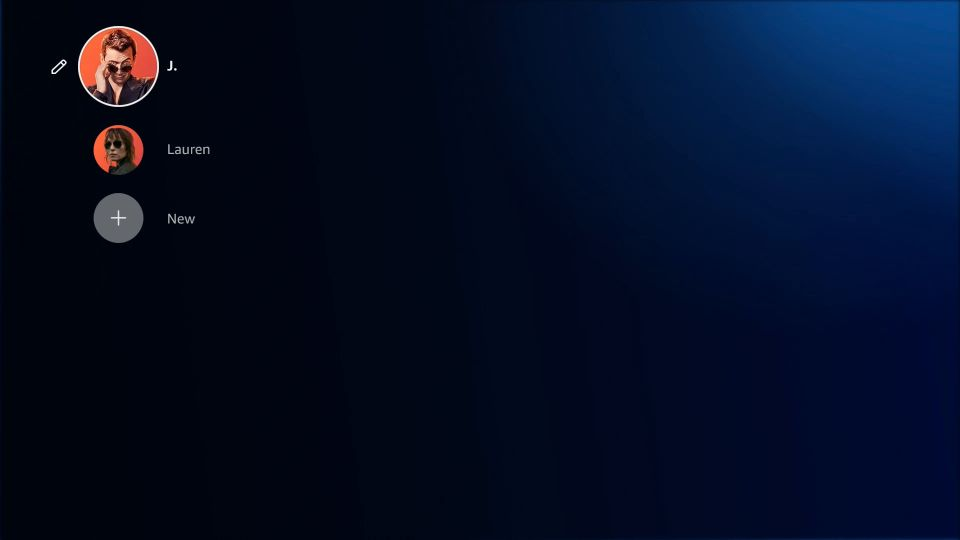
Update: Prime Video working on TS4K
I got Prime lanes working on my TiVo Stream 4K (Android TV) with two adult Household profiles. On the TS4K, ADBTuner's text matching reads no on-screen text once Prime is open, so the v3.0 config never detected the "Who's watching?" screen.
The fix/hack was to replace text matching with timed key presses: launch the deep link, wait 7 seconds and press Select to pick the top profile, then wait 5 seconds and press Select on Watch Live.
"tune_commands": [
  "am start -n $(dumpsys package '||TARGET_PACKAGE_NAME||' 2>/dev/null | awk '/https:/{getline; print $2; exit}') -d '||TARGET_URL_OR_IDENTIFIER||'",
  "sleep 7",
  "input keyevent KEYCODE_DPAD_CENTER",
  "sleep 5",
  "input keyevent KEYCODE_DPAD_CENTER"
],
"tune_match_text_commands": [],
1 Like
Timing related solutions can work, but are not ideal -- as such timings can vary by device, or other factors.
Fixing the identification and selection of profiles, or other prompts is the real fix.
Totally agree hence the hack reference.
Did you delete your Guest profile? With that gone, New is the only potential match word left.
Also, did you try adding J. and Lauren to your match words?
Yes, guest was deleted and I added J. and Lauren to the match words.
- Screen shows "J.", "Lauren", and "New" (screenshots based on the screenshots from ADBTuner's tuning start and playback start).
- Every check returns "Matches found: None", and no "On screen text" is logged while the picker is up.
- Plain Tesseract reads "Lauren" from the same screenshot.
So the capture looks fine, but the text matching isn't reading it.