Yes. This is fixed!
Awesome. Much more useful that way. Thanks!

Yes. This is fixed!
Awesome. Much more useful that way. Thanks!
You are amazing staying on top of this project. Your efforts are greatly appreciated.
I've been running the :experimental version of adbtuner for a while and it is working - I briefly tried the :development version and it didn't release the tuners - I attempted this about 3-4 times and it never released, so I went back to the :experimental version - testing with both FireTV and Onn TV devices and YouttubeTV
Update to my last post on the "dimming" issue on the NBC app. As refresher, you can make the dim screen go away if you bring up the menu then exit. I do this with an ADBTuner special config.
Seems the app now responds differently, possibly an update. Used to need to use the "select" Menu to bring up the Live Guide option. Now the app does the same with selecting "down" remote command. This actually makes the process a touch smoother. Here is the tune portion of the updated config:
 "tune_commands": [
        "am start -W -a android.intent.action.VIEW -d '||TARGET_URL_OR_IDENTIFIER||' '||TARGET_PACKAGE_NAME||'",
        "sleep 5",
        "input keyevent 20",
        "sleep 1",
        "input keyevent 19",
        "sleep 1",
        "input keyevent 23",
        "sleep 1",
        "input keyevent 4"
The process above is remote commands:
The sleep timers are depending on the speed of your device. My Onn 4K boxes need a full second, but my Onn 4K Plus test box can get buy with less. You'll have to test your own setup.
@bnhf , do adbtuner change the video signal in any way? Or is the signal exactly the same as from the linkpi?
ADBTuner is only starts the stream. The LinkPi is the device which sends video to Channels. The Channels DVR may REMUX the H264 stream coming from the LinkPi, but it should be very fast.
A couple of small updates in the development version (20250802-1):
Please refresh your browser window to make sure you are using the current version of the web interface.
@JT-DFW thank you for the feedback. Were you seeing incorrectly locked tuners in normal use via Channels (or other player), or in testing via the web interface?
Overall I spent a good amount of time this past week borrowing hardware and duplicating configurations, but I am still unable to reproduce the issues related to incorrectly locked tuners. If anyone has a way to reliably reproduce this I would very much appreciate a detailed list of steps (ex. click preview button, wait for video to play, click X icon to close video popup, etc.).
Some general notes (development version):
[Tune SHmpaJRPRWbx2fqE6fWMRf] in the logs. This identifier is used to track the status of each tune operation through its entire lifecycle.My recent troubleshooting has been focused on the web interface. I haven't been able to duplicate this, but my theory is that that was, or still is, a bug that causes the player to silently continue streaming in the background even after the modal popup window is closed. If this happens a few times you may end up hitting the browser's per-domain connection limit (6) and then everything in the web interface becomes non-responsive until all ADBTuner windows/tabs are closed.
That was a lot of words. Anyway, thanks as always for any feedback and troubleshooting assistance!
I was seeing locked tuners while testing from the channels DVR web interface / guide - I click on the program guide, select "watch now", watch for a while then click "stop" - I just downloaded the latest development version and did a quick test and tuners are still not being released - I tested with both a FireTV 4K max (android 9) and an Onn TV HD (android 14) and both exhibited the problem with YTTV - I then tested from a Channels DVR client on an Onn 4K stick connected to a TV and the tuner wasn't released in that case either - I can confirm pushing the release button on the ADBTuner page now works - will have to revert back to the :experimental version for now...
EDIT: forgot to mention I am running Channels DVR and ADBTuner in Dockers on Unraid 7.1.4 - in case that matters
Thanks. I can try to duplicate that configuration to see if it changes anything. I tested on a Mac and in Synology DSM so far with no luck.
I pushed a small update (20250803-5) this morning to the development version. The only change is some additional logging related to active (locked) tuners.
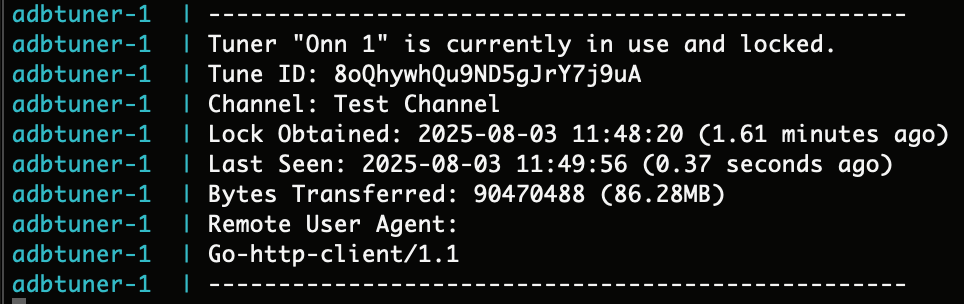
Every 30 seconds a log entry like the screenshot below will be written for each locked tuner. If a tuner is supposed to be unlocked, but there is still an active connection that is consuming data we need to figure out what is causing that to happen. I wanted to include the client ip address here, but that information is not easily available within a container so we will have to make do without.
I copied part of the ADBTuner docker log file into a text file for the 2 cases where it works (:experimental) and doesn't (:development) - but I am not sure how to upload it - here is the critical part after I press stop with the :development version:
2025-08-03 11:21:28.606 - lib.adb - [Tune (6NjEdp8JmvYpAVwtz4eF7n)] ADB: 192.168.2.113 - input keyevent KEYCODE_MEDIA_STOP
2025-08-03 11:21:29.754 - lib.adb - [Tune (6NjEdp8JmvYpAVwtz4eF7n)] ADB: 192.168.2.113 - am start -W -a android.intent.action.VIEW -d 'https://tv.youtube.com/watch/g5BmB1qXulc?onboard=1' 'com.amazon.firetv.youtube.tv'
2025-08-03 11:21:32.226 - lib.adb - [Tune (6NjEdp8JmvYpAVwtz4eF7n)] Detected 99.94% black pixels. Assuming HDCP is active and video is playing.
2025-08-03 11:21:32.227 - stream - [Tune 6NjEdp8JmvYpAVwtz4eF7n] Waiting for playback start. Status: playing
2025-08-03 11:21:32.227 - stream - [Tune 6NjEdp8JmvYpAVwtz4eF7n] Tuning completed in 4.32 seconds. [Tune 6NjEdp8JmvYpAVwtz4eF7n] Display was on, application (com.amazon.firetv.youtube.tv) was running.
2025-08-03 11:21:32.227 - lib.adb - [Tune (6NjEdp8JmvYpAVwtz4eF7n)] ADB: Closing connection - 192.168.2.113
2025-08-03 11:21:32.227 - uvicorn.access - 192.168.2.70:0 - "GET /stream/11 HTTP/1.1" 307
2025/08/03 11:21:32 [PROXY] 192.168.2.70 -> GET "/proxy/6?requestKey=6NjEdp8JmvYpAVwtz4eF7n" -> "http://192.168.2.220:8090/stream0"
2025-08-03 11:21:43.480 - server - Locked tuners: (1, [('6NjEdp8JmvYpAVwtz4eF7n', 1754238087)])
2025-08-03 11:22:01.981 - tuner_management - Releasing tuner 6 as it has been inactive for 5 seconds.
2025-08-03 11:22:02.051 - lib.adb - [Tune 6NjEdp8JmvYpAVwtz4eF7n] ADB: 192.168.2.113 - Connected.
2025-08-03 11:22:02.173 - server - Tuner monitor crashed. Restarting. Error: 'NoneType' object is not subscriptable
2025-08-03 11:22:05.187 - tuner_management - Releasing tuner 6 as it has been inactive for 9 seconds.
2025-08-03 11:22:05.249 - lib.adb - [Tune 6NjEdp8JmvYpAVwtz4eF7n] ADB: 192.168.2.113 - Connected.
2025-08-03 11:22:05.393 - server - Tuner monitor crashed. Restarting. Error: 'NoneType' object is not subscriptable
The last part seems to repeat until I manually release the tuner - hope it helps
This is very helpful, thank you. I just pushed an update (20250803-6) that adds more logging in this area. Hopefully this helps us get to the root cause. Whenever you have the free time, if you could run another test and get me the log output it would be much appreciated.
I've been having a lot of trouble getting my guide info lined up, but it seems to be correct now that I added a +3 offset. (I'm on Pacific time, many of the links in posted JSONs don't work for me in the Sacramento metro region.) The trouble here is that every time Channels downloads guide data, it won't have anything for 3 hours on those channels where I have this offset, such as FoodNetwork and HGTV. Is anyone aware of a way to merge the new downloaded guide data with existing guide data for example, or change the time of the data refresh? (If it happens at Midnight for example, I don't think it'd give me any trouble.)
Thanks, and I love this product. Having NBC back, with commercial skipping, is worth all the money & trouble.
(And yeah everyone looking at this should just bite the bullet and get the 4-channel streamer.)
Config details:
Channels version: 2025.08.01.1845
Channels host: Synology DS218+ linux (kernel: 4.4.302+)
Running a current FireTV 4k Max & ADB Tuner is on a separate Raspberry Pi 4 in Portainer.
Channel configs:
{
    "alternate_package_name": "",
    "configuration_uuid": "8ec77d65-30d6-46a3-8045-282571cff8d8",
    "guide_offset_hours": 3,
    "name": "Food Network",
    "number": 9102,
    "package_name": "com.amazon.firetv.youtube.tv",
    "provider_name": "YouTube TV",
    "tvc_guide_stationid": "12574",
    "url": "https://tv.youtube.com/watch/Djg6PPX6zMM"
},
{
    "alternate_package_name": "",
    "configuration_uuid": "8ec77d65-30d6-46a3-8045-282571cff8d8",
    "guide_offset_hours": 3,
    "name": "HGTV",
    "number": 9104,
    "package_name": "com.amazon.firetv.youtube.tv",
    "provider_name": "YouTube TV",
    "tvc_guide_stationid": "14902",
    "url": "https://tv.youtube.com/watch/7RkvajttVmo"
}
One of my CCwgTV 4K devices just updated to android tv 14 and adb over usb ethernet no longer works  My ONN 4K Pro's are all running android tv 14 with no issues. Looks like I am going to have to replace my CCwgTV devices. Rumors are there is possibly an updated ONN 4K Pro 2 (or maybe called Ultra) coming some time soon but I don't know if I can hold out too long. I can handle 1 being down but if they all update I will have to do something.
@john.ping For the two YTTV channels you have posted, I found Gracenote matches for the Pacific Timezone:
Food Network Gracenote ID: 82119 Name: FOODPHD
HGTV Gracenote ID: 87317 Name: HGTVPHD
Here you go:
2025-08-03 14:06:26.473 - lib.adb - [Tune (ABnawKbjEdt4ZkcvVidqHs)] ADB: Closing connection - 192.168.2.64
2025-08-03 14:06:26.473 - uvicorn.access - 192.168.2.70:0 - "GET /stream/11 HTTP/1.1" 307
2025/08/03 14:06:26 [PROXY] 192.168.2.70 -> GET "/proxy/5?requestKey=ABnawKbjEdt4ZkcvVidqHs" -> "http://192.168.2.220:8090/stream1"
2025-08-03 14:06:34.866 - server - Locked tuners: (1, [('ABnawKbjEdt4ZkcvVidqHs', 1754247982)])
2025-08-03 14:06:45.206 - tuner_management - Releasing tuner 5 as it has been inactive for 5 seconds.
2025-08-03 14:06:45.279 - lib.adb - [Tune ABnawKbjEdt4ZkcvVidqHs] ADB: 192.168.2.64 - Connected.
2025-08-03 14:06:45.389 - server - Tuner monitor crashed. Restarting. Error: 'NoneType' object is not subscriptable
2025-08-03 14:06:46.265 - uvicorn.access - 192.168.2.143:0 - "GET / HTTP/1.1" 200
2025-08-03 14:06:46.445 - lib.adb - ADB: 192.168.2.199 - Connected.
2025-08-03 14:06:46.470 - lib.adb - ADB: 192.168.2.199 - Connected.
2025-08-03 14:06:46.773 - lib.adb - ADB: 192.168.2.135 - Connected.
2025-08-03 14:06:46.824 - lib.adb - ADB: 192.168.2.135 - Connected.
2025-08-03 14:06:47.136 - lib.adb - ADB: 192.168.2.64 - Connected.
2025-08-03 14:06:47.237 - lib.adb - ADB: 192.168.2.64 - Connected.
2025-08-03 14:06:47.437 - lib.adb - ADB: 192.168.2.113 - Connected.
2025-08-03 14:06:47.618 - lib.adb - ADB: 192.168.2.113 - Connected.
2025-08-03 14:06:47.759 - lib.adb - ADB: 192.168.2.239 - Connected.
2025-08-03 14:06:48.009 - lib.adb - ADB: 192.168.2.239 - Connected.
2025-08-03 14:06:48.408 - tuner_management - Releasing tuner 5 as it has been inactive for 8 seconds.
2025-08-03 14:06:48.485 - lib.adb - [Tune ABnawKbjEdt4ZkcvVidqHs] ADB: 192.168.2.64 - Connected.
2025-08-03 14:06:48.597 - server - Tuner monitor crashed. Restarting. Error: 'NoneType' object is not subscriptable
2025-08-03 14:06:51.612 - tuner_management - Releasing tuner 5 as it has been inactive for 11 seconds.
2025-08-03 14:06:51.685 - lib.adb - [Tune ABnawKbjEdt4ZkcvVidqHs] ADB: 192.168.2.64 - Connected.
2025-08-03 14:06:51.789 - server - Tuner monitor crashed. Restarting. Error: 'NoneType' object is not subscriptable
2025-08-03 14:06:54.803 - tuner_management - Releasing tuner 5 as it has been inactive for 14 seconds.
2025-08-03 14:06:54.879 - lib.adb - [Tune ABnawKbjEdt4ZkcvVidqHs] ADB: 192.168.2.64 - Connected.
2025-08-03 14:06:54.989 - server - Tuner monitor crashed. Restarting. Error: 'NoneType' object is not subscriptable
2025-08-03 14:06:58.004 - tuner_management - Releasing tuner 5 as it has been inactive for 18 seconds.
2025-08-03 14:06:58.073 - lib.adb - [Tune ABnawKbjEdt4ZkcvVidqHs] ADB: 192.168.2.64 - Connected.
2025-08-03 14:06:58.174 - server - Tuner monitor crashed. Restarting. Error: 'NoneType' object is not subscriptable
2025-08-03 14:07:01.192 - tuner_management - Releasing tuner 5 as it has been inactive for 21 seconds.
2025-08-03 14:07:01.274 - lib.adb - [Tune ABnawKbjEdt4ZkcvVidqHs] ADB: 192.168.2.64 - Connected.
2025-08-03 14:07:01.389 - server - Tuner monitor crashed. Restarting. Error: 'NoneType' object is not subscriptable
Just to make sure I'm doing this right, I just need to change the tag from experimental to development, click apply, and it will pull the latest development version, right?
Thanks! That looks correct. I don't have those in the previously posted JSONs or anything I've found with OliveTin's search - do you have a source you can share?
(I've got more hardware to deploy if I can find good sources.)
To be honest, I’m not familiar with how docker containers are managed in Unraid. It’s possible you might have to do something in addition to that to pull the current version. Based on this section of the log I think you might still be on an older development version. The version number should be logged when adbtuner starts.
For this purpose I don't know that it really matters. I doubt we will see any sort of significant performance increase, it will probably just be on par with the current "plus" version. I hope they keep the ethernet and standard 12v barrel power connector. Those make things easier.
I figured it out - have to perform a "check for updates" manually, here's the updated log after stopping playback:
--------------------------------------------------
Tuner "Encoder #2 FireTV Max MR" is currently in use and locked.
Tune ID: 2fxYzGtUcvEFw9dhnS7adB
Channel: BBC News
Lock Obtained: 2025-08-03 15:07:21 (0.19 minutes ago)
Last Seen: 2025-08-03 15:07:31 (1.13 seconds ago)
Bytes Transferred: 20463048 (19.52MB)
Remote User Agent:
Go-http-client/1.1
--------------------------------------------------
2025-08-03 15:07:50.436 - uvicorn.access - 192.168.2.143:0 - "GET / HTTP/1.1" 200
2025-08-03 15:07:50.581 - tuner_management - Releasing tuner 5 as it has been inactive for 5 seconds.
2025-08-03 15:07:50.581 - tuner_management - Releasing tuner: {'lock_obtained': 1754251641, 'tuner_name': 'Encoder #2 FireTV Max MR', 'name': 'BBC News', 'number': 6026, 'provider_name': 'Youtube TV', 'tuner_id': 5, 'channel_id': 11, 'request_key': '2fxYzGtUcvEFw9dhnS7adB', 'target_package': 'com.amazon.firetv.youtube.tv'}
2025-08-03 15:07:50.613 - lib.adb - ADB: 192.168.2.199 - Connected.
2025-08-03 15:07:50.628 - lib.adb - ADB: 192.168.2.199 - Connected.
2025-08-03 15:07:50.662 - lib.adb - [Tune 2fxYzGtUcvEFw9dhnS7adB] ADB: 192.168.2.64 - Connected.
2025-08-03 15:07:50.774 - server - Tuner monitor crashed. Restarting. Error: 'NoneType' object is not subscriptable
Traceback (most recent call last):
  File "/app/app/main.py", line 102, in tuner_monitor_supervisor
    release_disconnected_tuners(app.tuner_manager)
  File "/app/app/tuner_management.py", line 214, in release_disconnected_tuners
    tune_complete(
  File "/app/app/tuner_management.py", line 293, in tune_complete
    f"{log_prefix}Using configuration: {channel_configuration['name']} ({channel_configuration['uuid']}) for channel cleanup."
                                        ~~~~~~~~~~~~~~~~~~~~~^^^^^^^^
TypeError: 'NoneType' object is not subscriptable

2025-08-03 15:07:50.933 - lib.adb - ADB: 192.168.2.135 - Connected.
2025-08-03 15:07:50.987 - lib.adb - ADB: 192.168.2.135 - Connected.
2025-08-03 15:07:51.268 - lib.adb - ADB: 192.168.2.64 - Connected.
2025-08-03 15:07:51.382 - lib.adb - ADB: 192.168.2.64 - Connected.
2025-08-03 15:07:51.576 - lib.adb - ADB: 192.168.2.113 - Connected.
2025-08-03 15:07:51.726 - lib.adb - ADB: 192.168.2.113 - Connected.
2025-08-03 15:07:51.866 - lib.adb - ADB: 192.168.2.239 - Connected.
2025-08-03 15:07:52.089 - lib.adb - ADB: 192.168.2.239 - Connected.
2025-08-03 15:07:55.788 - tuner_management - Releasing tuner 5 as it has been inactive for 10 seconds.
2025-08-03 15:07:55.788 - tuner_management - Releasing tuner: {'lock_obtained': 1754251641, 'tuner_name': 'Encoder #2 FireTV Max MR', 'name': 'BBC News', 'number': 6026, 'provider_name': 'Youtube TV', 'tuner_id': 5, 'channel_id': 11, 'request_key': '2fxYzGtUcvEFw9dhnS7adB', 'target_package': 'com.amazon.firetv.youtube.tv'}
2025-08-03 15:07:55.858 - lib.adb - [Tune 2fxYzGtUcvEFw9dhnS7adB] ADB: 192.168.2.64 - Connected.
2025-08-03 15:07:55.982 - server - Tuner monitor crashed. Restarting. Error: 'NoneType' object is not subscriptable
Traceback (most recent call last):
  File "/app/app/main.py", line 102, in tuner_monitor_supervisor
    release_disconnected_tuners(app.tuner_manager)
  File "/app/app/tuner_management.py", line 214, in release_disconnected_tuners
    tune_complete(
  File "/app/app/tuner_management.py", line 293, in tune_complete
    f"{log_prefix}Using configuration: {channel_configuration['name']} ({channel_configuration['uuid']}) for channel cleanup."
                                        ~~~~~~~~~~~~~~~~~~~~~^^^^^^^^
TypeError: 'NoneType' object is not subscriptable

2025-08-03 15:07:56.289 - uvicorn.access - 192.168.2.143:0 - "GET / HTTP/1.1" 200
2025-08-03 15:07:56.441 - lib.adb - ADB: 192.168.2.199 - Connected.
2025-08-03 15:07:56.459 - lib.adb - ADB: 192.168.2.199 - Connected.
2025-08-03 15:07:56.754 - lib.adb - ADB: 192.168.2.135 - Connected.
2025-08-03 15:07:56.845 - lib.adb - ADB: 192.168.2.135 - Connected.
2025-08-03 15:07:57.114 - lib.adb - ADB: 192.168.2.64 - Connected.
2025-08-03 15:07:57.264 - lib.adb - ADB: 192.168.2.64 - Connected.
2025-08-03 15:07:57.379 - lib.adb - ADB: 192.168.2.113 - Connected.
2025-08-03 15:07:57.575 - lib.adb - ADB: 192.168.2.113 - Connected.
2025-08-03 15:07:57.709 - lib.adb - ADB: 192.168.2.239 - Connected.
2025-08-03 15:07:57.992 - lib.adb - ADB: 192.168.2.239 - Connected.
2025-08-03 15:08:00.996 - tuner_management - Releasing tuner 5 as it has been inactive for 15 seconds.
2025-08-03 15:08:00.996 - tuner_management - Releasing tuner: {'lock_obtained': 1754251641, 'tuner_name': 'Encoder #2 FireTV Max MR', 'name': 'BBC News', 'number': 6026, 'provider_name': 'Youtube TV', 'tuner_id': 5, 'channel_id': 11, 'request_key': '2fxYzGtUcvEFw9dhnS7adB', 'target_package': 'com.amazon.firetv.youtube.tv'}
2025-08-03 15:08:01.072 - lib.adb - [Tune 2fxYzGtUcvEFw9dhnS7adB] ADB: 192.168.2.64 - Connected.
2025-08-03 15:08:01.183 - server - Tuner monitor crashed. Restarting. Error: 'NoneType' object is not subscriptable
Traceback (most recent call last):
  File "/app/app/main.py", line 102, in tuner_monitor_supervisor
    release_disconnected_tuners(app.tuner_manager)
  File "/app/app/tuner_management.py", line 214, in release_disconnected_tuners
    tune_complete(
  File "/app/app/tuner_management.py", line 293, in tune_complete
    f"{log_prefix}Using configuration: {channel_configuration['name']} ({channel_configuration['uuid']}) for channel cleanup."
                                        ~~~~~~~~~~~~~~~~~~~~~^^^^^^^^
TypeError: 'NoneType' object is not subscriptable
REPEATS...
perfect. thanks. this is a huge help. I'm looking into this issue now.