I found this on Google (AI) search.
adb command close the i'm still watching prompt - Google Search

Thanks! I'll need one of the experts to let me know if/how I can periodically send an ADB command like these.
Method 2: Using screen coordinates
This method is more specific. It requires finding the coordinates of the "continue" or "I'm still watching" button.
x,y coordinates from the Pointer Location overlay.<x> and <y>:adb shell input tap <x> <y>
How to automate the command
To automate the command, create a simple script that periodically sends the command.
Example Windows batch file (.bat):
bat
:loop
adb shell input keyevent 4
timeout /t 3600
goto loop
This script sends a KEYCODE_BACK command every 3600 seconds (1 hour).
I tried using the remote. The "back key" changes channels to the next one down. The best code would be the select/ok/enter button. (in the center of the d-pad)
When you do get your Osprey's, you'll have to turn on the Live Screen option, turn off the Keep Watching, and turn on the USB debugging (which is always the hard one to find for me). I believe there is a list that spammedeeper posted in the ah4c thread.
I pulled the trigger on two C71KW-400 DirecTV Now Osprey boxes. I thought about trying just one for testing, as you suggested. If it works well, I'd need to pick up another one soon anyway. If they don't work out for me, there is a 30 day free return window at Walmart.
This is the way.
I should be receiving my Osprey boxes tomorrow. When I get them setup and have a couple days of usage I’ll be sure to report back here.
Over on the Roku Tuner Bridge discussion, we have successfully gone beyond the 4 hour "are you still watching prompt" by periodically sending an "Enter" command by ECP to the DTV app on Roku devices. I expect that this has been tried with ADBTuner before. On the surface, the Roku and Android apps appear to be the same. I'm wondering if this Idea can be revisited to see if the DTV app may accept a similar ADB command in its current version.
As I have had success with the Roku setup, I have swapped out some of my ONN 4k boxes for Roku Streaming Stick 4k's.
My LinkPi now has the three Roku 4k streaming sticks, and three onn 4k Android boxes. The third onn 4k box is feeding through an inexpensive USB HDMI capture card attached to the LinkPi's USB 3.0 port.
I also have two DTV Osprey boxes being delivered tomorrow. As the Roku's seem to be working out well, I may return the Ospreys. If I can get the onn 4k boxes to play well with the DTV app, I may be able to return the 2 new Roku sticks also. (I'm still staying very budget conscious)
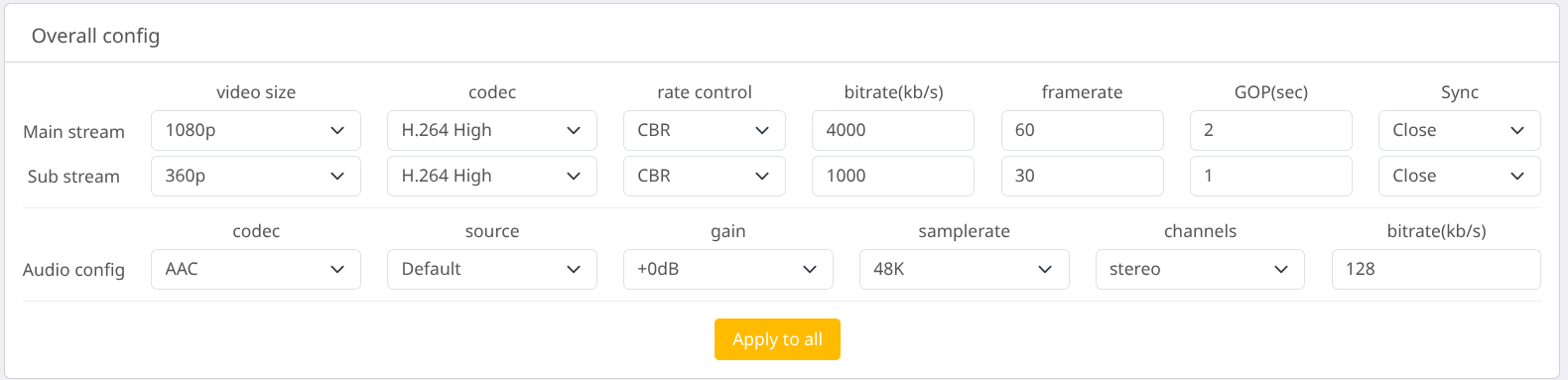
I do have a problem with video stuttering on all the HDMI inputs on the LinkPi. The onn 4k box connected to the USB capture device does not seem to have the same issue. I have switched input devices around and the stutter appears to be independent of device type, and related to the HDMI inputs. I'm wondering if anyone has experienced this stutter, and if it can be resolved by changing the default HDMI encoding settings on the LinkPi.
These are the settings I am currently using. They are the defaults after a hard system restore on the LinkPi.
How does one determine the deep link for each application? I'd love to pull in NESN from their NESN 360 app, but I have no idea how to grab that deep link.
I think I figured out why my stuttering video issue began. For YTTV, I was running 5 Android boxes at 1080p, 60 fps and 8000 bitrate. When I switched from YTTV to DTV, I started playing around with different tuner configurations. I added the Rokus into the mix.
Not wanting to abandon all of the onn boxes and ABDT, I ended up with 6 tuners...three Roku, and three Android. Leaving the settings at the previous resolution, frame rate, and bitrate was more than the poor little LinkPi box could handle.
So, today I experimented with backing down the number of tuners, frame rate, and/or bitrate. It turns out that I can run all six tuners at 1080p, 12000 kbps, and 45fps without stuttering.
The video processing will keep you going. Sounds like you have a good handle on things.
EPlus TV has NESN integrated. I'm not sure if it has the same content as the 360 app, but here is the link
NESN is currently broken in EPlusTV and may or may not be fixable. They changed the authentication method and possibly also added DRM.
That stinks.
If you have an m3u8 detector in Chrome, Log inito the site and play the stream and see what is detected.
I’m gonna need more Ospreys.
Lot's of reading today, but I have ADBTuner up and running. So far I have NBC Sports Boston which is great.
The question now is NESN. There's a NESN 360 app that streams both NESN and NESN+ stations. It's not as straight forward as YoutubeTV. How might I go about bringing NESN into ADBTuner? Where do I start to determine links and all that?
Sorry, one more question. Should the quality of the streams being pulled in from YouTubeTV be the same quality as if I'm watching on YouTubeTV? They look more pixelated when watching through Channels DVR. Definitely not a clean 1080p stream.
You will need to adjust your encoder settings and make sure you are using the main stream from your encoder.