
I tried both .m3u and .m3u8
Are you running Channels and ADBT as containers? Sometimes the default bridge network doesn’t allow containers to talk to each other.
Channels DVR is running natively on a Windows PC and ADBTuner is in a container on a Synology NAS. Would that still cause this issue?
On your Win PC, make sure your PC & Synology can see & communicate with each other.
In that case you should be fine. Since Windows is your Channels host, and I assume you were browsing the ADBT web interface, the Synology ADBT container is accessible to the network.
But to test, on your Windows Channel Host, open a browser and navigate to your M3U8 link:
If it's working, it should download a file. If it does download, ADBT of hosting correctly and Channels should be able to see the link. If it does not, there is more to troubleshoot, starting with the Windows firewall.
adbtuner is flawlessly controlling my Tivo Stream 4K.. I'd say it's at or near 100% in starting a recording on this older device. Intermittently, however, the TS4K will just revert back to the home screen for a 2-3 hour recording. I'll start to watch a recorded sports event and maybe at the 125 minute mark the recording would switch from the game it recorded to the TS4K home screen. Kinda like the TS4k just got tired. It's probably time to swap that thing out with an ONN or Google Streamer but before doing so just asking if anyone has a suggestion on why it occasionally reverts back to Tivo/Android TV Home Screen late in a recording.
This sounds similar to an issue I was seeing with Firestick 4K Max devices. After some time they would drop back to the Home Screen. Often, this seemed to coincide with another stream (recording or live) ending. Setting KNOWN_STREAM_DEFAULT_TIMEOUT set to 8 seems to have resolved the issue for me. You might give that a try and see if it helps your situation.
Note: I also tried values of 5 and 10. 5 seemed a bit too aggressive as I did see the problem with that setting one time. Going to 10 didn't seem to offer any advantage over 8.
Where would i find that variable?
8 seconds is the default in the current development version. I would recommend updating to see if that helps.
Otherwise, if you can share the docker logs from when the video stopped playing that would help identify the root cause.
You need to add it to your environment variables.
I'm on latest tag and added it and it cured my issue. I'm using the 10 sec as my variable for timeout since it works and tuner availability is not a concern for me.
How do I update to latest version, or see if I'm on current version?
Assuming you’re using Portainer, go to the ADB Stack.
Select editor.
Add the new environmental variable.
Select update the stack and use the slider to update to current version.
Should take you about 30 seconds
1 Like
The most recent version is 20260501-1 and this is associated with the adbtuner:development tag.
The version number is displayed at the top right of ADBTuner's web interface.
adbtuner:stable = stable, well tested version
adbtuner:development = current development version, does new things, more likely to have bugs
adbtuner:latest should no longer be used as it does not reflect the most recent version.
done! I changed the TAG variable to "development" in stack editor. I also added KNOWN_STREAM_DEFAULT_TIMEOUT with a value of 8 in the ENV variables and clicked "update stack". adbtuner web interface now says version 20260501-1. That all looks good but when I inspect EVN Variables, I don't see the KNOWN_STREAM_DEFAULT_TIMEOUT on the container. Does this development version ignore it? it shows as being there if I open the Stack editor. Just tried to watch a adbtuner channel and it brought up the channel. I'm recording a baseball game on an adbtuner channel later so that will be a good test. Thanks!
First, simply changing to development will change the default for this value to 8 as @turtletank said.
If you want to update it in the standard Project One-Click way, since I know you used that for the deployment. The Docker Compose would need to be modified as follows:
services:
  # GitHub home for this project with setup instructions: Caution! This project is not open source, and is not available on GitHub
  # Docker Hub home for this project: https://hub.docker.com/u/turtletank99
  adbtuner:
    image: turtletank99/adbtuner:${TAG}
    container_name: adbtuner
    dns_search: ${DOMAIN} # Change to the name of your LAN's domain, which is usually local or localdomain
    init: true
    ports:
      - ${HOST_PORT}:5592 # Use the same port number the container is using, or optionally change it if the port is already in use on your host
    environment:
      - KNOWN_STREAM_DEFAULT_TIMEOUT=${KNOWN_STREAM_DEFAULT_TIMEOUT}
    volumes:
      - adbtuner:/app/.config
    restart: unless-stopped
volumes:
  adbtuner:
    name: ${HOST_VOLUME}
And then your env vars can be adjusted like this (using your values of course):
TAG=latest
DOMAIN=localdomain
HOST_PORT=5592
KNOWN_STREAM_DEFAULT_TIMEOUT=8
HOST_VOLUME=adbtuner_config
Recorded a 4 hour baseball game on an adbtuner channel. During this time a program on a TVE channel completed and the game didn't skip a beat. Fingers crossed going forward! I didn't use Project One Click to make the changes (i just used portainer). Should i leave it alone or go back and redo via Project One Click?
That's totally fine, Project One-Click simply automates what you've just done.
I pushed a new development build this morning (20260502-3). This build includes the following changes:
Performance Tweaks
- Removed hardcoded tuning delays that should not be relevant anymore.
- Improved tuning speed by sharing one ADB connection during the entire tuning process. This should save a small amount of time that was being wasted connecting/disconnecting.
- Optimized playback status checking to focus on more efficient methods first instead of immediately jumping into screenshot analysis.
- With number 3 in place it was ok to increase the frequency in which we check playback status which could help identify media playback sooner.
Don't expect a miracle with these changes, but if all goes right you might save a second on each tune. I'm hoping this is enough to allow for optional connectivity checks while maintaining the same performance as older versions of ADBTuner.
Bug Fixes
- Fixed issue which could cause a tuner to be shared when it's in the process of being cleaned up. I think this is the root cause of the bug we were working around by increasing
KNOWN_STREAM_DEFAULT_TIMEOUT. I left the default at 8 seconds for now, but will consider rolling it back if possible to do so safely. - With
MPEG_NULL_PACKETSenabled ADBTuner will now give up on reconnecting if a response indicating an error is received from the streaming endpoint (ex. 404/500). - With
MPEG_NULL_PACKETSenabled ADBTuner will now give up on reconnecting after 60 seconds of cumulative retry attempts instead of just looking for 60s of continuous failures. This stops ADBTuner from getting stuck in an infinite loop if the endpoint keeps dropping offline, but returning momentarily.
This is a pretty big update. Please report any issues here or via PM.
You can rollback to adbtuner:20260501-1 if necessary.
Please keep an eye out for situations where ADBTuner should be hiding splash screens / content loading, but fails to do so. Thanks.
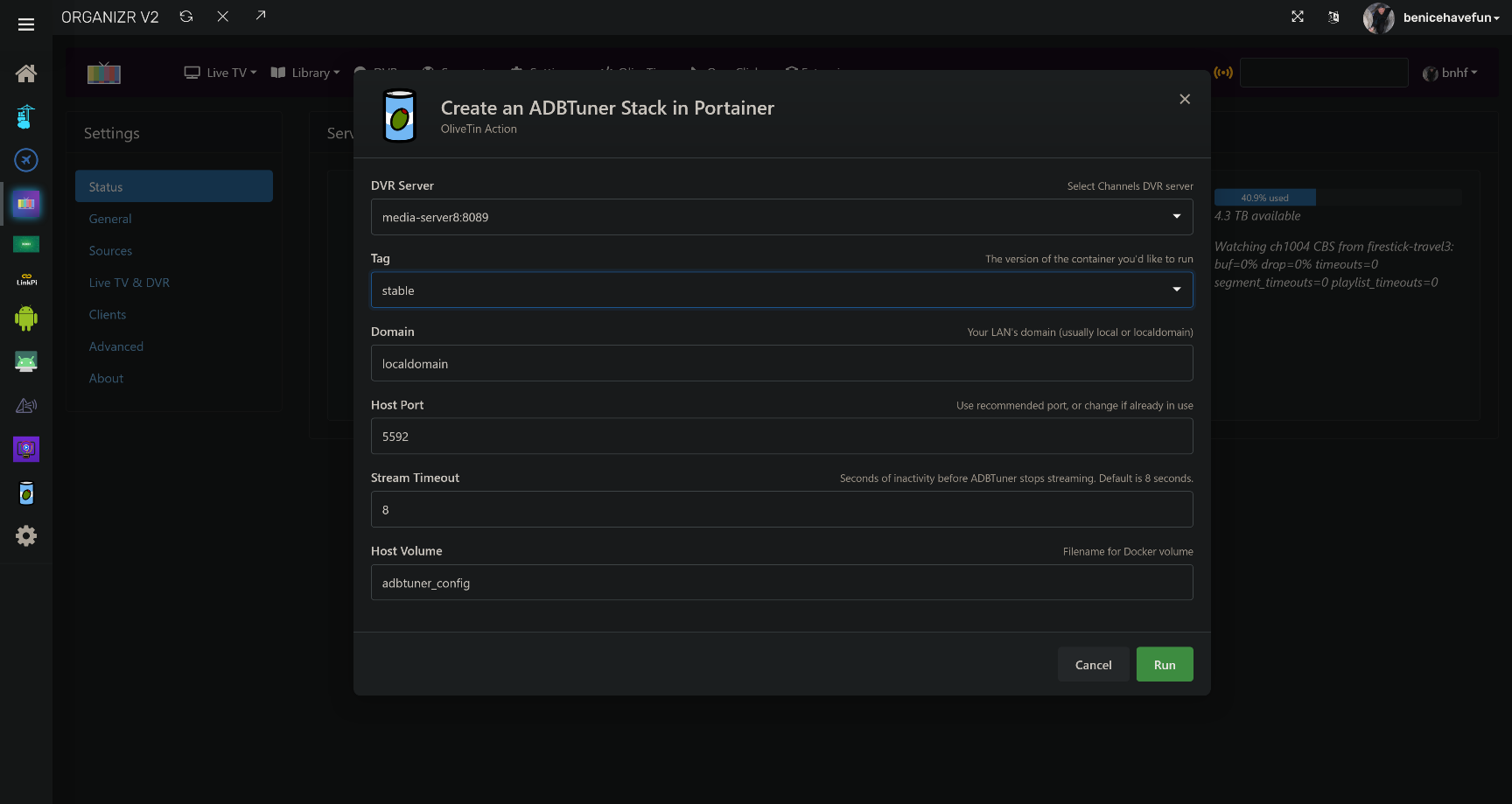
New bnhf/olivetin:latest (aka bnhf/olivetin:2026.05.02) pushed today with updated Project One-Click support for installing ADBTuner via a Portainer stack.
This includes a dropdown to choose between stable and development versions, plus the addition of the KNOWN_STREAM_DEFAULT_TIMEOUT env var. Both the classic dashboard and Project WebUI+ (shown) have been updated:
Hi - I'm using a Fire TV Stick with a paid TV streaming app used to watch international TV channels. The app doesn't support deep linking but does support channel numbers entered as keyevents (e.g. entering 1 then 2 then 3 to tune to channel 123) - and I can confirm that through ADB shell from my laptop.
I have added the Fire TV Stick and HDMI encoder into Channels via adbtuner with a single channel for the encoder stream, and confirmed that is viewable fine in Channels. How do I setup adbtuner to send the relevant keyevents through adb shell to "tune" to each channel number?
Many thanks!