
I'm not seeing any problems with the script so far. Where are you getting the channel count from -- the ADBTuner - DirecTV Custom Source?
Yes I'm getting it from the custom source. When I run the script I get 345 channels. If I export from ADBT and then re-import and delete I get the correct channel count.
Could you post the M3U from http://192.168.200.40:5592/channels.m3u8?provider=DirecTV if at some point you see the incorrect channel count again -- in the hopes we can see where this is coming from?
It's super weird because when I'm exporting from ADB Tuner I'm getting 345 channels in the JSON. I reimport and I get 333, or the last time 334, which was strange. I'm thinking the 345 channels is correct, actually. I just don't know why in my custom guide I was seeing duplicate channels. Also, only on the Apple TV, which was super weird. I'm starting to wonder if maybe something was cached.
I pasted the M3U on here. I'm starting to assume that everything is actually correct and maybe there's something weird cached on my Apple TV and I have to kick it out of Channels and add it back in.
Yeah, the second I export and re-import, the extra channels on my Apple TV just disappear! Super weird!!
The higher number of channels you saw initially is probably due to the constantly changing nature of FAST channels (4xxx) on DTV -- which is part of the reason I think this Action is going to be great long term, as you can just rerun it whenever you want to sync CDVR to DTV.
The duplicates were likely because the CDVR clients often need to be killed and relaunched when there are changes to collections. I typically just reboot my ATV when I make significant channel changes and I want to see them reflected immediately.
EDIT: Oh, and the M3U you posted contained 345 channels, so that's your current number -- which could change at any time of course, based on the whims of DTV.
Thanks. I'll give that a shot!
Rebooting the Apple TV didn't help.
I'm really not sure what's causing this. But, at least in my situation, exporting and re-importing fixes the issue entirely.
I'm wondering if the automation that's importing the m3u into Channels is causing some sort of issue with duplicates. When I export and re-import, ADB Tuner is showing 345 channels. When I reload the M3U in ChannelsDVR, it's showing 333 channels. There are some overflow channels for a few of the RSN's that seem to be causing the 345 vs 333. They all have the same channel number since they are overflows. The initial import from Olivetin shows 345. It's exporting the 345 channels and re-importing that shows the correct 333
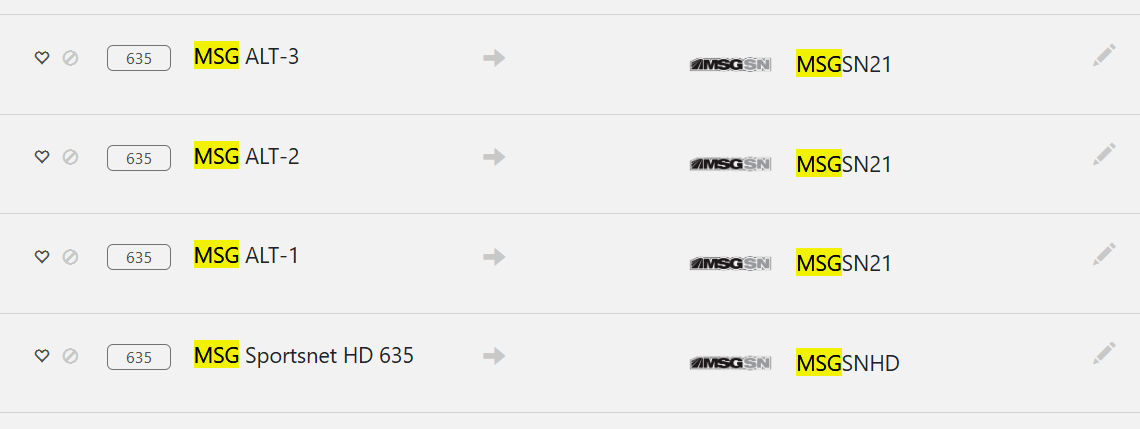
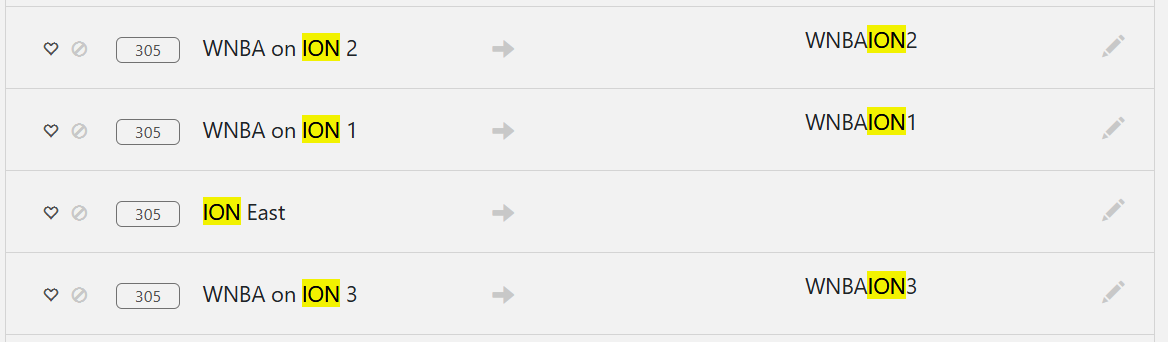
I had Claude compare and this is what it found:
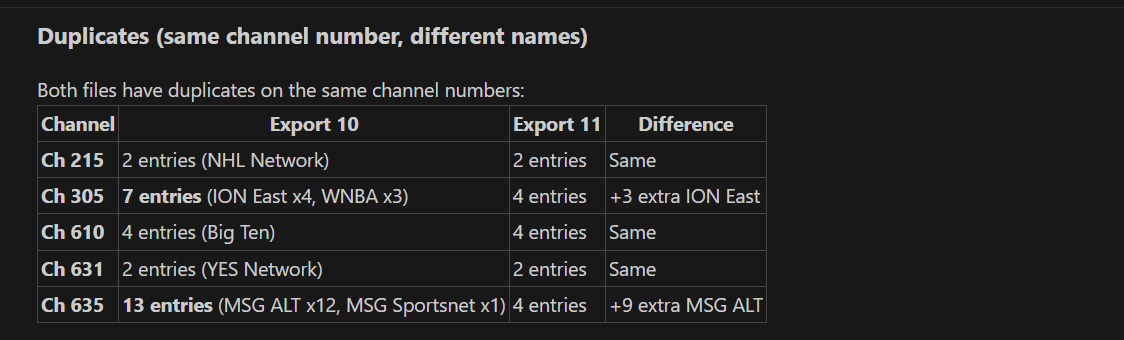
It seems like overflow RSN's with the same channel number are my issue
Confirmed, I overrode the channel numbers and started them at 1000, so they're all unique, and it is 100% caused by duplicate channel numbers.
Indeed. I appreciate you sticking with diagnosing this problem.
Duplicate channel numbers have been a challenge with DTV in the past, and since I've moved to YTTV myself, I haven't thought about it much. However, we do want to deal with this, as the Olympics are coming up again -- and that's when people really noticed it last time, especially on Ospreys.
In the past, for my personal purposes when I was using DTV, I added A, B, C, D, E to the alternates -- and that worked well. So, my initial proposal would be try that, as I can add another function that will search for duplicates and add a letter to them.
As a test could you manually edit the offending channels in ADBTuner, to see if it's OK with adding a letter to the channel number -- and to see if it addresses the issue? If so, I'll get to work on a fix.
It doesn't take a letter but it'll take a decimal. 610, 610.1 610.2, 610.3 etc.
That's probably just as good, and will allow people to use the baked-in DTV channel numbers if desired. Many long time DTV users can recite the numbers of their favorite channels anytime anywhere. 
EDIT: So, that's what I'll do then. Duplicate channels will be preserved using .1, .2, .3 with the first occurrence of that channel keeping the whole number.
I agree!
Let me know when you make the change and I'll reimport!
Thanks so much! 
1 Like
@bnhf
I found that channel 635, which is the MSG network, has 11 channels and you can only go up to 9. So that last one would have to jump to 636.1 in order to work an ADB tuner.
There are a couple of things that don't work in the WebUI, that do work via the API -- so let's see if this is one. I'll upload a tester shortly...
1 Like
Cool!
1 Like
Can you give bnhf/olivetin:test a try and see if it does what we have in mind. It runs without error for me, but I don't have any duplicate channel numbers in my package to test it properly.
Unfortunately, it failed on the duplicates.
POST FAILED for channel: {"m3u_id":"","provider_name":"DirecTV","number":"215.null","name":"NHL Network HD","package_name":"com.att.tv","alternate_package_name":"com.att.tv","url_or_identifier":"dtvnow://deeplink.directvnow.com/play/channel/NHLHD/f70c4f77-652e-bfc0-6f4d-65f32fc3f2ba","configuration_uuid":"3c7d5a19-6f2e-4b8a-9d3f-8e1c4b7a5f92","tvc_guide_stationid":"58690","guide_offset_hours":"","data":null,"id":0}
The API actually stopped inserting channels after that first duplicate channel.
Here is a full debug: Debug - mackid1993
OK, it was worth a shot, but it looks like I'll need to gin up a test dataset to do this properly. It'll probably be tomorrow before I have something new for you to try.
No worries!