Add "Use provider numbers" for TVE channels

Similar to the setting "Use OTA numbers" for Locast, it would be great to have "Use provider numbers" (or "Use DirecTV numbers").

TV Land : 6020 (TVE) -> 304 (DirecTV)
TruTV : 6037 (TVE) -> 246 (DirecTV)
Hallmark: 6090 (TVE) -> 312 (DirecTV)
etc.

In my family, we've been DirecTV subscribers for nearly 20 years so we know the numbers of our favorite channels by heart.

To be considered? :yum:

I like this. Like you I've used DTV forever it seems like.

1 Like

This doesn't really work, because the streams coming in from the network sites don't carry their information in the stream. (And, it varies by provider.) So Channels doesn't have any way to know what the "provider" channel number is.

I understand what you are saying and I agree with you. :slightly_smiling_face:

However, I'm thinking simply having static tables with predefined channel numbers per provider to do the mapping seems to be quite trivial to me (thinking as a 20-year professional software engineer.)
After all, the TV providers don't change their channel numbers very often, it is a rare occurrence.

Obviously, I don't know the code of Channels DVR but, in theory, it shouldn't be hard to do in software. :wink:

But that requires the developers to have access to every provider that they support via TVE to be able to see what their lineups are. That's not a particularly practical ask.

However, if you'd like to compile this information for a publicly accessible database that is regularly updated and kept current, you're welcome to do so ;).

1 Like

How about let the user replace with whatever channel numbers they want? I could renumber ESPN 206 or 2006?

1 Like

You're making a great point. In my mind, I was only thinking about the big names such as DirecTV, Dish Network, Comcast/Xfinity and a few other big cable companies.
I was forgetting all the many local cable providers in the whole the country.

On second thought, I agree with you, that's not practical, unfortunately. :confused:

Thank you for bringing this to my attention. :+1:

use my mapping solution and you can do it yourself (that's actually the reason i wrote it to begin with)...

i had been asking the devs to let us re-map the channels to whatever number we wanted (for this very reason), and they kept telling me it's on the radar but they don't know when. so i wrote this to do it for us until they get a chance to build it into channels...

3 Likes

This is great! Thanks for doing this and sharing!

I'm new to all this stuff but I think I found an easier way... much easier.

Using this URL for my server (http://192.168.1.13:8089/devices) I found my TVE feed for example was called 'TVE-Verizon' and I too hate that I can't remap the channel numbers.

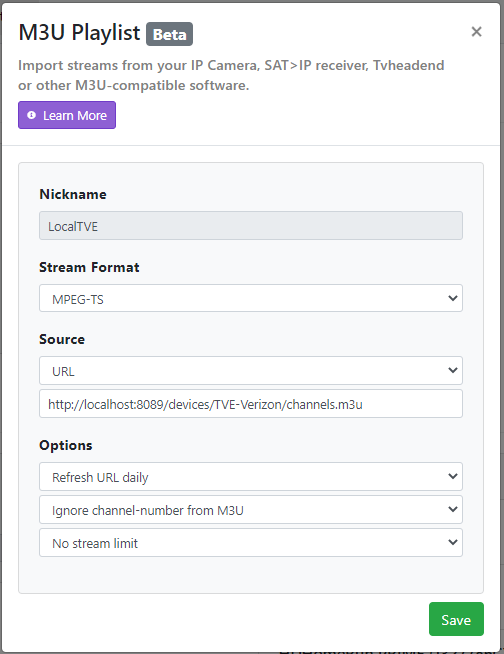
I simply made a new m3u source and pointed it to the URL of my Verizon TVE feed, in this case
(http://192.168.1.13:8089/devices/TVE-Verizon/channels.m3u) and then set it to MPEG-TS and to ignore the channel from the m3u. I then set the provider to my local Verizon and it mapped the channels with the local numbers automatically.

Simple! :slight_smile:

Another way to do this would be to point the same Channels M3U url to xTeve and change the channel numbers in the mapping section, and use the xTeve.m3u output as the M3U for Channels. This would give even more control because if it couldn't map a channel in the above method and still had a bad number, you can force it through xTeve.

Interesting. Looks like this ought to work. However, you may want to change the IP to 127.0.0.1 or localhost to ensure that the playlist is always found, in case your server's IP address changes across reboots.

(If this works, I may use this when trialing Channels for my parents, so the channel numbers align with their previous DirecTV lineup.)

Confirmed that that also works and the best part about this is that if you don't want to show all the channels, you can hide them in the original TVE list and they won't show up in the imported M3U.

Finally, on my devices where I watch, I just hide the TVE listing and make the "new" TVE M3U a priority.

Funny enough it doesn't work... despite the GUI showing the right channel number, when I try to watch or export the M3U-LocalTVE.m3u, the channels come out like this..

channel-id="9057" tvg-chno="9057" instead of what should be channel-id="9057" tvg-chno="504" if it were correct... not sure why... Honestly not even sure HOW that's possible when the GUI shows it correctly... any devs wanna take a shot at why that wouldn't work?

The channel numbers that appear on the right when you edit the guide info/lineup under the sources in the DVR is just showing you what the guide source you listed has that channel for. To get the actual channel number in Channels to change, you need to change the channel-id tag of the playlist.

The best way to do this is to save the M3U locally, then manually edit the playlist to change the channel numbers.

Yeah so I think it'll have to route through xTeve first, set the numbers that way rather route channels to itself.

Unless you know a way to link to the providers list and the channels/numbers outside of channels?

Manual editing is the best option.

I figured as much, so then this will work but rather than a 2nd instance of Channels, xTeve will have to import the TVE feed, update/edit the channel numbers and output the xTeve.m3u as your correctly mapped TVE.

No need for xTeVe. Just open the M3U from Channels into a text editor, manually change the channel numbers, then just set the M3U Playlist source to "Text" in Channels, and paste in the edited playlist.