
Actually the typical USB device is capture only, and does not re-encode. Maybe someday, but we're a ways from supporting one of those. That would mean the encoding and caption generating would all need to be done on your CPU and/or GPU.
Will do. I should have a roll-up for you in a little bit.
3 Likes
Have you tested any of this yet with your encoder set to H.265. I think we've all gotten used to using H.264 due to certain limitations of ADBTuner, but HEVC encoding combined with captioning could be pretty killer for ah4c. Don't you think?
I'm going to try that right now. Hang on. I have Claude vibing on something, so I will switch to H.265 and see what happens.
Edit woo hoo:
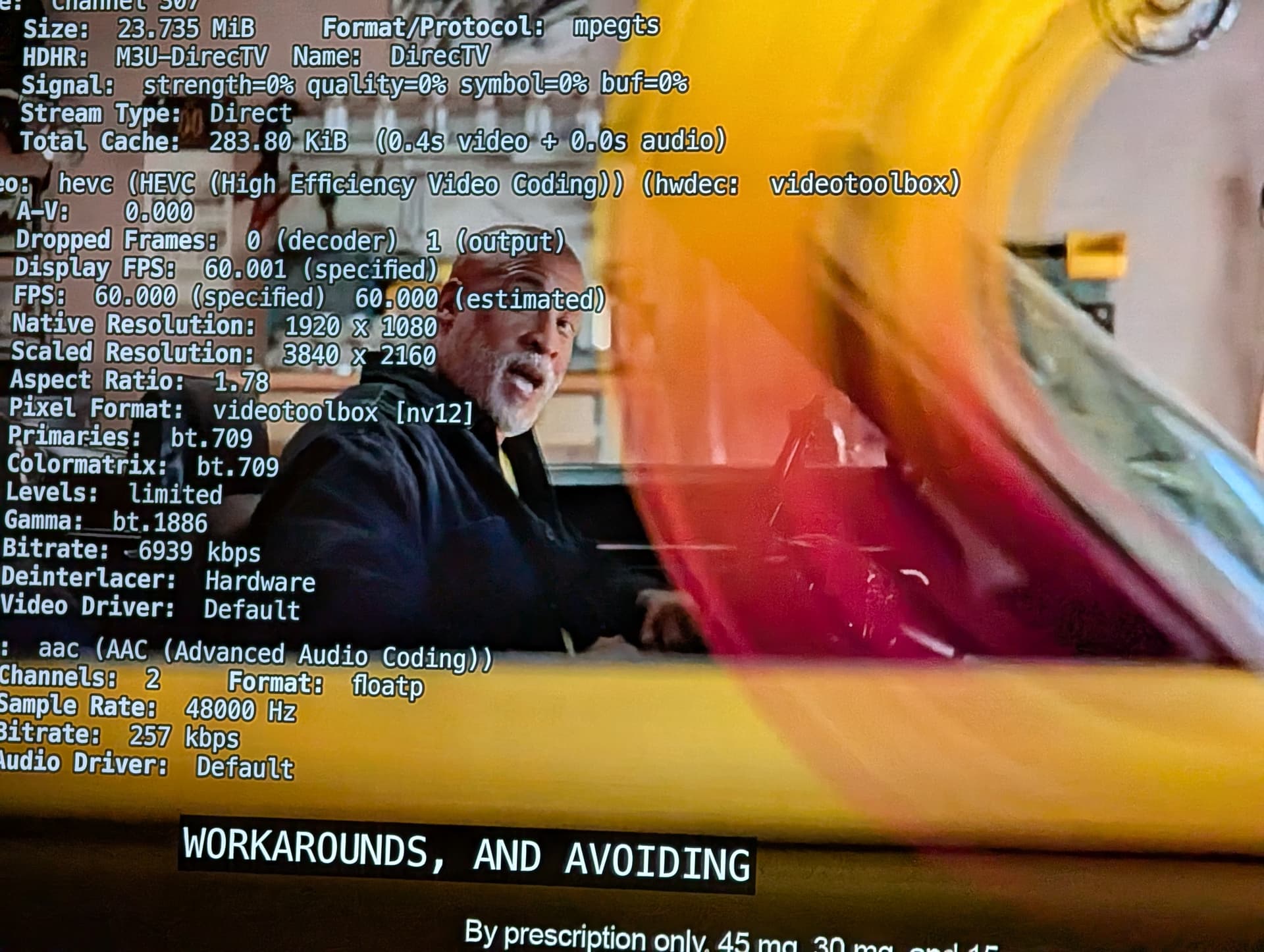
My spidey sense tells me this could be better for avoiding transcoding issues...
nobody mentioned this in here yet, so
you could try this neat trick
I've been leaving everything alone on mysetup for a few days after the complete rebuild I did over the weekend. I might get to it tonight..
1 Like
For what it’s worth, ADBTuner supports H.265.That was fixed a long time ago. I’ve been running H.265 in my own config for a while.
@mackid1993 clever idea with the captions!
1 Like
It's the beauty of open source free MIT Licensed software, anyone can contribute an innovative idea. 
That screen capture looks sharp as hell, nice and crisp. Good work!
1 Like
Thank you so much!!
I did not know that -- but it's good news! Are you up for doing some testing on what we have going here? It'd be fantastic to have another knowledgeable person putting this through its paces...
2 Likes
Here's what things are looking like in my ah4c Docker container with five tuners active (all with captions being added), using the compact setup I detailed here:
Here's the new Activity page from ah4c. This is with the Parakeet Unified Model, and using all recommended/default settings:
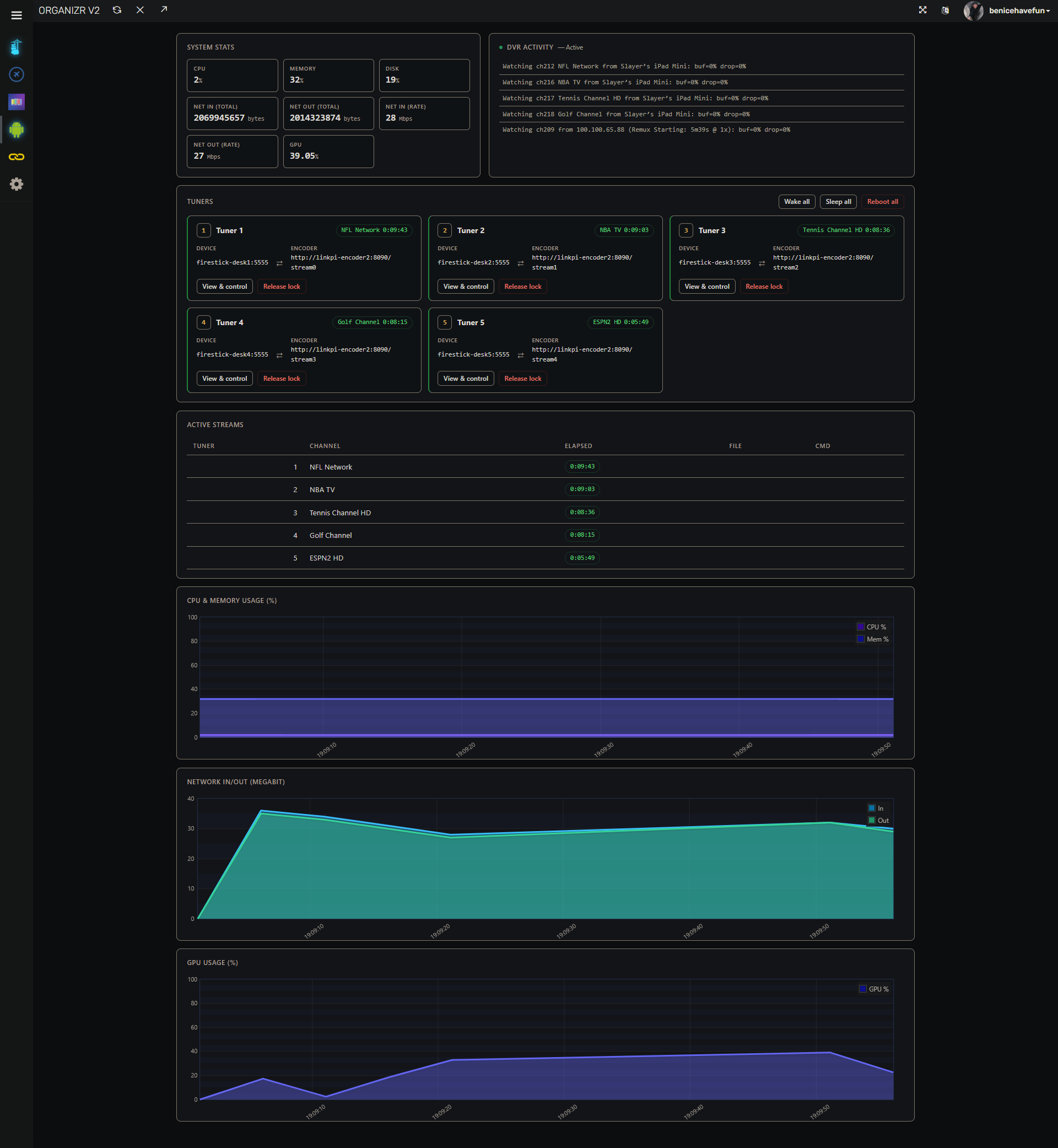
The Proxmox Debian LXC I have running this Docker container is barely breaking a sweat. The GPU is doing all the work, but it's in bursts:
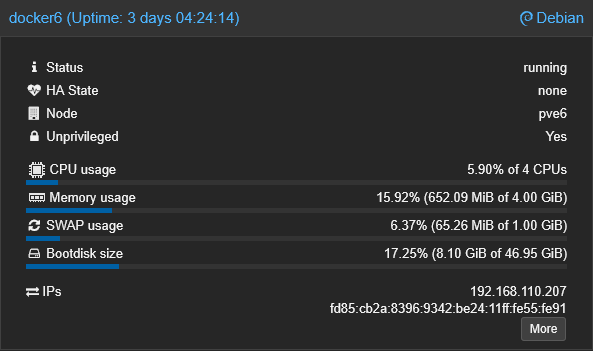
intel-gpu-top: Intel Raptorlake_s (Gen12) @ /dev/dri/card0 -   88/  88 MHz;  91% RC6;  0.38/41.61 W;        7 irqs/s

         ENGINES     BUSY                                                                                                          MI_SEMA MI_WAIT
       Render/3D   33.85% |██████████████████████████████████▋                                                                   |      0%      0%
         Blitter    0.00% |                                                                                                      |      0%      0%
           Video    0.00% |                                                                                                      |      0%      0%
    VideoEnhance    0.00% |                                                                                                      |      0%      0%

    PID      MEM      RSS          Render/3D                    Blitter                      Video                    VideoEnhance         NAME
3186819  695276K  695148K |▉                         ||                          ||                          ||                          | ah4c
@bnhf Full UI Redesign and some Bugfixes + Native AI Closed Captions by mackid1993 · Pull Request #20 · sullrich/ah4c · GitHub
I added that environment variable like you asked, hopefully it works right.
I also added just some general polish. I cleaned up the playback detection feature and it's working a lot better now. It's a little bit more reliable. Just a little bit of hardening.
I also cleaned up some of the UI. Considering I have 10 tuners, I realized the activity card might overflow, so I added a scroll to it if it does get too long. I also added real-time mode to Parakeet Unified and sentence mode to Nemotron, and you can switch between the two. I made sentence mode the default since it's probably the best for most people. When using real-time mode, there's a warning about memory usage since it can't share memory across tuners.
Let me know whenever you merge it or if you have any issues.
Also, if anyone has a home server or a PC with an NVIDIA card and can test CUDA, that would be great.
I have an NVIDIA card in my server, but it's currently used by a VM, so I don't want to remove it from that and mess with my VM...
Edit: just found a bug with my latest commit....patching.
Edit1: Patched, but I am running a defensive audit just to be sure.
1 Like
Ready to test in the next couple of days. I get a few errors when tuning:
2026/08/20 02:47:34 [EXECUTE] Stdout: '2026-08-20 02:47:25 ERROR [pyatv.scripts.atvremote]: Command 'home' is not supported by device
2026-08-20 02:47:27 ERROR [pyatv.scripts.atvremote]: Command 'launch_app' is not supported by device
2026/08/20 02:47:35 [EXECUTE] Stdout: '2026-08-20 02:47:35 ERROR [pyatv.scripts.atvremote]: Command 'launch_app' is not supported by device
And no channel is fired up. These are my settings:
services:
  # 2026.08.16
  # GitHub home for this project with setup instructions: https://github.com/sullrich/ah4c
  # Docker Hub home for this project: https://hub.docker.com/repository/docker/bnhf/ah4c
  ah4c:
    image: bnhf/ah4c:${TAG:-latest}
    container_name: atvtuner
    hostname: atvtuner
    dns_search: ${DOMAIN:-localdomain} # Specify the name of your LAN's domain, usually local or localdomain
    runtime: ${DOCKER_RUNTIME:-runc} # Closed captions only. Set DOCKER_RUNTIME=nvidia for an NVIDIA GPU with the CUDA engine build. Requires the NVIDIA container toolkit
    devices:
      - ${GPU_DEVICE:-/dev/null} # Closed captions only. Set GPU_DEVICE=/dev/dri to let the Vulkan engine build use an Intel or AMD GPU. Left at the default it passes /dev/null, which always exists and does nothing
    ports:
      - ${ADBS_PORT:-5037}:5037 # Port used by adb-server
      - ${HOST_PORT:-7654}:7654 # Port used by this ah4c proxy
#      - ${WSCR_PORT:-8000}:8000 # Port used by ws-scrcpy
    environment:
      - IPADDRESS=${IPADDRESS} # Hostname or IP address of this ah4c extension to be used in M3U file (also add port number if not in M3U)
      - NUMBER_TUNERS=${NUMBER_TUNERS} # Number of tuners you'd like defined - add a matching TUNERn_IP and ENCODERn_URL line below for each beyond 9
      - TUNER1_IP=${TUNER1_IP} # Streaming device #1 with adb port in the form hostname:port or ip:port
      - TUNER2_IP=${TUNER2_IP} # Streaming device #2 with adb port in the form hostname:port or ip:port
      - TUNER3_IP=${TUNER3_IP} # Streaming device #3 with adb port in the form hostname:port or ip:port
      - TUNER4_IP=${TUNER4_IP} # Streaming device #4 with adb port in the form hostname:port or ip:port
      - TUNER5_IP=${TUNER5_IP} # Streaming device #5 with adb port in the form hostname:port or ip:port
      - TUNER6_IP=${TUNER6_IP} # Streaming device #6 with adb port in the form hostname:port or ip:port
      - TUNER7_IP=${TUNER7_IP} # Streaming device #7 with adb port in the form hostname:port or ip:port
      - TUNER8_IP=${TUNER8_IP} # Streaming device #8 with adb port in the form hostname:port or ip:port
      - TUNER9_IP=${TUNER9_IP} # Streaming device #9 with adb port in the form hostname:port or ip:port
      - ENCODER1_URL=${ENCODER1_URL} # Full URL for tuner #1 in the form http://hostname/stream or http://ip/stream
      - ENCODER2_URL=${ENCODER2_URL} # Full URL for tuner #2 in the form http://hostname/stream or http://ip/stream
      - ENCODER3_URL=${ENCODER3_URL} # Full URL for tuner #3 in the form http://hostname/stream or http://ip/stream
      - ENCODER4_URL=${ENCODER4_URL} # Full URL for tuner #4 in the form http://hostname/stream or http://ip/stream
      - ENCODER5_URL=${ENCODER5_URL} # Full URL for tuner #5 in the form http://hostname/stream or http://ip/stream
      - ENCODER6_URL=${ENCODER6_URL} # Full URL for tuner #6 in the form http://hostname/stream or http://ip/stream
      - ENCODER7_URL=${ENCODER7_URL} # Full URL for tuner #7 in the form http://hostname/stream or http://ip/stream
      - ENCODER8_URL=${ENCODER8_URL} # Full URL for tuner #8 in the form http://hostname/stream or http://ip/stream
      - ENCODER9_URL=${ENCODER9_URL} # Full URL for tuner #9 in the form http://hostname/stream or http://ip/stream
      - STREAMER_APP=${STREAMER_APP} # Streaming device name and streaming app you're using in the form scripts/streamer/app (use lowercase with slashes between as shown)
      - PYATV=${PYATV:-false} # Set to TRUE to run docker-start-pyatv.sh at container start for Apple TV tuners via pyatv, instead of the default docker-start.sh used for adb-based tuners. Case-insensitive; anything else runs the default.
      - CHANNELSIP=${CHANNELSIP} # Hostname or IP address of the Channels DVR server itself
      - ALERT_SMTP_SERVER=${ALERT_SMTP_SERVER} # The domainname:port of the SMTP server you'll be using like smtp.gmail.com:587. This is for sending ah4c alerts if tuning fails.
      - ALERT_AUTH_SERVER=${ALERT_AUTH_SERVER} # The auth server for the e-mail you'll be using like smtp.gmail.com
      - ALERT_EMAIL_FROM=${ALERT_EMAIL_FROM} # The e-mail address you'd like your ah4c failure alert e-mails to show as being from.
      - ALERT_EMAIL_PASS=${ALERT_EMAIL_PASS} # Gmail and Yahoo both support the creation of app-specific e-mail passwords, and this is the way to go! It's NOT recommended to use your everyday e-mail password.
      - ALERT_EMAIL_TO=${ALERT_EMAIL_TO} # The e-mail address you'd like your alert e-mails sent to.
      #- ALERT_WEBHOOK_URL=""
      - LIVETV_ATTEMPTS=${LIVETV_ATTEMPTS} # For FireTV Live Guide tuning only, set maximum number of attempts at finding the desired channel
      - CREATE_M3US=${CREATE_M3US:-false} # Set to true to create device-specific M3Us for use with Amazon Prime Premium channels -- requires a FireTV device
      - UPDATE_SCRIPTS=${UPDATE_SCRIPTS:-true} # Set to true if you'd like the sample scripts and STREAMER_APP scripts updated whether they exist or not
      - UPDATE_M3US=${UPDATE_M3US:-true} # Set to true if you'd like the sample m3us updated whether they exist or not
      - TZ=${TZ} # Your local timezone in Linux "tz" format
      - SPEED_MODE=${SPEED_MODE:-false} # Set to false if you'd like the target streaming app to be closed after each tuning cycle (limited script support).
      - KEEP_WATCHING=${KEEP_WATCHING} # In supported scripts, set the delay before resending a tuning deeplink to prevent "Are you still watching?" type messages. Examples: Use 4h for 4 hours or 240m for 240 minutes.
      - NULL_FRAME_INSERTION=${NULL_FRAME_INSERTION:-false} # Set to TRUE to fill encoder stalls with MPEG-TS NULL packets (PID 0x1FFF) so the DVR never sees a zero-byte gap mid-recording. Case-insensitive (true/True/TRUE all work); anything else, including 1/yes, leaves the feature off.
      - PLAYBACK_DETECTION=${PLAYBACK_DETECTION:-false} # Set to TRUE to hold the stream until the device reports media audio playing and the picture is actually moving, then start on a keyframe, so a recording begins on the program rather than on the app's loading screen. Requires adb access to the tuner; network tuners only. Case-insensitive (true/True/TRUE all work); anything else, including 1/yes, leaves the feature off.
      - PLAYBACK_DELAY=${PLAYBACK_DELAY} # Set to a whole number of seconds to skip the start of each tune, so a recording begins on the program rather than on the app's loading screen. Piped through the bundled ffmpeg with -ss and stream copy; no re-encoding, and the skip starts on the next keyframe so it can run slightly past the configured value. The value is the total tune time, scripts included. Supported range is 2 to 30, since the DVR allows a tune about 30 seconds; values outside the range are clamped and logged. Ignored when PLAYBACK_DETECTION is TRUE; network tuners only. 0 or unset leaves the feature off.
      - HEARTBEAT_INTERVAL=${HEARTBEAT_INTERVAL:-0} # In supported scripts (currently osprey), seconds between keepalive keyevents sent during playback to stop the app's UI inactivity timer from resetting the stream. Set to 0 to disable.
      - NVIDIA_VISIBLE_DEVICES=${NVIDIA_VISIBLE_DEVICES} # Closed captions only. Set to all alongside DOCKER_RUNTIME=nvidia to expose an NVIDIA GPU. Empty means no GPU and is the default
      - NVIDIA_DRIVER_CAPABILITIES=${NVIDIA_DRIVER_CAPABILITIES} # Closed captions only. Set to compute,utility when using an NVIDIA GPU, so the driver the CUDA engine build needs is passed in
    volumes:
      - ${HOST_DIR}/ah4c/scripts:/opt/scripts # pre/stop/bmitune.sh scripts will be stored in this bound host directory under streamer/app
      - ${HOST_DIR}/ah4c/m3u:/opt/m3u # m3u files will be stored here and hosted at http://<hostname or ip>:7654/m3u for use in Channels DVR - Custom Channels settings
      - ${HOST_DIR}/ah4c/adb:/root/.android # Persistent data directory for adb keys
      - ${HOST_DIR}/ah4c/captions:/opt/captions # Closed caption settings, and the speech model, engine and any GPU driver downloaded from the Closed Captions page. Stays empty unless you turn captions on
    restart: unless-stopped

TAG=beta4
DOMAIN=localdomain
DOCKER_RUNTIME=runc
GPU_DEVICE=/dev/null
ADBS_PORT=5037
HOST_PORT=7654
SCRC_PORT=7655
IPADDRESS=10.10.11.23:7654
NUMBER_TUNERS=1
TUNER1_IP=10.10.11.42
ENCODER1_URL=http://10.10.11.43:8090/stream0
STREAMER_APP=scripts/atv/spectrum
PYATV=true
CHANNELSIP=http://10.10.11.20:8089
ALERT_SMTP_SERVER=
ALERT_AUTH_SERVER=
ALERT_EMAIL_FROM=
ALERT_EMAIL_PASS=
ALERT_EMAIL_TO=
UPDATE_SCRIPTS=false
UPDATE_M3US=false
TZ=America/New_York
SPEED_MODE=false
KEEP_WATCHING=4h
NULL_FRAME_INSERTION=false
PLAYBACK_DETECTION=false
PLAYBACK_DELAY=0
HEARTBEAT_INTERVAL=0
HOST_DIR=/etc/appletvtuner
NVIDIA_VISIBLE_DEVICES=
NVIDIA_DRIVER_CAPABILITIES=
I had to comment out ${WSCR_PORT:-8000}:8000 or container wouldn't create.
Are you doing this in a brand new test container? Depending on where your ATV authorization credentials are stored, you may have do another pairing with the apple tv.
Well, yeah, that port's not going to work with an Apple TV. I think that probably should be better documented. Good catch. I wonder if we can hide the device control tile if one is using an Apple TV. Although I wouldn't be able to test that because I don't run anything in that config.
A couple of different issues here -- one of which is what's in the Docker Compose, and I believe we're going to be able to eliminate both WSCR_PORT and ADBS_PORT. With your new internal proxy of ws-scrcpy in the WebUI, I don't see any need to expose it on a separate port. ADBS_PORT was added way-back-when to support something experimental, that was never implemented.
I'm just verifying a couple of things now, but then I'll post a new Docker Compose here that I'd like us to use as the standard, along with a sample env var file.
As far as Device Control in the WebUI, could you hide it if PYATV=true? That might be the simplest way to handle it.
New :beta4 built with the most recent changes.
I just added some logic really quickly to hopefully hide the device control tile when PYATV is set to true. I don't know if you want to take a look. I don't really have an Apple TV for tuning, and I don't have a lot of time because I have to leave for work in 10 minutes.
But I would love the feedback and to know that I hopefully did it right the first time.
Edit: I just smoke tested on WSL and it does work.
1 Like