I know right? It's a touch more work than TVE to get going, but after a month of using it, I'd say it's better than TVE ever was. It doesn't work with as many providers, but most of us are flexible as far as that's concerned these days.
1 Like
-
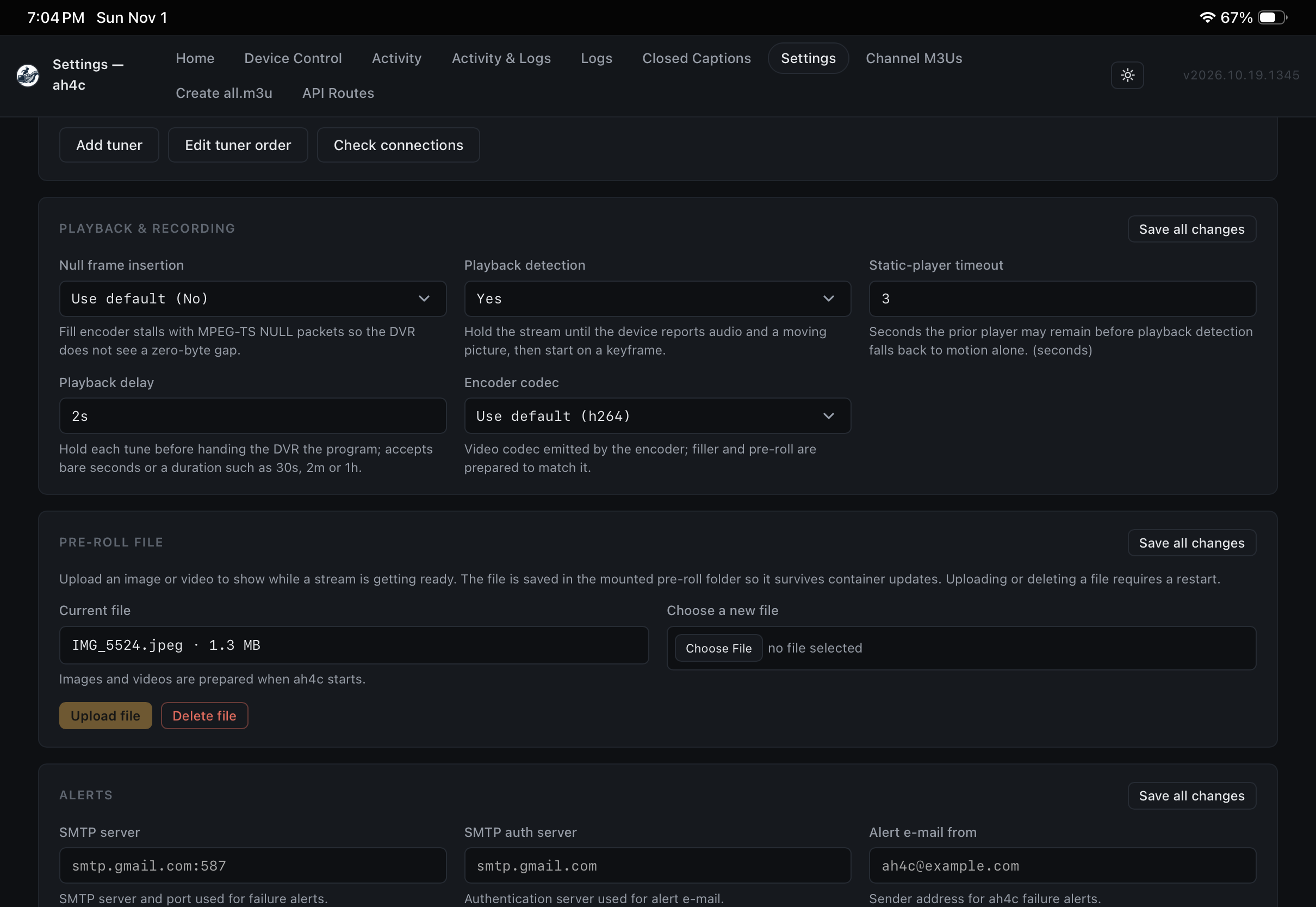
Is there really a difference how you defined the Preroll in the Hosting section than what I'm currently using?
-
On my Osprey ah4c stack, which uses environmental variables and is noted in the new webui as "set by environment" retains the correct value when I delete the env var in Portainer and restart. Cool - this allows me to easily select which variables are set in the webui just by deleting it at the stack level.
-
I know that I can add or delete tuners in either the stack level or the webui level. Would it be possible to pause a tuner. Currently I’m running a ah4c container for my Osprey’s and one for Fast Channels Bridge. It'd be nice to run just one container and pause tuners and change scripts as needed.
From Docker Compose in Hosting Section:
volumes:
      - ${HOST_DIR}/ah4c/scripts:/opt/scripts # pre/stop/bmitune.sh scripts will be stored in this bound host directory under streamer/app
      - ${HOST_DIR}/ah4c/m3u:/opt/m3u # m3u files will be stored here and hosted at http://<hostname or ip>:7654/m3u for use in Channels DVR - Custom Channels settings
      - ${HOST_DIR}/ah4c/adb:/root/.android # Persistent data directory for adb keys
      - ${HOST_DIR}/ah4c/captions:/opt/captions # Closed caption settings, and the speech model, engine and any GPU driver downloaded from the Closed Captions page. Stays empty unless you turn captions on
      - ${PREROLL_FILE:-${HOST_DIR}/ah4c/preroll}:/opt/preroll # A video or still image shown to the DVR instead of NULL packets, during a PLAYBACK_DELAY/PLAYBACK_DETECTION hold or a NULL_FRAME_INSERTION stall. Set PREROLL_FILE to a host path, or drop the file into this directory. Anything ffmpeg reads; prepared once at startup, loops until the real stream is ready
From my ah4c stacks:
    volumes:
      - ${HOST_DIR:-/data}/ah4c/config:/opt/config # Settings saved from the web interface
      - ${HOST_DIR:-/data}/ah4c/scripts:/opt/scripts # pre/stop/bmitune.sh scripts will be stored in this bound host directory under streamer/app
      - ${HOST_DIR:-/data}/ah4c/m3u:/opt/m3u # m3u files will be stored here and hosted at http://<hostname or ip>:7654/m3u for use in Channels DVR - Custom Channels settings
      - ${HOST_DIR:-/data}/ah4c/adb:/root/.android # Persistent data directory for adb keys
      - ${HOST_DIR:-/data}/ah4c/captions:/opt/captions # Closed caption settings, and the speech model, engine and any GPU driver downloaded from the Closed Captions page. Stays empty unless you turn captions on
      - ${HOST_DIR:-/data}/ah4c/preroll:/opt/preroll # A video or still image shown to the DVR instead of NULL packets, during a PLAYBACK_DELAY/PLAYBACK_DETECTION hold or a NULL_FRAME_INSERTION stall. Set PREROLL_FILE to a host path, or drop the file into this directory. Anything ffmpeg reads; prepared once at startup, loops until the real stream is ready
So that settings.json file stored in the config directory contains all the data showing on the webui. If so, that actually may make my combining "2 containers" into one container by just changing the json file.
Setup:
Ospreys with env variables thru stack
FC with webui (minimal compose).
Convert Osprey stack variables to webui variables. Save a copy of the json file on the NAS. Copy FC settings.json file to config folder replacing the Osprey json file. Restart container and the webui should show with the FC info.
This looks like a quick way to accomplish what I’m trying to do. I want a quick way to bring back the Osprey's in case of a failure in my system.
I'm really happy with FC. We record more than watch live tv so we always skip ads. I haven’t used the Osprey's since I bridged to FC. Will probably power them down this week but it's good to know that I can use the json file to bring back to life if needed.
2 Likes
I've asked every AI and haven't found an answer, so I thought I'd try here in case someone already found the answer. Is anyone else using Xfinity Stream? Have you found a way to capture these channels since the URL doesn't expose the data needed for ah4c? I've searched the network XHR tab in the console while playing one of these channels, and none of the many 9-digit numbers are what I need to tune the stream with ah4c. It's still low priority, but for the sake of completeness I'd love to nail down these stragglers.
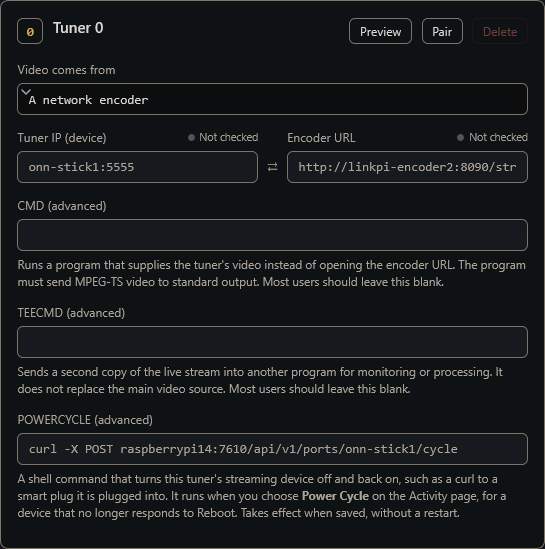
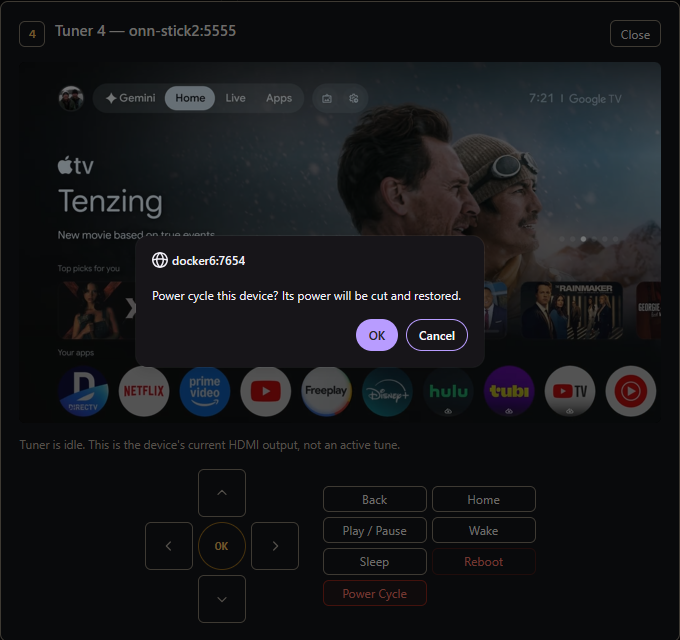
New bnhf/ah4c:latest (aka bnhf/ah4c:2026.10.19) pushed this morning with support for power cycling a streaming stick via API. If you're powering your virtual tuner pool with the USB hub mentioned here:
Are using Shelly Smart Plugs, or a UniFi PoE Switch (for a few examples), you can now configure ah4c to trigger a power cycle of that stick:
1 Like
I'm getting ready to make the switch from Xfinity to DirecTV. Is it as simple as 1) ordering the plan 2) set up Fastchannels 3) Point ah4c to Fastchannels 4) Add the new ah4c/Fastchannels source to CDVR? Am I missing any steps?
I don't think you're missing anything. FastChannels pulls your subscribed channel list, including Gracenote Station IDs, so that task is eliminated vs Xfinity. The FastChannels Bridge has a few steps, but nothing difficult.
I'd suggest not including FAST channels in your DTV channel list (you can get those from other sources, if you even want them). Also, I'd choose to use DTV channel numbers. That way, if you do use any standalone Ospreys or Geminis in the future, all your sources will tune with the same numbers.
EDIT: Also, FASTChannels supports turning on Closed Captions in the source's stream -- which I find very nice. For recordings, that does result in burned-in captions, but there's a lot less processing to deal with. They're either on or off for all virtual tuners, but there is a toggle to control them in Bridge - Settings.
1 Like
@tanderson92 Here's what a fairly flushed out FastChannels ah4c Bridge looks like, with 5 tuners configured, and 4 in-use (click on the image first to select it, and then you can zoom in):
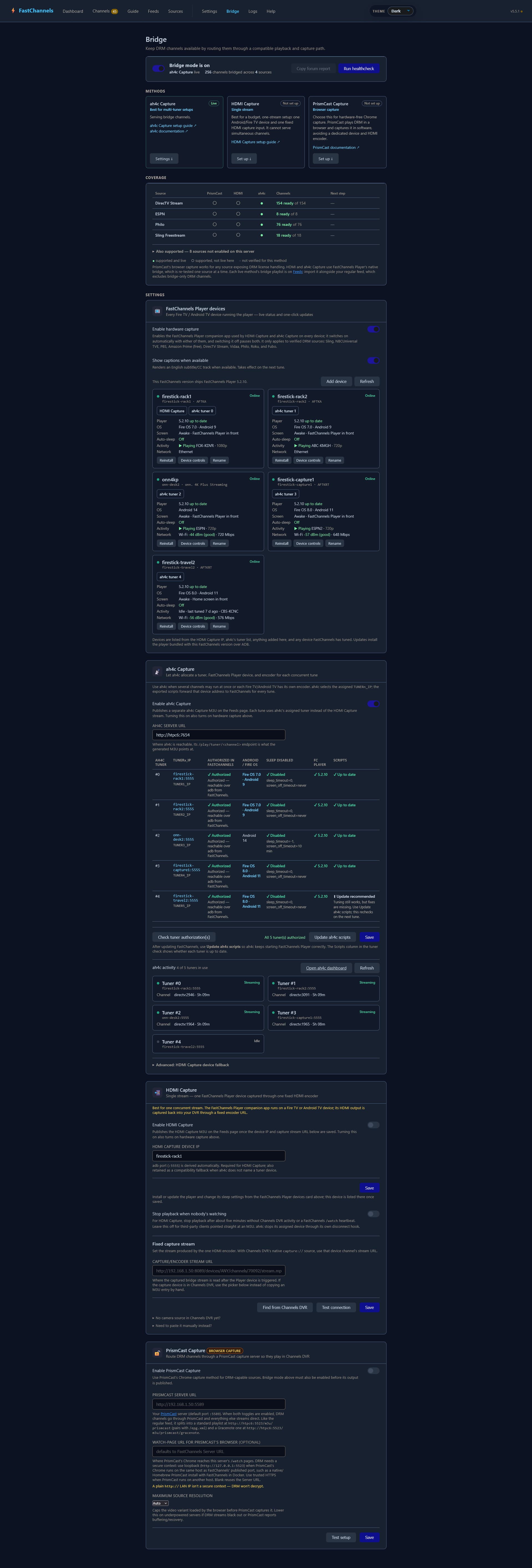
EDIT: And the companion ah4c showing the same virtual tuners:
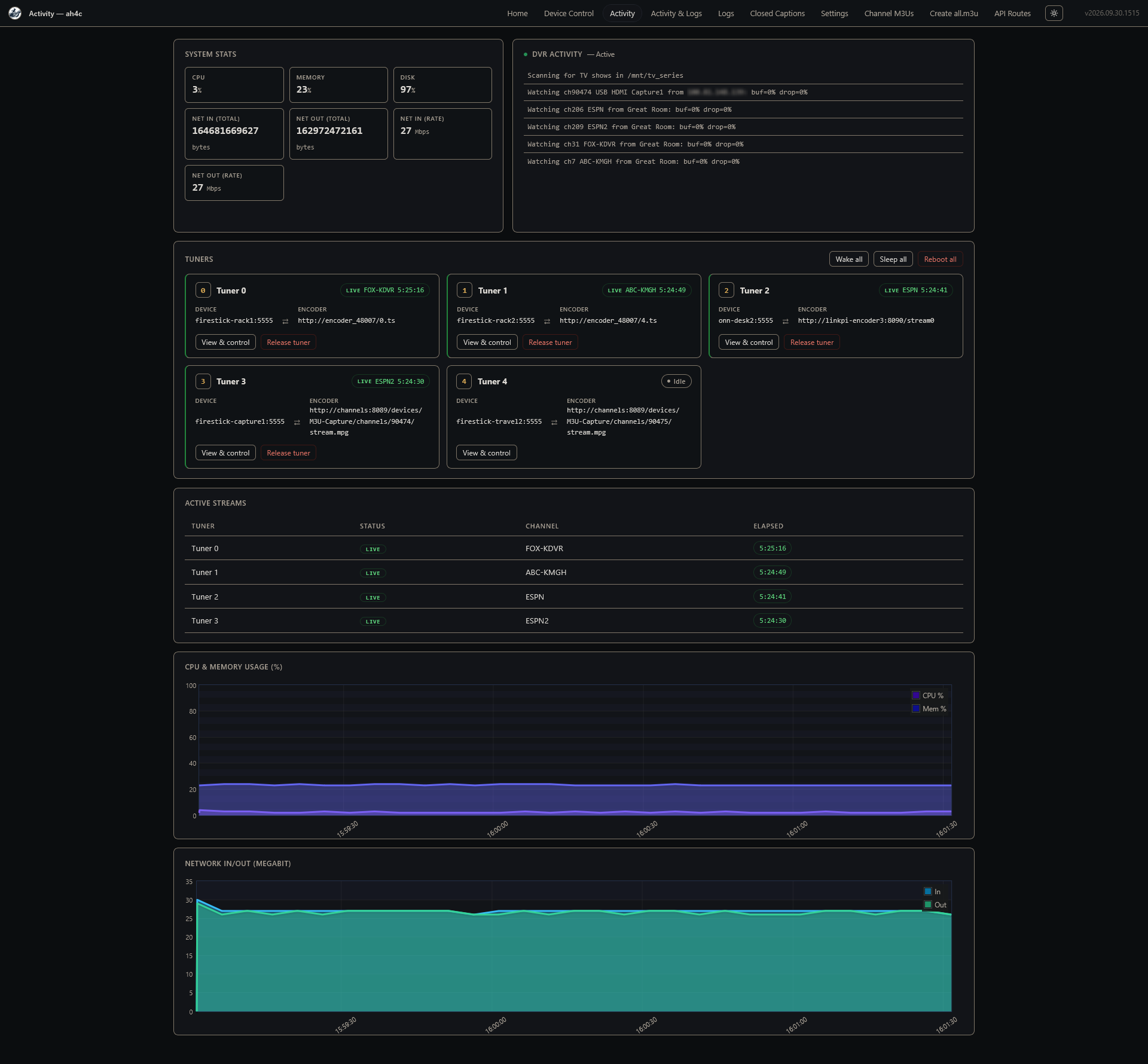
Thanks!
Might be an obvious question, but do the FireTV sticks need the DTV app on them first? I'm setting up remotely but will be home tomorrow if I'm not able to get everything working today.
1 Like
The DTV app is not used. FastChannels has its own player that you can install from the WebUI, once you've completed the ADB authorizations for FastChannels.
1 Like
Thanks, here's another beginner question. In Fastchannels, should I login to TVE before setting up the bridge, or is that not required? So far it's opening a separate DTV login for each service (History, A&E, etc). It's not remembering my password and not allowing me to paste (that seems to be DTV not Fastchannels). I really don't want to type my complex password dozens of times. Is this step necessary? I'm reading through Fastchannels and ah4c threads and not seeing this addressed, so I feel like I must be doing something wrong.
It's not, and I wouldn't bother -- just use the bridge. Only one login there. Go to Sources - Premium Sources - DirecTV Stream.
If I'm understanding the setup correctly, setting up DirecTV Stream is going to stop Xfinity from working in ah4c. I'm not ready to pull that trigger yet because both CDVRs are using Xfinity right now. I want to make the change when both servers are idle.
Incidentally, ah4c shows it's recording channel 827 right now, but the LinkPi shows the tuner is on Channel 868. I don't know if Xfinity changed the lineup in the last few days or what. Anyway, it will me nice to move over to DTV and not manage the m3u manually.
As long as you're using a single ah4c container, the tuning requests can come from multiple sources. ah4c knows and manages which tuners are in use.
However, when you do the ah4c ADB authorizations for FastChannels (which are separate from ah4c's), you are going to get USB Debugging pop-ups on each stick -- so you don't really want to be using that stick for anything else at that moment.
Sometimes I see the preroll, sometimes I don’t. The log below was a tune a few minutes ago that I didn’t see the preroll.
Screenshot is of my ah4c settings page.
It's not a big issue but is there a setting to adjust that would help. Everything running on a Synology 220+.
2026/11/01 18:56:25 [GIN-debug] Request: 172.21.0.1 GET /api/hostname, latency: 45.869µs, status: 200

2026/11/01 18:56:25 [GIN-debug] Request: 172.21.0.1 GET /api/pyatv, latency: 11.809µs, status: 200

2026/11/01 18:56:25 [GIN-debug] Request: 172.21.0.1 GET /api/version, latency: 15.002µs, status: 200

2026/11/01 18:56:56 [PREROLL] tuner= channel=directv:8208 answered at once with the pre-roll

2026/11/01 18:56:56 Attempting network tune for device http://10.0.1.52:8090/stream0 10.0.1.62:5555 directv:8208

2026/11/01 18:56:56 [EXECUTE] Running [./scripts/firetv/fastchannels/prebmitune.sh 10.0.1.62:5555 directv:8208]

2026/11/01 18:56:58 [EXECUTE] Stdout: '[STARTING] prebmitune.sh 10.0.1.62:5555

'

2026/11/01 18:56:58 [EXECUTE] Stderr: '+ TUNERIP=10.0.1.62:5555

+ echo '[STARTING] prebmitune.sh 10.0.1.62:5555'

+ ensure_adb

+ [[ 10.0.1.62:5555 == *:* ]]

++ timeout 2 adb -s 10.0.1.62:5555 get-state

+ '[' device == device ']'

+ return 0

+ adb -s 10.0.1.62:5555 shell input keyevent KEYCODE_WAKEUP

+ exit 0

'

2026/11/01 18:56:58 [EXECUTE] Finished running ./scripts/firetv/fastchannels/prebmitune.sh in 1.452817479s

2026/11/01 18:56:58 [PREROLL] tuner= channel=directv:8208 stream ready in 1.499s; pre-roll carries on under the hold

2026/11/01 18:56:58 [EXECUTE] Running [./scripts/firetv/fastchannels/bmitune.sh directv:8208 10.0.1.62:5555]

2026/11/01 18:56:58 [HOLD] tuner=10.0.1.62:5555 encoder open and draining for the wait

2026/11/01 18:57:00 [PLAYBACK] start on keyframe, 1.552s from the mark

2026/11/01 18:57:00 [HOLD] tuner=10.0.1.62:5555 hold 3.602s, 564 bytes sent, program starts

2026/11/01 18:57:03 [EXECUTE] Stdout: '[STARTING] bmitune.sh directv:8208 10.0.1.62:5555

[TRIGGER] http://10.0.1.65:5523/play/fc-player/directv/8208.m3u8?scripts=2026.10.17&adb=10.0.1.62:5555

[WAITING] for stream to start.....

[SUCCESS] directv:8208 has started.

'

2026/11/01 18:57:03 [EXECUTE] Stderr: '+ STATION=directv:8208

+ TUNERIP=10.0.1.62:5555

+ SOURCE=directv

+ CHANNEL_ID=8208

+ SCRIPTS_VERSION=2026.10.17

+ declare -i COUNTER=0

+ declare -i FAILSAFE=0

+ STATUS=notplaying

+ echo '[STARTING] bmitune.sh directv:8208 10.0.1.62:5555'

+ '[' -z directv ']'

+ '[' -z 8208 ']'

+ '[' directv == 8208 ']'

+ TUNE_FILE=/tmp/fastchannels-tune-10.0.1.62_5555

+ TUNE_TOKEN='directv:8208 705'

+ echo 'directv:8208 705'

+ trigger

+ [[ ! http://10.0.1.65:5523 =~ ^https?:// ]]

+ local 'url=http://10.0.1.65:5523/play/fc-player/directv/8208.m3u8?scripts=2026.10.17'

+ '[' -n 10.0.1.62:5555 ']'

+ url='http://10.0.1.65:5523/play/fc-player/directv/8208.m3u8?scripts=2026.10.17&adb=10.0.1.62:5555'

+ echo '[TRIGGER] http://10.0.1.65:5523/play/fc-player/directv/8208.m3u8?scripts=2026.10.17&adb=10.0.1.62:5555'

+ curl -s -o /dev/null --max-time 10 'http://10.0.1.65:5523/play/fc-player/directv/8208.m3u8?scripts=2026.10.17&adb=10.0.1.62:5555'

+ echo -n '[WAITING] for stream to start...'

+ '[' notplaying == notplaying ']'

+ sleep 1

+ is_current_tune

++ cat /tmp/fastchannels-tune-10.0.1.62_5555

+ '[' 'directv:8208 705' == 'directv:8208 705' ']'

+ is_media_playing

+ local sessions

++ adb -s 10.0.1.62:5555 shell dumpsys media_session

+ sessions='MEDIA SESSION SERVICE (dumpsys media_session)

7 sessions listeners.

Global priority session is null

User Records:

Record for full_user=0

Volume key long-press listener: null

Volume key long-press listener package:

Media key listener: null

Media key listener package:

OnMediaKeyEventDispatchedListener: added 0 listener(s)

OnMediaKeyEventSessionChangedListener: added 1 listener(s)

from com.android.bluetooth

Last MediaButtonReceiver: MBR {pi=PendingIntent{e83f994: PendingIntentRecord{b48c3d com.fastchannels.player broadcastIntent}}, type=0}

Media button session is com.fastchannels.player/androidx.media3.session.id. (userId=0)

Sessions Stack - have 3 sessions:

androidx.media3.session.id. com.fastchannels.player/androidx.media3.session.id. (userId=0)

ownerPid=22692, ownerUid=10042, userId=0

package=com.fastchannels.player

launchIntent=null

mediaButtonReceiver=MBR {pi=PendingIntent{e83f994: PendingIntentRecord{b48c3d com.fastchannels.player broadcastIntent}}, type=0}

active=true

flags=7

rating type=0

controllers: 3

state=PlaybackState {state=6, position=0, buffered position=0, speed=0.0, updated=3306165423, actions=7339671, custom actions=[], active item id=0, error=null}

audioAttrs=AudioAttributes: usage=USAGE_MEDIA content=CONTENT_TYPE_MUSIC flags=0x800 tags= bundle=null

volumeType=1, controlType=2, max=0, current=0

metadata: size=2, description=null, null, null

queueTitle=null, size=1

AlexaMediaPlayerRuntime com.amazon.alexamediaplayer.runtime.ftv/AlexaMediaPlayerRuntime (userId=0)

ownerPid=3454, ownerUid=10118, userId=0

package=com.amazon.alexamediaplayer.runtime.ftv

launchIntent=null

mediaButtonReceiver=MBR {pi=PendingIntent{a638eb2: PendingIntentRecord{18a2e03 com.amazon.alexamediaplayer.runtime.ftv broadcastIntent}}, type=1}

active=false

flags=3

rating type=0

controllers: 1

state=PlaybackState {state=0, position=0, buffered position=0, speed=0.0, updated=0, actions=6, custom actions=[], active item id=-1, error=null}

audioAttrs=AudioAttributes: usage=USAGE_MEDIA content=CONTENT_TYPE_UNKNOWN flags=0x800 tags= bundle=null

volumeType=1, controlType=2, max=0, current=0

metadata: size=1, description=null, null, null

queueTitle=null, size=0

TtsPlayerServer com.amazon.vizzini/TtsPlayerServer (userId=0)

ownerPid=15584, ownerUid=10210, userId=0

package=com.amazon.vizzini

launchIntent=null

mediaButtonReceiver=null

active=false

flags=0

rating type=0

controllers: 0

state=null

audioAttrs=AudioAttributes: usage=USAGE_MEDIA content=CONTENT_TYPE_UNKNOWN flags=0x800 tags= bundle=null

volumeType=1, controlType=2, max=0, current=0

metadata: size=1, description=null, null, null

queueTitle=null, size=0

Audio playback (lastly played comes first)

uid=10042 packages=com.fastchannels.player '

+ grep -q -e 'state=PlaybackState {state=3' -e 'state=PlaybackState {state=PLAYING(3)'

+ grep -A 12 package=com.fastchannels.player

+ echo -n .

+ (( COUNTER > 15 ))

+ (( FAILSAFE > 3 ))

+ (( COUNTER++ ))

+ '[' notplaying == notplaying ']'

+ sleep 1

+ is_current_tune

++ cat /tmp/fastchannels-tune-10.0.1.62_5555

+ '[' 'directv:8208 705' == 'directv:8208 705' ']'

+ is_media_playing

+ local sessions

++ adb -s 10.0.1.62:5555 shell dumpsys media_session

+ sessions='MEDIA SESSION SERVICE (dumpsys media_session)

7 sessions listeners.

Global priority session is null

User Records:

Record for full_user=0

Volume key long-press listener: null

Volume key long-press listener package:

Media key listener: null

Media key listener package:

OnMediaKeyEventDispatchedListener: added 0 listener(s)

OnMediaKeyEventSessionChangedListener: added 1 listener(s)

from com.android.bluetooth

Last MediaButtonReceiver: MBR {pi=PendingIntent{e83f994: PendingIntentRecord{b48c3d com.fastchannels.player broadcastIntent}}, type=0}

Media button session is com.fastchannels.player/androidx.media3.session.id. (userId=0)

Sessions Stack - have 3 sessions:

androidx.media3.session.id. com.fastchannels.player/androidx.media3.session.id. (userId=0)

ownerPid=22692, ownerUid=10042, userId=0

package=com.fastchannels.player

launchIntent=null

mediaButtonReceiver=MBR {pi=PendingIntent{e83f994: PendingIntentRecord{b48c3d com.fastchannels.player broadcastIntent}}, type=0}

active=true

flags=7

rating type=0

controllers: 3

state=PlaybackState {state=6, position=3635632, buffered position=3635632, speed=0.0, updated=3306166767, actions=7340031, custom actions=[], active item id=0, error=null}

audioAttrs=AudioAttributes: usage=USAGE_MEDIA content=CONTENT_TYPE_MUSIC flags=0x800 tags= bundle=null

volumeType=1, controlType=2, max=0, current=0

metadata: size=2, description=null, null, null

queueTitle=null, size=1

AlexaMediaPlayerRuntime com.amazon.alexamediaplayer.runtime.ftv/AlexaMediaPlayerRuntime (userId=0)

ownerPid=3454, ownerUid=10118, userId=0

package=com.amazon.alexamediaplayer.runtime.ftv

launchIntent=null

mediaButtonReceiver=MBR {pi=PendingIntent{a638eb2: PendingIntentRecord{18a2e03 com.amazon.alexamediaplayer.runtime.ftv broadcastIntent}}, type=1}

active=false

flags=3

rating type=0

controllers: 1

state=PlaybackState {state=0, position=0, buffered position=0, speed=0.0, updated=0, actions=6, custom actions=[], active item id=-1, error=null}

audioAttrs=AudioAttributes: usage=USAGE_MEDIA content=CONTENT_TYPE_UNKNOWN flags=0x800 tags= bundle=null

volumeType=1, controlType=2, max=0, current=0

metadata: size=1, description=null, null, null

queueTitle=null, size=0

TtsPlayerServer com.amazon.vizzini/TtsPlayerServer (userId=0)

ownerPid=15584, ownerUid=10210, userId=0

package=com.amazon.vizzini

launchIntent=null

mediaButtonReceiver=null

active=false

flags=0

rating type=0

controllers: 0

state=null

audioAttrs=AudioAttributes: usage=USAGE_MEDIA content=CONTENT_TYPE_UNKNOWN flags=0x800 tags= bundle=null

volumeType=1, controlType=2, max=0, current=0

metadata: size=1, description=null, null, null

queueTitle=null, size=0

Audio playback (lastly played comes first)

uid=10042 packages=com.fastchannels.player '

+ grep -A 12 package=com.fastchannels.player

+ grep -q -e 'state=PlaybackState {state=3' -e 'state=PlaybackState {state=PLAYING(3)'

+ echo -n .

+ (( COUNTER > 15 ))

+ (( FAILSAFE > 3 ))

+ (( COUNTER++ ))

+ '[' notplaying == notplaying ']'

+ sleep 1

+ is_current_tune

++ cat /tmp/fastchannels-tune-10.0.1.62_5555

+ '[' 'directv:8208 705' == 'directv:8208 705' ']'

+ is_media_playing

+ local sessions

++ adb -s 10.0.1.62:5555 shell dumpsys media_session

+ sessions='MEDIA SESSION SERVICE (dumpsys media_session)

7 sessions listeners.

Global priority session is null

User Records:

Record for full_user=0

Volume key long-press listener: null

Volume key long-press listener package:

Media key listener: null

Media key listener package:

OnMediaKeyEventDispatchedListener: added 0 listener(s)

OnMediaKeyEventSessionChangedListener: added 1 listener(s)

from com.android.bluetooth

Last MediaButtonReceiver: MBR {pi=PendingIntent{e83f994: PendingIntentRecord{b48c3d com.fastchannels.player broadcastIntent}}, type=0}

Media button session is com.fastchannels.player/androidx.media3.session.id. (userId=0)

Sessions Stack - have 3 sessions:

androidx.media3.session.id. com.fastchannels.player/androidx.media3.session.id. (userId=0)

ownerPid=22692, ownerUid=10042, userId=0

package=com.fastchannels.player

launchIntent=null

mediaButtonReceiver=MBR {pi=PendingIntent{e83f994: PendingIntentRecord{b48c3d com.fastchannels.player broadcastIntent}}, type=0}

active=true

flags=7

rating type=0

controllers: 3

state=PlaybackState {state=3, position=3635632, buffered position=3641638, speed=1.0, updated=3306168342, actions=7340031, custom actions=[], active item id=0, error=null}

audioAttrs=AudioAttributes: usage=USAGE_MEDIA content=CONTENT_TYPE_MUSIC flags=0x800 tags= bundle=null

volumeType=1, controlType=2, max=0, current=0

metadata: size=2, description=null, null, null

queueTitle=null, size=1

AlexaMediaPlayerRuntime com.amazon.alexamediaplayer.runtime.ftv/AlexaMediaPlayerRuntime (userId=0)

ownerPid=3454, ownerUid=10118, userId=0

package=com.amazon.alexamediaplayer.runtime.ftv

launchIntent=null

mediaButtonReceiver=MBR {pi=PendingIntent{a638eb2: PendingIntentRecord{18a2e03 com.amazon.alexamediaplayer.runtime.ftv broadcastIntent}}, type=1}

active=false

flags=3

rating type=0

controllers: 1

state=PlaybackState {state=0, position=0, buffered position=0, speed=0.0, updated=0, actions=6, custom actions=[], active item id=-1, error=null}

audioAttrs=AudioAttributes: usage=USAGE_MEDIA content=CONTENT_TYPE_UNKNOWN flags=0x800 tags= bundle=null

volumeType=1, controlType=2, max=0, current=0

metadata: size=1, description=null, null, null

queueTitle=null, size=0

TtsPlayerServer com.amazon.vizzini/TtsPlayerServer (userId=0)

ownerPid=15584, ownerUid=10210, userId=0

package=com.amazon.vizzini

launchIntent=null

mediaButtonReceiver=null

active=false

flags=0

rating type=0

controllers: 0

state=null

audioAttrs=AudioAttributes: usage=USAGE_MEDIA content=CONTENT_TYPE_UNKNOWN flags=0x800 tags= bundle=null

volumeType=1, controlType=2, max=0, current=0

metadata: size=1, description=null, null, null

queueTitle=null, size=0

Audio playback (lastly played comes first)

uid=10042 packages=com.fastchannels.player '

+ grep -q -e 'state=PlaybackState {state=3' -e 'state=PlaybackState {state=PLAYING(3)'

+ grep -A 12 package=com.fastchannels.player

+ STATUS=playing

+ echo ''

+ echo '[SUCCESS] directv:8208 has started.'

+ '[' playing == notplaying ']'

+ exit 0

'

2026/11/01 18:57:03 [EXECUTE] Finished running ./scripts/firetv/fastchannels/bmitune.sh in 5.430107388s

2026/11/01 18:58:58 [GIN-debug] Request: 172.21.0.1 GET /logs, latency: 5.723602ms, status: 200

2026/11/01 18:58:58 [GIN-debug] Request: 172.21.0.1 GET /static/css/ah4c.css, latency: 320.287µs, status: 200
Don't know if it is a FastChannels issue or a ah4c issue, but I believe I have everything configured correctly. I am getting a blank screen when trying to tune. 192.168.x.x is not the actual ip it is trying to tune to - just removed it from logs. FC Player is installed and onn4k is set to not sleep. All connections to the linkpi and onn4k show as working correctly and NBC was logged in successfully in FastChannels. Any help would be appreciated. Here are the ah4c logs of a failed tune
+ is_current_tune
++ cat /tmp/fastchannels-tune-192.168.x.x
+ '[' 'nbc_tve:bravovault 1401' == 'nbc_tve:bravovault 1401' ']'
+ is_media_playing
+ local sessions
++ adb -s 192.168.x.x shell dumpsys media_session
+ sessions='MEDIA SESSION SERVICE (dumpsys media_session)
9 sessions listeners.
Global priority session is null
User Records:
Record for full_user=0
  Volume key long-press listener: null
  Volume key long-press listener package:
  Media key listener: null
  Media key listener package:
  OnMediaKeyEventDispatchedListener: added 0 listener(s)
  OnMediaKeyEventSessionChangedListener: added 1 listener(s)
    from com.android.bluetooth
  Last MediaButtonReceiver: null
  Media button session is null
  Sessions Stack - have 3 sessions:
    androidx.media3.session.id. com.fastchannels.player/androidx.media3.session.id. (userId=0)
      ownerPid=21020, ownerUid=10030, userId=0
      package=com.fastchannels.player
      launchIntent=null
      mediaButtonReceiver=null
      active=true
      flags=7
      rating type=0
      controllers: 4
      state=PlaybackState {state=BUFFERING(6), position=0, buffered position=0, speed=0.0, updated=2341501965, actions=7339671, custom actions=[], active item id=0, error=null}
      audioAttrs=AudioAttributes: usage=USAGE_MEDIA content=CONTENT_TYPE_MUSIC flags=0x800 tags= bundle=null
      volumeType=LOCAL, controlType=ABSOLUTE, max=0, current=0, volumeControlId=null
      metadata: size=2, description=null, null, null
      queueTitle=null, size=1
    BluetoothMediaBrowserService com.android.bluetooth/BluetoothMediaBrowserService (userId=0)
      ownerPid=1033, ownerUid=1002, userId=0
      package=com.android.bluetooth
      launchIntent=null
      mediaButtonReceiver=null
      active=false
      flags=3
      rating type=0
      controllers: 0
      state=PlaybackState {state=ERROR(7), position=0, buffered position=0, speed=0.0, updated=32615, actions=0, custom actions=[], active item id=-1, error=Bluetooth audio disconnected}
      audioAttrs=AudioAttributes: usage=USAGE_MEDIA content=CONTENT_TYPE_UNKNOWN flags=0x800 tags= bundle=null
      volumeType=LOCAL, controlType=ABSOLUTE, max=0, current=0, volumeControlId=null
      metadata: null
      queueTitle=Now Playing, size=0
    BluetoothMediaBrowserService com.android.bluetooth/BluetoothMediaBrowserService (userId=0)
      ownerPid=1033, ownerUid=1002, userId=0
      package=com.android.bluetooth
      launchIntent=null
      mediaButtonReceiver=null
      active=false
      flags=3
      rating type=0
      controllers: 0
      state=PlaybackState {state=ERROR(7), position=0, buffered position=0, speed=0.0, updated=32831, actions=0, custom actions=[], active item id=-1, error=Bluetooth audio disconnected}
      audioAttrs=AudioAttributes: usage=USAGE_MEDIA content=CONTENT_TYPE_UNKNOWN flags=0x800 tags= bundle=null
      volumeType=LOCAL, controlType=ABSOLUTE, max=0, current=0, volumeControlId=null
      metadata: null
      queueTitle=Now Playing, size=0
Audio playback (lastly played comes first)
  uid=10074 packages=com.amazon.amazonvideo.livingroom
Media session config:
  media_button_receiver_fgs_allowlist_duration_ms: [cur: 10000, def: 10000]
  media_session_calback_fgs_allowlist_duration_ms: [cur: 10000, def: 10000]
  media_session_callback_fgs_while_in_use_temp_allow_duration_ms: [cur: 10000, def: 10000]'
+ grep -A 12 package=com.fastchannels.player
+ grep -q -e 'state=PlaybackState {state=3' -e 'state=PlaybackState {state=PLAYING(3)'
+ echo -n .
+ (( COUNTER > 15 ))
+ (( FAILSAFE > 3 ))
+ (( COUNTER++ ))
+ '[' notplaying == notplaying ']'

1
+ is_current_tune
++ cat /tmp/fastchannels-tune-192.168.x.x
+ '[' '' == 'nbc_tve:bravovault 1401' ']'

'
+ echo '[STOPPED] nbc_tve:bravovault was stopped or replaced by a newer tune on 192.168.x.x. Not retrying.'
+ exit 0
'
[EXECUTE] Finished running ./scripts/firetv/fastchannels/bmitune.sh in 9.613594959s
This seems like a FastChannels issue, but I can't say for sure based on the log snippet you posted. Have you tried to tune something other than nbc_tve?
EDIT: Here's a log section that covers a full tuning cycle -- so that you'll know what it looks like:
Attempting network tune for device http://encoder_48007/0.ts firestick-rack1:5555 directv:3278

[EXECUTE] Running [./scripts/firetv/fastchannels/prebmitune.sh firestick-rack1:5555 directv:3278]

[EXECUTE] Stdout: '[STARTING] prebmitune.sh firestick-rack1:5555

'

[EXECUTE] Stderr: '+ TUNERIP=firestick-rack1:5555

+ echo '[STARTING] prebmitune.sh firestick-rack1:5555'


+ ensure_adb

+ [[ firestick-rack1:5555 == *:* ]]

++ timeout 2 adb -s firestick-rack1:5555 get-state

+ '[' device == device ']'

+ return 0

+ adb -s firestick-rack1:5555 shell input keyevent KEYCODE_WAKEUP

+ exit 0

'

[EXECUTE] Finished running ./scripts/firetv/fastchannels/prebmitune.sh in 1.033859071s

[PREROLL] tuner= channel=directv:3278 stream ready in 1.035s; pre-roll carries on under the hold

[EXECUTE] Running [./scripts/firetv/fastchannels/bmitune.sh directv:3278 firestick-rack1:5555]

[HOLD] tuner=firestick-rack1:5555 encoder open and draining for the wait

[PLAYBACK] start on keyframe, 592ms from the mark

[HOLD] tuner=firestick-rack1:5555 hold 2.592s, 1.4 MB sent, program starts

[HOLD] tuner= channel=directv:3278 the program's clock was carried on from the pre-roll's rather than left as a jump

[EXECUTE] Stdout: '[STARTING] bmitune.sh directv:3278 firestick-rack1:5555

[TRIGGER] http://htpc6:5523/play/fc-player/directv/3278.m3u8?scripts=2026.10.17&adb=firestick-rack1:5555

[WAITING] for stream to start.....

[SUCCESS] directv:3278 has started.

'

[EXECUTE] Stderr: '+ STATION=directv:3278

+ TUNERIP=firestick-rack1:5555

+ SOURCE=directv

+ CHANNEL_ID=3278

+ SCRIPTS_VERSION=2026.10.17

+ declare -i COUNTER=0

+ declare -i FAILSAFE=0

+ STATUS=notplaying

+ echo '[STARTING] bmitune.sh directv:3278 firestick-rack1:5555'

+ '[' -z directv ']'

+ '[' -z 3278 ']'

+ '[' directv == 3278 ']'

+ TUNE_FILE=/tmp/fastchannels-tune-firestick-rack1_5555

+ TUNE_TOKEN='directv:3278 280'

+ echo 'directv:3278 280'


r

+ [[ ! http://htpc6:5523 =~ ^https?:// ]]

+ local 'url=http://htpc6:5523/play/fc-player/directv/3278.m3u8?scripts=2026.10.17'

+ '[' -n firestick-rack1:5555 ']'

+ url='http://htpc6:5523/play/fc-player/directv/3278.m3u8?scripts=2026.10.17&adb=firestick-rack1:5555'

+ echo '[TRIGGER] http://htpc6:5523/play/fc-player/directv/3278.m3u8?scripts=2026.10.17&adb=firestick-rack1:5555'

+ curl -s -o /dev/null --max-time 10 'http://htpc6:5523/play/fc-player/directv/3278.m3u8?scripts=2026.10.17&adb=firestick-rack1:5555'

+ echo -n '[WAITING] for stream to start...'

+ '[' notplaying == notplaying ']'


1

+ is_current_tune

++ cat /tmp/fastchannels-tune-firestick-rack1_5555

+ '[' 'directv:3278 280' == 'directv:3278 280' ']'

+ is_media_playing

+ local sessions

++ adb -s firestick-rack1:5555 shell dumpsys media_session

+ sessions='MEDIA SESSION SERVICE (dumpsys media_session)

7 sessions listeners.

Global priority session is null

User Records:

Record for full_user=0

  Volume key long-press listener: null

  Volume key long-press listener package:

  Media key listener: null

  Media key listener package:

  Callback: android.media.session.ICallback$Stub$Proxy@b53698e

  Last MediaButtonReceiver: null

  Restored MediaButtonReceiver: null

  Media button session is null

  Sessions Stack - have 4 sessions:

    androidx.media3.session.id. com.fastchannels.player/androidx.media3.session.id. (userId=0)

      ownerPid=9201, ownerUid=10043, userId=0

      package=com.fastchannels.player

      launchIntent=null

      mediaButtonReceiver=PendingIntent{60cd8c8: PendingIntentRecord{356d61 com.fastchannels.player broadcastIntent}}

      active=true

      flags=7

      rating type=0

      controllers: 2

      state=PlaybackState {state=6, position=0, buffered position=0, speed=0.0, updated=68841818, actions=7339671, custom actions=[], active item id=0, error=null}

      audioAttrs=AudioAttributes: usage=USAGE_MEDIA content=CONTENT_TYPE_MUSIC flags=0x0 tags= bundle=null

      volumeType=1, controlType=2, max=0, current=0

      metadata:size=2, description=null, null, null

      queueTitle=null, size=1

    TtsPlayerServer com.amazon.vizzini/TtsPlayerServer (userId=0)

      ownerPid=1852, ownerUid=10142, userId=0

      package=com.amazon.vizzini

      launchIntent=null

      mediaButtonReceiver=null

      active=false

      flags=0

      rating type=0

      controllers: 0

      state=null

      audioAttrs=AudioAttributes: usage=USAGE_MEDIA content=CONTENT_TYPE_UNKNOWN flags=0x0 tags= bundle=null

      volumeType=1, controlType=2, max=0, current=0

      metadata:size=1, description=null, null, null

      queueTitle=null, size=0

    AlexaMediaPlayerRuntime com.amazon.alexamediaplayer.runtime.ftv/AlexaMediaPlayerRuntime (userId=0)

      ownerPid=5357, ownerUid=10048, userId=0

      package=com.amazon.alexamediaplayer.runtime.ftv

      launchIntent=null

      mediaButtonReceiver=PendingIntent{8195086: PendingIntentRecord{6f44d47 com.amazon.alexamediaplayer.runtime.ftv broadcastIntent}}

      active=false

      flags=3

      rating type=0

      controllers: 1

      state=PlaybackState {state=0, position=0, buffered position=0, speed=0.0, updated=0, actions=6, custom actions=[], active item id=-1, error=null}

      audioAttrs=AudioAttributes: usage=USAGE_MEDIA content=CONTENT_TYPE_UNKNOWN flags=0x0 tags= bundle=null

      volumeType=1, controlType=2, max=0, current=0

      metadata:size=1, description=null, null, null

      queueTitle=null, size=0

    PlayerManager com.sling/PlayerManager (userId=0)

      ownerPid=8484, ownerUid=10216, userId=0

      package=com.sling

      launchIntent=null

      mediaButtonReceiver=null

      active=false

      flags=3

      rating type=0

      controllers: 1

      state=null

      audioAttrs=AudioAttributes: usage=USAGE_MEDIA content=CONTENT_TYPE_UNKNOWN flags=0x0 tags= bundle=null

      volumeType=1, controlType=2, max=0, current=0

      metadata:size=0, description=null

      queueTitle=null, size=0

Audio playback (lastly played comes first)'

+ grep -A 12 package=com.fastchannels.player

+ grep -q -e 'state=PlaybackState {state=3' -e 'state=PlaybackState {state=PLAYING(3)'

+ echo -n .

+ (( COUNTER > 15 ))

+ (( FAILSAFE > 3 ))

+ (( COUNTER++ ))

+ '[' notplaying == notplaying ']'


1

+ is_current_tune

++ cat /tmp/fastchannels-tune-firestick-rack1_5555

+ '[' 'directv:3278 280' == 'directv:3278 280' ']'

+ is_media_playing

+ local sessions

++ adb -s firestick-rack1:5555 shell dumpsys media_session

+ sessions='MEDIA SESSION SERVICE (dumpsys media_session)

7 sessions listeners.

Global priority session is null

User Records:

Record for full_user=0

  Volume key long-press listener: null

  Volume key long-press listener package:

  Media key listener: null

  Media key listener package:

  Callback: android.media.session.ICallback$Stub$Proxy@b53698e

  Last MediaButtonReceiver: null

  Restored MediaButtonReceiver: null

  Media button session is null

  Sessions Stack - have 4 sessions:

    androidx.media3.session.id. com.fastchannels.player/androidx.media3.session.id. (userId=0)

      ownerPid=9201, ownerUid=10043, userId=0

      package=com.fastchannels.player

      launchIntent=null

      mediaButtonReceiver=PendingIntent{60cd8c8: PendingIntentRecord{356d61 com.fastchannels.player broadcastIntent}}

      active=true

      flags=7

      rating type=0

      controllers: 2

      state=PlaybackState {state=6, position=3635632, buffered position=3635632, speed=0.0, updated=68842881, actions=7340031, custom actions=[], active item id=0, error=null}

      audioAttrs=AudioAttributes: usage=USAGE_MEDIA content=CONTENT_TYPE_MUSIC flags=0x0 tags= bundle=null

      volumeType=1, controlType=2, max=0, current=0

      metadata:size=2, description=null, null, null

      queueTitle=null, size=1

    TtsPlayerServer com.amazon.vizzini/TtsPlayerServer (userId=0)

      ownerPid=1852, ownerUid=10142, userId=0

      package=com.amazon.vizzini

      launchIntent=null

      mediaButtonReceiver=null

      active=false

      flags=0

      rating type=0

      controllers: 0

      state=null

      audioAttrs=AudioAttributes: usage=USAGE_MEDIA content=CONTENT_TYPE_UNKNOWN flags=0x0 tags= bundle=null

      volumeType=1, controlType=2, max=0, current=0

      metadata:size=1, description=null, null, null

      queueTitle=null, size=0

    AlexaMediaPlayerRuntime com.amazon.alexamediaplayer.runtime.ftv/AlexaMediaPlayerRuntime (userId=0)

      ownerPid=5357, ownerUid=10048, userId=0

      package=com.amazon.alexamediaplayer.runtime.ftv

      launchIntent=null

      mediaButtonReceiver=PendingIntent{8195086: PendingIntentRecord{6f44d47 com.amazon.alexamediaplayer.runtime.ftv broadcastIntent}}

      active=false

      flags=3

      rating type=0

      controllers: 1

      state=PlaybackState {state=0, position=0, buffered position=0, speed=0.0, updated=0, actions=6, custom actions=[], active item id=-1, error=null}

      audioAttrs=AudioAttributes: usage=USAGE_MEDIA content=CONTENT_TYPE_UNKNOWN flags=0x0 tags= bundle=null

      volumeType=1, controlType=2, max=0, current=0

      metadata:size=1, description=null, null, null

      queueTitle=null, size=0

    PlayerManager com.sling/PlayerManager (userId=0)

      ownerPid=8484, ownerUid=10216, userId=0

      package=com.sling

      launchIntent=null

      mediaButtonReceiver=null

      active=false

      flags=3

      rating type=0

      controllers: 1

      state=null

      audioAttrs=AudioAttributes: usage=USAGE_MEDIA content=CONTENT_TYPE_UNKNOWN flags=0x0 tags= bundle=null

      volumeType=1, controlType=2, max=0, current=0

      metadata:size=0, description=null

      queueTitle=null, size=0

Audio playback (lastly played comes first)'

+ grep -q -e 'state=PlaybackState {state=3' -e 'state=PlaybackState {state=PLAYING(3)'

+ grep -A 12 package=com.fastchannels.player

+ echo -n .

+ (( COUNTER > 15 ))

+ (( FAILSAFE > 3 ))

+ (( COUNTER++ ))

+ '[' notplaying == notplaying ']'


1

+ is_current_tune

++ cat /tmp/fastchannels-tune-firestick-rack1_5555

+ '[' 'directv:3278 280' == 'directv:3278 280' ']'

+ is_media_playing

+ local sessions

++ adb -s firestick-rack1:5555 shell dumpsys media_session

+ sessions='MEDIA SESSION SERVICE (dumpsys media_session)

7 sessions listeners.

Global priority session is null

User Records:

Record for full_user=0

  Volume key long-press listener: null

  Volume key long-press listener package:

  Media key listener: null

  Media key listener package:

  Callback: android.media.session.ICallback$Stub$Proxy@b53698e

  Last MediaButtonReceiver: PendingIntent{60cd8c8: PendingIntentRecord{356d61 com.fastchannels.player broadcastIntent}}

  Restored MediaButtonReceiver: null

  Media button session is com.fastchannels.player/androidx.media3.session.id. (userId=0)

  Sessions Stack - have 4 sessions:

    androidx.media3.session.id. com.fastchannels.player/androidx.media3.session.id. (userId=0)

      ownerPid=9201, ownerUid=10043, userId=0

      package=com.fastchannels.player

      launchIntent=null

      mediaButtonReceiver=PendingIntent{60cd8c8: PendingIntentRecord{356d61 com.fastchannels.player broadcastIntent}}

      active=true

      flags=7

      rating type=0

      controllers: 3

      state=PlaybackState {state=3, position=3635632, buffered position=3638434, speed=1.0, updated=68844285, actions=7340031, custom actions=[], active item id=0, error=null}

      audioAttrs=AudioAttributes: usage=USAGE_MEDIA content=CONTENT_TYPE_MUSIC flags=0x0 tags= bundle=null

      volumeType=1, controlType=2, max=0, current=0

      metadata:size=2, description=null, null, null

      queueTitle=null, size=1

    TtsPlayerServer com.amazon.vizzini/TtsPlayerServer (userId=0)

      ownerPid=1852, ownerUid=10142, userId=0

      package=com.amazon.vizzini

      launchIntent=null

      mediaButtonReceiver=null

      active=false

      flags=0

      rating type=0

      controllers: 0

      state=null

      audioAttrs=AudioAttributes: usage=USAGE_MEDIA content=CONTENT_TYPE_UNKNOWN flags=0x0 tags= bundle=null

      volumeType=1, controlType=2, max=0, current=0

      metadata:size=1, description=null, null, null

      queueTitle=null, size=0

    AlexaMediaPlayerRuntime com.amazon.alexamediaplayer.runtime.ftv/AlexaMediaPlayerRuntime (userId=0)

      ownerPid=5357, ownerUid=10048, userId=0

      package=com.amazon.alexamediaplayer.runtime.ftv

      launchIntent=null

      mediaButtonReceiver=PendingIntent{8195086: PendingIntentRecord{6f44d47 com.amazon.alexamediaplayer.runtime.ftv broadcastIntent}}

      active=false

      flags=3

      rating type=0

      controllers: 1

      state=PlaybackState {state=0, position=0, buffered position=0, speed=0.0, updated=0, actions=6, custom actions=[], active item id=-1, error=null}

      audioAttrs=AudioAttributes: usage=USAGE_MEDIA content=CONTENT_TYPE_UNKNOWN flags=0x0 tags= bundle=null

      volumeType=1, controlType=2, max=0, current=0

      metadata:size=1, description=null, null, null

      queueTitle=null, size=0

    PlayerManager com.sling/PlayerManager (userId=0)

      ownerPid=8484, ownerUid=10216, userId=0

      package=com.sling

      launchIntent=null

      mediaButtonReceiver=null

      active=false

      flags=3

      rating type=0

      controllers: 1

      state=null

      audioAttrs=AudioAttributes: usage=USAGE_MEDIA content=CONTENT_TYPE_UNKNOWN flags=0x0 tags= bundle=null

      volumeType=1, controlType=2, max=0, current=0

      metadata:size=0, description=null

      queueTitle=null, size=0

Audio playback (lastly played comes first)

  uid=10043 packages=com.fastchannels.player '

+ grep -A 12 package=com.fastchannels.player

+ grep -q -e 'state=PlaybackState {state=3' -e 'state=PlaybackState {state=PLAYING(3)'

+ STATUS=playing


'

+ echo '[SUCCESS] directv:3278 has started.'

+ '[' playing == notplaying ']'

+ exit 0

'

[EXECUTE] Finished running ./scripts/firetv/fastchannels/bmitune.sh in 4.375702398s

[IO] io.Copy: write tcp 172.26.0.2:7654->100.116.12.116:56490: write: broken pipe

[IOINFO] Successfully copied 19214916 bytes

[IOINFO] Transfer speed: 4.94892239600191 Mbits/second

Performing Close() for firestick-rack1:5555

[EXECUTE] Running [./scripts/firetv/fastchannels/stopbmitune.sh firestick-rack1:5555 directv:3278]

[EXECUTE] Stdout: '[STOPPING] stopbmitune.sh directv:3278 firestick-rack1:5555

'

[EXECUTE] Stderr: '+ TUNERIP=firestick-rack1:5555

+ STATION=directv:3278

+ echo '[STOPPING] stopbmitune.sh directv:3278 firestick-rack1:5555'

+ TUNE_FILE=/tmp/fastchannels-tune-firestick-rack1_5555

++ cat /tmp/fastchannels-tune-firestick-rack1_5555

+ [[ directv:3278 280 == \d\i\r\e\c\t\v\:\3\2\7\8\ * ]]

+ rm -f /tmp/fastchannels-tune-firestick-rack1_5555

+ [[ firestick-rack1:5555 == *:* ]]

++ timeout 2 adb -s firestick-rack1:5555 get-state

+ '[' device '!=' device ']'

+ adb -s firestick-rack1:5555 shell am start -n com.fastchannels.player/.PlaybackActivity --es command warm_stop --es channel_key directv:3278

+ exit 0

'

[EXECUTE] Finished running ./scripts/firetv/fastchannels/stopbmitune.sh in 111.638408ms
There's really nothing in your log to indicate why you're not always seeing pre-roll. What do you have your PLAYBACK_DELAY value set to? Also, do you have your encoder set to output h.264 or h.265, and do you have your ENCODER_CODEC value set to match?