
Yes.
I am setting up ah4c on a Synology NAS via Portainer to control a TiVo Stream 4K through a JTECH-ENCH4 encoder. I could not get olivetin EZstart to run, so I used portainer to build ah4c container with image bnhf/ah4c:latest@sha256:082599e69621c401db3be6663a5cd1232848c9d12f047b78f16da1291721f604. I have confirmed the encoder's HTTP stream is working in VLC (http://192.168.10.218/0.ts) and I can manually send ADB commands to the TiVo. However, when attempting to tune via the ah4c dashboard, I receive a "device(s) not available" error. Also, from the ah4c dashboard, it shows 0 192.168.10.219:5555 http://192.168.10.218/0.ts false, so ah4c thinks the tuner is offline?
Current Environment:
- Network Mode: Host.
- Tuner Device: TiVo Stream 4K (192.168.10.219:5555).
- Encoder: JTECH-ENCH4 (192.168.10.218).
- Container Port: 7654.
Relevant Environment Variables:
- NUMBER_TUNERS: 1
- TUNER1_IP: 192.168.10.219:5555
- ENCODER1_URL: http://192.168.10.218/0.ts
- STREAMER_APP: hulu
- IPADDRESS: 192.168.10.10:7654
Logs showing the error:
Attempting network tune for device http://192.168.10.218/0.ts 192.168.10.219:5555 9003
[EXECUTE] Running [./hulu/prebmitune.sh 192.168.10.219:5555 9003]
[EXECUTE] Finished running ./hulu/prebmitune.sh in 427.405µs
[ERR] Failed to run pre script: fork/exec ./hulu/prebmitune.sh: no such file or directory 192.168.10.219:5555
[ERR] Failed to tune device(s) not available
[GIN-debug] Request: 192.168.10.99 GET /play/tuner/9003, latency: 66.865901ms, status: 500
Question: It appears the container cannot find the ./hulu/ directory or the prebmitune.sh script. Should I be using a different value for STREAMER_APP, or is there a specific script package I need to map into the container?
Any help would be appreciated. I’m probably 20 hours into this and cant stop now!
You shouldn't run any container in host mode unless it's absolutely required -- which it is not here.
This value is incorrect. Try scripts/firetv/hulu, which should get you started. I didn't originally write that particular set of scripts though, and have never tested them -- so some adjustments will very likely be required for your streaming devices.
What were your errors when trying to set up Olive Tin. I'd be more worried about that. Once you get that running, it's almost on cruise control. Did you create all the required folders? You’ve already got the hardest part done. You don’t need Easy Start, just use the base compose and put your variables in and deploy in Portainer.
@bnhf con probably point you to the correct topic.
Here's the latest with my Tivo Stream 4K/Hulu live nightmare..
I’m ready to take a sledgehammer to my dusty old Tivo Stream 4K but figured I’d send this “Hail Mary” post to see if anyone out there has a working Tivo Stream 4K/Hulu Live TV setup working.
I’m running the setup in a container on a Synology NAS (via portainer), and while the bridge is up, the tuning process has become a "road to nowhere."
The Core Issue: Standard deep links and intents for Hulu seem to fail or be ignored by the TiVo (I often get Error type 3 when trying to launch specific activities). Because of this, I’ve had to resort to "Menu Climbing"—using ADB input keyevent to navigate the sidebar, select search, and type the channel name.
The Current Roadblocks:
- The "A" Keyboard Ghost: When the script reaches the Hulu search bar and sends input text the TiVo virtual keyboard remains focused on the letter "A." The result is a search box filled with "AAAAA" instead of the intended string.
- Ghost Locks: If the script hangs or takes too long (hitting the 30s timeout), ah4c gets stuck in a Tuner 0 is active - skipping loop. I’ve added rm -f /dev/shm/tuner* to a prebmitune.sh script, but it’s a constant battle with 500 errors.
- App Launching: I'm currently forced to use monkey -p com.hulu.livingroom.plus 1 because direct activity starts like com.hulu.livingroom.plus/.MainActivity aren't working reliably.
My Environment:
- Host: Synology NAS (Docker/Portainer)
- Image: bnhf/ah4c
My Questions:
- Has anyone found a reliable Deep Link or Direct Intent for Hulu Live on the TiVo 4K that bypasses the need for manual navigation?
- Is there a way to bypass the TiVo's "Leanback" keyboard via ADB so input text actually works?
- At this stage, is the TiVo simply too finicky for this level of automation? Would moving to an ONN or Google TV 4K Pro solve the ADB/Keyboard issues, or is this just the nature of the beast with the current Hulu app?
I’ve spent several days tweaking sleeps and navigation steps, but the "human emulation" method via ADB keyevents feels extremely fragile on this hardware. Any advice or working script snippets would be greatly appreciated! I’m really hoping to keep Hulu Live since it’s channel package meets my needs the best but realize that if the Hulu app just isn’t built for this automation so be it.
Hi, trying to run project one-click to install ah4c. I already have portainer running and channels dvr running in a container. I get this error when after hitting button to "Create an ah4c Stack in Portainer + CDVR Custom Channels" using project one-click " JSON response from 192.168.10.10:8089: {"error":"failed to load m3u: no channels found in m3u"}. Is there a pre-requisite to running one-click such as ensuring that I have certain paths defined on my Synology NAS? I already have these 2 folders defined: /volume2/data/ah4c/scripts and /volume2/data/ah4c/m3u and both of these folders are currently empty.
You should start with valid values for HOST_DIR, STREAMER_APP and CDVR_M3U_NAME, and then later if you want to create something custom, you can do that and contribute it back to the project.
So for example, if you're still working with Hulu, these would be typical on Synology:
HOST_DIR=/volume1/docker
STREAMER_APP=scripts/firetv/hulu
CDVR_M3U_NAME=hulu.m3u
In the above example on Synology, /volume1/docker/ah4c needs to be created in advance.
Thanks, I was able to get the one-click to run error-free. ah4c container is running and I can access the website via IP_Addr:7654. tuner status still shows false. Logs are below:
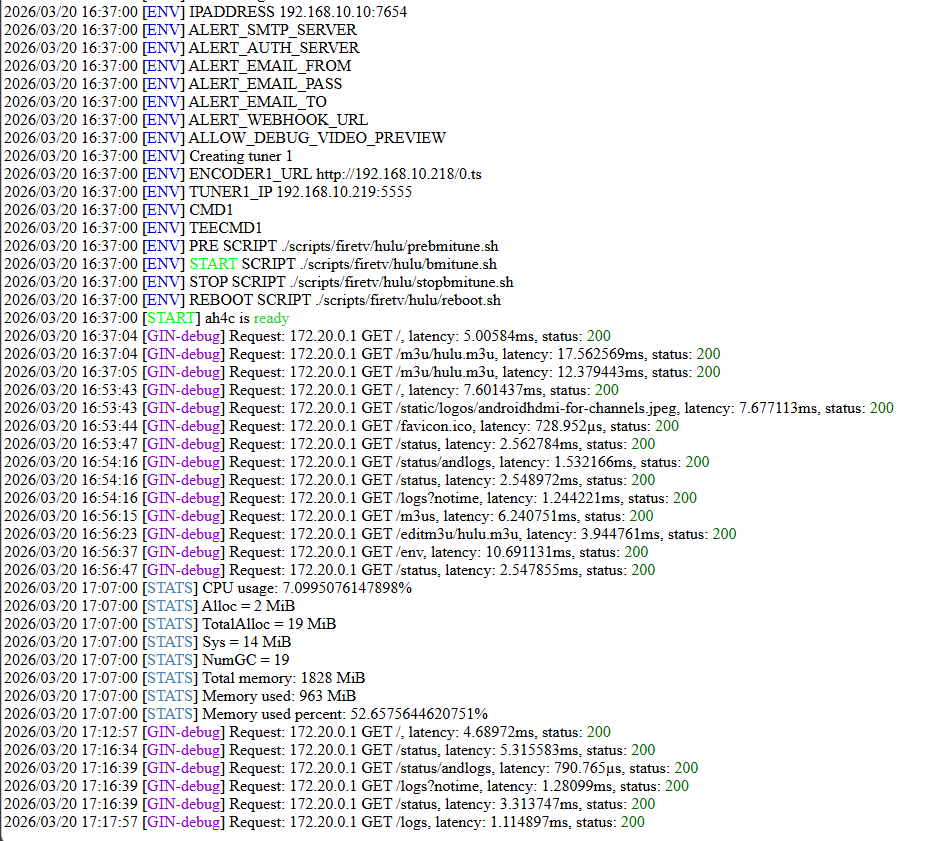
That just means you're not actively streaming anything.
so the logs look to be in a good state? The ah4c tuner did appear as a source in CDVR admin. Is there a way to see what is coming out on HDMI port (like the "view" ability on adbtuner). Tried to play a channel via this tuner but no luck. this is progress!
tried to play a channel via the ah4c tuner using channels app on android phone. Got this error:
Streaming to the tuner failed. Press Play to try again. M3U: GET: http://192.168.10.10:5592/stream/1: 404 Not Found
You can use VLC connected to the same encoder URL to view what's happening as you're connecting.
Haven't you already done a bunch of this recently when you were trying to get your other streaming device working with ah4c?
this is that same device (Tivo Stream 4K) and I never got it to work. Figured I'd back off and start from scratch this time using Project 1-click. When I bring up the encoder URL via VLC I see the Tivo device home screen. Thoughts on the error I'm getting when I try to tune to a channel that is now present in the ah4c tuner? Here is the error: Streaming to the tuner failed. Press Play to try again. M3U: GET: http://192.168.10.10:5592/stream/1: 404 Not Found
Please post the complete set of env vars you're using with ah4c, so I can see where you're at, and we don't need to do this piecemeal.
@rss7 Also, I was just looking at your last post in the ADBTuner thread, where you got Hulu Live working with your Google Streamer device. Now that you have a working virtual tuning setup there, your easiest path forward would be to add this TiVo device to that ADBTuner setup.
But the tivo doesn't support deeplinks at all so I figured ah4c was the only hope for the tivo?
Are you sure about that?
Are the Hulu package names the same on the TiVo and the streamer? What version of Android is the TiVo running?
I spent hours truing to get adbtuner to work with the tivo. Once I got the google Streamer it was working in 15 mins Here are my ah4c ENV variables:
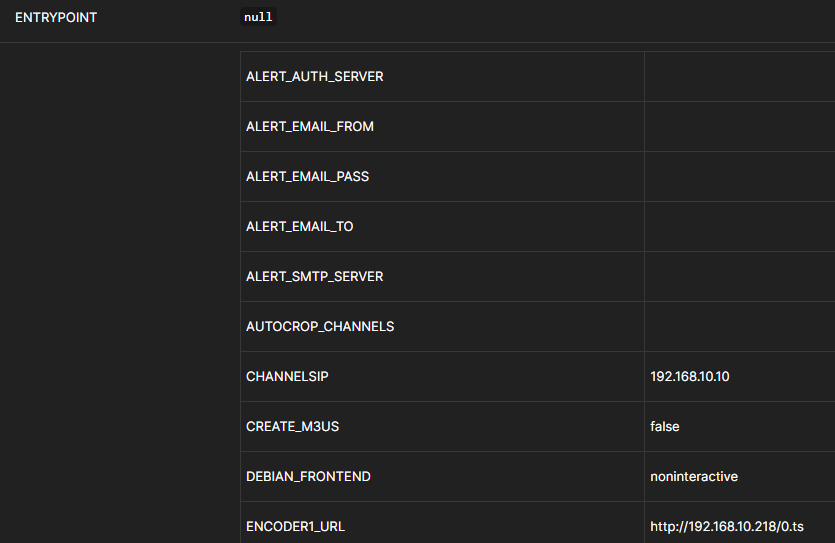
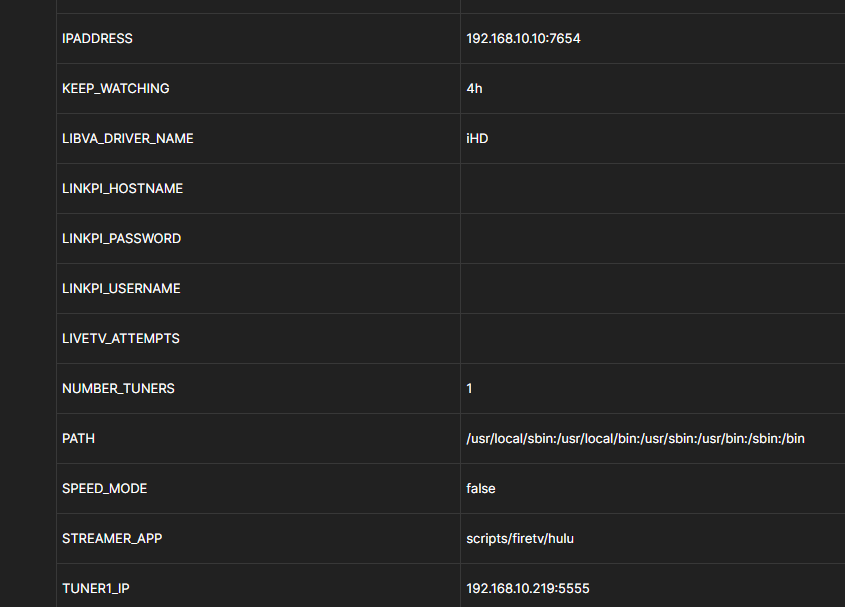
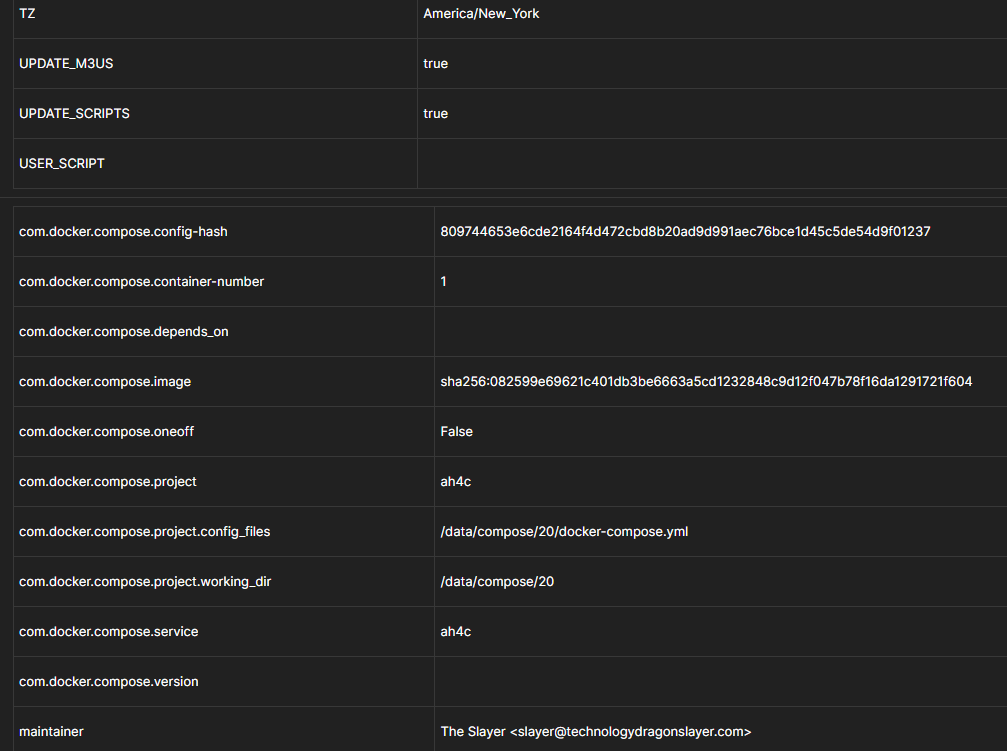
Please post the env vars as shown in the Environment variables section of the Portainer-Stacks Editor. They should look like this:
TAG=latest
DOMAIN=tailxxxxx.ts.net localdomain
ADBS_PORT=5037
HOST_PORT=7654
WSCR_PORT=7655
IPADDRESS=channels0:7654
NUMBER_TUNERS=2
TUNER1_IP=192.168.1.93:5555
ENCODER1_URL=http://192.168.1.52:8090/stream0
TUNER2_IP=192.168.1.201:5555
ENCODER2_URL=http://192.168.1.52:8090/stream2
STREAMER_APP=scripts/firetv/xfinity
CHANNELSIP=utheater-pc
CHANNELSPORT=8089
ALERT_SMTP_SERVER=smtp.gmail.com:587
ALERT_AUTH_SERVER=smtp.gmail.com
ALERT_EMAIL_FROM=[Redacted]
ALERT_EMAIL_PASS=[Redacted]
ALERT_EMAIL_TO=[Redacted]
UPDATE_SCRIPTS=false
UPDATE_M3US=false
TZ=US/Central
SPEED_MODE=false
KEEP_WATCHING=4h
AUTOCROP_CHANNELS=1810 1812 1841 1842 1846 1848 1852 1862
LINKPI_HOSTNAME=linkpi-encoder
LINKPI_USERNAME=admin
LINKPI_PASSWORD=[Redacted]
USER_SCRIPT=scripts/update_hosts.sh
HOST_DIR=/data
@rss7 I'd still like the answers to these questions -- including the actual Hulu package name on the TiVo, whether it's the same as the Streamer or not...