There are others that can help you more with Osprey specifics, but generally yes, a big part of what people like about ah4c is being able to customize the scripts.
prebmitune.sh wakes up the streaming device, or does any other quick setup to prepare for tuning.
bmitune.sh does the virtual tuning.
stopbmitune.sh puts the device to sleep, or performs any other post tune requirements.
All three scripts must exist, but the can be no-op, if they're not needed.
Is there a way to delay the stream coming up on the TV, kind of like with ADB Tuner?
The only thing I'm running into is when I don't sleep the boxes and tune to a channel, it shows the previous channel for a good 2 to 3 seconds before it tunes to the new channel. I'm just curious if there's a way to avoid that.
I'm trying to modify the shell script to allow me to do that. I just can't figure out exactly the architecture to get that to work.
What's the advantage in doing it this way vs the ffmpeg approach?
I would have incorporated your script into OliveTin, but it was Windows specific. And actually, I was able to duplicate those couple hundred lines of Python in what's essentially a single jq command. Tools like jq make Bash a pretty sweet way to go for scripts like this.
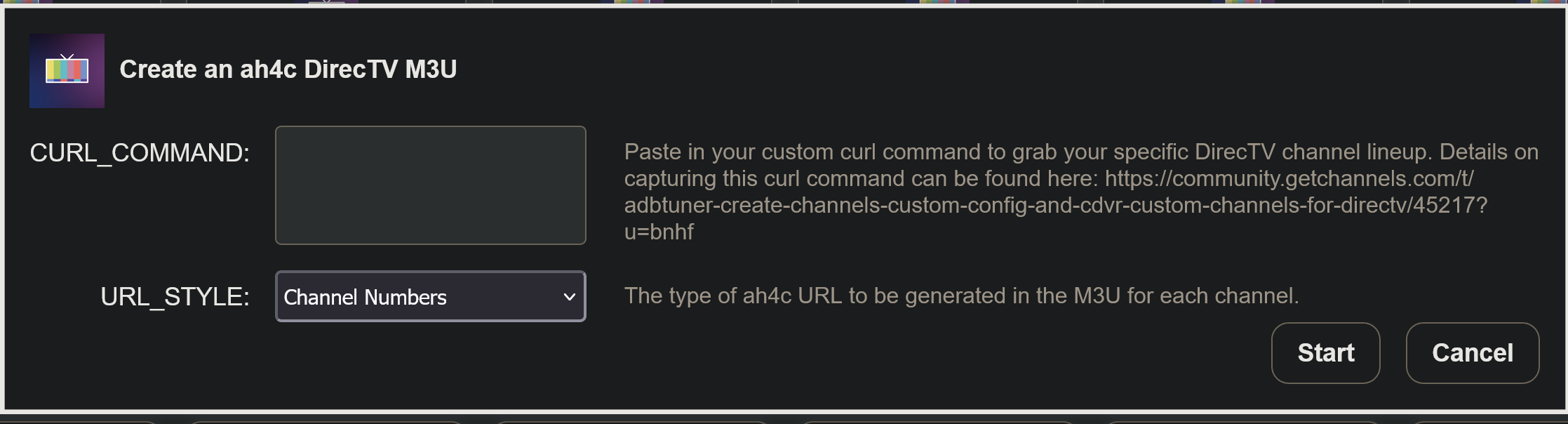
This has been pushed as bnhf/olivetin:latest (aka bnhf/olivetin:2026.03.29), and the new Create an ah4c DirecTV M3U is available in the classic Dashboard or Project WebUI+.
Actually, my script was written on Mac!
Thank you for implementing that action, though!!
So the reason for delaying the stream that way is it doesn't cut out any video. It literally pauses the execution of the stream by a few seconds.
It's also inherently a slightly lighter weight, but not by much. I'm actually able to let my Ospreys sleep now because I picked up a different USB capture card that doesn't freeze when I let them sleep. It turns out those Elgato Camlink 4Ks freeze when they lose HDMI connection.
I'm going to make a separate post in the LinkPi thread about what I actually did.
Powershell was for Windows clipboard support. It grabbed off the clipboard on Mac as well. In fact I used it first on Mac and tested onn Windows later!
Added an option to the new Action to generate deep link or channel number style URLs in the M3U. The M3U appears in the results window, and can be copy and pasted as desired:
For anyone using Spectrum it looks like they have finally got around to adding an app for FireTv Devices according to Cord Cutters News. CordCutters - Spectrum on FireTv
Supposed to become available on April 15th and supposedly also has a new multiview feature. This may already be in the ATV version that I use for tuners but I haven't looked.
Hopefully they remembered to support deeplinks also!
I will do some experimenting when I get a chance after the 15th.
@bnhf. Could you add the provider in the event there is a need to combine m3us from different providers? Recall you had helped me to get a this going where the relevant m3u lines look like the following for providers yttv, dtv, and max:
I have a question for anyone who knows. I'm curious if there's a way to run in a while loop essentially, or that would probably be the best way to do it. Just two commands like sleep 3600 then an input keyevent KEYCODE_ENTER.
My goal would be ultimately in the long term to let my Osprey boxes sleep and have the four-hour timeout on them enabled. But I don't want them to sleep if I'm watching the same channel for more than 4 hours, like having the news on in the background all day. My previous testing, KEYCODE_ENTER, works to tell DirecTV you have a heartbeat still, but doesn't actually make the boxes time out. It also doesn't show anything on the screen.
So my question would be, how do I script that? And what script would I put it in? And then I'll go and try to figure it out with Claude. I'm just curious if anyone has any tips, or if that's already implemented, because I know there's a keep watching prompt environment variable, and I'm not sure if that's implemented for the Osprey scripts.
This will be more relevant when my LinkPi ENC5-V2 ends up coming in a few weeks, so I don't have to rely on the flakiness of the USB input on my ENC1-V3 units.
I believe I implemented this for Osprey deeplinks:
I still have to watch for 4 hours and confirm it works like the DirecTV app on a regular Android box. (it should)
bmitune.sh
#!/bin/bash
# bmitune.sh for osprey/dtvospreydeeplinks
# 2025.09.26
#Debug on if uncommented
set -x
#Global
channelID=$(echo $1 | awk -F~ '{print $2}')
channelName=$(echo $1 | awk -F~ '{print $1}')
specialID="$channelName"
streamerIP="$2"
streamerNoPort="${streamerIP%%:*}"
adbTarget="adb -s $streamerIP"
[[ $SPEED_MODE == "" ]] && speedMode="true" || speedMode="$SPEED_MODE"

mkdir -p $streamerNoPort
echo $$ > "$streamerNoPort/bmitune_pid"

#Trap end of script run
finish() {
  echo "bmitune.sh is exiting for $streamerIP with exit code $?"
}
trap finish EXIT
#Set encoderURL based on the value of streamerIP
matchEncoderURL() {
  case "$streamerIP" in
    "$TUNER1_IP")
        encoderURL=$ENCODER1_URL
        ;;
    "$TUNER2_IP")
        encoderURL=$ENCODER2_URL
        ;;
    "$TUNER3_IP")
        encoderURL=$ENCODER3_URL
        ;;
    "$TUNER4_IP")
        encoderURL=$ENCODER4_URL
        ;;
    "$TUNER5_IP")
        encoderURL=$ENCODER5_URL
        ;;
    "$TUNER6_IP")
        encoderURL=$ENCODER6_URL
        ;;
    "$TUNER7_IP")
        encoderURL=$ENCODER7_URL
        ;;
    "$TUNER8_IP")
        encoderURL=$ENCODER8_URL
        ;;
    "$TUNER9_IP")
        encoderURL=$ENCODER9_URL
        ;;
    *)
        exit 1
        ;;
  esac
}
#Tuning is based on channel name/ID values from dtvospreydeeplinks.m3u.
tuneChannel() {
  $adbTarget shell am start -a android.intent.action.VIEW -d https://deeplink.directvnow.com/tune/live/channel/$channelName/$channelID com.att.tv.openvideo
  echo -e "#!/bin/bash\n\nwhile true; do sleep $KEEP_WATCHING; $adbTarget shell input keyevent KEYCODE_ENTER; done" > ./$streamerNoPort/keep_watching.sh && chmod +x ./$streamerNoPort/keep_watching.sh
  [[ $KEEP_WATCHING ]] && nohup ./$streamerNoPort/keep_watching.sh &
}
main() {
  tuneChannel
}
main
stopbmitune.sh
#!/bin/bash
# stopbmitune.sh for osprey/dtvospreydeeplinks
# 2025.09.26
#Debug on if uncommented
set -x

streamerIP="$1"
streamerNoPort="${streamerIP%%:*}"
adbTarget="adb -s $streamerIP"

#Check if bmitune.sh is done running
bmituneDone() {
  bmitunePID=$(<"$streamerNoPort/bmitune_pid")
  keepWatchingPID=$(pgrep -f "$streamerNoPort/keep_watching.sh")
  keepWatchingPPID=$(ps -o ppid= -p "$keepWatchingPID")
  keepWatchingCPID=$(pgrep -P $keepWatchingPID)

  while ps -p $bmitunePID > /dev/null; do
    echo "Waiting for bmitune.sh to complete..."
    sleep 2
  done

  [[ $KEEP_WATCHING ]] && pkill -P $keepWatchingPPID && kill $keepWatchingCPID
  rm ./$streamerNoPort/keep_watching.sh
}

#Device sleep
adbSleep() {
  sleep="input keyevent KEYCODE_SLEEP"
  $adbTarget shell $sleep
  echo "Sleep initiated for $streamerIP"
  date +%s > $streamerNoPort/stream_stopped
  echo "$streamerNoPort/stream_stopped written with epoch stop time"
}

main() {
  bmituneDone
  adbSleep
}

main
Final Result
root@ah4c:/opt/192.168.200.16# cat keep_watching.sh
#!/bin/bash

while true; do sleep 1h; adb -s 192.168.200.16:5555 shell input keyevent KEYCODE_ENTER; done
Hopefully someone can tell me if I did this correctly, but it's set with the environment variables.
Thanks for letting me know. I will watch for 4 hours and let you know if it works.
Probably not tonight, but definitely tomorrow. This might be a nice enhancement for the Osprey scripts because you could set the sleep mode on the device and that would prevent a box that may have accidentally woken from staying awake, but by pressing enter, ideally every hour or so, you would prevent it from timing out while actually watching. That's my goal at least.
Edit I'm testing now. Updated the script with some logging too!
#!/bin/bash
# bmitune.sh for osprey/dtvospreydeeplinks
# 2025.09.26
#Debug on if uncommented
set -x
#Global
channelID=$(echo $1 | awk -F~ '{print $2}')
channelName=$(echo $1 | awk -F~ '{print $1}')
specialID="$channelName"
streamerIP="$2"
streamerNoPort="${streamerIP%%:*}"
adbTarget="adb -s $streamerIP"
[[ $SPEED_MODE == "" ]] && speedMode="true" || speedMode="$SPEED_MODE"

mkdir -p $streamerNoPort
echo $$ > "$streamerNoPort/bmitune_pid"

#Trap end of script run
finish() {
  echo "bmitune.sh is exiting for $streamerIP with exit code $?"
}
trap finish EXIT
#Set encoderURL based on the value of streamerIP
matchEncoderURL() {
  case "$streamerIP" in
    "$TUNER1_IP")
        encoderURL=$ENCODER1_URL
        ;;
    "$TUNER2_IP")
        encoderURL=$ENCODER2_URL
        ;;
    "$TUNER3_IP")
        encoderURL=$ENCODER3_URL
        ;;
    "$TUNER4_IP")
        encoderURL=$ENCODER4_URL
        ;;
    "$TUNER5_IP")
        encoderURL=$ENCODER5_URL
        ;;
    "$TUNER6_IP")
        encoderURL=$ENCODER6_URL
        ;;
    "$TUNER7_IP")
        encoderURL=$ENCODER7_URL
        ;;
    "$TUNER8_IP")
        encoderURL=$ENCODER8_URL
        ;;
    "$TUNER9_IP")
        encoderURL=$ENCODER9_URL
        ;;
    *)
        exit 1
        ;;
  esac
}
#Tuning is based on channel name/ID values from dtvospreydeeplinks.m3u.
tuneChannel() {
  $adbTarget shell am start -a android.intent.action.VIEW -d https://deeplink.directvnow.com/tune/live/channel/$channelName/$channelID com.att.tv.openvideo
  echo -e "#!/bin/bash\n\necho \"[\$(date)] Keep-alive started for $streamerIP (interval: $KEEP_WATCHING)\" > /proc/1/fd/1\nwhile true; do sleep $KEEP_WATCHING; echo \"[\$(date)] Keep-alive sent to $streamerIP\" > /proc/1/fd/1; $adbTarget shell input keyevent KEYCODE_ENTER; done" > ./$streamerNoPort/keep_watching.sh && chmod +x ./$streamerNoPort/keep_watching.sh
  [[ $KEEP_WATCHING ]] && nohup ./$streamerNoPort/keep_watching.sh &
}
main() {
  tuneChannel
}
main
@bnhf I fixed a small bug in ah4c. Previously in Docker when accidentally clicking: /config all streams would stop and the container would basically crash. It was a great way to hit the wrong button and kill all of your streams at once. I fixed that so it displays a message:
"This feature is not available when running in Docker. ENV configuration should be managed through your Docker Compose file or environment variables.".
I also did the same for /env and while that wouldn't crash the container, it would output a blank white page, and it was just super confusing to me as a new user. I guarded both changes with if _, err := os.Stat("/.dockerenv");. That way it should only take effect when Docker is detected regardless if someone's using Portainer, which is supported, or regular Docker, which is obviously not supported, but possible.
It's literally a 10-line change. I just figured before I open a pull request I should mention it here. If you want me to open a PR, I can, or the code is right here. It's a very small change. But it prevents a crash that would actively stop all streaming by clicking that one button. And it also makes ah4c a little bit more user-friendly, so users know that those buttons are no-ops in Docker. I was super confused by those buttons at first and had no idea why they kept crashing the container and I thought something was broken.
I also found a bug in the Osprey Script; MS NOW won't load because of the space. It's possible this wasn't an issue before because perhaps DirecTV wasn't returning spaces in their channel names. I checked with a recent curl pull and they definitely are now. Also KEYCODE_ENTER brings up the UI but KEYCODE_MEDIA_PLAY doesn't!!
Updated script with quoting for channel names with spaces so they tune:
$adbTarget shell "am start -a android.intent.action.VIEW -d 'https://deeplink.directvnow.com/tune/live/channel/$channelName/$channelID' com.att.tv.openvideo"
Full script with keep alive I am re-testing:
bmitune.sh
#!/bin/bash
# bmitune.sh for osprey/dtvospreydeeplinks
# 2025.09.26
#Debug on if uncommented
set -x
#Global
channelID=$(echo $1 | awk -F~ '{print $2}')
channelName=$(echo $1 | awk -F~ '{print $1}')
specialID="$channelName"
streamerIP="$2"
streamerNoPort="${streamerIP%%:*}"
adbTarget="adb -s $streamerIP"
[[ $SPEED_MODE == "" ]] && speedMode="true" || speedMode="$SPEED_MODE"

mkdir -p $streamerNoPort
echo $$ > "$streamerNoPort/bmitune_pid"

#Trap end of script run
finish() {
  echo "bmitune.sh is exiting for $streamerIP with exit code $?"
}
trap finish EXIT
#Set encoderURL based on the value of streamerIP
matchEncoderURL() {
  case "$streamerIP" in
    "$TUNER1_IP")
        encoderURL=$ENCODER1_URL
        ;;
    "$TUNER2_IP")
        encoderURL=$ENCODER2_URL
        ;;
    "$TUNER3_IP")
        encoderURL=$ENCODER3_URL
        ;;
    "$TUNER4_IP")
        encoderURL=$ENCODER4_URL
        ;;
    "$TUNER5_IP")
        encoderURL=$ENCODER5_URL
        ;;
    "$TUNER6_IP")
        encoderURL=$ENCODER6_URL
        ;;
    "$TUNER7_IP")
        encoderURL=$ENCODER7_URL
        ;;
    "$TUNER8_IP")
        encoderURL=$ENCODER8_URL
        ;;
    "$TUNER9_IP")
        encoderURL=$ENCODER9_URL
        ;;
    *)
        exit 1
        ;;
  esac
}
#Tuning is based on channel name/ID values from dtvospreydeeplinks.m3u.
tuneChannel() {
  $adbTarget shell "am start -a android.intent.action.VIEW -d 'https://deeplink.directvnow.com/tune/live/channel/$channelName/$channelID' com.att.tv.openvideo"
  echo -e "#!/bin/bash\n\necho \"[\$(date)] Keep-alive started for $streamerIP (interval: $KEEP_WATCHING)\" > /proc/1/fd/1\nwhile true; do sleep $KEEP_WATCHING; echo \"[\$(date)] Keep-alive sent to $streamerIP\" > /proc/1/fd/1; $adbTarget shell input keyevent KEYCODE_MEDIA_PLAY; done" > ./$streamerNoPort/keep_watching.sh && chmod +x ./$streamerNoPort/keep_watching.sh
  [[ $KEEP_WATCHING ]] && nohup ./$streamerNoPort/keep_watching.sh &
}
main() {
  tuneChannel
}
main
stopbmitune.sh
#!/bin/bash
# stopbmitune.sh for osprey/dtvospreydeeplinks
# 2025.09.26
#Debug on if uncommented
set -x

streamerIP="$1"
streamerNoPort="${streamerIP%%:*}"
adbTarget="adb -s $streamerIP"

#Check if bmitune.sh is done running
bmituneDone() {
  bmitunePID=$(<"$streamerNoPort/bmitune_pid")
  keepWatchingPID=$(pgrep -f "$streamerNoPort/keep_watching.sh")
  keepWatchingPPID=$(ps -o ppid= -p "$keepWatchingPID")
  keepWatchingCPID=$(pgrep -P $keepWatchingPID)

  while ps -p $bmitunePID > /dev/null; do
    echo "Waiting for bmitune.sh to complete..."
    sleep 2
  done

  [[ $KEEP_WATCHING ]] && pkill -P $keepWatchingPPID && kill $keepWatchingCPID
  rm ./$streamerNoPort/keep_watching.sh
}

#Device sleep
adbSleep() {
  sleep="input keyevent KEYCODE_SLEEP"
  $adbTarget shell $sleep
  echo "Sleep initiated for $streamerIP"
  date +%s > $streamerNoPort/stream_stopped
  echo "$streamerNoPort/stream_stopped written with epoch stop time"
}

main() {
  bmituneDone
  adbSleep
}

main
Edit 1 5:40PM: @bnhf I can confirm this variation did indeed work sending KEYCODE_MEDIA_PLAY worked just as I expected. I watched for a little over 4 hours straight and my Osprey stayed awake with no pop-ups or anything on the screen.
So this theoretically could make it upstream for other users who want their boxes to sleep but not sleep during the middle of a TV show, but also want the regular power saving mode enabled just in case a box gets turned on. I also fixed that bug with the quoting for channels with spaces and obviously the patch for the Docker related crash I found. Please let me know if I should open a more comprehensive PR, including everything, the Osprey script and the patch or if this forum post is sufficient.



 I fixed that so it displays a message:
