I noticed that -- you can only go down now from the top. Going up no longer loops you to the bottom of the guide.
Shouldn't be too tough to fix. I'll sort it out in the next few days next week.

I noticed that -- you can only go down now from the top. Going up no longer loops you to the bottom of the guide.
Shouldn't be too tough to fix. I'll sort it out in the next few days next week.
I've built a new all-in-one image under bnhf/ah4c:test that includes the fix for firetv/livetv. Moving through the FireTV LiveTV guide now happens only in a downward direction, as "wrap around" only works now from the bottom of the guide to the top.
Support for arm/v7 has been dropped. For anyone using a Raspberry Pi, you'll want to upgrade to a 64bit OS (there are a number of options for the Pi), to use this container.
Updated, seems to be working.
Thank You!
I'm having a problem with the first channel in the list. It lands on the channel, but doesn't select it. Just sits stationary on the guide. All other channels work.
Try bnhf/ah4c:latest -- I've tweaked the top-of-guide logic, as it seems to be unnecessary with the updated FireTV LiveTV guide.
Got it.
Seems to be working.
Once it got stuck and wouldn't change channels, but now I can't duplicate the problem.
Is this the consolidated version that also works with DirecTV?
I have been away for awhile.
It is.
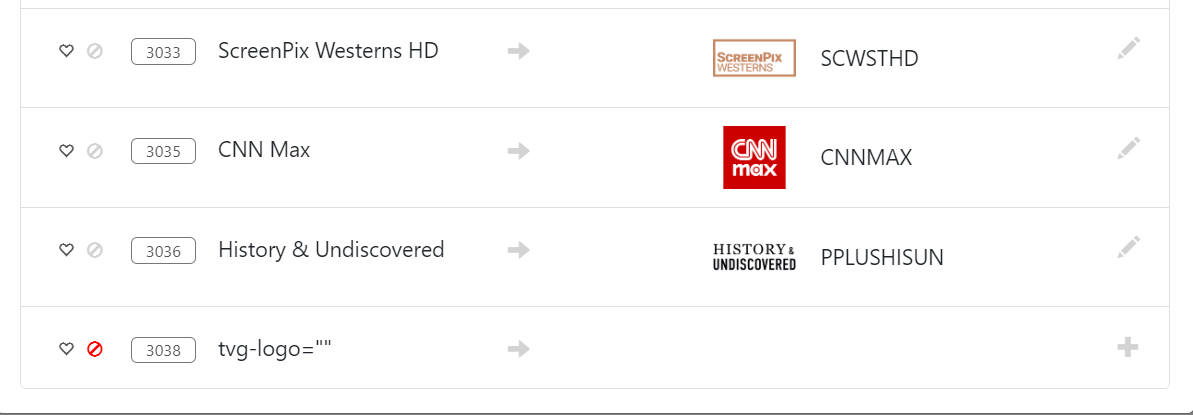
Looks like the banner in the guide is causing an issue.
The log says the m3u creation may have failed, but it seems to be ok from what I am see so far.
I
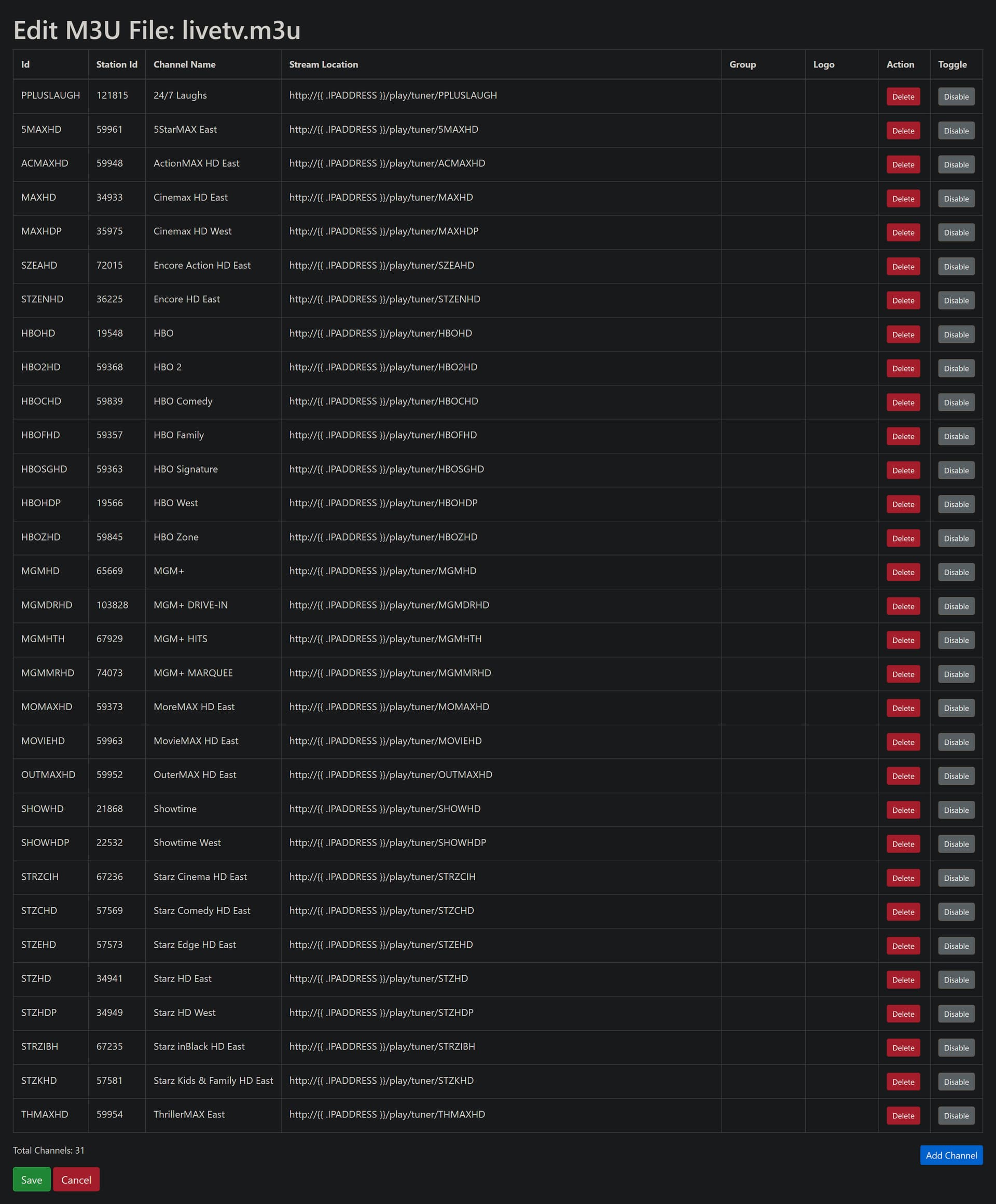
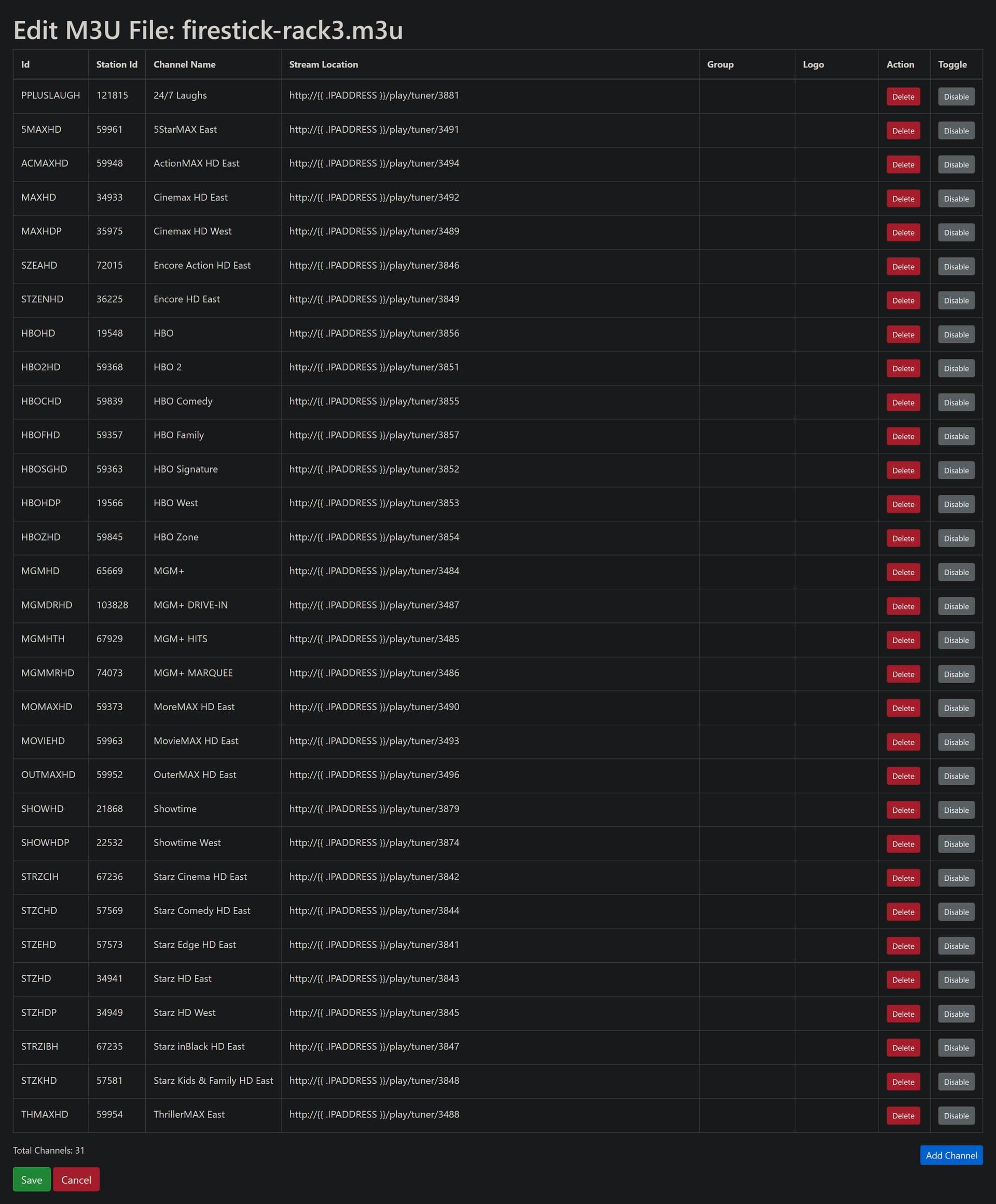
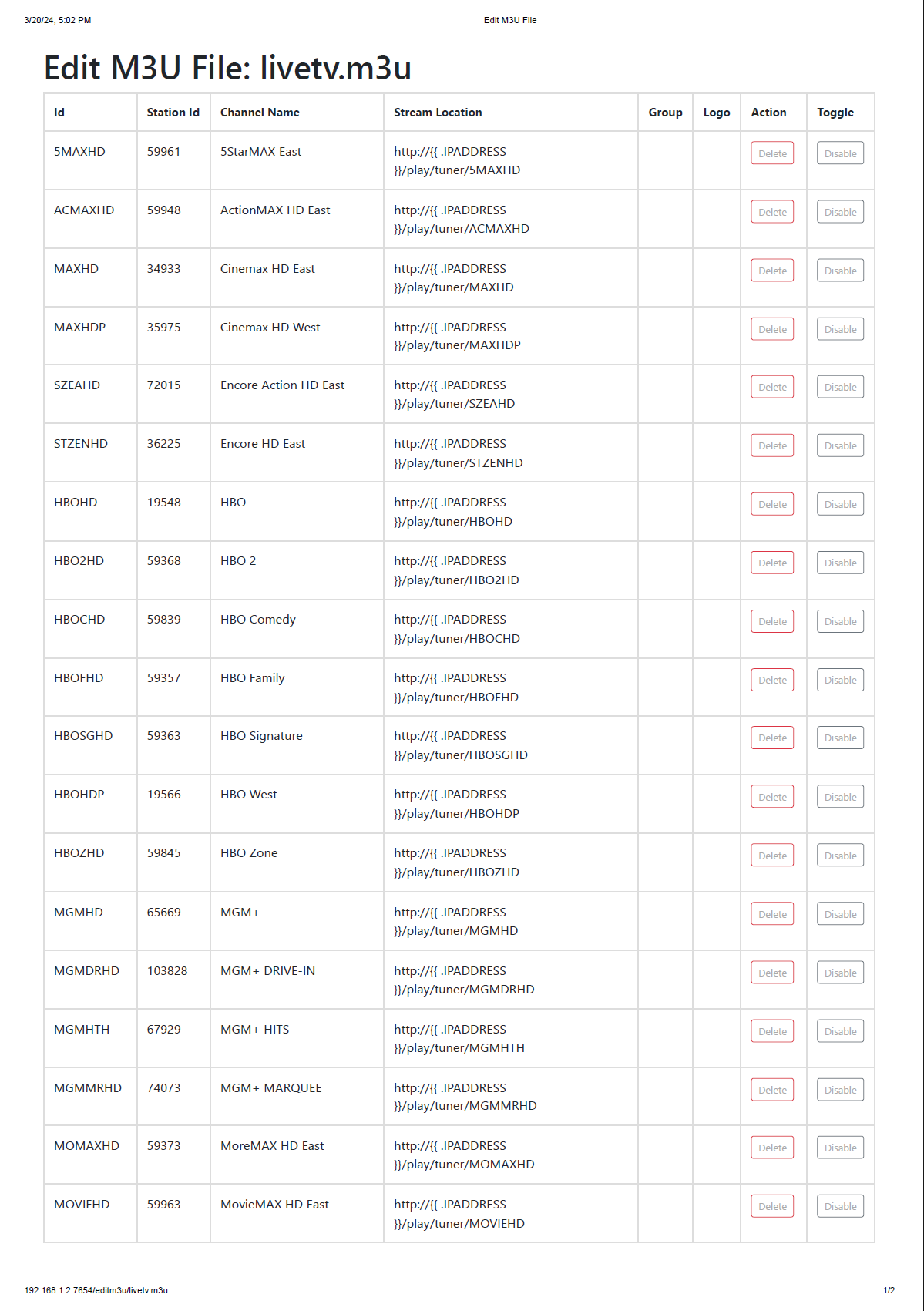
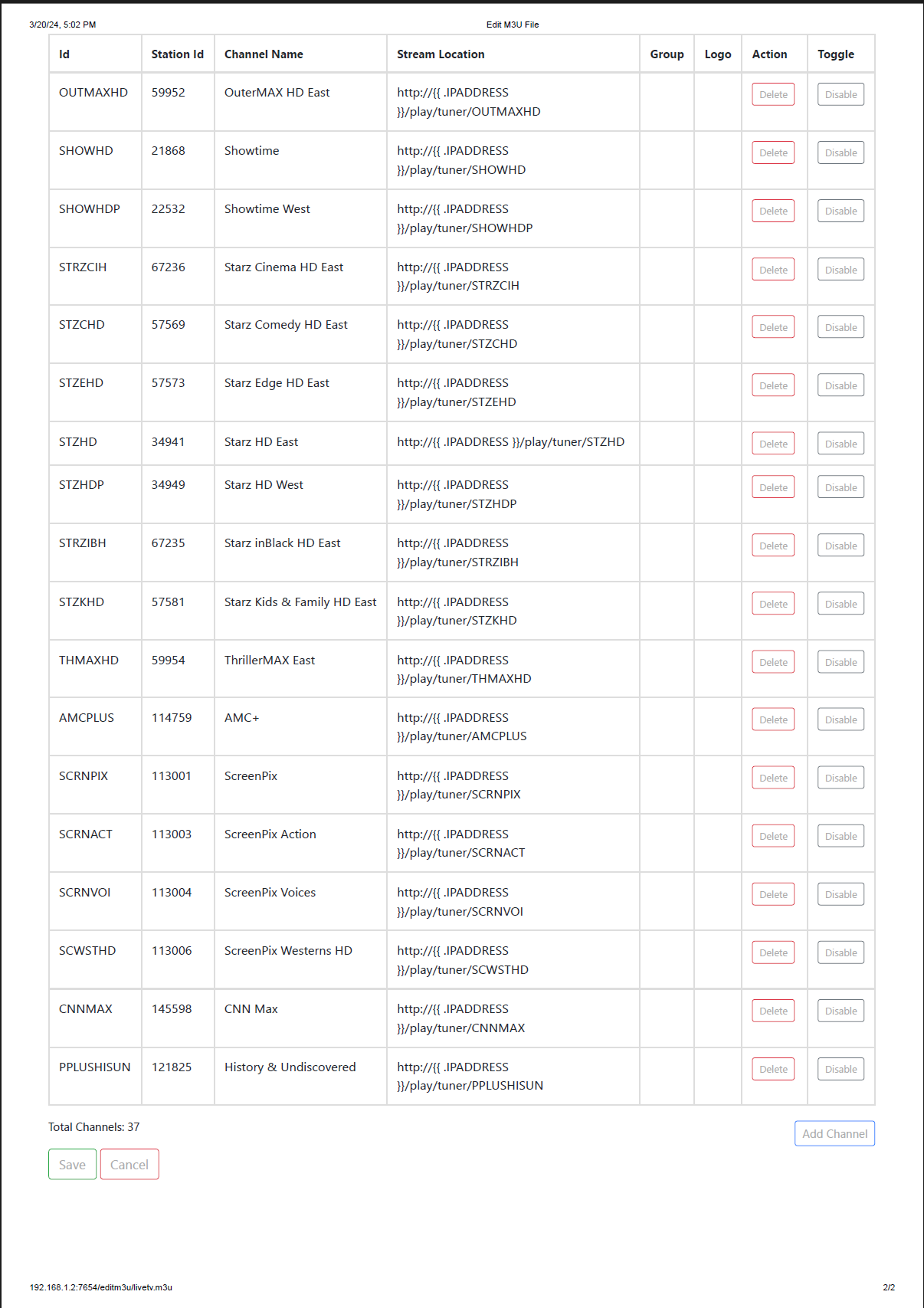
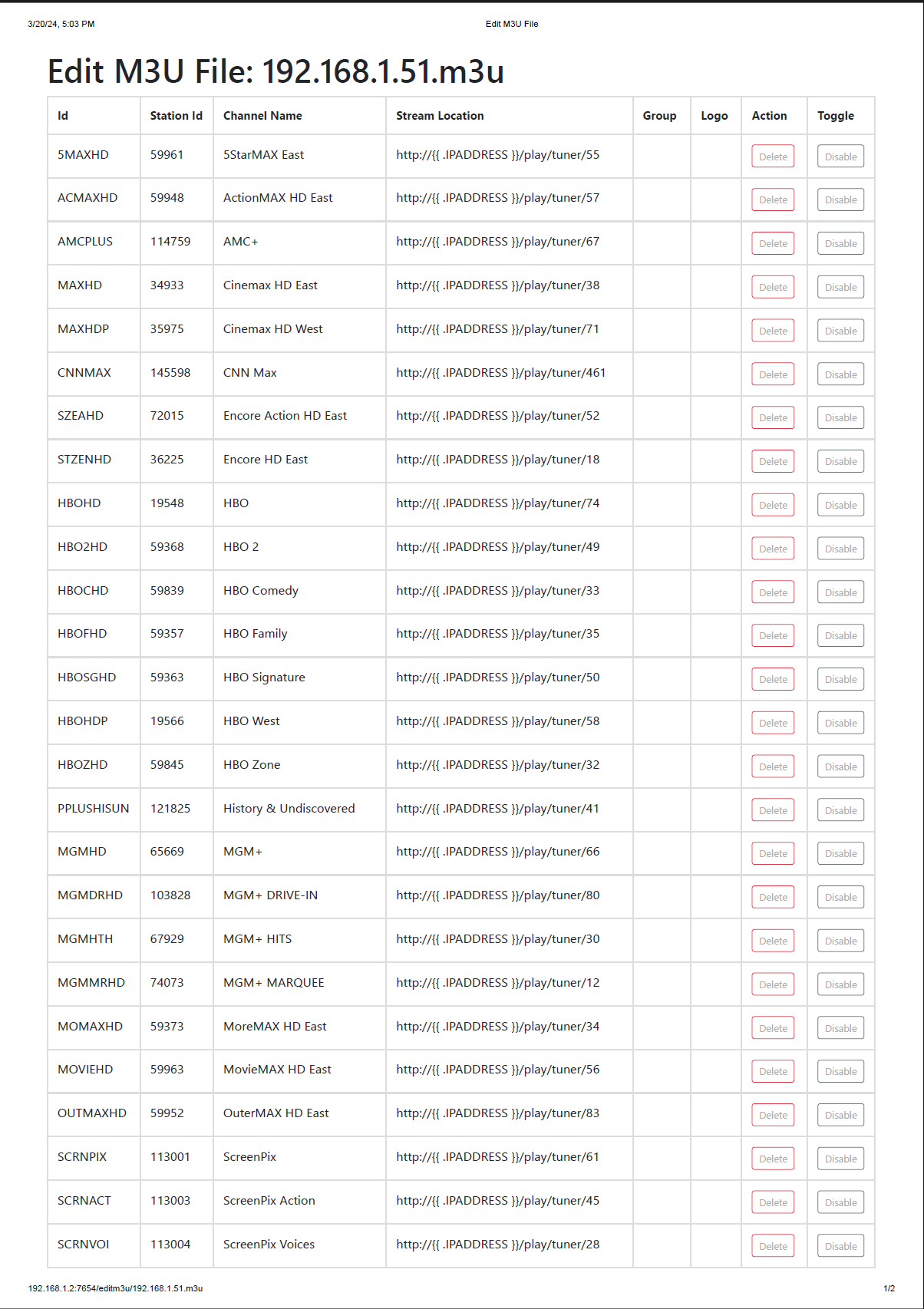
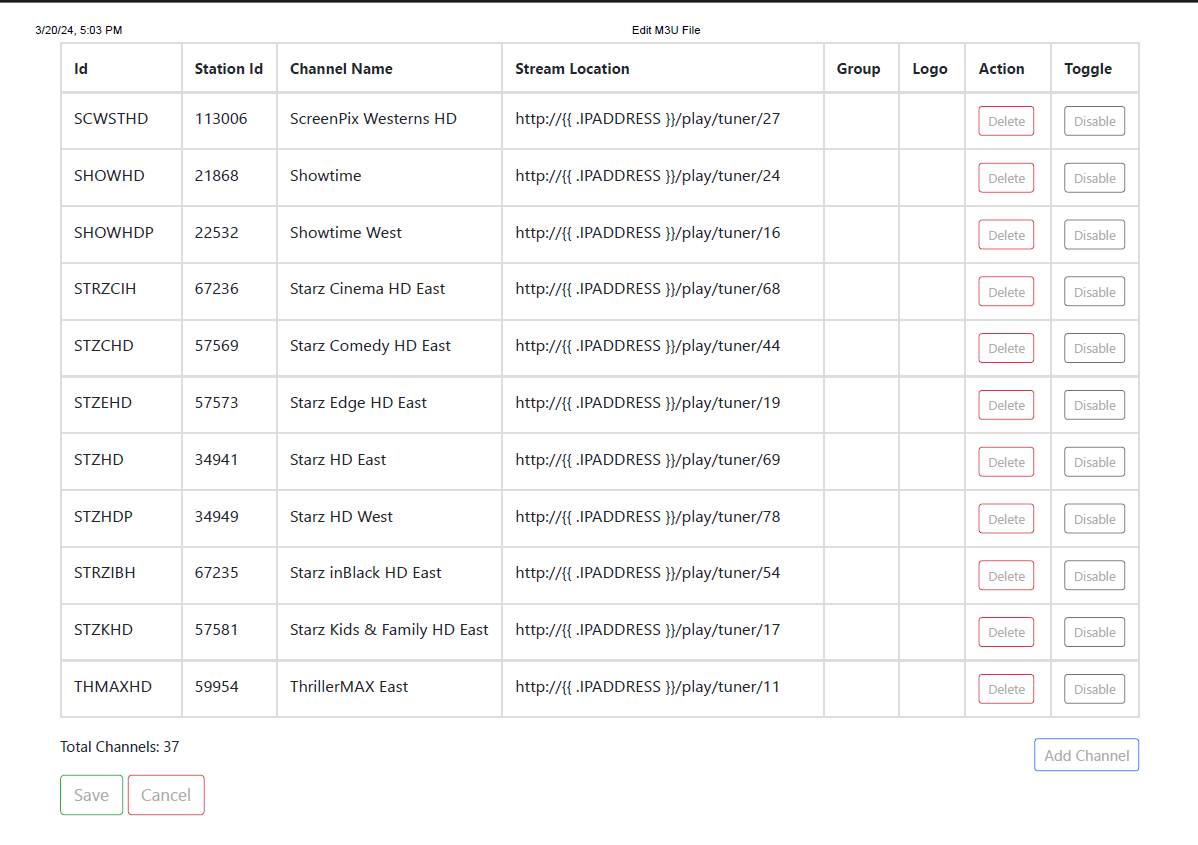
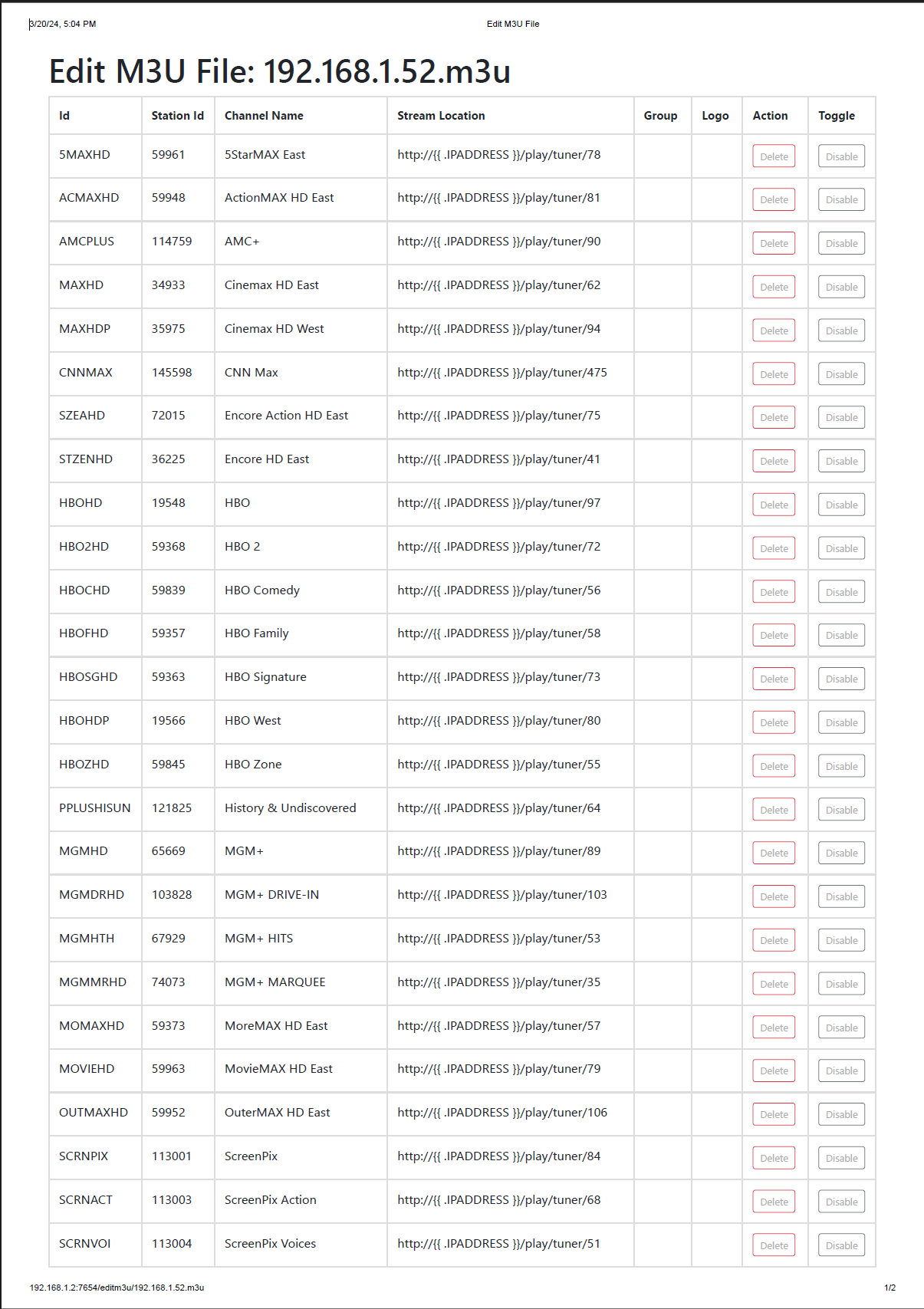
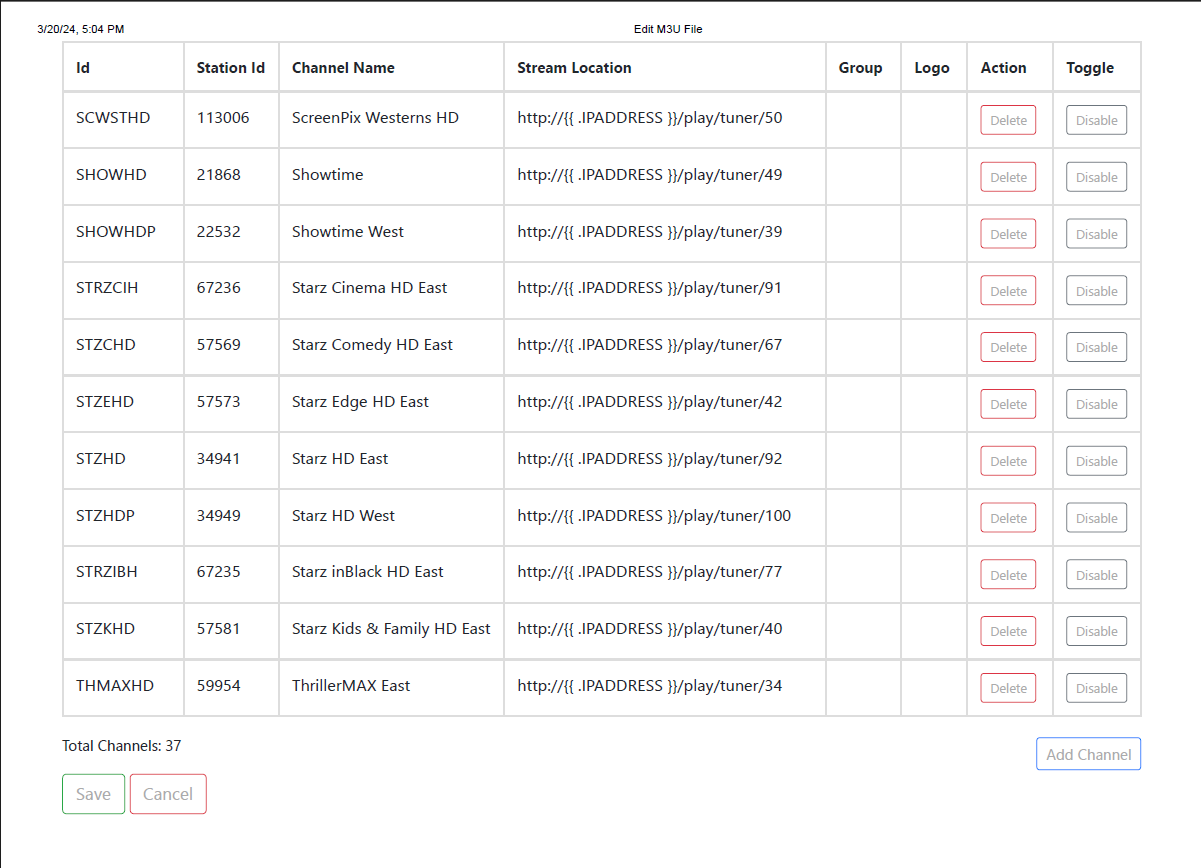
Could you post the livetv.m3u you're using from the ah4c M3U Editor, and the same for each of the FireStick-specific M3Us created? Should look something like this:
Still having a problem where the first channel (5StarMax) in the list doesn't always play.
The guide is in position, but it doesn't always select the channel.
Does the script cycle through the guide once, but then still not find that channel -- or does it just go to the top and sit there?
It just goes to the top and sits there.
With the changes Amazon made to moving through the LiveTV guide, we need a small delay added after landing on the correct channel, before we select it. This is the function in question in bmitune.sh (under scripts/firetv/livetv):
tuneLiveTV() {
  channelName=$(awk '/tuner\/'"$specialID"'/ {print prev} {prev = $0}' m3u/$m3uName)
  channelName=$(echo $channelName | awk -F, '{print $2}')
  specialID=$(awk -F'["/]' '/'"$channelID"'/{getline; print $6}' m3u/$streamerNoPort.m3u)
  topGuideChannel=$(grep -m 1 "/play/tuner" m3u/$streamerNoPort.m3u | awk -F/ '{print$6}')
  local maxLoops=$LIVETV_ATTEMPTS
  local loopCount=0

  firstLetterChannel="${channelName:0:1}" && echo "Channel name begins with $firstLetterChannel"
  [[ "$firstLetterChannel" == [A-La-l0-9] ]] && dpadDirection="KEYCODE_DPAD_DOWN"
  [[ "$firstLetterChannel" == [M-Zm-z] ]] && dpadDirection="KEYCODE_DPAD_DOWN"

  # Move to top of Live TV guide, and confirm that its ID matches the top channel in the M3U
  $adbTarget shell input keyevent KEYCODE_LIVE_TV; sleep 2
  startingGuideChannel=$($adbTarget shell "input keyevent KEYCODE_LIVE_TV && logcat -d" | grep GuideManager | tail -n 1 | awk -F? '{print$3}')
  #confirmTopGuidePosition
  #[ -z $startingGuideChannel ] && startingGuideChannel=$(grep -m 1 "/play/tuner" m3u/$m3uName | awk -F/ '{print$6}')
  currentGuideChannel=$startingGuideChannel

  while [ "$loopCount" -lt "$maxLoops" ]; do
    #[[ $currentGuideChannel == $startingGuideChannel ]] && [ "$loopCount" -gt 0 ] \
      #&& echo "No channels in the Live TV Guide match $specialID, exiting..." && exit 1
    [[ $currentGuideChannel == $specialID ]] \
      && $adbTarget shell input keyevent KEYCODE_DPAD_CENTER \
      && echo "Live TV ID $currentGuideChannel is the desired $specialID" && break
    echo "Live TV ID $currentGuideChannel is not the desired $specialID, continuing..."
    currentGuideChannel=$($adbTarget shell "input keyevent ${dpadDirection} && logcat -d" | grep GuideManager | tail -n 1 | awk -F? '{print$3}')
    [ -z $currentGuideChannel ] && $adbTarget shell input keyevent KEYCODE_DPAD_DOWN \
      && currentGuideChannel=$($adbTarget shell "input keyevent KEYCODE_DPAD_UP && logcat -d" | grep GuideManager | tail -n 1 | awk -F? '{print$3}')
    ((loopCount++))
  done
}
And it's this line that needs an && sleep 2 added`:
[[ $currentGuideChannel == $specialID ]] && sleep 2 \
I'll push an update tomorrow, but if you're anxious to fix it now, go for it. You can change the sleep 2 to a sleep 3 if needed for your setup that way also.
The extra time didn't help.
I did notice this while creating new M3U's
Initial pass through the guide completed
Beginning second pass to confirm play/tuner values...
Confirming a guideID #EXTINF:-1 channel-id="" tvc-guide-stationid="" tvg-group="" tvg-logo="", is present
assigned to M3U channel name:
scripts/firetv/livetv/createm3u.sh: line 82: [: too many arguments
Confirming a guideID 55 is present
I appreciate you testing the M3U creation process -- but I wouldn't recommend doing that every time, especially is you have working M3Us. Set the CREATE_M3US env var to false to prevent recreation on every startup.
The extra time did fix it for me, so maybe you just need an extra second or two?
Also try pulling the :latest build, as I've added the 2 second delay as of earlier today.
I went to 3 seconds. No change.
If I play a channel other than the first one, and then go back to the first one, it works.
If I repeatedly try to play the first channel, it never plays. Just sits there like a dead thing.
Yeah, I set those to false normally.
OK thanks. I'll look at it again tomorrow.
I do believe I found the problem -- and the required logic change was needed for determining the top-of-guide in M3U creation as well. I built it under the :test tag for now, but if you're able to confirm the fix, I'll rebuild it as :latest.
Using the new logic I ran this test of createm3u.sh:
bash-5.1# ./scripts/firetv/livetv/createm3u.sh firestick-rack4:5555
 Waking firestick-rack4...

 Sorting livetv.m3u alphabetically to match FireTV LiveTV Guide...

 Reading firestick-rack4.m3u and updating it with device specific channelID...

Starting channelID is 3658
assigned to M3U channel name: 24/7 Laughs

Current channelID is 2404
assigned to M3U channel name: 5StarMAX East

Current channelID is 2407
assigned to M3U channel name: ActionMAX HD East

Current channelID is 2405
assigned to M3U channel name: Cinemax HD East

Current channelID is 2402
assigned to M3U channel name: Cinemax HD West

Current channelID is 3205
assigned to M3U channel name: Encore Action HD East

 EPG ad detected, skipping...

Current channelID is 3208
assigned to M3U channel name: Encore HD East

Current channelID is 3635
assigned to M3U channel name: HBO

Current channelID is 3630
assigned to M3U channel name: HBO 2

Current channelID is 3634
assigned to M3U channel name: HBO Comedy

Current channelID is 3636
assigned to M3U channel name: HBO Family

Current channelID is 3631
assigned to M3U channel name: HBO Signature

Current channelID is 3632
assigned to M3U channel name: HBO West

Current channelID is 3633
assigned to M3U channel name: HBO Zone

Current channelID is 2399
assigned to M3U channel name: MGM+

Current channelID is 2398
assigned to M3U channel name: MGM+ DRIVE-IN

Current channelID is 2400
assigned to M3U channel name: MGM+ HITS

Current channelID is 2397
assigned to M3U channel name: MGM+ MARQUEE

Current channelID is 2403
assigned to M3U channel name: MoreMAX HD East

Current channelID is 2406
assigned to M3U channel name: MovieMAX HD East

Current channelID is 2409
assigned to M3U channel name: OuterMAX HD East

Current channelID is 3656
assigned to M3U channel name: Showtime

Current channelID is 3651
assigned to M3U channel name: Showtime West

Current channelID is 3201
assigned to M3U channel name: Starz Cinema HD East

Current channelID is 3203
assigned to M3U channel name: Starz Comedy HD East

Current channelID is 3209
assigned to M3U channel name: Starz Edge HD East

Current channelID is 3202
assigned to M3U channel name: Starz HD East

Current channelID is 3204
assigned to M3U channel name: Starz HD West

Current channelID is 3206
assigned to M3U channel name: Starz inBlack HD East

Current channelID is 3207
assigned to M3U channel name: Starz Kids AND Family HD East

Current channelID is 2401
assigned to M3U channel name: ThrillerMAX East

Current channelID is 3658
 Initial pass through the guide completed

 Beginning second pass to confirm play/tuner values...

Confirming a guideID 3658 is present
assigned to M3U channel name: 24/7 Laughs

Confirming a guideID 2404 is present
assigned to M3U channel name: 5StarMAX East

Confirming a guideID 2407 is present
assigned to M3U channel name: ActionMAX HD East

Confirming a guideID 2405 is present
assigned to M3U channel name: Cinemax HD East

Confirming a guideID 2402 is present
assigned to M3U channel name: Cinemax HD West

Confirming a guideID 3205 is present
assigned to M3U channel name: Encore Action HD East

Confirming a guideID 3208 is present
assigned to M3U channel name: Encore HD East

Confirming a guideID 3635 is present
assigned to M3U channel name: HBO

Confirming a guideID 3630 is present
assigned to M3U channel name: HBO 2

Confirming a guideID 3634 is present
assigned to M3U channel name: HBO Comedy

Confirming a guideID 3636 is present
assigned to M3U channel name: HBO Family

Confirming a guideID 3631 is present
assigned to M3U channel name: HBO Signature

Confirming a guideID 3632 is present
assigned to M3U channel name: HBO West

Confirming a guideID 3633 is present
assigned to M3U channel name: HBO Zone

Confirming a guideID 2399 is present
assigned to M3U channel name: MGM+

Confirming a guideID 2398 is present
assigned to M3U channel name: MGM+ DRIVE-IN

Confirming a guideID 2400 is present
assigned to M3U channel name: MGM+ HITS

Confirming a guideID 2397 is present
assigned to M3U channel name: MGM+ MARQUEE

Confirming a guideID 2403 is present
assigned to M3U channel name: MoreMAX HD East

Confirming a guideID 2406 is present
assigned to M3U channel name: MovieMAX HD East

Confirming a guideID 2409 is present
assigned to M3U channel name: OuterMAX HD East

Confirming a guideID 3656 is present
assigned to M3U channel name: Showtime

Confirming a guideID 3651 is present
assigned to M3U channel name: Showtime West

Confirming a guideID 3201 is present
assigned to M3U channel name: Starz Cinema HD East

Confirming a guideID 3203 is present
assigned to M3U channel name: Starz Comedy HD East

Confirming a guideID 3209 is present
assigned to M3U channel name: Starz Edge HD East

Confirming a guideID 3202 is present
assigned to M3U channel name: Starz HD East

Confirming a guideID 3204 is present
assigned to M3U channel name: Starz HD West

Confirming a guideID 3206 is present
assigned to M3U channel name: Starz inBlack HD East

Confirming a guideID 3207 is present
assigned to M3U channel name: Starz Kids AND Family HD East

Confirming a guideID 2401 is present
assigned to M3U channel name: ThrillerMAX East

 Device specific M3U creation appears successful as the starting and ending channel IDs match.

 It's recommended NOT to leave CREATE_M3US set to true. Create new device specific M3Us only as needed.

 Final format of new firestick-rack4.m3u...
Lots of test tuning as well, with no failures.
I will test it shortly.....
It didn't work on the first attempt.
It still said the m3u creation was unsuccessful, and it was unsuccessful. I switched it back to the latest and it's back to working mostly.
I can spend more time on it tomorrow.
Just as a reminder, and I say this because I had to remind myself  , but your livetv.m3u must exactly match the channels you have enabled in the LiveTV guide during the create M3U process. This is much less important once the unique IDs have been captured.
In my case, for example, I had disabled the "24/7 Laughs" channel many months ago -- but it was still in my original livetv.m3u. Any mismatch between what's in that M3U and what you have showing in a given LiveTV guide will cause a failure on the initial scan(s). Printing that M3U and comparing it to what's showing in each LiveTV guide is a handy way to approach it.