
If there isn’t a backlog of pending submissions (which there generally should not be) it should submit within a few seconds of saving.
1 Like
Thank you everyone who has opted in to this! It's very helpful to have this data! 
The more people we have, the wider range of channels and shows we can get that will hopefully make comskip behave better in more circumstances.
6 Likes
I'm interested in helping out too, since I have around 1500 verified recordings.
@eric I'm seeing some issues and have some questions.
After updating to pre-release v2025.12.11.0247 on Dec 10 around 10pm EST, even though "Share Commercial Edits" had been set to Off (as it had been since the feature was introduced), I've noticed the following: starting at midnight every night since (first occurrence: 2025/12/11 00:00:47 EST), the DVR has automatically started generating fingerprints for a bunch of files even when the DVR server is busy, while the DVR server activity also displays "Submitting comskip recordings" for the first 15-30 minutes (even though commercial edits are not actually being submitted). The fingerprinting seems to be processing files both with and without comskip/ads info, and regardless of verified status.
Questions and Issues:
-
Why is fingerprinting now running automatically at midnight when "Share Commercial Edits" is Off? Is this behavior intended—to fingerprint the entire library in the background—and not directly associated with "Share Commercial Edits"? My expectation was that setting "Share Commercial Edits" to Off would also disable fingerprinting in the background, but that is clearly not the case. (I have never run "Generate Media Fingerprints" under Settings > General > Maintenance.)
-
The fingerprinting is not pausing when recording or watching like it is supposed to, which is overwhelming my server. Even if multiple recordings start, whether manual or scheduled, and I also start watching a recording from a client, the fingerprinting usually continues, significantly slowing down my Synology DS1520+ server (it's only an Intel J4125 CPU: 4 cores @ 2 GHz).
- It seems like the busy activity "check" doesn't happen often enough, since it sometimes takes roughly 15 minutes to pause, or other times the fingerprinting doesn't seem to pause at all, despite recordings already in progress before midnight or being started manually.
-
There is no clear way to stop the fingerprinting once it automatically starts.
-
The DVR server displaying the activity message "Submitting comskip recordings" while the fingerprinting is happening makes it seem like the "Share Commercial Edits" setting is not being respected properly. However, after temporarily setting "Share Commercial Edits" to On, I could see that there was a specific message logged per recording when it was actually submitted; this was not happening when "Share Commercial Edits" was Off, so it appears to be just that the activity message "Submitting comskip recordings" is misleading in certain cases.
At 2025/12/12 00:52:59 EST, I submitted diagnostics as a5953080-738f-4f34-a8bb-a1bc95363dad.
Shortly afterward, I updated to v2025.12.12.0245 and temporarily turned on "Share Commercial Edits" for a bit before turning it back off, but that didn't stop the fingerprinting.
This automatic midnight fingerprinting behavior is still an issue for me with the recent v2025.12.20.0100 pre-release, since there seems to be no clear way to disable it.
At 2025/12/20 00:40:21 EST, I submitted diagnostics again as 37a8c5e1-ffd1-40ee-8096-4fec9deb464d.
Thanks for catching this. We were reporting this activity even though no commercial edits were being shared (due to the setting not being enabled). The latest pre-release resolves this issue.
I've made some improvements to fingerprinting where it was being more aggressive than it should have been.
Thanks for reporting these issues. Can you try the latest pre-release and see if it lowers the load on your system?
1 Like
Thanks for fixing the misleading "Submitting comskip recordings" activity message!
Those changes definitely helped, thank you! When recording or watching, the fingerprinting does now pause reliably when the DVR is busy. It also pauses more quickly: as soon as the current file is finished being fingerprinted. When the fingerprinting is running though, it does still slow down the DVR Web UI noticeably and make it sluggish.
I noticed another issue: when I run "Scan Personal Media" while fingerprinting is ongoing, the imported files don't get processed (i.e., stream index generated and fingerprinted) at all (presumably because they are sent to the back of the processing queue), but I would expect them to instead take priority over the background fingerprinting, especially when manually running "Scan Personal Media". I have Settings > General > Library Database > Scan Frequency set to Manually. For example, I imported file ID 23444 at 2025/12/22 00:42:37 and the Streaming Index is still "Out of date" today nearly six days later, since fingerprinting is still ongoing.
I submitted diagnostics earlier this week when I first noticed the issue: 69368bef-d7af-4919-a047-cb13072f3a8d.
Recent diagnostics from today: 32ae5609-3e7a-4704-b295-b327968dcf6a.
Yes, when there is a queue of fingerprinting scans, it will delay indexing of Personal Media.
Looking at your latest diagnostics I did see something about the queue handling that could be improved. That's now in the latest pre-release.
I fit the requirements of this. I have to manually adjust (verify) a lot
@Robinlmp great! update to the latest pre-release and enable the setting and it'll start sharing with us!
Will this be in the stable release channel at some point?
Yes, at some point.
I record 3 shows weekdays for my mother. The bold and Beutiful, Young and the Restless, and General Hospital. I've been using the default comskip.ini. I usually need to fix the markers everytime and I've submitted them for the last 2 weeks. Should I continue to submit the changes for these recordings or can I stop? I use my own comskip.ini for my shows I record and they are usually spot on. So I don't submit for any other recordings.
@thart06 the more results we get the more we can learn from them. Could you share what your custom .ini looks like? That’s interesting that it helps you and I’m curious if your changes are.
This is my custom .ini that I use. It's not perfect. I still have to modify the markers at times but not nearly as much as the default .ini file. The default comskip flags to many commercials as show blocks.
Usually if I need to update markers it's at the beginning of a recording. Sometimes the duration of a show block in the beginning is not long, so it flags it as commercial. But it doesn't happen all the time. However, I mostly record from OTA networks. So, my custom .ini may not work well for TVE channels.
detect_method=59
validate_silence=1
validate_uniform=1
validate_scenechange=1
verbose=10
max_brightness=60
test_brightness=40
max_avg_brightness=20
non_uniformity=500
max_volume=500
min_silence=15
min_black_frames_for_break=1
intelligent_brightness=0
max_commercialbreak=600
min_commercialbreak=60
max_commercial_size=125
min_commercial_size=4
min_show_segment_length=222
always_keep_first_seconds=0
always_keep_last_seconds=180
length_nonstrict_modifier=1.5
logo_at_bottom=1
logo_percentile=0.92
logo_threshold=0.75
logo_fraction=0.39
logo_percentage_threshold=0.60
logo_filter=0
logo_present_modifier=1
punish_no_logo=1
aggressive_logo_rejection=1
connect_blocks_with_logo=1
two_pass_logo=1
use_existing_logo_file=0
shrink_logo=5
after_logo=0
delete_logo_file=0
border=20
cut_on_ar_change=1
punish=0
punish_threshold=1.3
punish_modifier=2
cc_correct_type_modifier=1
delete_show_after_last_commercial=0
delete_show_before_or_after_current=0
delete_block_after_commercial=0
remove_before=0
remove_after=0
padding=0
ms_audio_delay=5
volume_slip=20
skip_b_frames=0
max_repair_size=200
disable_heuristics=0
output_framearray=0
output_data=0
output_videoredo=0
output_videoredo3=0
output_womble=0
output_mls=0
output_cuttermaran=0
output_mpeg2schnitt=0
output_mpgtx=0
output_dvrcut=0
output_zoomplayer_chapter=0
output_zoomplayer_cutlist=0
output_edl=1
output_dvrmstb=0
output_edlx=0
output_vcf=0
output_bsplayer=0
output_btv=0
output_projectx=0
output_avisynth=0
output_vdr=0
output_demux=0
edl_skip_field=3
cuttermaran_options="cut="true" unattended="true" muxResult="false" snapToCutPoints="true" closeApp="true""
mpeg2schnitt_options="mpeg2schnitt.exe /S /E /R25 /Z %2 %1"
avisynth_options="LoadPlugin("MPEG2Dec3.dll") \nMPEG2Source("%s")\n"
dvrcut_options="dvrcut "%s.dvr-ms" "%s_clean.dvr-ms" "
windowtitle="Comskip - %s"
hardware_decode=1
thread_count=4
sage_framenumber_bug=0
sage_minute_bug=0
live_tv_retries=4
dvrms_live_tv_retries=300
standoff=0
live_tv=1
Server running pre-release 2026.01.06.0212.
Every single time I go to the server, it's always submitting comskip recordings, even when the server is busy recording. Like now:
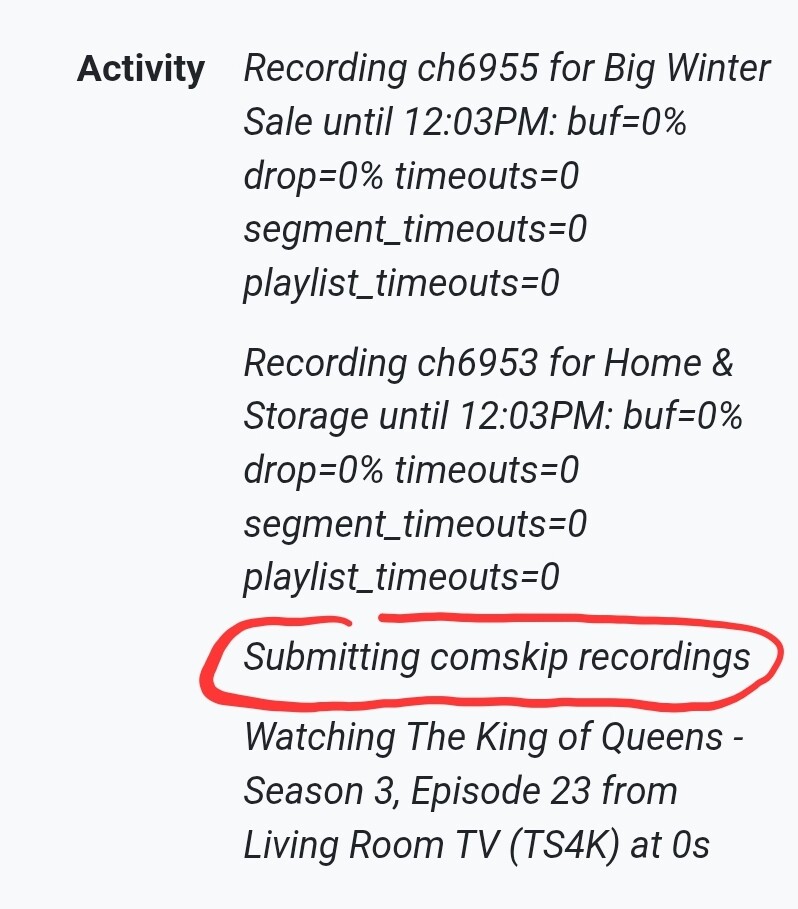
Is this expected? I thought this was supposed to happen only when the server was idle.
@eric one thing that may skew your stats is that if a show has a final segment of less than 30 seconds, I have to include enough commercials in front of it to total 30 seconds or the system won't skip over all the commercials before that.
1 Like
@mjitkop I don't see any recent diagnostics from you, so I don't have a way to know what's going on there.
@Pokemon_Dad I'm not sure what you're describing here — we don't have any logic around 30 seconds. And yes, if you aren't properly annotating the start and end of commercials, it will skew our logic. Could you take a screenshot of the commercial editor in one of these situations and post it here so I have a better idea what you're referring to?
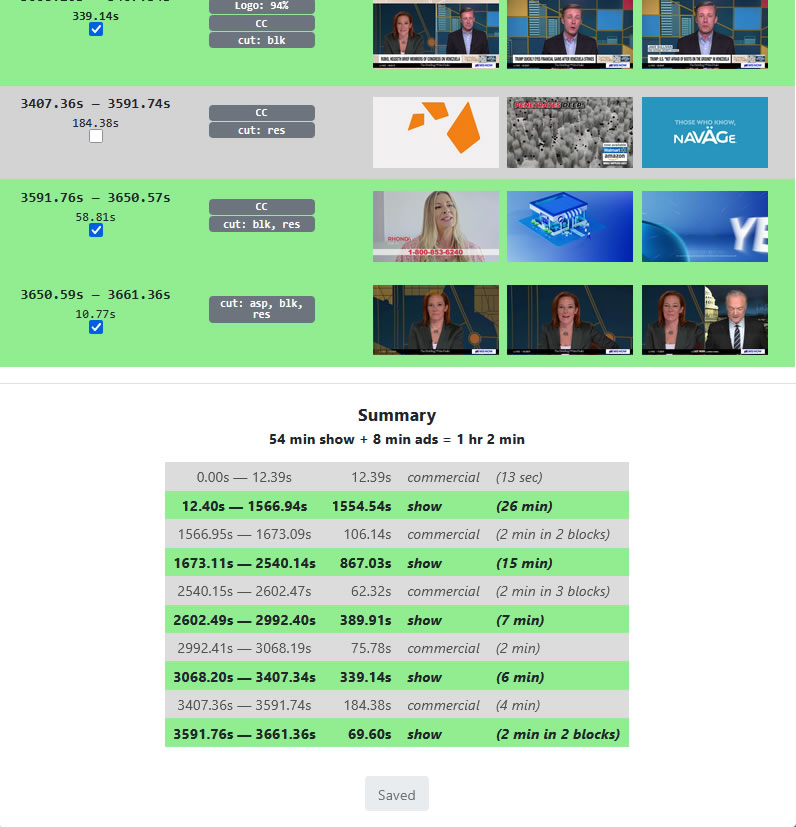
Sure, here you go. This is an extreme example, with a final show block of 10.77 seconds. Usually the last show block in many news shows and late night talk shows will be closer to, but just under, 30 seconds.
In this example, if I don't include that 58.81s last commercial block, none of the commercials before that last 10.77 seconds of the show will be skipped. The same thing will happen even if that last show block is 29.9999 seconds. Channels DVR will not skip to any show block that is less than 30 seconds.
Conversely, any commercials shorter than 30 seconds are also not skipped. I've only encountered this with PlayOn downloads, because they sometimes contain one or two commercials that are shorter than 30 seconds. Channels DVR sees the PlayOn indexing of those commercials, but doesn't skip them because they are 29 seconds or less.
Thirty seconds is a longstanding theme with comskip. I've regularly encountered this since installing Channels DVR in 2019.
Fair statement.
I'm in the process of generating the diagnostic logs and it's been doing it for more than 5 minutes now!
Usually, it takes less than a minute. I'll let it go as long as it doesn't spit out any errors.
With "comskip" or with "commercial skipping in Channels".
@mjitkop I've responded to you privately. It looks like your DVR has gotten into a bad state and I'd like to figure out if there's a bug we can uncover here.