Best Android Based Client

I believe @speedingcheetah is referring to the Android TV home update that added ads to the top of the launcher.

The Google TV launcher is a separate app that Google is only installing and making available to certain devices, just like they do with the Pixel launcher. (The home screen/launcher is separate from the OS itself.)

This is what I have. It's listed as USB 3.0. The internal USB port is blue too.

Plus I got the USB-C adapters.

https://www.amazon.ca/gp/product/B07XYTHCXV/ref=ppx_yo_dt_b_asin_image_o01_s00?ie=UTF8&psc=1

Benchmark says this is crap. :slight_smile:

https://usb.userbenchmark.com/Kingston-DataTraveler-100-G3-USB-30-16GB/Rating/1521

Color means nothing. Just cause its blue does not mean its always a 3.0 port.
I have seen 3.0 ports in all sorts of colors, black, white, yellow..

You may want to consider getting a Nvidia Shield Pro.
That is my primary media device these days, for everything, and it has excellent performance.

I guess yes.

The Google Tv launcher REPLACES the Android TV Home app, as the main launcher.
That is what the articles i have read on the new Google TV said anyways...so, i consider them the same thing. They do look the same to me. have stupid annoying home screen adverts for shows i dont want or care about. (and confuses the hell out of my tech illiterate elderly parents that use the TS4K)

But like i said, the TS4K apps update at some point months ago, and i turn it on one day and there is annoying ads. so i reverted it. has been fine since, even with OS updates. But, i do suspect it will change if it does get a major OS update to Android TV v10. if that is the case, i try a different launcher...or trash the thing.

Gotcha. So he's mistaken as to what Google TV is. We just got the updated Android TV launcher. Don't care about that. Going to the Google TV launcher and you're in aggregated recommended hell with no app specific rows.

That is what the launcher is and what i am saying i do not want either....its ads to me, u can call it aggregated recommendations, but that is annoyingly long to type those specfic words. I did not use it long enough to see about how the app rows work, i just wanted it gone, since it took up the entire screen on the tiny 17in 720p tv i have in her bedroom.

Android TV is now called Google TV starting with OS version 10. It is just a re-brand with a refreshed launcher. Same OS other wise. Just google it and you can find articles comparing that.

The Google TV OS that is on the new Chromecast dongle, is more restrictive a bit, I have read, due to the design of the device being more focused on a Chromecast+ like experience, vs a full on dedicated multi purpose stream boxes (like the Nvidia Shield). However, i have read hear and elsewhere, that folks, using a usb 3.0 hub, seem to think it preforms better than the TS4K for their use.

Wolf Launcher, seems to be mentioned a few times here and there.
Might be worth giving it a try.

Again... Google TV launcher is not the Android TV launcher in any form be it your pre-big preview at the top or the one with it. The Google TV launcher is all aggregated content in various forms. Recommendations, genre recommendations, paid placement like HBO Max being everywhere. Gone are the app specific rows of your choosing. They are two different animals. There is nothing Google TV on the TS4k.

Google TV Home screen is what's on the CCGTV.

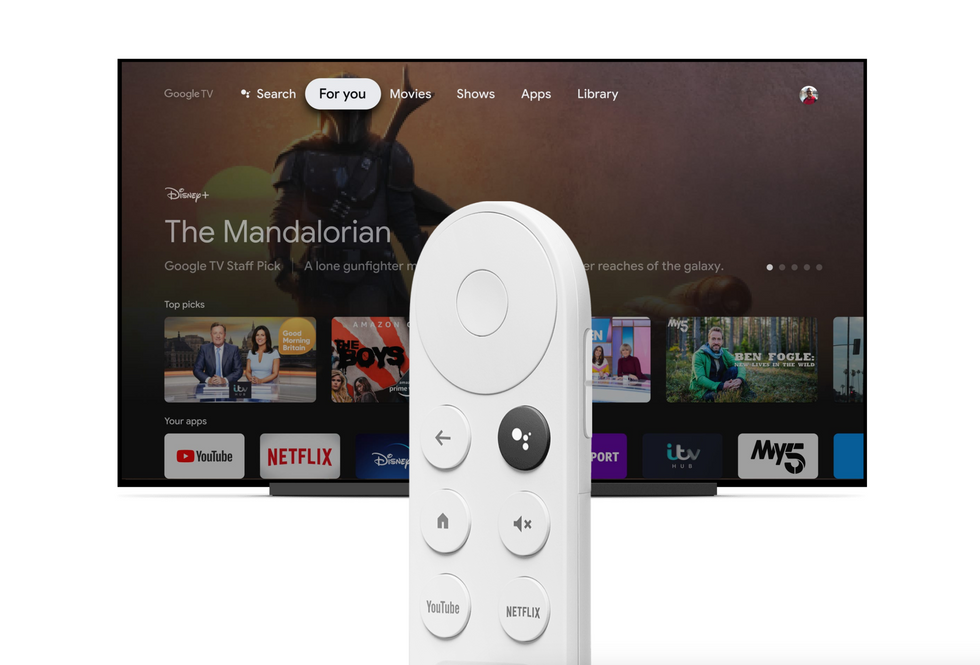
THis is the Google TV home screen....and this is what it looked like on the updated Android tv launcher while back....may be minor differences, but its the same style aggregated content on the top, and the Top pick bar.
I do see a section for "your apps" though in this image.
Are you saying your Google Tv looks differnt?

from https://www.gearbrain.com/google-tv-vs-android-tv-2647889465.html

EDIT: There is an App only mode for GTV.

Anyways, If you are skilled and patient enough with Android, you can make a Pi 4 into a decent Android TV box. I found a custom bare bones ROM of Android TV 9 that work surprisingly well in on my Pi4 8GB. You have to sideload everything as it has no Google Apps, and has it cons, but it functions fine with Channels, Emby, and a few other streaming apps i have tried, but it wont work for apps that require Google certified software, like Disney +

You don't scroll much do you? You just think that big giant ad mean's it's Google tv. No. That big giant ad is also present in the Android tv homescreen now. If you would scroll down, you would see where the big differences are. But you don't have a ccgtv to actually see that. Way to assume...

So pretty much useless for the vast majority who use those apps....

So the big question is, is google tv worth it over tivo stream 4K?

I will have both soon. I’m currently using a ts4k.

If you invest in a remote, 18/20W PD power adapter, USB-C hub with PD passthrough, USB3 flash drive, and a USB-C cable, then it provides a better experience. The TS4K still has some decoding issues, but I haven't experienced any with the CCGTV.

Once you start adding up all these devices, why not just buy an Nvidia shield.

Cost-wise, with all the additions, it's still less than the cost of the Shield (maybe 2/3s). If you're going to spend the money on the Shield, my personal opinion is go for an AppleTV instead. (Especially if it's for your DVR ... the AppleTV really is the best device for Channels. The 16GB Shield is the same cost as the 64GB AppleTV.)

It's a suitable usable device for both channels DVR as well as Emby. Both home at DVR software solutions have dedicated images for the raspberry pi. And since this is a channel's DVR form the primary use of it would be channels DVR and that's fine with most people that are on this form.
As far as the negatives that I mentioned about a custom Android TV ROM you could always cast to it from another certified device. Also you can get up and running with a pie for about $20.

That's exactly what I said from the beginning That add exists on both. And as the article states the new Google TV UI is an overlay to Android TV. And I have teen several videos of people using the Google TV dongle and there is a line there to access your apps and do this basically the same functions as the current Android TV does. If yours doesn't have that then you have some issues. The Google TV is much more a full and rich experience that TiVo tries to do with their immersive content aggregation service... Not something everybody is a fan of.But in my personal opinion at least it's cleaner and less in your face than any Amazon fire TV device is.

And absolutely not scrolling is a waste of time and button press.on my Android TV I have the apps on the very first line and it loads it straight away I only have to click left and right or press the hot button on the remote and instantly launches the app I want.I sure as hell am not going to be scrolling down screens and flipping around pages just to get to the one damn app I want and mainly use hence why I hate the entire screen be taken up by some stupid advertisement for some stupid show I don't want to see.

But again if you don't like Google's home screen ui... use a different launcher.

Again,you're just flat out wrong because you don't know, understandacceot or whatever the differences between app specific rows and aggregated recommended crap. Outside of your weird obsession with "the ad" and a row of apps, there is nothing else remotely the same. You clearly haven't seen anything with all that watching of the Google TV interface you've done because you would never see all the trending rows of crap via "Google TV" as the same as app specific rows on "android tv".

You're so obsessed with "the ad", you just dismiss everything else as the same.

And with "Google TV" you're even stuck with crap like a whole row of YouTube junk even if you disable or uninstall the app.

The whole Google TV main menu is based on aggregated recommended crap based on your viewing habits with tons of paid placement and content you don't already pay for. A completely different animal than the Android tv home screen with or without "the ad".

I suppose if you are unable to make your own decisions on what you want to watch, a ccgtv is the right device for you because Google will fill your entire home screen with random stuff it thinks you want to watch,and pretty much nothing else except the continue watching row.

I'll take the TS4k with the old android tv home screen, app specific rows and a few recommendations any day, with or without cheetah's hated "the ad". I don't need Google telling me what I should watch while shoving YouTube content and such down my throat.

I'll also take that with slightly less hub compatibility because there are still plenty of usb-c devices that want to work, and I'm sure compatibility will only continue to increase as more firmware updates hit, as they already have and already improved compatibility since release.

My personal take... Google will improve the device more to help them monitize your viewing habits. While tivo isn't a lesser evil in that respect, their cable OS relies on Android tv, and their TS4k is a consumer Guinea pig box for it. So they're going to focus on improving the device from a general usability point of view as well as improve their Stream app on both fronts because it only helps improve their cable box OS. They might be a little slow on the uptake, but they are getting there. And since it's their future moving ahead, they are vested in making the product solid.

Okay, off the soap box.

And if you use a different launcher, you get nothing but app icons. There is zero active or personalized content. Unless you have found something I haven't seen. You pretty much have a home screen that's really no different than my old Palm OS home screen from. Well over a decade ago.

Really dude.... You always have to have the last word. Like I said all the ads and crap that are on the screen are not something I want.
I just want a line of my apps which is what the original Android TV home launcher does and is what third-party lamp launcher does.

If you want to keep it going on and explaining how you think I'm wrong and keep detailing for every person here all the technicalities and miniscule details feel free, but I didn't even bother to read any of that crap.... Cuz it's overall irrelevant and superfluous. It all ads and crap that is useless and unwanted for many people that do not subscribe to ALL the bloody online streaming services there are out there. (and the aggregate content does not work with Channels DVR anyways)

If you like it then fine, u are free to use it. but you keep pressing things then the mod will lock this thread. This is a Channels DVR forum site, not google tv and how they can make better the home screen aggerate content.

No matter what device you have, what home screen it has, most users here primary concern, and the OP's question, is what is the best Android based client for Channels DVR. I have seen many folks thats only use this app on whatever streambox they have, an some set an auto launch bypass, so that they don't even have to see the home screen.

1 Like