BETA: Custom Channels via M3U Playlists

@maddox thanks for pluto-for-channels and this great new feature. I have it running well using Docker on my Synology NAS. I noticed that you indicated updates would need to be done manually - pull a new image. I have not used Docker before. Do I need to follow any particular procedure to update the image and preserve the settings?

Thanks again for making this possible.

Is this status screen strictly for the Windows version of Docker? I can't seem to find it on my Synology version.

Good to know! I'm certainly a novice.

Do you see anything in the xml link above that would stop it from being properly parsed by Channels?

Comparing the output of the XML from the Pluto TV Docker and the one from Techzyon for Stirr I see that the Pluto one has the channel listed and then the shows for it right after. The Stirr one looks like all the channels are defined and then programs are listed. Would that cause problems?

I have an issue where the Pluto guide runs out of program data about midway through the day. It actually gets to the point where I have no guide data for the current time. It updates again overnight, then we start the same issue over again. I know the docker app updates the guide about every three hours. How often does ChannelsDVR server reach out to the docker files? It feels like I need to make that happen more often. Hopefully, I'm just being an idiot. :grin:

That's the status screen of the container itself, not Docker's.

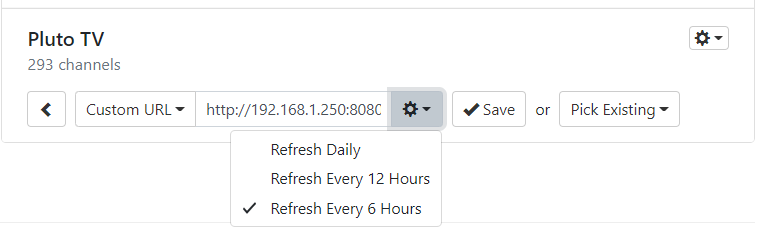
You have to set the xmltv option on the dvr to refresh every few hours too

I had the same issue. Try this:

Go to the Basic Setup then to your Pluto TV source. Click the gear menu and choose 'Guide Data - Change Provider'

Then when that is open choose the gear that appears. There you can choose a setting to update the guide data more often.

Here is what mine looks like:

D'oh!! Every single time I looked at that, I just saw the trash can and my brain said "use that to delete Pluto", instead of "read the text next to the trash can". Thanks. That will probably fix it. Now, if I can just figure out how to integrate my Ring camera into Channels. :sunglasses: Love this community!!! Love Channels!!!

OK. Thanks for the info.

Ok, an XML validator says the EPG is valid. I then tried to re-add the Stirr EPG with a refresh rate of every 6 hours and then shows popped up! Does Channels not like gaps in the schedule? Will keep an eye on it as not sure it will stick around.

It seems as if the server loses track of a shorter epg refresh time whenever it's restarted, For example, with a 6 hour refresh, if it had been 4 hours since that last refresh and you restart, the next refresh won't be for 6 hours instead of the expected 2 hours. I've started forcing a refresh on restarts or dvr updates.

1 Like

Not related implicitly to this thread but when I recorded from Stirr a movies "Mega Shark vs Crocozaurus" and "Mega Shark vs Octopus" (don't judge me :P) they are classified as TV Shows instead of Movies, which makes me problems with organizing stuff.

Technically, I could delete mention on them from database and then made import from different folder but I assume that expected behaviour is to recognize this out of the box, anyone encountered similar problem?
Speaking of which I think it should be separate category for Live TV converts since they are neither movies nor tv series.

If your xmltv file doesn't tag it as a movie, then the DVR has no way to know it is a movie.

You can check the pluto-for-channels example to see how movies should appear inside xmltv files.

Easier solution is to delete Stirr from the lineup as there is no way to automatically analyze and tag xmltv files or to get properly tagged EPG.
If the XMLTV include one day "Concert" tag is Channels able to detect it?

Garbage in, garbage out. If your EPG xml does not have the information that Channels needs to populate good guide items, then it's just not going to work.

Channels has a set requirement of metadata and we can't and won't work around random EPG files to make everything found on the internet work. It's just not tenable. Instead we'll provide what is needed so that you can ensure the XML data you are using works best with Channels.

If a source has guide data that is close to working but needs some data massaging, that's up to the person that's using the data for their custom channels. Small projects like scripts that read in the EPG XML that then add in extra attributes that make it work better with Channels is what is going to be required for a lot of things. It might be outside of the comfort zone for some people, but not for others.

As @tmm1 suggested, the pluto-for-channels project is a great example to check out to see how it does its best at providing data that Channels can consume to get best results in the guide (and for recordings). But this is a separately operated open sources project, and not officially supported by Channels. Again, it's a great example to use if you want to help take an EPG source and get it in great shape for Channels.

We could do better at documenting things like what @tmm1 mentioned above and we'll work on it. We want to make sure we provide the right tools and documentation for you guys to create projects like these to extend Channels and make it amazing for yourself and others.

UPDATE:

I've added some Proptips to the Custom Channels documentation to show how to make the best of Channels by tweaking your EPG XML.

4 Likes

To that end, this might be a pain for the moderators, but I want to suggest creating a sub-category in the Channels DVR category for Custom Channels, as this individual post is becoming a little unwieldy. It would be great if there were separate threads for setting up IP cameras, Pluto TV, Stirr, etc. or ask individual questions about specific issues with xml data, EPG setup, pluto-for-docker and so on.

Thanks to everyone who contributed here, I got a lot of great information here and learned a lot — smile

Done!!

https://community.getchannels.com/c/playground/custom-channels

Now that we have a new category for discussing Custom Channels hacks and projects, I'm going to close this thread. Thanks to everyone that helped make it one of our most popular threads! It's been a BLAST watching you guys come up with cool stuff and helping each other do it.

See ya in Custom Channels!!

7 Likes