
My Channel DVR server is installed on a Windows 11 machine. Once upon a time, all was working, but things have changed. The ipaddress for the machine running my channel dvr server is 192.168.1.243. The computer name for that same machine is ChannelDVR. Entering 192.168.1.243:8089 from another machine or from the Channel DVR app running on Android TV results in the error that the server cannot be found. The same error occurs when I enter 127.0.0.1:8098, localhost:8089, and 192.168.1.243:8089 on the machine that is running the server. But if I use the computer name and enter ChannelDVR:8089, then there is not a connection problem. When I access the server settings, using ChannelDVR:8089 and select "Status", it shows 192.168.1.243 as being my server's address.
Try http://192.168.1.243:8089 from a browser
Not 192.168.1.243:8089 and not https://192.168.1.243:8089
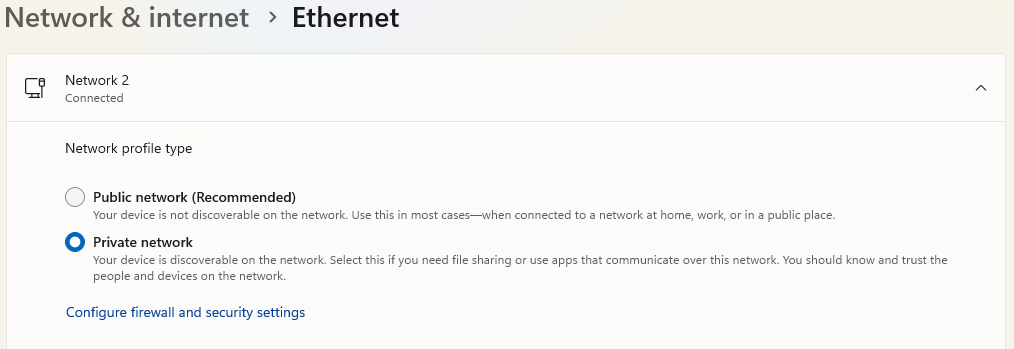
Make sure it's set as a PRIVATE network
If it still doesn't work after you try @chDVRuser's suggestions, it could be an issue with Windows.
I was in the same situation as you, running Channels DVR server on Windows 11. It was working fine for years but recently I had the same problem where I could not go to the server anymore on my LAN.
It worked fine if I went to it by using Tailscale, even on my LAN.
This issue pushed me to migrate my Channels DVR server to a different system. I am now running it in a Docker container that is installed on an Unraid system.
It's working flawlessly now.
"http://" did not do any thing special. On my system 192.168.1.243:8089 translates to http://192.168.1.243:8089. Actually, I was having two issues. The other, that I put is in a separate post, was that the tv guide when displayed from my Android TV app would not populate. A suggestion was that I reboot my Android TV box, which I did. Unfortunately, now the Channel DVR app is trying to connect to 192.168.1.243 and it can no longer find it. So this whole thing is spiraling downward. Last week it all worked. My guess is that at some point I will come upon a solution.
Make sure the Network is set to PRIVATE.
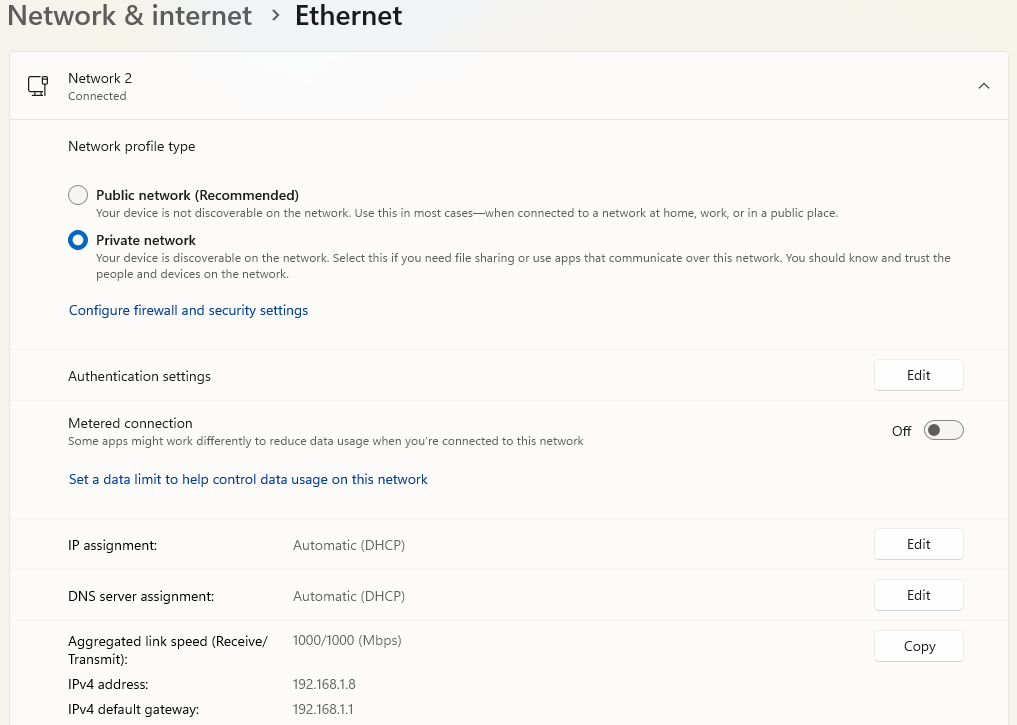
Double check the IPv4 address.
Then temporarily disable the Firewall if it still doesn't work.
fairly sure this is all the same issue.
I think the firewall is blocking inbound.
this is what my firewall settings show

or this
No, 127.0.0.1, localhost, nor the actual ipadress of the server machine from the server machine will work. Just the computer name.
dhcp lease shouldn't affect 127.0.0.1. the fact dns does work suggests tailscale is setup and working.
@predsfan
what does ipconfig report?
i took a small leap
if this works,
what happens when you ping ChannelDVR
my laptop on my local wifi does this
>ping nanoa1

Pinging nanoa1.red-fish.ts.net [100.100.34.100] with 32 bytes of data:
Reply from 100.100.34.100: bytes=32 time=36ms TTL=128
Reply from 100.100.34.100: bytes=32 time=3ms TTL=128
Reply from 100.100.34.100: bytes=32 time=4ms TTL=128
Reply from 100.100.34.100: bytes=32 time=5ms TTL=128

Ping statistics for 100.100.34.100:
    Packets: Sent = 4, Received = 4, Lost = 0 (0% loss),
Approximate round trip times in milli-seconds:
    Minimum = 3ms, Maximum = 36ms, Average = 12ms
from my server
ping nanoa1

Pinging NanoA1 [100.100.34.100] with 32 bytes of data:
Reply from 100.100.34.100: bytes=32 time<1ms TTL=128
Reply from 100.100.34.100: bytes=32 time<1ms TTL=128
Reply from 100.100.34.100: bytes=32 time<1ms TTL=128
Reply from 100.100.34.100: bytes=32 time<1ms TTL=128

Ping statistics for 100.100.34.100:
    Packets: Sent = 4, Received = 4, Lost = 0 (0% loss),
Approximate round trip times in milli-seconds:
    Minimum = 0ms, Maximum = 0ms, Average = 0ms
Pinging ChannelDVR.local [fe80::bd91:8880:bb1e:4794%9] with 32 bytes of data:
Reply from fe80::bd91:8880:bb1e:4794%9: time=1ms
Reply from fe80::bd91:8880:bb1e:4794%9: time=1ms
Reply from fe80::bd91:8880:bb1e:4794%9: time=2ms
Reply from fe80::bd91:8880:bb1e:4794%9: time=2ms
Ping statistics for fe80::bd91:8880:bb1e:4794%9:
I am somewhat concerned that it appears to return a version 6 address and not a version 4
Packets: Sent = 4, Received = 4, Lost = 0 (0% loss),
Approximate round trip times in milli-seconds:
Minimum = 1ms, Maximum = 2ms, Average = 1ms
I did a ping channeldvr -4 and got this:
Pinging ChannelDVR.local [192.168.1.243] with 32 bytes of data:
Reply from 192.168.1.243: bytes=32 time=2ms TTL=128
Reply from 192.168.1.243: bytes=32 time=2ms TTL=128
Reply from 192.168.1.243: bytes=32 time=2ms TTL=128
Reply from 192.168.1.243: bytes=32 time=2ms TTL=128
Ping statistics for 192.168.1.243:
Packets: Sent = 4, Received = 4, Lost = 0 (0% loss),
Approximate round trip times in milli-seconds:
Minimum = 2ms, Maximum = 2ms, Average = 2ms
/all just returned the v6 data
But if I do a ping from channeldvr to my normal machine, it returns the V4 data
I will give it a try
I turned off V6. I uninstalled my channel dvr server and then reinstalled it. Still cannot access it.
I am starting to get bored with this. I bought my HDHomerun because I wanted to record the Nashville predators hockey games and DirecTV stream did not carry channel 28. After buying the device and installing Channels DVR, DirecTV stream magically starting carrying that channel. So there is not a good reason to continue down this path. If I need to record an OTA channel, then I can do it via the HDHomerun app. Thank you for your trying to help me.
Obviously, something screwy is going on. The only thing I can think of is that after getting things working, I installed tailscale. I was able to get it to work. I cannot remember if I accessed the server via my android TV device after the tailsale install. But I can access folders on my server machine using the server machine's ipaddress. I can access the channel dvr server using the computer name and the 8089 port number. I just cannot access the server with the ipaddress and port number. Heck, on the server machine, I cannot access the server via 127.0.0.1:8089. No changes were made to Windows Defender. I have uninstalled Tailscale. I have removed my port forwarding from my router. There was a network command that I entered when I was getting Tailscale installed. I cannot remember what it was now. That is the only thing that I can think of that would cause the problem.
I uninstalled Channel DVR server and then installed it on my personal desktop. I can access that new server from the old server machine using the ipaddress. I hope that makes sense. I don't want to run the server on this machine but I just wanted to do some testing. I will try to find that network command.
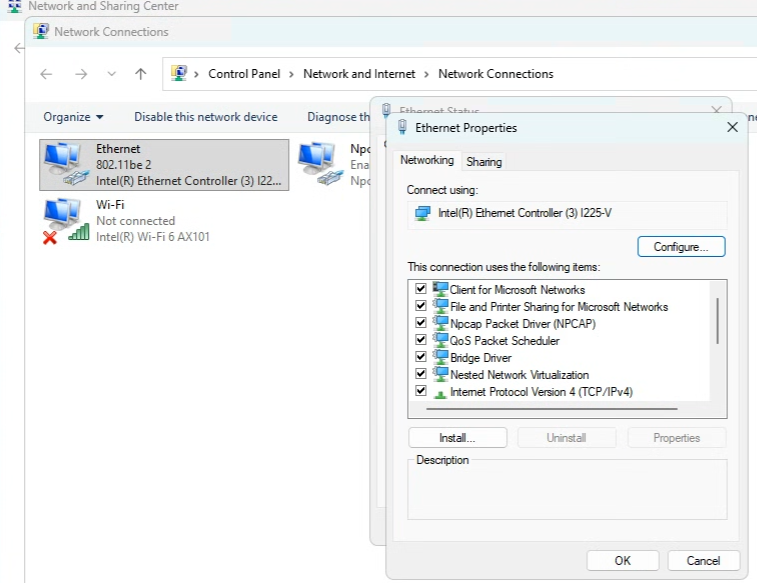
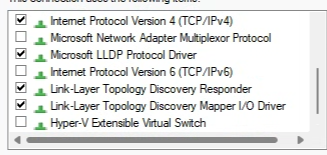
Make sure you have IPv4 enabled on it.
If you still cannot access it using its IPv4 address, disable the PRIVATE firewall as a test.
here's my network properties for your reference
I don't remember anything for tailscale, but older versions of cdvr had instructions to disable flow control, but i think it does it for you now with a click.
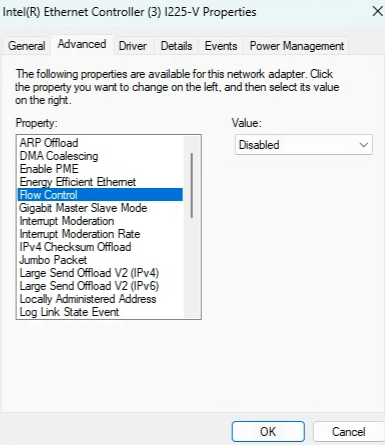
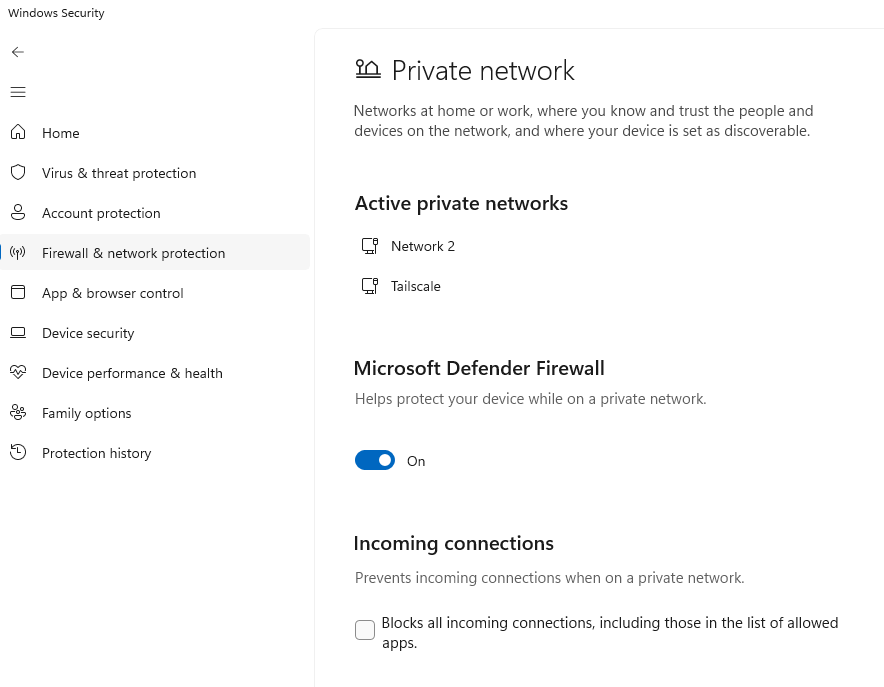
TCP/IP v4 is enabled. Turning off Defender did not help.
Earlier today, when I discovered I had problems, I uninstalled tailscale in order to make sure that it was not causing the problem. So, I do not have those settings. Since the server works (accessible) on my desktop system, that indicates that the problem is machine specific. I also have a Mac so tomorrow I will install the server on that machine and see how things go. If it works, then I will retire my second Windows system. I don't think you you need to continue to fight this thing. It would be nice to be able to reinstall Windows on the second machine and start of clean. But that is not going to happen. I really appreciate your efforts to help me. Thank you.