
I don't know what I specified as my 'HOST_DIR'. Is there any way to find out?
Sure. Go into Portainer, and navigate to the OliveTin stack. In the stack editor, scroll down past the compose until you get to the Environment variables section. In with those variable definitions, you should see HOST_DIR.
Sorry, I'm so ignorant. I got to Portainer with: https://localhost:9443
The Portainer Dashboard shows:
Stacks: 0
Containers:8, 6 Running
I tried various menu options, but got nothing useful.
With this combination -- I'd guess that you started, but didn't complete, the OliveTin EZ-Start process? If so, you don't have the full OliveTin-for-Channels running yet. If you're accessing OliveTin EZ-Start on port 1338, rather than the standard 1337, then you haven't installed the full OliveTin yet.
I am using port 1338, so I must have messed up, even though Olive Tin seems to be working. I'll go back and see if I can fix things.
Thanks for your help.
Since you have OliveTin EZ-Start running (which looks just like the full OliveTin, but will not work as such), and Portainer installed -- you probably just skipped the last couple of steps. Start from here:
I have deleted and reinstalled Olive Tin and Portainer. I now get better results. In "Stacks list" -> "olivetin-for-channels" -> "Stack details" -> "Editor" -> "environment:", there is no "HOST_DIR".
However, under " OliveTin Environment Variables Generator/Tester", I find the following:
HOST_DIR=/data
DVR_SHARE=/mnt/g/channels data
LOGS_SHARE=/mnt/c/programdata/channelsdvr
TUBEARCHIVIST_SHARE=/mnt/g/channels data
However, I still don't know where to find "/data" or "/mnt".
Your installation is still not correct then, but let's see what we can do to fix it:
Can you please run the OliveTin Post-Install Healthcheck Action and post the results here?
OliveTin Post-Install Healthcheck
Standard Output

Checking your OliveTin-for-Channels installation...
(extended_check=false)

OliveTin Container Version 2025.07.30
OliveTin Docker Compose Version 2025.03.26

----------------------------------------

Checking that your selected Channels DVR server (192.168.0.232:8089) is reachable by URL:
HTTP Status: 200 indicates success...

  % Total    % Received % Xferd  Average Speed   Time    Time     Time  Current
                                 Dload  Upload   Total   Spent    Left  Speed

  0     0    0     0    0     0      0      0 --:--:-- --:--:-- --:--:--     0
100  1276  100  1276    0     0   415k      0 --:--:-- --:--:-- --:--:--  415k
HTTP Status: 200
Effective URL: http://192.168.0.232:8089/

----------------------------------------

Checking that your selected Channels DVR server's data files (/mnt/192.168.0.232-8089) are accessible:
Folders with the names Database, Images, Imports, Logs, Movies, Streaming and TV should be visible...

total 8
drwxr-xr-x 2 root root 4096 Aug 16 13:15 .
drwxr-xr-x 1 root root 4096 Aug 16 13:15 ..

Docker reports your current DVR_SHARE setting as...
/mnt/g/channels data

If the listed folders are NOT visible, AND you have your Channels DVR and Docker on the same system:

Channels reports this path as...
G:\Channels Data

When using WSL with a Linux distro and Docker Desktop, it's recommended to use...
/mnt/g/Channels Data

----------------------------------------

Checking that your selected Channels DVR server's log files (/mnt/192.168.0.232-8089_logs) are accessible:
Folders with the names data and latest should be visible...

total 8
drwxr-xr-x 2 root root 4096 Aug 16 13:15 .
drwxr-xr-x 1 root root 4096 Aug 16 13:15 ..

Docker reports your current LOGS_SHARE setting as...
/mnt/c/programdata/channelsdvr

If the listed folders are NOT visible, AND you have your Channels DVR and Docker on the same system:

Channels reports this path as...
C:\ProgramData\ChannelsDVR

When using WSL with a Linux distro and Docker Desktop, it's recommended to use...
/mnt/c/ProgramData/ChannelsDVR

----------------------------------------

Checking if your Portainer token is working on ports 9000 and/or 9443:

Portainer http response on port 9000 reports version 2.27.9
Portainer Environment ID for local is 3
Portainer https response on port 9443 reports version 2.27.9
Portainer Environment ID for local is 3

----------------------------------------

Here's a list of your current OliveTin-related settings:

HOSTNAME=olivetin
CHANNELS_DVR=192.168.0.232:8089
CHANNELS_DVR_ALTERNATES=
CHANNELS_CLIENTS=
ALERT_SMTP_SERVER=
ALERT_EMAIL_FROM=[Redacted]@
ALERT_EMAIL_PASS=[Redacted]
ALERT_EMAIL_TO=[Redacted]@
UPDATE_YAMLS=true
UPDATE_SCRIPTS=true
PORTAINER_TOKEN=[Redacted]
PORTAINER_HOST=192.168.0.232
PORTAINER_PORT=9443
PORTAINER_ENV=null

----------------------------------------

Here's the contents of /etc/resolv.conf from inside the container:

# Generated by Docker Engine.
# This file can be edited; Docker Engine will not make further changes once it
# has been modified.

nameserver 127.0.0.11
search
options ndots:0

# Based on host file: '/etc/resolv.conf' (internal resolver)
# ExtServers: [host(192.168.65.7)]
# Overrides: [search]
# Option ndots from: internal

----------------------------------------

Here's the contents of /etc/hosts from inside the container:

127.0.0.1	localhost
::1	localhost ip6-localhost ip6-loopback
fe00::	ip6-localnet
ff00::	ip6-mcastprefix
ff02::1	ip6-allnodes
ff02::2	ip6-allrouters
172.20.0.3	olivetin
@TV_Ken The above looks pretty good, though you don't have your paths quite right:
As you can see, the folders that should be visible are not, both above and below:
Please run the OliveTin Environment Variables Generator/Tester, and post the results here.
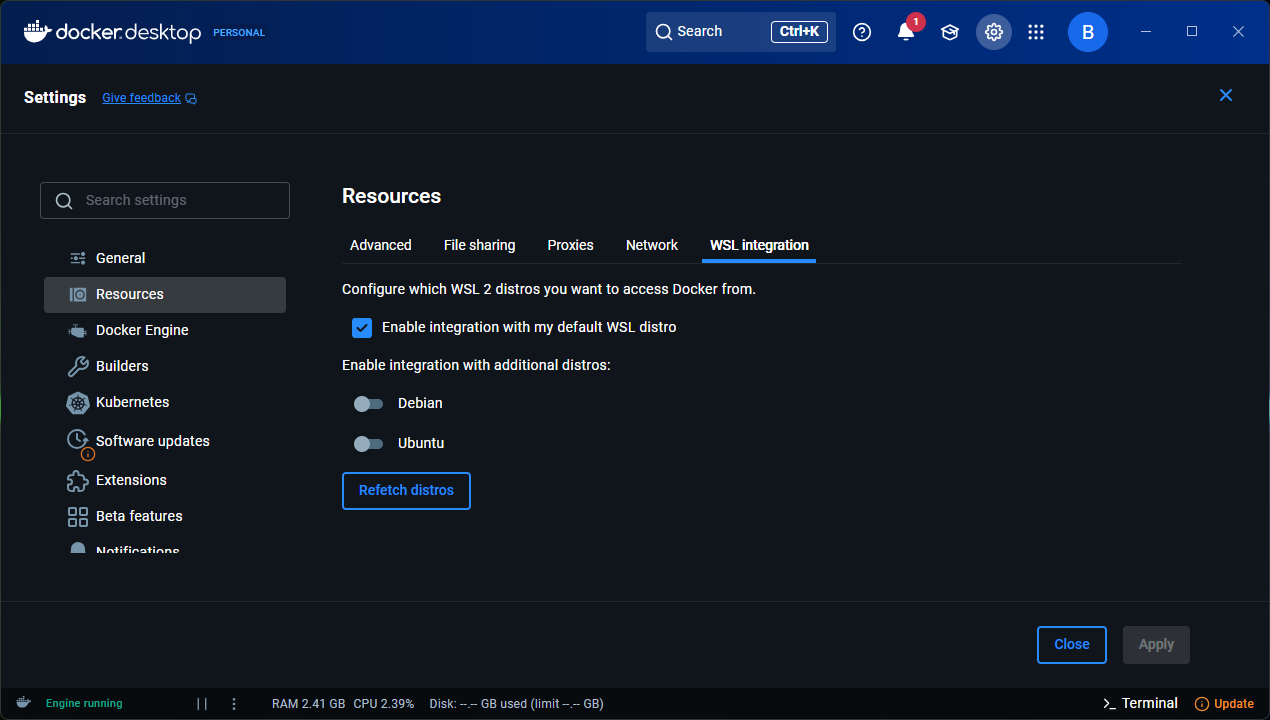
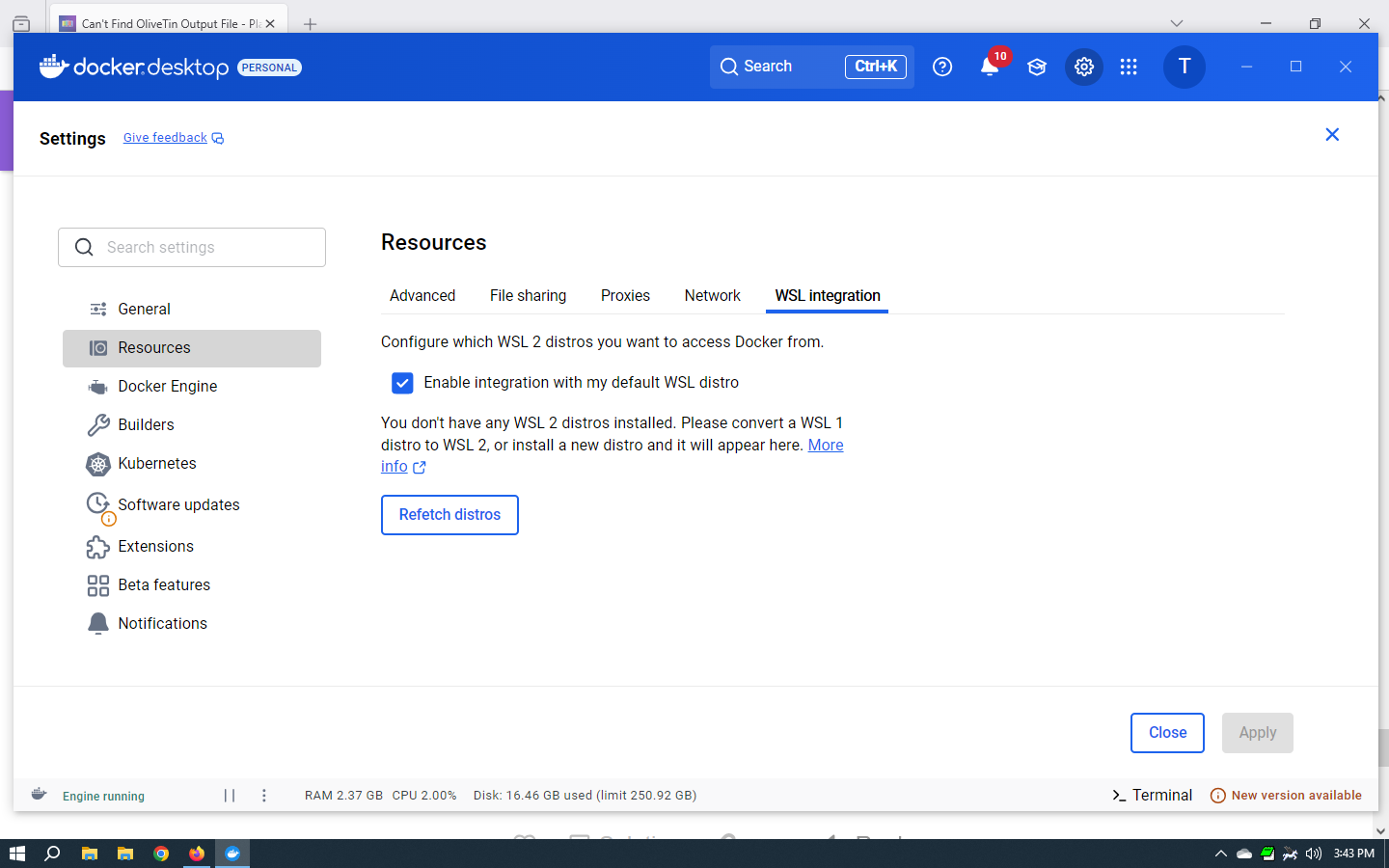
Also, can you confirm that you have a default distro like Debian or Ubuntu installed, and that you have "integration" with your default distro enabled in Docker Desktop?
I don't know what these are or where to get them.
OliveTin Environment Variables Generator/Tester
Standard Output

TAG=latest
DOMAIN=
HOST_PORT=1337
CHANNELS_DVR_HOST=192.168.0.232
CHANNELS_DVR_PORT=8089
CHANNELS_CLIENTS=
ALERT_SMTP_SERVER=
ALERT_EMAIL_FROM=
ALERT_EMAIL_PASS=
ALERT_EMAIL_TO=
UPDATE_YAMLS=true
UPDATE_SCRIPTS=true
TZ=America/New_York
HOST_DIR=/data
DVR_SHARE=/mnt/g/channels data
LOGS_SHARE=/mnt/c/programdata/channelsdvr
TUBEARCHIVIST_SHARE=/mnt/g/channels data
DVR2_SHARE=
LOGS2_SHARE=
TUBEARCHIVIST2_SHARE=
DVR3_SHARE=
LOGS3_SHARE=
TUBEARCHIVIST3_SHARE=
HOST_SFS_PORT=8080
FOLDER=/web
PORTAINER_TOKEN=ptr_cpj7unLejq5lki8TXl0WC05EcU0XFxtaWDm9NGPOdFo=
PORTAINER_HOST=192.168.0.232
PORTAINER_PORT=9443
PORTAINER_ENV=null
PERSISTENT_LOGS=false

Standard Error
The above are the values you should be using, so copy and paste the above. Then in Portainer-Stacks, stop the olivetin stack, go into the stacks editor and scroll down to the Environment variables section. In advanced mode, you can replace the current set of variables with what you copy and pasted from here. Finally, click Update the stack, and run the healthcheck again including posting the results here.
In Docker Desktop Settings-Resources-WSL Integration, things should look similar to this, though you'll probably only show one distro installed:
How did you get OliveTin EZ-Start installed, if you don't have a Linux distro installed?
First line of the post with the installation steps:
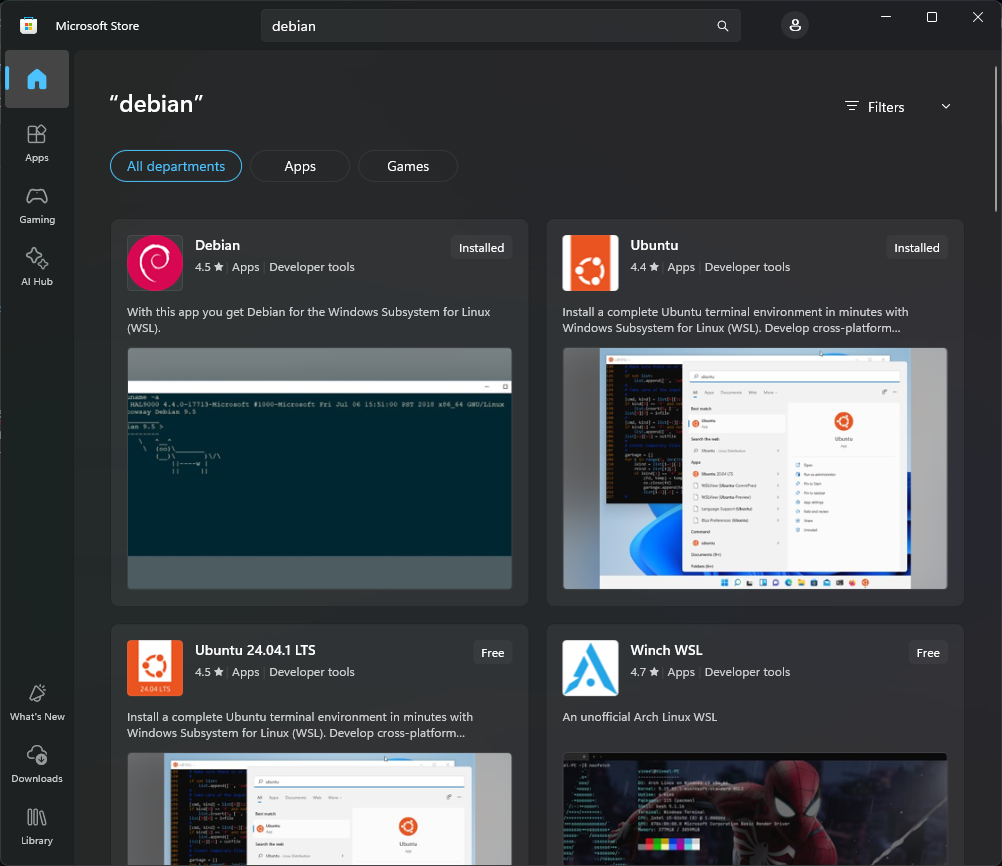
Debian or Ubuntu are available from the Microsoft Store:
He is probably on WSL 1. I think that is default on Windows 10. Updating to WSL 2 shouldn't be too hard.
@TV_Ken When you have a moment can you run the following in PowerShell:
PS C:\Users\slayer> wsl --version
WSL version: 2.5.9.0
Kernel version: 6.6.87.2-1
WSLg version: 1.0.66
MSRDC version: 1.2.6074
Direct3D version: 1.611.1-81528511
DXCore version: 10.0.26100.1-240331-1435.ge-release
Windows version: 10.0.26100.4946
And post the results here...
I just installed Debial.
PS D:\TV_Data> wsl --version
WSL version: 2.5.10.0
Kernel version: 6.6.87.2-1
WSLg version: 1.0.66
MSRDC version: 1.2.6074
Direct3D version: 1.611.1-81528511
DXCore version: 10.0.26100.1-240331-1435.ge-release
Windows version: 10.0.19045.6216
Go ahead and update the OliveTin stack as described in post #15, and then run the healthcheck again and post the results here...
I did the edits in Portainer, and confirmed that they were properly there, but the address of the server is lost in Olive Tin.
TAG=latest
DOMAIN=
HOST_PORT=1337
CHANNELS_DVR_HOST=
CHANNELS_DVR_PORT=
CHANNELS_CLIENTS=
ALERT_SMTP_SERVER=
ALERT_EMAIL_FROM=
ALERT_EMAIL_PASS=
ALERT_EMAIL_TO=
UPDATE_YAMLS=true
UPDATE_SCRIPTS=true
TZ=America/New_York
HOST_DIR=/data
DVR_SHARE=/mnt/g/channels data
LOGS_SHARE=/mnt/c/programdata/channelsdvr
TUBEARCHIVIST_SHARE=/mnt/g/channels data
DVR2_SHARE=
LOGS2_SHARE=
TUBEARCHIVIST2_SHARE=
DVR3_SHARE=
LOGS3_SHARE=
TUBEARCHIVIST3_SHARE=
HOST_SFS_PORT=8080
FOLDER=/web
PORTAINER_TOKEN=ptr_cpj7unLejq5lki8TXl0WC05EcU0XFxtaWDm9NGPOdFo=
PORTAINER_HOST=192.168.0.232
PORTAINER_PORT=9443
PORTAINER_ENV=3
PERSISTENT_LOGS=false