
I just wanted to say thank you for doing this. My wife is disabled and has trouble reading the default colors/contrast.
5 Likes
Is this dark-themed mod still available? If so, how do I know which to download? There are several links in the original post. Thanks.
EDIT: Never mind about the download. I see it a few post upthread. Thanks.
I love using this theme, so glad you brought it back. I read through the thread and upthread you mentioned other users might want to make their own themes. I would be interested in this and had some ideas to possibly make either a Windows app or a browser app using ChatGPT. You've already done all the really hard work. Right now I'm just throwing out some ideas as I wouldn't be able to really commit to something like this for a while due to my circumstances, maybe in the next few months or so. Right now just wondering if you're interested and what you think initially. Also, I know nothing about coding and next to nothing about AI, but I've seen on YT vids that AI can create apps so I asked ChatGPT about it. First I asked how to edit an APK file and the response was to use a program called APKTools to decompile it into something it called a "human-readable Smali" file for editing.
So then I asked ChatGPT the following (excuse the awkward wording):
I would like to know if any of the paid AI programs, either stand-alone or on the web, can create a stand-alone app for MS Windows or that would work in a browser which would do the following:
Open and edit a human readable Smali file and search for and replace text. In the left column would be several lines of code from the imported file which would be set permanently, with each row being one line of code, such as:
<color name="abc_decor_view_status_guard_light">#ffffffff</color>
In the right column adjacent to each individual line of code would be some kind of color picker, similar to the color picker used in MS Windows menus to pick a color for various things such as fonts. The user would be able to pick a color for that specifice line of code and replace the current HTML Hex Color Code for the new color that the user picked.
For example, the user chooses this line in the left column:
<color name="abc_decor_view_status_guard_light">#ffffffff</color>
In the right column he chooses the color black from the color picker and clicks an "Apply" button and the app changes that line of code to:
<color name="abc_decor_view_status_guard_light">#000000</color>
This was the complete response from ChatGPT (I have some further comments at the end):
Yes — paid AI tools, including some that offer app generation capabilities, can help create the type of stand-alone or browser-based app you're describing. However, the degree to which they can build a fully functional, user-friendly UI with interactive elements like color pickers varies significantly depending on:
The tool you choose
Your technical comfort level (for post-editing/debugging code)
How much of the app is auto-generated vs. custom-coded
 What You’re Asking For — In Summary
You want an app (Windows or browser) that can:
Feature Description
Input Load human-readable .smali or .xml files (e.g., Android resource files with tags)
Display Show each line in a fixed left column
Interact In the right column, show a color picker next to each line
Modify User picks a new color → clicks "Apply" → updates that line's color code
Export Save or export the modified file
This is totally feasible to build — and yes, AI-assisted tools can help, but none currently build this entire app without some human guidance/editing.
 Top Tools to Consider
1. GPT-4 (ChatGPT Plus + Code Interpreter) — Browser or Standalone
What it can do: Generate a full app in HTML/JS (for browser) or Python/Tkinter (for Windows).
Limitations: You’ll need to run/test the code and might need to debug a little.
Pro: Very customizable. Can walk you through packaging it as an .exe.
You’re already halfway there with GPT-4 — I can build a browser version or a Python app that does exactly what you want.
2. Replit AI or GitHub Copilot Workspace
What it can do: Auto-suggest code and UI layout as you type
Best for: Developers or tinkerers comfortable tweaking code
Limitations: Won’t build full apps from a prompt alone
Pro: Great for modifying or improving generated code
3. Builder.ai / Appgyver / FlutterFlow (Visual App Builders)
What they do: Drag-and-drop app builders with AI suggestions
Browser/Windows App: Mostly focused on mobile/web apps, not desktop Windows apps
Limitations:
Not ideal for parsing and editing text/code files
Limited support for advanced UI like line-by-line editable text with custom widgets
 Realistic Recommendation for You
You don’t need a paid AI tool to get this done — you can build this with GPT-4 right now in either:
Option A: Browser App
Built with HTML, CSS, JavaScript
User opens the .xml or .smali file
Left column: code lines
Right column: color pickers
Click “Apply” to change values
Click “Save” to download updated file
Option B: Windows App
Built in Python + Tkinter
Similar layout with two columns
Native Windows color picker
Can be packaged into an .exe file using PyInstaller
Since then I was looking again at your Carbon theme and it really only seems to use a few colors - a deep black, a lighter black, a light gray, etc. So I was thinking that in the first column, first row could be a label like "Primary Theme Color", then first column, second row, something like "Secondary Theme Color", third row maybe "Unfocused Font Color", fourth row, "Focused Font Color" and so on. In the second column in each row would be a color picker, and when you pick the color and click "Apply" it would change the color in every line of code that pertains to the primary theme or secondary theme or unfocused font, etc. So in creating the app ChatGPT would need to know every line of code that it needed to search for and replace in "Primary Theme Color", "Secondary Theme Color", and so on. It's really kind of basic as far as that goes, basic text search and replace.
I don't want to impose on you, if you're not interested, that's fine, I know you've already put in scads of work on this. But if you are interested I'd definitely need your help, I'd need to know all those lines of code and where they would belong as far as in "Primary Theme Color" or "Secondary Theme Color", etc.
If this were possible to create then such an app would be pretty user-friendly. Again, I'm just throwing out ideas right now. If you're interested and think it's feasible, and if you have any suggestions or ideas or thoughts, let me know. Thanks.
Yes, I could help with the colors.xml and what I changed. I need to update this and provide those files. And while you are right there are only a handful of colors, there are much more variables in the colors.xml that use the same color. Which presented a problem. Sometimes they conflicted and I had to go find a different .xml calling on the variable and change that to just a hex code, bypassing the colors file. Conflicts such as all gray in a guide cell, or in the recordings section, or only some text being what I wanted it to be. I just googled color hex editor and found one that had a color wheel and it gave me the hex. It would be great to only edit the colors file and get the desired results, that way you can just find and replace. The colors file also has variable names that aren't descriptive enough to know what's changing without recompiling to see. Yes, I used apktools to unpack and pack it. It also works in BlueStacks on windows as an android app fairly decent. Is that what you are trying to do? A native windows app? I'll find these files shortly for you. Have you unpacked it yet?
Thanks for your response. I'll get back to you in more detail as soon as I can. In the meantime, please don't rush anything on my account. As I said in my previous msg, it may be a while before I can get to this due to circumstances.
If only we could get actual themes without hacking it! Maybe a Christmas present from the Channels dev team?!
1 Like
Yea, fat chance. I'll always be disappointed in this product as long as we have no slo-mo playback and dark themes. Shame really, nice product for my sports needs otherwise.
2 Likes
What files are modified here? If we wanted to recompile this ourselves with the latest apk, which files are we replacing? Is it more than just colors.xml?
I haven't had the opportunity to create the app I was talking about earlier but following AtoZ0to9's instructions from the top of the thread I was able to create a blue theme using ChatGPT (free version). I zipped up the entire Res folder from the decompiled APK of the latest beta, uploaded to ChatGPT and instructed it to change all purple colors to corresponding shades of blue. I also instructed it not to alter any fonts or any other colors. It took about 5 minutes. I download the file, unzipped it and copied the whole thing back into the original apk, overwriting the old files. On my nVidia Shield I had to uninstall the Channels app and then it installed fine. Looks great and seems to be working great. Not bad for a first try. Will experiment more when I have the chance.
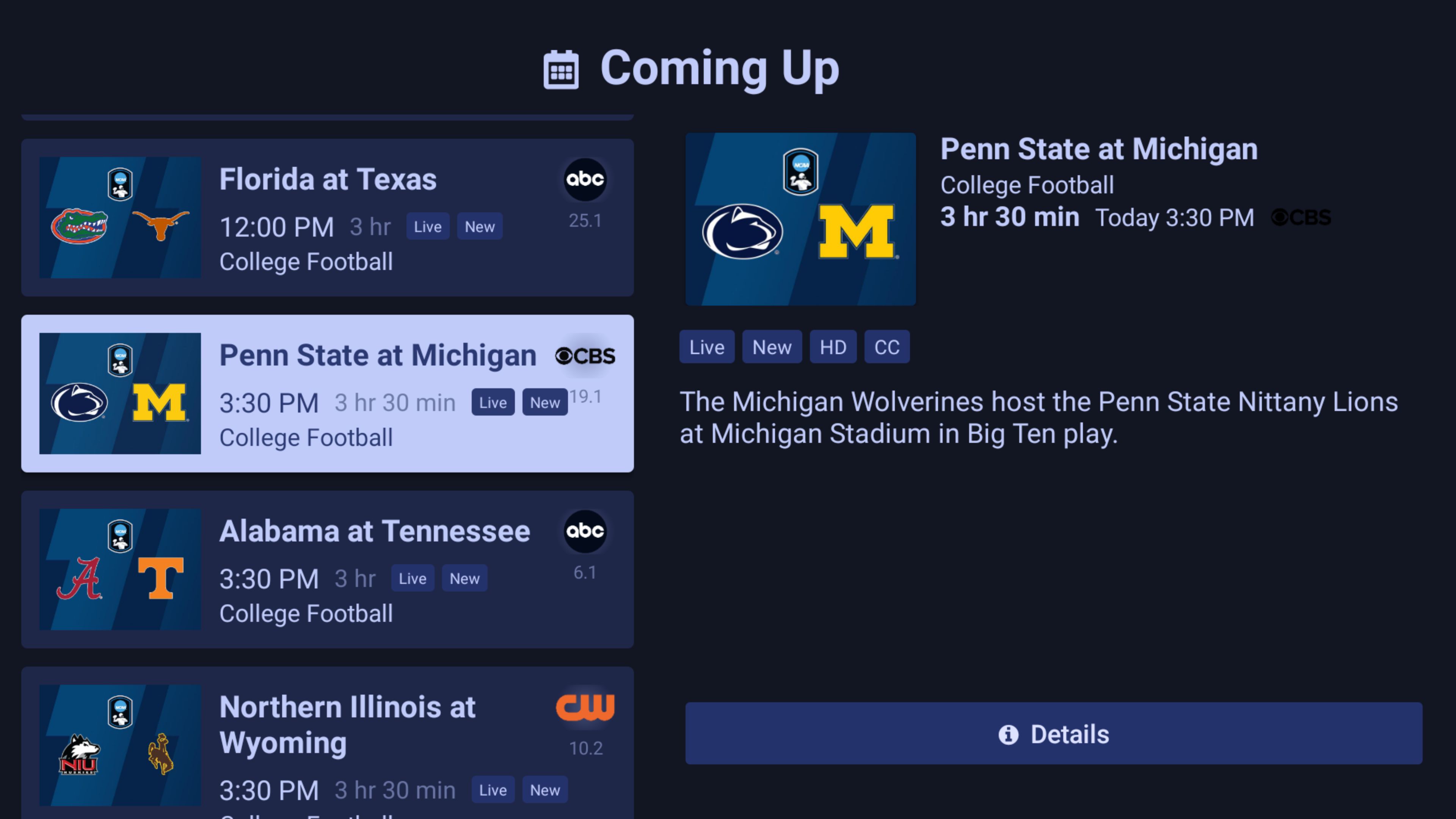
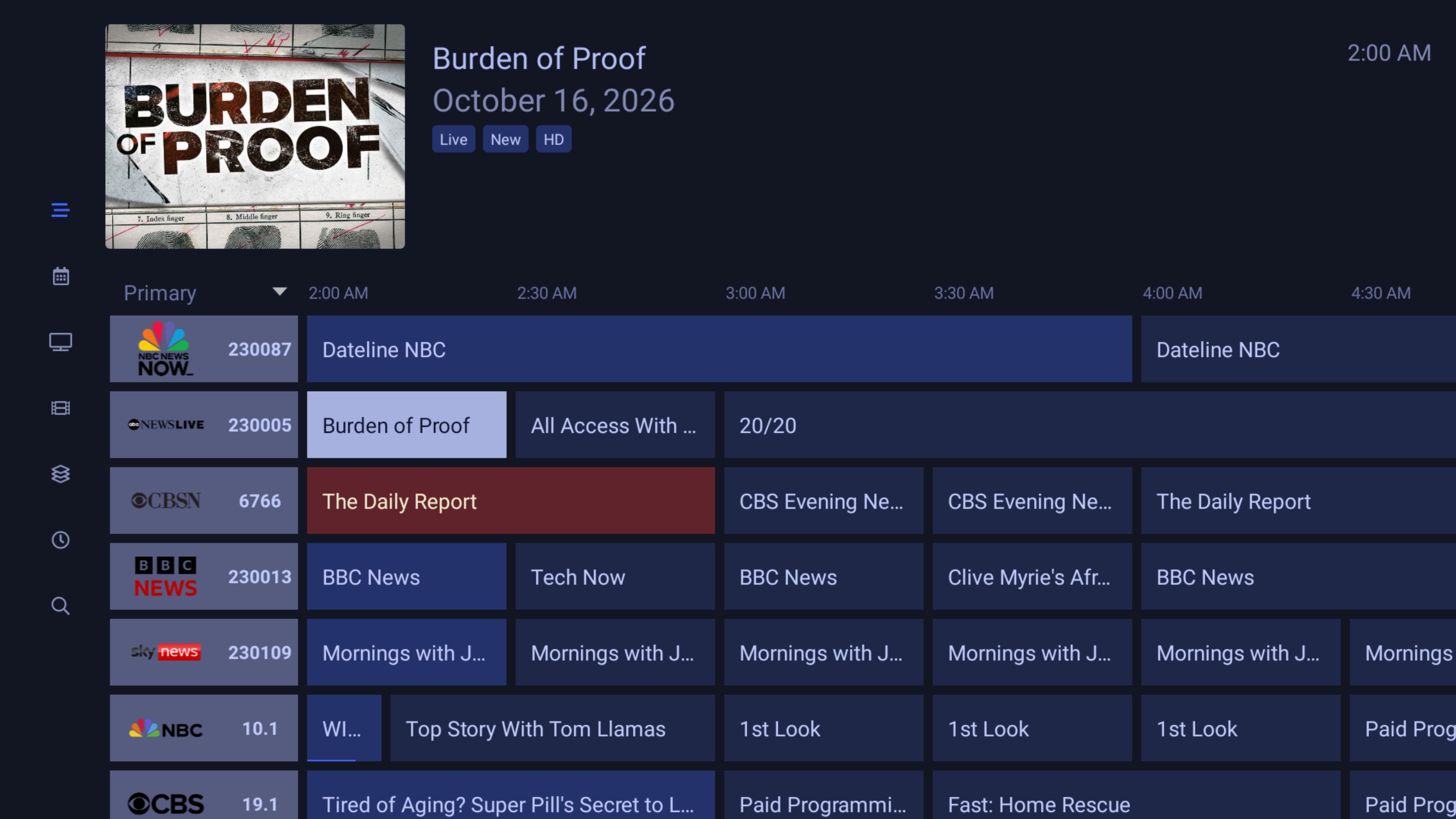
1 Like
Would you be able to share this file?
That's totally awesome. I've been doing some vibecoding with Claude for some niche use cases and pet projects I'd been thinking about for awhile and am having pretty surprising success. Given how arduous of a process AtoZ0to9 described this to be, I had the thought that AI could help with this project specifically, and now I'm glad to see that's true!
Looking forward to seeing developments in this space moving forward.
1 Like
Absolutely, but I've never shared a file before. I have a free Dropbox acct, would that be good for this? Or is there another site that would be better for this? As long as it's free.
Yeah, I've been watching some YT vids on vibe coding. Very interesting stuff going on.
Dropbox should work fine.
Ok, let's see if this link works.
1 Like
Doing some experimenting with just the channel grid now. This is the first version, I'll continue to work on it and then other sections.
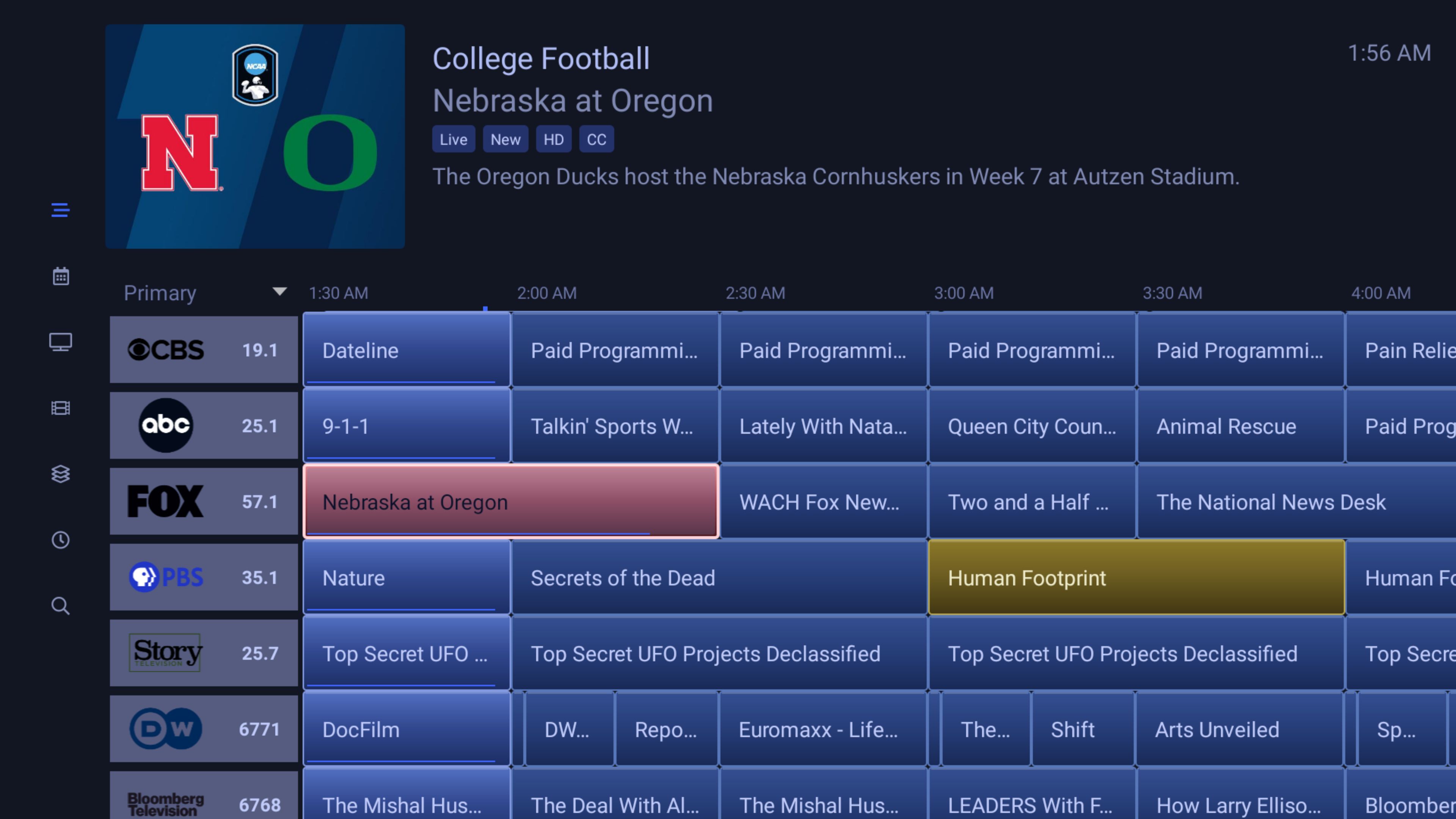
1 Like
It worked! Thank you. My TV's File Manager app did flag the file as harmful, however. I had to temporarily turn off Play Protect. I also had to uninstall Channels Carbon first. But it looks good.
Let me add that the inability to have themes by default is pretty outrageous for an app we pay for monthly. I've been a paying customer for nearly 8 years. I've found a couple pretty solid alternatives, each with their limitations. One simply being an SMB network issue with my Mac for use with their DVR player, which I've been trying to solve. I'll also add that each of their GUIs are miles ahead of Channels, which is a pretty huge factor that Channels developer's clearly don't give serious consideration.
That said, I look forward to how AI and one's imagination may improve this situation for now, but it's a shame it's had to come to this.
I'm glad you like it. However - and I'm very new to this so maybe someone else can clarify it - if you turn Play Protect back on it may block the app sooner or later. This has something to do with a "key" or "signature key", I forget what it's called. Due to changes Android made in its policy a while back I think apps are supposed to be "officially" signed, a lot of folks were raising hell that they couldn't sideload apps anymore. I had problems with sideloaded apps so I turned off Play Protect and have left it that way. As I understand it, when I recompiled the apk after modifying it, the APK Editor Studio app I'm using assigned an "unofficial" key. But without that I don't think the app will install at all, with or without Play Protect.
Again, this is far from my area of expertise but I believe that's the gist of it. If someone reading this knows of a solution to this issue perhaps they'll let us know.
EDIT: BTW, this issue didn't occur to me until you mentioned it which is why I didn't bring it up. As I say, I'm very new to this.
1 Like
So I just enabled Play Protect and rebooted my system. I figure if there is any point at which it will block any apps it will be after a reboot. The Channels app opened fine and is working fine. This is on my nVidia Shield. It may behave differently on your device, I don't know.
The first theme I created, which just replaced all purple colors with blue, I'm calling the Flat Blue theme. This current theme, with the 3D-ish effects, I'm calling the Neon Blue theme. Here is a pic of Neon Blue version 2.
EDIT: Since this may be an ongoing project and I don't want to usurp this thread I've started my own, titled "Neon Blue Theme for Android". Download links to the Flat Blue and Neon Blue themes are there.
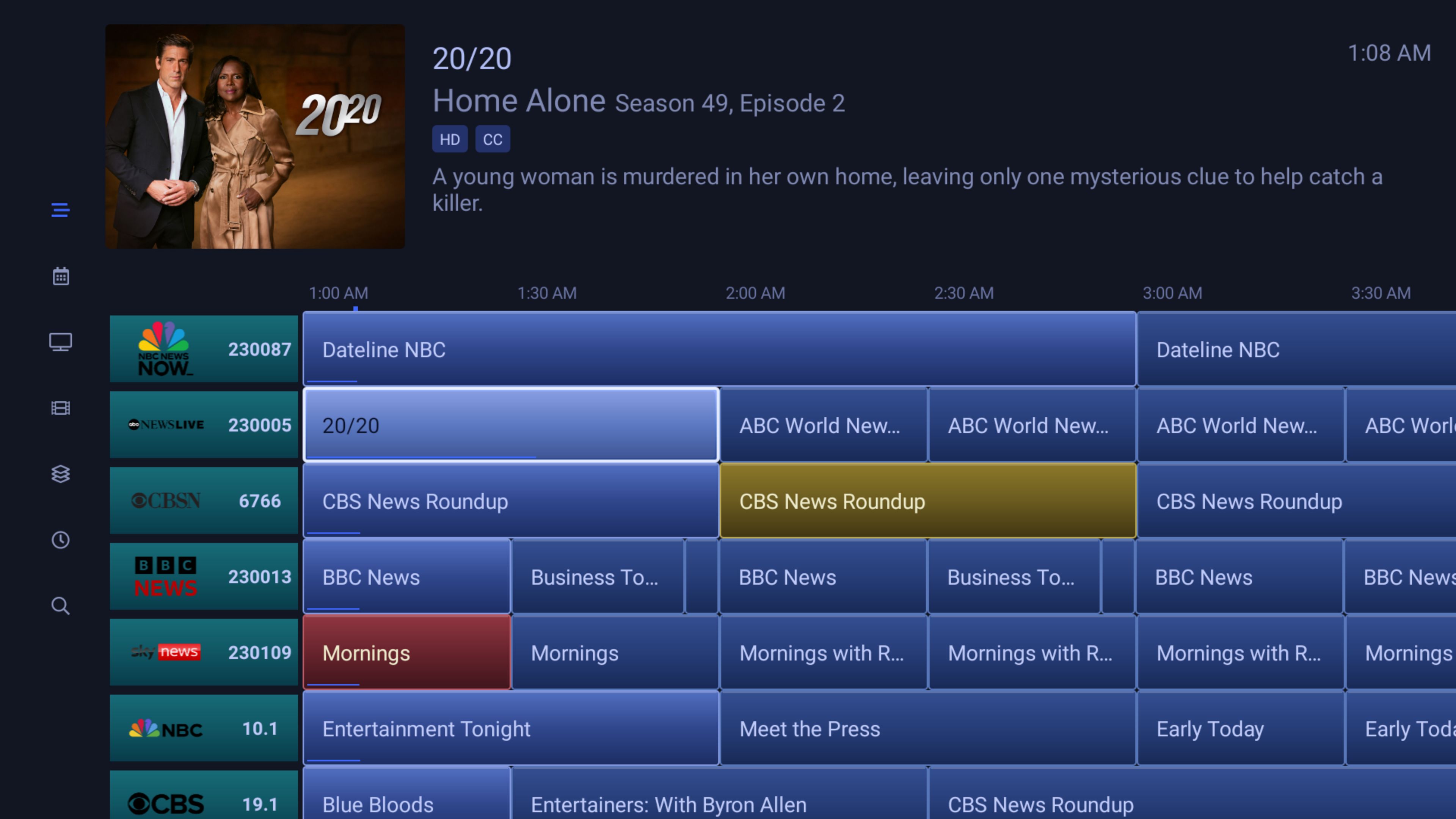
1 Like