Channels Reusing Stream for Multiple Viewers

I'm using Dispatcharr as a M3U IPTV source in Channels DVR. When two or more users watch the same live TV channel, Dispatcharr only shows a single client connection and a single stream request from Channels DVR, even with Tuner Sharing disabled on both the server and clients. The second viewer appears to be attached to the existing stream rather than causing Channels to request a separate stream from Dispatcharr.

The issue I'm seeing is that playback becomes choppy when multiple users watch the same channel. If users watch different channels, playback is normal.

My questions are:

  1. Does Channels DVR intentionally reuse a single upstream IPTV stream when multiple users watch the same channel, even with Tuner Sharing disabled?
  2. Is there any way to force separate upstream stream requests per viewer?
  3. Are there any known issues or settings related to choppy playback when multiple viewers are attached to the same live TV stream?

Source details:

  • Channels DVR Server version: 2026.06.20.0022
  • Dispatcharr version: 0.27.0
  • Source type: M3U
  • Tuner Sharing: Disabled on server and clients

In Dispatcharr, two viewers on the same channel result in only one active client/connection being shown.
Have you tried using HDHomeRun emulation?

I have. When I add it just goes back to the Sources page and doesn't show the HDHomeRun Device.

Can your Channels server ping the virtual HDHome run?

Yes. It's the same server Dispatcharr runs on. Dispatcharr can serve content via HDHR or M3U.

I don't know why the HDHome Run emulation is not working. As for your original question, you don't need two streams unless there out of sync. If your IPTV Provider has multiple channels, are you able to watch one channel and record another on your Channels DVR or Record both channels simultaneously. If this works I think you are fine.

1 Like

It doesn't work for me. The issue I'm seeing is that playback becomes choppy when multiple users watch the same channel. If users watch different channels, playback is normal. Yes, I am able to watch one channel while recording another.

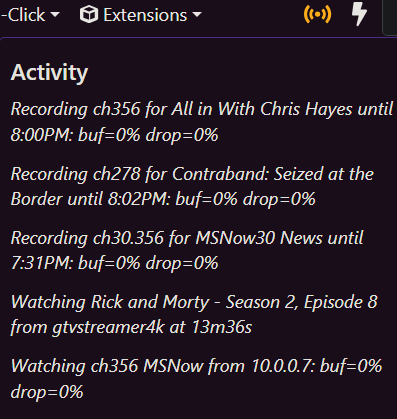
what does your cdvr activity show?
Screenshot 2026-06-22 192339
I'm constantly recording 2 copies of an ah4c source, i'm forcing the (&codec=copy) in my m3u http://10.0.0.7:8089/devices/M3U-ah4c-dtv/channels/356/stream.mpg?format=ts&codec=copy
I do not need to have it that way, but that's how i've decided to do it.

are the clients getting a transcoded stream or Direct/Original?

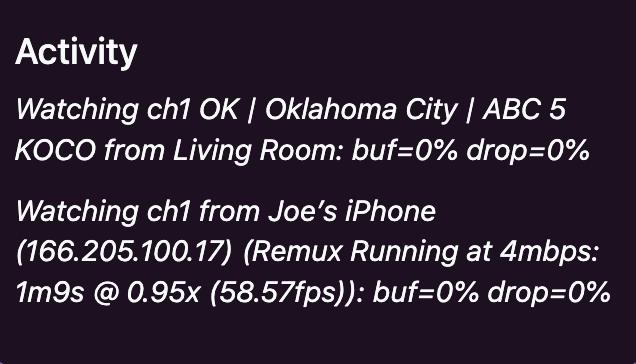
Below is what my CDVR activity shows. When tuning in from Living Room without someone else watching the same channel, it loads within 1 second. When tuning in from Living Room with someone else watching the same channel, it loads within 4 to 5 seconds.

Screenshot 2026-06-22 at 7.42.44 PM

Any ideas or comments from the developers?

I've been playing around with this too. Enabling "Direct stream URLs" via Dispatcharr bypasses its proxy, meaning the clients connect directly to the source. But I don't think that'll address your problem, and it may also cause other issues, with regards to stream limits. It may help you troubleshoot, though.

That said, CDVR's page about Tuner Sharing notes:

So first let's figure out why you're not able to use Dispatcharr's HDHR emulation.

I had the same issue but eventually got it working by editing the URL. Did you try removing the “http://" prefix?

This format worked for me, with one "sports" profile:
x.x.x.x:9191/hdhr/Sports

As did this:
x.x.x.x:9191/hdhr
for adding all of Dispatcharr's channels.

(in these examples, x.x.x.x is the server's IP address and 9191 is the port Dispatcharr is running on, replace those numbers with your own)

I'm still tinkering and learning, comparing different strategies to see what works best for me.

I found other tools, similar to Dispatcharr, that offer HDHR emulation too. I couldn't really get the hang of hdhriptv, but m3u-editor looks very promising.

I hope this helps, and look forward to reading your findings or anything else you figure out.

1 Like

Thanks for the detailed reply. I was able to add Dispatcharr as a HDHR tuner by removing "http". Channels cannot play anything over it though and is returning a 404 Not Found error. It appears to be looking for http://192.168.100.241:9191/hdhr/auto/v1 which isn't available.

2026/06/24 11:53:52.647036 [ERR] Failed to start stream for ch1: GET: http://192.168.100.241:9191/hdhr/auto/v1: 404 Not Found
2026/06/24 11:53:52.666668 [HLS] Couldn't generate stream playlist for ch1-dANY-ip192.168.100.9: GET: http://192.168.100.241:9191/hdhr/auto/v1: 404 Not Found
2026/06/24 11:53:52.666883 [HLS] Stopping transcoder session ch1-dANY-ip192.168.100.9 (out=0s finished=false first_seq=0 last_seq=-1)```

Hmm. And these same channels stream fine when you add them via M3U, just not via HDHR emulation?

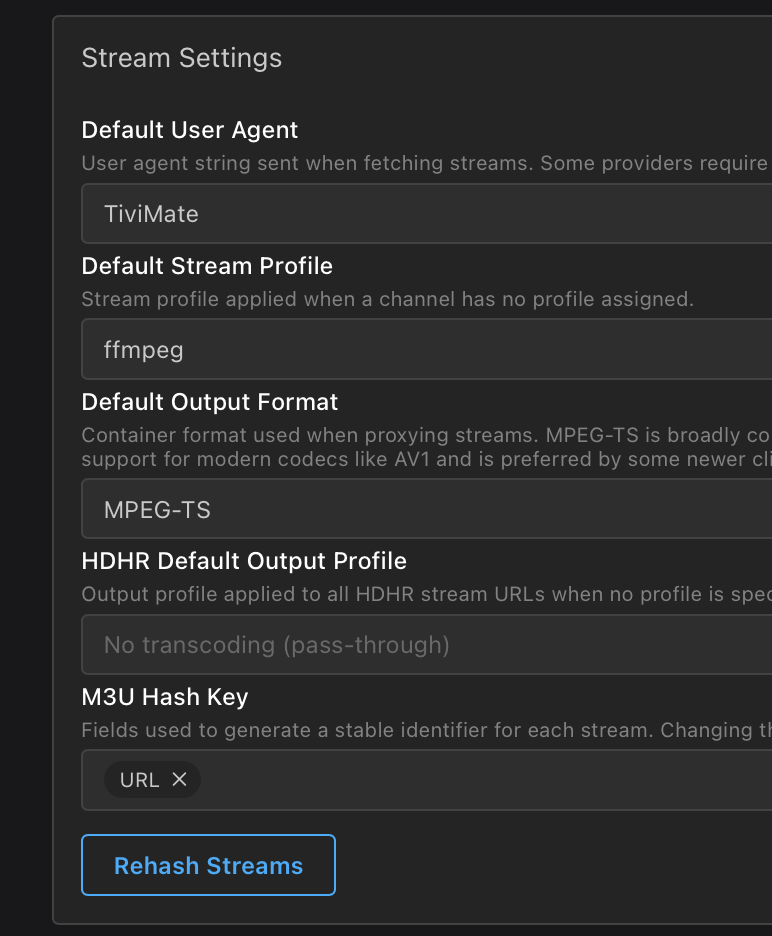
Just a guess but maybe try to "Rehash Streams?" These are my current Stream Settings inside Dispatcharr:

Aside from that, I'm out of ideas. Hmm. Perhaps the Dispatcherr developer or his Discord channel can offer some insight?

Yes, the same channels work when using the M3U link in CDVR.

I gave up on HDHR emulation after trying to use ip:port months ago. I posted a question to the devs here and they said "won't work from a port other than 80, and we don't support emulators." I saw the post here saying "x.x.x.x:9191/hdhr" was working -just tried again - while I can load the channel lists etc, the streams all "404". I used a management tool that I could run on port 80, and that solved the stream 404s, but I can't easily park DSPTR on that port