
I don't know why the HDHome Run emulation is not working. As for your original question, you don't need two streams unless there out of sync. If your IPTV Provider has multiple channels, are you able to watch one channel and record another on your Channels DVR or Record both channels simultaneously. If this works I think you are fine.
1 Like
It doesn't work for me. The issue I'm seeing is that playback becomes choppy when multiple users watch the same channel. If users watch different channels, playback is normal. Yes, I am able to watch one channel while recording another.
what does your cdvr activity show?
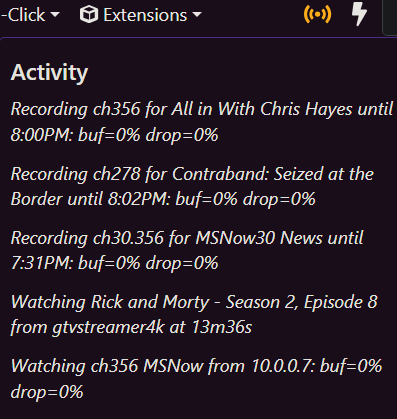
I'm constantly recording 2 copies of an ah4c source, i'm forcing the (&codec=copy) in my m3u http://10.0.0.7:8089/devices/M3U-ah4c-dtv/channels/356/stream.mpg?format=ts&codec=copy
I do not need to have it that way, but that's how i've decided to do it.
are the clients getting a transcoded stream or Direct/Original?
1 Like
Below is what my CDVR activity shows. When tuning in from Living Room without someone else watching the same channel, it loads within 1 second. When tuning in from Living Room with someone else watching the same channel, it loads within 4 to 5 seconds.
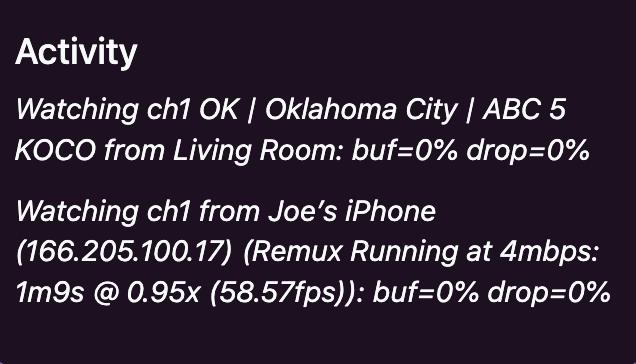
Any ideas or comments from the developers?
I've been playing around with this too. Enabling "Direct stream URLs" via Dispatcharr bypasses its proxy, meaning the clients connect directly to the source. But I don't think that'll address your problem, and it may also cause other issues, with regards to stream limits. It may help you troubleshoot, though.
That said, CDVR's page about Tuner Sharing notes:
So first let's figure out why you're not able to use Dispatcharr's HDHR emulation.
I had the same issue but eventually got it working by editing the URL. Did you try removing the “http://" prefix?
This format worked for me, with one "sports" profile:
x.x.x.x:9191/hdhr/Sports
As did this:
x.x.x.x:9191/hdhr
for adding all of Dispatcharr's channels.
(in these examples, x.x.x.x is the server's IP address and 9191 is the port Dispatcharr is running on, replace those numbers with your own)
I'm still tinkering and learning, comparing different strategies to see what works best for me.
I found other tools, similar to Dispatcharr, that offer HDHR emulation too. I couldn't really get the hang of hdhriptv, but m3u-editor looks very promising.
I hope this helps, and look forward to reading your findings or anything else you figure out.
1 Like
Thanks for the detailed reply. I was able to add Dispatcharr as a HDHR tuner by removing "http". Channels cannot play anything over it though and is returning a 404 Not Found error. It appears to be looking for http://192.168.100.241:9191/hdhr/auto/v1 which isn't available.
2026/06/24 11:53:52.647036 [ERR] Failed to start stream for ch1: GET: http://192.168.100.241:9191/hdhr/auto/v1: 404 Not Found
2026/06/24 11:53:52.666668 [HLS] Couldn't generate stream playlist for ch1-dANY-ip192.168.100.9: GET: http://192.168.100.241:9191/hdhr/auto/v1: 404 Not Found
2026/06/24 11:53:52.666883 [HLS] Stopping transcoder session ch1-dANY-ip192.168.100.9 (out=0s finished=false first_seq=0 last_seq=-1)```Hmm. And these same channels stream fine when you add them via M3U, just not via HDHR emulation?
Just a guess but maybe try to "Rehash Streams?" These are my current Stream Settings inside Dispatcharr:
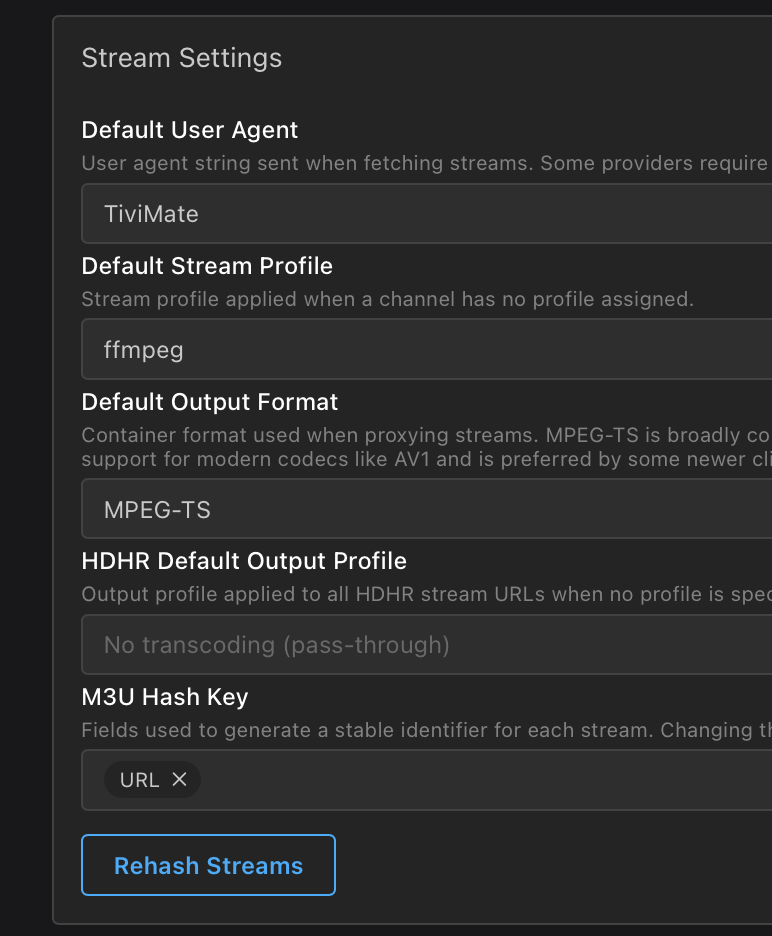
Aside from that, I'm out of ideas. Hmm. Perhaps the Dispatcherr developer or his Discord channel can offer some insight?
Yes, the same channels work when using the M3U link in CDVR.
I gave up on HDHR emulation after trying to use ip:port months ago. I posted a question to the devs here and they said "won't work from a port other than 80, and we don't support emulators." I saw the post here saying "x.x.x.x:9191/hdhr" was working -just tried again - while I can load the channel lists etc, the streams all "404". I used a management tool that I could run on port 80, and that solved the stream 404s, but I can't easily park DSPTR on that port
I had marked a solution, but it didn't actually answer the original question, so I unmarked it. It would be nice to hear from one of the developers.
to help narrow down the issue, do you experience the problem when 2 clients watch the same channel without transcoding or remux?
try
client settings / streaming quality / home/internet streaming = original
client settings / steaming quality / original quality delivery = direct
what client apps? apple, android, android tv, roku, firestick?
is there any difference between the main app or beta?
one way currently available would be to add the source multiple times with different channel numbers (I don't use dispatchr, so this may not work if the same id's for channels are used)
the other way would be having multiple cdvr servers, one for each user/client.
Yes, the issue is when two clients watch the same channel. I do not have Playback > Streaming Quality > Home Streaming or Playback > Streaming Quality > Original Quality Delivery set because those two options are set to original/direct by default according to Channels Support. All clients are AppleTV running the latest non-beta tvOS and non-beta ChannelsDVR app. I have tried with the beta app and see no differences.
I'd rather not do that. In the end I'm just trying to understand why two clients share one stream when watching the same channel when tuner sharing is disabled.
I could be wrong, but the way I’m interpreting this note is that we can only toggle Tuner Sharing on or off with HDHomeRun channels, and that any other stream from other channels, such as the ones you’re piping in via Dispatchharr, will always use Tuner Sharing, no matter what.
Tuner Sharing only affects local HDHomeRun streams. Streaming away-from-home, or from DVR-powered sources (such as TV Everywhere or Custom Channels) will always stream through your DVR and use the tuner sharing buffer
(emphasis mine)
Just brainstorming here, but have you tried enabling "Direct stream URLs" in Dispatcharr?
And I'm curious, what is your broadband's upstream speed?
Direct
Direct will uses a constant TCP connection to directly stream your video from Channels DVR Server to your device. This is the fastest way to stream video, but it requires a constant connection to your DVR Server. If you lose your connection, you’ll lose your video.
Direct is what is used by default when you are at home and using Original Quality.
I use a baremetal tailscale server for remote access so my phone thinks it's 'home'
your earlier activity screenshot showed your iphone using remux so it's using the 'internet streaming' which can also be set to original.
I travel all over the country side daily and even when I dip through a valley driving and my cell drops, the video does resume it's self unless the connection was gone too long, all you have to do is press play. I've never needed transcoding on my android stuff.
Stream
Stream uses HTTP Live Streaming(HLS) which uses many HTTP requests and local caching to stream videos.
Stream is what is used by default when you are away from home and using any quality selection or have chosen a quality other than Original while at home.
Protip: Use Stream while at home to place the buffer on the server if your streaming device’s storage is preventing you from pausing for a long enough time.
Deep Dive
There are many cases you may choose one over the other. Here is a deeper explanation of each.
Direct
Direct uses MPEG-TS over a single TCP connection. This has the benefit of having the lowest latency for tuning and lowest overhead for your DVR and network. The downside is that it is susceptible to experiencing issues if there is high latency (which is why we do not use this for Away From Home streaming).
this explains why tuner sharing is a thing for hdhr (channels has a client that only connects to them, without a cdvr server)
When watching live from a HDHomeRun, a connection is made directly from the app to the HDHomeRun, bypassing the DVR entirely. If two apps are watching the same channel at the same time, it will use two tuner slots on the HDHomeRun.
When watching live from TVE, a connection is made to the DVR because all TVE streams are served by the DVR. The client stores the entire Live TV buffer locally.
if any clients are using stream you will have delays on live feeds. (the following reference to "LiveTv" not transcoding does not apply to many custom sources)
Stream
When watching Live TV from any source, it will be processed and served from the DVR (but it will not be transcoded). Because each HLS segment is 1 second and the additional processing that must happen, tuning into Live TV can take 1-3 seconds to load (which is generally higher and less consistent than Direct).
This is also putting small additional CPU and disk IO load on the DVR, which generally is not a problem, but can cause issues if the DVR or disk is overloaded.
The server stores the entire Live TV buffer and the client will store as much of it as it can handle with the available disk space.
also more on tuner sharing
Tuner Sharing
Tuner Sharing is a feature that modifies the behavior of Direct to cause live TV streams going to the HDHomeRun to go through the DVR, allowing for multiple apps watching the same channel to only use a single tuner on the HDHomeRun.
This setting does not change the behavior of watching TVE streams.
The DVR buffer holds a small number of seconds of data so it is still the responsibility of the client to store the entire Live TV buffer locally. This doubles the amount of network traffic and can lead to flaky problems if the DVR is overloaded or the network is at its limit (from being over WiFi or other such issues).
What should you use?
If you’re not having any problems, use the default settings. Direct streaming without Tuner Sharing will give you the most reliable experience in the most situations.
If you find that your streaming device does not have enough storage to get a very long buffer when pausing, use Stream with Original Quality to have the server handle the buffering, giving you more time to pause.
default are there for most use cases, custom sources can mean custom settings
If you have particular reasons to change the settings, please use these settings to make your experience better.
This is weird and shouldn't be the case. Can you recreate this issue and when you do, submit diagnostics from both clients and let us know?
I submitted logs from both Apple TV clients and from my CDVR server.
CDVR Server: b4a8104b-cc82-4880-b8a9-b1c55edfd3b3
Apple TVs: no codes were presented
1 Like